














In short
- It is better to hand a design to developers as an Adobe XD link than as a file. The developer then sees exactly the same design, with no shifted fonts or displaced elements, and a browser is enough to open it.
- The design should include element states (hover, click, typing text, an incorrectly filled field) and graphics marked for export. Logos, icons and other vectors must be exported in .svg format.
- A mobile view 375px wide is essential, and for complex views a tablet view of around 1000px too. The design should be simple to code, because the page has to load fast and over-engineered elements make the work harder.
The final stage of designing websites and online shops is preparing the files for coding. To avoid making things difficult for developers, and to keep the whole implementation running smoothly, you need to stick to a few rules. Here are the points that will help you prepare a graphic design for a website for developers:
Generating a link
I mostly use Adobe XD day to day, an app that lets you generate a link in a developer view. This is a much more convenient solution than handing over a file, because it guarantees that the developer sees exactly the same graphic design as we do. With a file, it can happen that fonts fail to load correctly, or someone accidentally moves elements around in the design. On top of that, you need to have XD itself installed, whereas with a link any browser will do.
Interested in a professional graphic design?
Exporting graphics
With the arrival of apps designed specifically for interface design, such as Adobe XD, Figma or Sketch, the problem of slicing graphics is a thing of the past. With the Adobe product, you just need to mark the relevant elements for export, so the developer can easily download all the graphics they need. For logos, icons or other vector graphics, remember to make them exportable in .svg format.
Element states
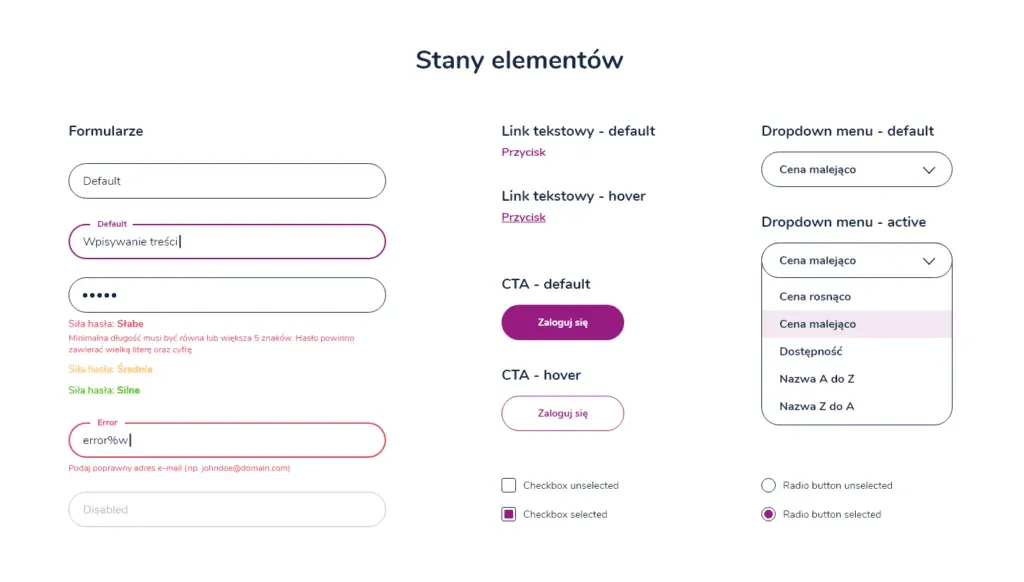
It's a good idea to prepare a separate artboard in the design for the states of forms, buttons, dropdown lists and so on. This makes it much easier to implement the graphic design according to the guidelines. It's worth planning for all the possible behaviours of each element: for forms, remember separate versions for hover, click, while typing, and an incorrectly filled-in field.
Mobile versions
Don't forget that you also need to prepare views for mobile devices, which today are one of the main ways people browse the internet. A view at a screen width of around 375px is practically essential, and for very complex views it's also worth thinking about a tablet width of around 1000px. Make sure you prepare graphics for mobile versions for export, so that desktop versions of graphics don't load at lower resolutions.
Don't overcomplicate it
Remember that a good website should load quickly, and the information on it should be easy to find. You can code anything, but think about whether that large background photo really needs to be in your graphic design. While working, keep in mind that you shouldn't make life difficult for developers: think ahead about which elements on the page might be hard to code, consider whether a given element really makes sense, and whether it could be done more simply. A solid grasp of HTML and CSS basics will definitely help you better understand the problems developers face when they receive an overcomplicated graphic design for a website or an online shop. This post is based on the process our interactive agency JustIdea follows. I hope it works for you too!

Have a question about this article? Write to us.


