













In short
- According to the article, as many as 40% of users give up when a page takes more than 3 seconds to load, and slow loading lowers conversion and raises the bounce rate. 2 seconds is taken as the optimal time. Speed also affects crawl budget and indexing.
- A slow page is caused by hosting, too many plugins or modules (WordPress, PrestaShop) and unused JavaScript. You measure it in PageSpeed Insights, Lighthouse, GTmetrix and WebPageTest, and Core Web Vitals consist of LCP, FID and CLS.
- What speeds a page up: WebP or AVIF format and images up to 100 kb, lazy loading, video from an external platform, fewer plugins, caching, CSS and JS minification, and asynchronous loading. It is not worth chasing a 100/100 score at all costs, though.
Does your website take a long time to load, and you're convinced it's down to a poor internet connection or your device not being powerful enough? Consider whether it's worth digging a bit deeper and checking whether something is slowing your site down from the very first seconds it starts up.
Why should you pay attention to page loading speed?
You might think page speed only affects how a user feels while using a site, but reality turns out to be a little different. A long page load time carries certain consequences, and below I'll try to walk you through a few of them.
What does a slow-loading page cause?
- loss of users
The first thing that comes to mind is certainly our own frustration caused by a slow-loading page. Usually, after a few seconds of waiting, we give up, leave the page and look for information on other sites. A long page load time is linked not only to losing users, but also to negative associations with the site.
As many as 40% of users give up staying on a page if its load time exceeds 3 seconds.
- lower visibility in Google search results
Website loading speed on its own doesn't have a direct effect on a page's position in the search engine, but it translates into user behaviour, which is largely responsible for those results.
- a lower conversion rate
In paid campaigns, the conversion rate is extremely important. Spending money on advertising a website that discourages visitors with a long load time uses up a budget that won't deliver results.
When pages load in 1 second, the average conversion rate is almost 40%. With a 2-second load time, the conversion rate already drops to 34%. At 3 seconds, the conversion rate starts to level off at 29%, reaching its lowest value at a 6-second load time (Portent, 2022).
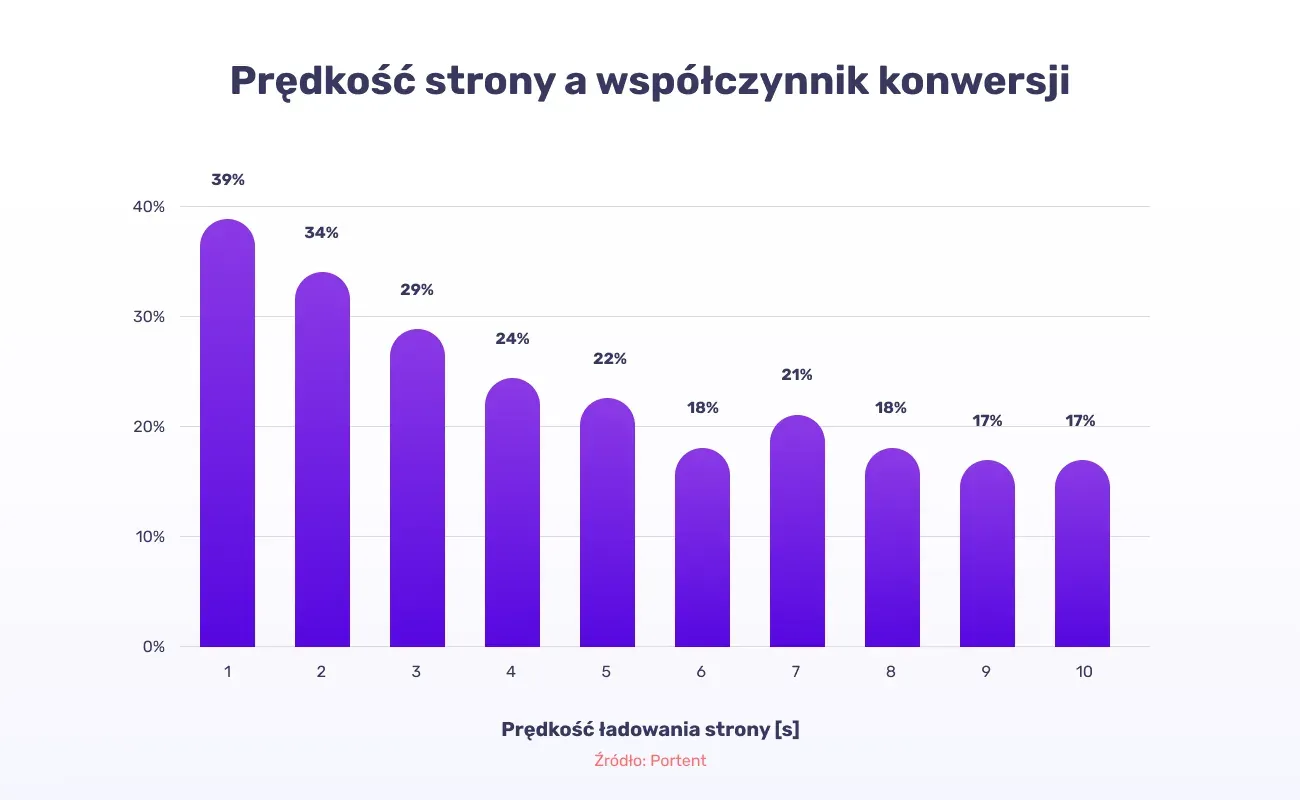
Source: Portent
- a higher bounce rate
This shows what proportion of users leave a page without any interaction. Here's data from Google showing the relationship between page load time and the likelihood of a user leaving the page without any interaction:

Source: Think with Google
Benefits of a fast-loading website
- less user frustration caused by long wait times
- better SEO positioning in search results
Page speed is one of Google's ranking factors, where even small changes can bring beneficial results. It's aimed mainly at mobile devices, which sometimes need more time to load a page.
- a higher conversion rate
It won't come as a surprise that the faster the page, the more satisfied users you get, who are more willing to make a purchase or express interest in doing so in the future.
Nearly 70% of consumers admit that page speed affects their likelihood of buying from an online retailer (Unbounce, 2019).
- a lower bounce rate
- faster indexing of pages by Google's crawlers
Page speed also matters a great deal for crawler bots, which crawl lighter pages more effectively. What's more, search engine crawlers have a limited number of pages they can index during a single visit to a site, known as the crawl budget. The indexing rate, the crawl rate limit, is affected by crawl health, which in turn depends on many technical factors. One of them is page loading speed, because crawlers often skip sites that are heavy and not properly optimised for loading speed. Adding the page to the index later can then take a long time, and sometimes doesn't happen at all.
What causes a page to load slowly?
To investigate the source of a page's heavy load, you need to take a close look at both the server that hosts the page and the code the site is built from.
Server-side causes
Hosting is where all the files for our site are stored. Its quality and correct operation are therefore hugely important for the site to display properly. Diving into this topic, it's worth taking a moment to understand what we're really talking about. The process of loading a website, in short, involves exchanging information between the browser and the server. It's the server that sends the files that let the browser display the page. So if the wait time on the hosting side is too long, page speed decreases, bringing with it the consequences mentioned earlier.
WordPress
WordPress is free software that lets you build a website without knowing how to code or any programming rules. In its dashboard you can make modifications and code improvements yourself. You get a range of free templates and themes to base your site on. However, this needs to be done sensibly, bearing in mind that more doesn't mean better.
- plugins: a useful addition when running your own website, but it's best to keep their number to a minimum. We use them to boost a site's functionality and correctness, but we often don't realise that installing too many achieves the opposite of what we intended. Unfortunately, they can weigh a page down, making it less pleasant to use. It's worth looking for plugins that combine several functions, so one can do the job of several you were using before.
- updates: a fairly contentious topic, since there's a lot of talk about bugs in the newest updates, but that's no reason to stick with an outdated version of WordPress carrying data accumulated over a long time. If you're not confident about a new release, it's better to wait a while and look for other users' opinions, so you feel more confident throughout the installation process.
- cache: in this case, it's worth investing in a plugin that lets you regularly clear the cache, which takes some load off the server and speeds up the page load time.
PrestaShop
PrestaShop is a free platform ideal for building online shops. It's a perfect fit for someone who doesn't necessarily want to dive into the ins and outs of programming, but dreams of setting up their own website. Just as with WordPress, here too you need to know what to watch out for so the changes you make don't cause loading problems.
- choice of hosting: the server is the first thing we should pay attention to. PrestaShop was officially written for Apache and NGINX hosting, so other servers should be avoided to prevent compatibility problems between the hosting and the script.
- limiting modules: extra modules are often responsible for slowing a website down further. It's therefore recommended to keep the number of modules to a minimum and use the template you're already working with to add new functionality.
- cleaning the database: it turns out PrestaShop stores a lot of unnecessary data in its database that serves purely statistical purposes. Besides simply deleting redundant information, this function can be switched off, which saves a lot of space and saves us the time spent on regularly deleting data.
The best servers for SEO
When choosing hosting, we should do thorough research so our choice doesn't turn out to be a problem later on. A server chosen with SEO in mind needs to be characterised by speed, which later has a huge impact on page loading speed. Guides that describe in detail what to look out for and what to be guided by when making a decision can help here. Below are a few server suggestions that work well for SEO purposes.
- Zenbox: hosting that lets you match a plan to the number of users your site gets in a month. Zenbox runs on servers located in Poland, specifically in Poznań, so it's the best solution if your site targets an audience mainly from that country. A lot of attention is paid to the performance and speed of sites hosted on this server, so even during a large, sudden traffic spike, the site loads without any issues.
- SeoHost: despite its low price, its quality doesn't fall behind more expensive, "better" hosting providers when it comes to performance, thanks to using LiteSpeed technology, which speeds up a site compared to competing solutions such as Apache or Nginx. It achieves the highest scores in tests checking website speed under heavy traffic.
- Dhosting: offers Flexible Web Hosting, which lets you freely adjust resources such as CPU, RAM and disk space as needed. Like the hosting providers listed above, it achieves some of the best results for page speed and performance after running a page speed test during a sudden traffic surge. In addition, the provider offers a 30-day money-back guarantee in case the server isn't to your liking. It's therefore worth testing and choosing the hosting that's ideal for your site.
Code-side causes
A common situation is that the code contains JavaScript scripts that aren't being used, but still have to be loaded by the server or browser. This can be caused by a large number of installed plugins or by using a ready-made site template that wasn't built specifically for your site. It's worth finding simple solutions that, with little effort, can help solve the problem. One example would be trying to create your own template based on the one you're using, but excluding elements and sections that have so far turned out to be redundant or not really needed.
When it comes to plugins, it's worth considering whether we can do ourselves what we needed them for. One example is image optimisation, where we can change the file format ourselves.
What should page loading time be?
As you might expect, the answer should be: as short as possible. And that's exactly how it is. Given how often users leave a site after 3 seconds, 2 seconds has been adopted as the optimal value. You should, however, aim for the best possible result. And do you know what your page's load time actually is?
When analysing this aspect, you need to be aware of Google's ranking signals, one of which is Core Web Vitals. These core web metrics show how fast a page loads. In 2020, Google presented the metrics that make up Core Web Vitals, which are:
- Largest Contentful Paint (LCP): the time needed to render the largest content element displayed in the visible area at the moment right after the page loads. This element can be a block of text, an image or a video.
- First Input Delay (FID): the time that passes between the user's first interaction with the page and the browser's response. It's measured using any interactive element on the page that the user clicks first. This measurement matters for pages where the user can take some action.
- Cumulative Layout Shift (CLS): the sum of all layout shifts on a page from the moment it starts loading. The best score is the one closest to 0, which shows that no changes occur in the arrangement of the page's elements.
Google has set standards for each metric:
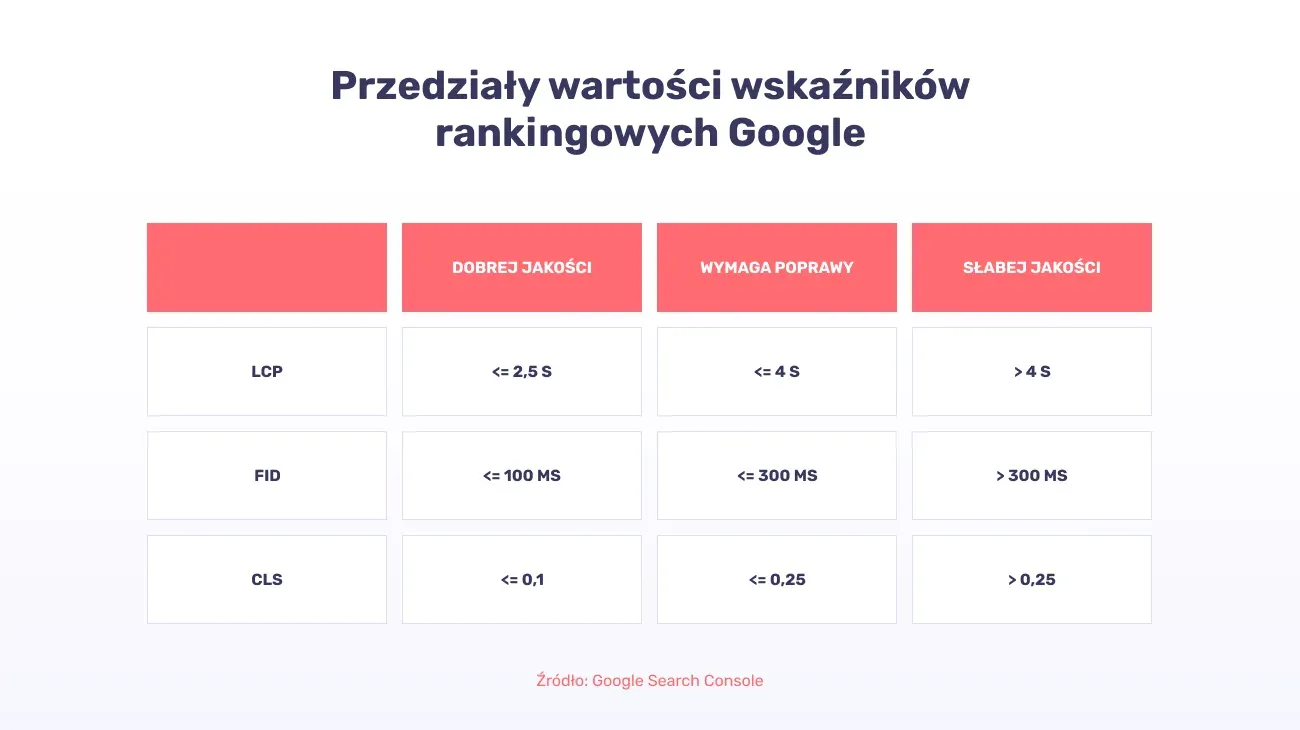
Source: Google Search Console
How do you check a page's loading speed?
There are many ways to check a website's speed. These range from an objective assessment with your own eyes after loading the page, to verification using specialised tools. Below I'll try to present a few worth using.
PageSpeed Insights
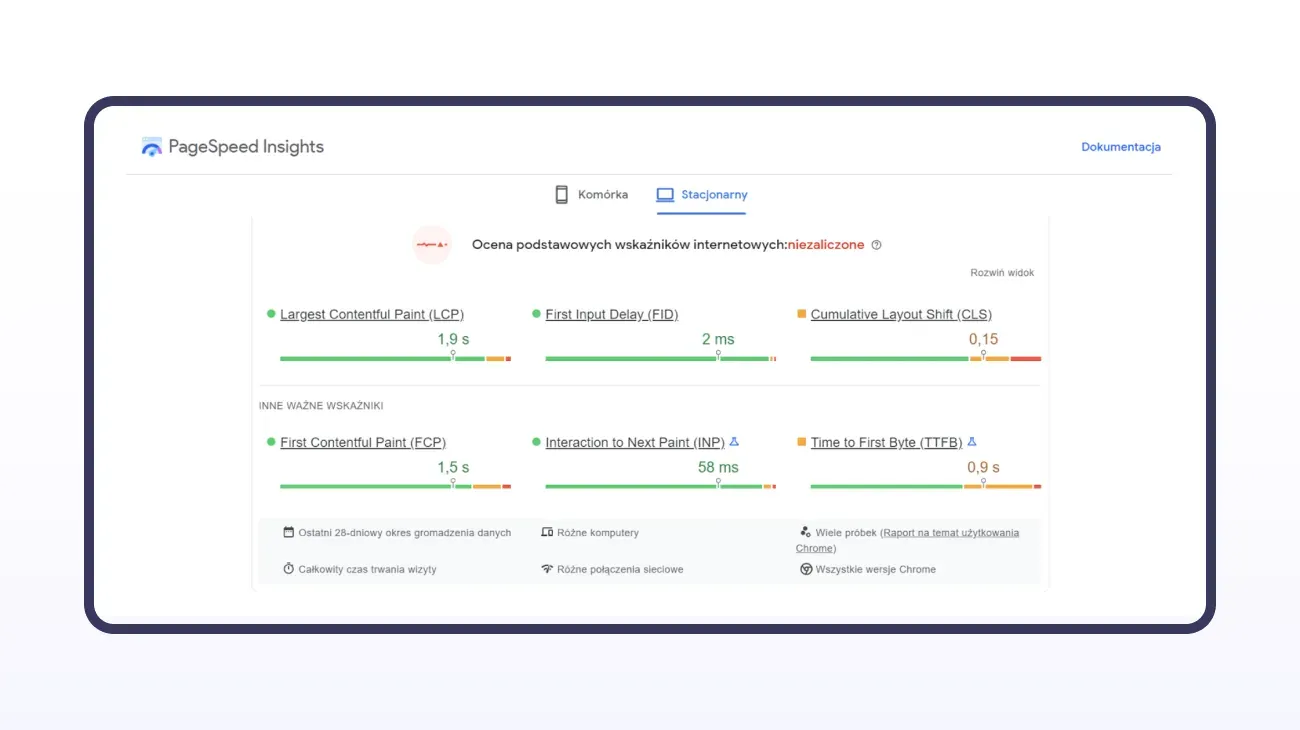
This is a free tool from Google that lets you easily check the desktop page load time and the mobile version, while also getting tips on what to improve and which elements take up the most space.
After analysing the finished report, we can work out what needs fixing first and which changes won't bring the expected results. The overall score is shown in three colours:
- red: 0-49 points, a state that needs improving
- orange: 50-89 points, an intermediate state
- green: 90-100 points, a state Google reads as positive
This tool also gives us insight into the Core Web Vitals ranking metrics scores. For each metric, the data can be expanded to see more detailed results.
Lighthouse
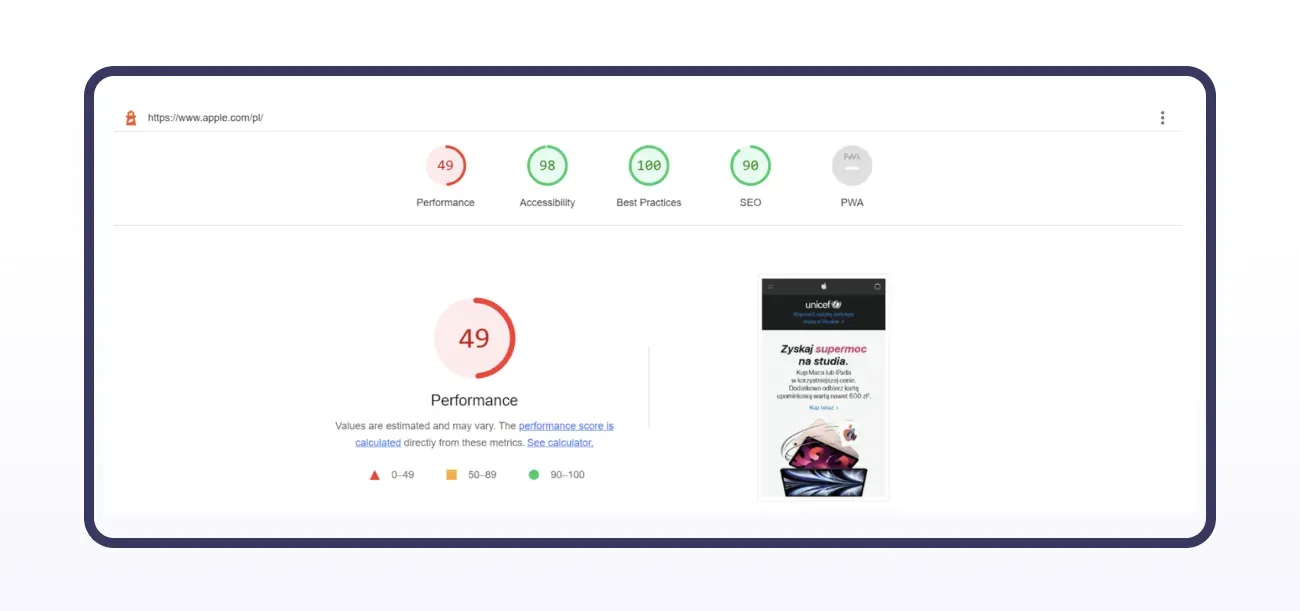
This tool is available in the Chrome browser and can be downloaded as an extension. It's exactly what Google PageSpeed uses when creating a page analysis. Lighthouse gives us insight into performance, accessibility, best practice and SEO metrics. Just as with PSI, we get a full report detailing what mainly needs fixing and how changing a given element will affect page speed.
GTmetrix
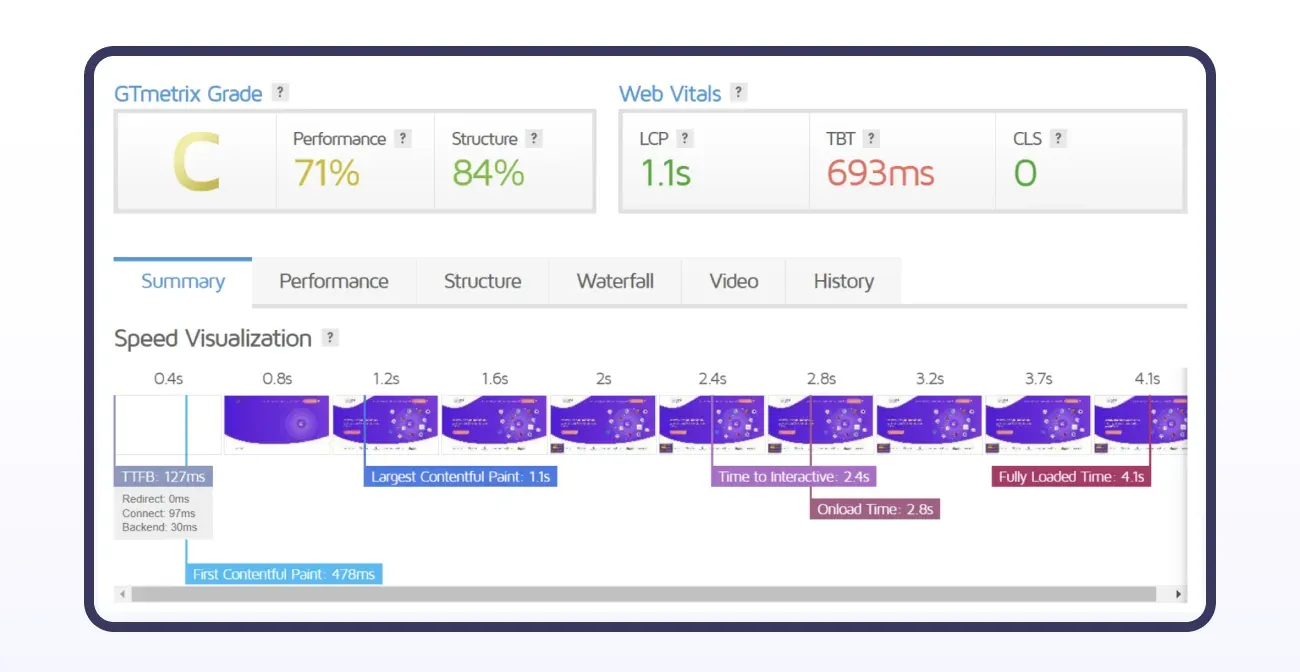
This is one of the more popular tools, and its analysis looks at more technical aspects of a page, such as HTML compression and JavaScript compression, and describes in more detail what can be changed to make Google's ranking metrics look better. It also shows the time a page needs to fully load all its elements and visualises this process on a timeline. We also get to see our site's history and how its speed results have looked over previous days, months or years.
WebPageTest
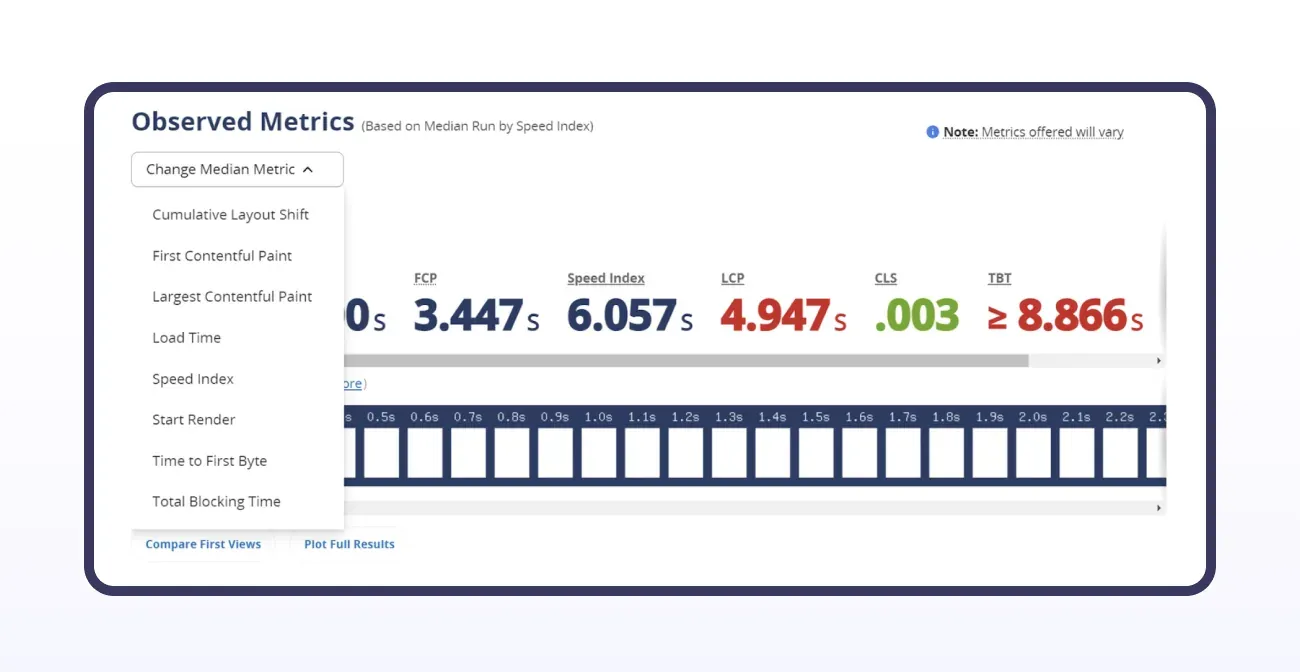
When testing a page, this tool runs three tests, and the final result is the median of data from all of them. You can also customise the results and pick from a list what interests you most. We get to see request waterfall charts from each test run. We can look in detail at the full checklist showing which page element has the biggest impact on its size. It gives a more precise picture of what really needs fixing, compared to the tools described earlier.
There are many such tools, and each stands out for something different. When analysing your own site's speed, it's worth testing several of them so you can later draw the most accurate conclusions.
Ways to speed up a page
There are several ways to improve how your site performs. We can implement some of these changes ourselves, or with a little help from someone who handles a site's technical side. Using the page speed assessment tools listed above gives us several pointers on what definitely needs fixing and how we can do it. Here are a few of them:
- Optimising photos and graphics on the page
When we talk about optimising graphic elements, we mean several actions that would significantly speed up our site:
-
changing the image format to WebP or AVIF will give better compression than JPG or PNG. They'll take up less space, and this change won't affect their quality. You can use ready-made plugins, available for example in WordPress, that automatically convert uploaded images to lighter formats.
-
along with changing the image format to WebP, their size will shrink. It's worth making sure images don't exceed 100 kb.
-
reducing image dimensions depending on what function they serve. For example, images used as product thumbnails shouldn't have the dimensions of an image that spans the full width of the screen.
-
using lazy loading, which involves delaying the loading of images that aren't visible to the user at a given moment. As the page is scrolled ("scrolling"), images further down the page appear. This saves the time needed to load all the graphics at once.
-
Embedding a video on the page from an external platform, e.g. YouTube, instead of hosting it on your own server. This makes the page less heavy, and the video plays back more smoothly.
-
Reducing the number of plugins and using ones that combine the functionality of several separate ones, for example the Rank Math SEO plugin we often use, which not only helps increase traffic to a site, but also helps with creating content, integrates with tools such as Google Analytics or Google Search Console that we use daily to analyse traffic and visibility, and lets you set up redirects, detect 404 errors, and many other features that would otherwise require a large number of additional plugins.
-
Using browser caching will save time loading certain files, such as stylesheets, JS files or images, when a user returns to the page.
-
Optimising CSS and JS files through code minification. This means removing unnecessary characters or spaces that are part of the code, and getting rid of them will reduce the file size.
-
Delaying the loading of certain page elements. When specifying the font used on a page, the "font-display" property is often used to keep text visible while the font is loading. Adding the "swap" value to it means that, until the font has fully loaded, the browser displays the text in a fallback typeface. This lets the page load faster and avoids a render block caused by loading an external font.
-
Loading CSS and JavaScript files asynchronously, or deferring them, means the browser loads all the files at the same time while the page loads, and there's no stall in page loading until each file, one after another, is fully downloaded and processed, as would happen with synchronous loading. Deferring the loading of heavier JS files further speeds up the loading of the remaining page elements, and with it, how quickly the page starts up.
Summary
Page loading speed has a big impact on how a site performs, but it isn't the most important factor, and we should avoid chasing a 100/100 score "at all costs." It's important to think carefully about whether we want to make a change that will improve page loading speed by 0.2 seconds if it's going to cost us a large amount of time, or even money. Page speed problems are noticeable even to people outside the industry, so this aspect matters and needs monitoring, but often even small fixes can bring about a significant change.
Want to discuss how fast your website performs? Our interactive agency would be happy to help you develop an optimisation strategy.