













In short
- A technical SEO audit checks whether Google's crawlers can properly crawl, index and understand a site. Without solid technical foundations even good content may not get indexed, and before a major rebuild of a site an audit is essential.
- The checklist covers robots.txt, the XML sitemap, noindex tags, broken links and redirect chains, speed and Core Web Vitals, the mobile version, URL structure and canonicals, HTTPS and structured data.
- The order of work is indexing, performance, the mobile version, URLs and structured data, internal linking. Problems are marked as critical, significant or low priority, and the audit is repeated at least once a quarter for medium and large sites, and after a migration or redesign.
What Is a Technical SEO Audit?
A technical SEO audit is one of the foundations of effective website optimisation. Its goal is to analyse the technical factors that affect a site's visibility in search engines. Unlike work on content or UX, technical SEO focuses on whether Google's robots are able to correctly crawl and understand your website.
Definition and Importance of Technical SEO
Technical SEO covers all the activities that improve a website's infrastructure in a way that makes it easier for search engines to understand. This includes optimising the code, indexing correctness, URL structure, loading speed and site security, among other things. A well-executed technical audit can significantly improve a site's position in search results and is essential during any major site rebuild.
Differences Between a Technical, Content and UX Audit
In practice, an SEO audit is divided into three main categories: technical, content and UX. A technical SEO audit analyses the site's infrastructure, a content audit focuses on the quality and uniqueness of the texts, while a UX audit examines how users navigate the site. All three elements are connected, but only a technical audit can identify problems that prevent the other two areas from working properly.
Why Is Technical SEO Crucial for Visibility?
Without solid technical foundations, even the best-written content may not get indexed by Google. Problems with indexing a site, incorrect redirects, a missing sitemap or an incorrectly configured robots.txt file: all of this can mean your site fails to appear in search results. That's why a regular technical audit is a mandatory part of every SEO strategy.
Key Components of a Technical SEO Audit
A technical SEO audit covers many aspects that together form the foundation of a well-optimised site. Analysing each one lets you not only spot existing problems but also optimise the site for better indexing, faster performance and better accessibility for search engine robots. Below are the most important elements to check carefully during an audit.
Crawlability and Indexability
The basis of search visibility is whether your site can be crawled and indexed by robots. If Googlebot cannot reach your subpages, they will not be included in search results. Checking the internal link structure, HTTP headers and server errors (such as 404 or 500) is a key task at this stage.
The robots.txt File: Controlling Search Engine Access
The robots.txt file is a tool for managing robot access to a site's resources. An incorrect configuration can accidentally block indexing of important sections of the site. You should check that the file does not contain a blanket disallow for key directories, for example "Disallow: /", and that it is correctly published in the domain's root directory.
XML Sitemap: A Guide to the Site for Bots
An XML sitemap acts as a signpost for search engine robots. It makes it easier for them to find all the available subpages. During a technical audit, you should make sure the XML sitemap is up to date, free of errors, and has been submitted in Google Search Console.
Noindex Tags and Their Impact on Indexing
Tags such as <meta name="robots" content="noindex"> tell search engines not to index a given page. They are sometimes used deliberately (for example on login pages), but using them by accident can remove important subpages from the results. An audit should include an analysis of these tags across all pages.
Broken Links and Redirect Chains
Broken links lead to pages that no longer exist, which negatively affects the user experience and indexing efficiency. Long redirect chains (for example 301 → 302 → 301) also slow down page loading and can lead to errors. Tools such as Screaming Frog let you quickly identify and remove these problems.

Site Indexing: Diagnosis and Improvement
Indexing is the process in which search engines analyse a site's content and add it to their index, the database used to generate search results. Indexing problems can result in a site not appearing in Google at all, which is why this aspect of a technical SEO audit is extremely important. In this section, we look at how to check which pages are indexed, what problems can occur, and how to fix them effectively.
How to Check What Has Been Indexed
The simplest way is to use the "site:" operator in Google, for example site:yourdomain.com. This shows all the subpages that have been indexed. However, more precise data comes from Google Search Console, a tool that tells you which pages are in the index, which are not, and why. You can also check indexing errors there and submit new URLs for indexing.
Common Causes of Indexing Problems
Problems with indexing a site can stem from various technical causes. The most common are:
- The presence of noindex tags on pages that should be indexed
- Resources blocked in the robots.txt file
- Server errors (such as 500) or a missing page (404)
- No internal links pointing to a given subpage
- Low-quality content that Google's algorithms deemed irrelevant
How to Fix Indexing Problems With Google Search Console
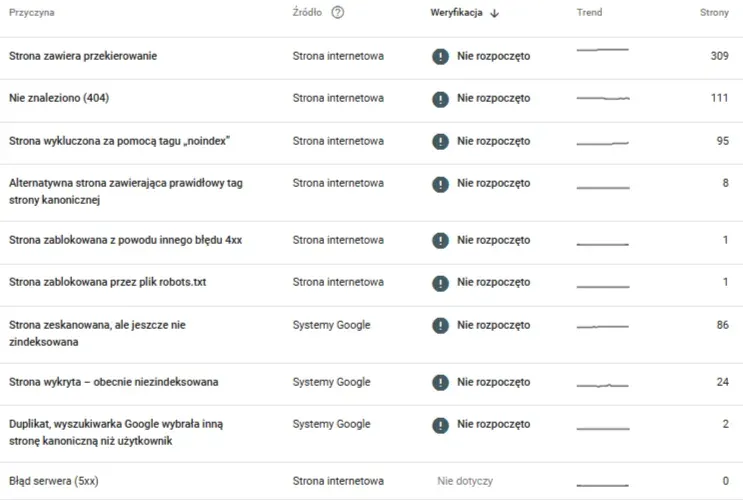
Google Search Console provides detailed information about why a particular page has not been indexed. In the "Status" panel, you can see messages such as "Excluded by noindex tag", "Access denied (403)" or "Discovered, currently not indexed". Each of these cases requires a different fix. Once you have resolved the problem, it is worth resubmitting the URL for indexing to speed up its return to the search results.
Site Performance and Speed: The Key to Better UX
A site's technical performance matters enormously, both for users and for search engine algorithms. Pages that load too slowly discourage visitors, increase the bounce rate and lower conversions. What's more, Google officially confirms that page speed is one of its ranking factors. In this section, we cover the key metrics, testing tools and the most common technical mistakes that affect loading time.
The Importance of Core Web Vitals
Core Web Vitals is a set of metrics introduced by Google that measures the quality of the user experience. It includes:
- LCP (Largest Contentful Paint): the loading time of the largest content element on the page
- FID (First Input Delay): the page's response time to the user's first interaction
- CLS (Cumulative Layout Shift): the visual stability of the page (whether elements shift around while loading)
Meeting the Core Web Vitals requirements is one of the basic goals of technical optimisation.
Tools for Testing Page Speed (PageSpeed Insights, GTmetrix, Pingdom)
There are many tools for analysing website performance. The most popular are:
- PageSpeed Insights: Google's official tool showing Core Web Vitals results
- GTmetrix: a detailed analysis of page loading with optimisation tips
- Pingdom Tools: a quick overview of loading time and page weight
It is worth using several sources to get a fuller picture of technical problems.
The Most Common Technical Errors Slowing Down a Site
During a technical SEO audit, certain typical mistakes that negatively affect page loading time often come up:
- Images that are too large or not optimised
- No file compression (such as Gzip or Brotli)
- No caching of static resources
- Unnecessary or poorly implemented JavaScript scripts
- Too many HTTP requests to the server
Best Practices for Optimising Page Speed
To improve a site's performance, it is worth implementing the following solutions:
- Compressing images to WebP or AVIF formats
- Implementing lazy loading for images and iframes
- Deploying a CDN (Content Delivery Network) to reduce access time
- Minifying and combining CSS and JS files
- Eliminating render-blocking resources from the <head> section
Regularly testing and applying the above practices helps keep a site in good technical shape, which translates into better SERP results and greater user satisfaction.
Mobile Version of the Site and Responsiveness
In an age dominated by mobile devices, optimising a site for smartphones and tablets is absolutely essential. Google has been using Mobile-First Indexing for several years now, which means a site is evaluated for search results based on its mobile version. Failing to adapt to mobile devices not only lowers your SERP positions but also puts off users, who abandon poorly adapted sites faster than desktop ones.
What Is Mobile-First Indexing and How Does It Work?
Mobile-First Indexing means that when indexing and evaluating a site, Google primarily analyses its mobile version. If the mobile content differs from the desktop version (for example missing content, links or graphic elements), it can negatively affect the ranking. That's why it is so important for the content, structure and structured data to be identical (or very similar) on both versions of the site.
How to Check Mobile Device Compatibility
Google offers several tools that let you assess a site's responsiveness:
- Mobile-friendly test: available in Google Search Console or as a separate online tool
- The "Mobile Usability" tab in Google Search Console
- Browser developer tools (for example Chrome DevTools, responsive mode)
Regularly analysing reports and mobile tests lets you quickly spot and fix technical problems affecting mobile users' experience.
Errors Affecting Mobile SEO
The most common errors found in mobile versions of sites are:
- Clickable elements placed too close together
- Content that overflows the screen (so-called overflow content)
- No scaling of the page to different resolutions
- Font size that is too small
- Use of technologies not supported by mobile devices (such as Flash)
Good Practices for Mobile UX Design
To ensure a high-quality mobile experience, you should:
- Use flexible grids and percentage-based units in CSS
- Ensure sufficient contrast and text readability
- Design intuitive mobile menus and gesture-based navigation
- Avoid elements that require precise clicking
- Adapt forms and buttons for touch use
With proper mobile optimisation, a site gains not only better visibility in Google but also a higher level of user engagement.
URL Structure and Information Architecture
A user-friendly URL structure and a logical information architecture are the foundation of effective SEO. They affect how easily a site can be indexed, the user experience, and the effectiveness of internal linking. During a technical SEO audit, it is worth paying particular attention to how the folder structure is organised, what format the URLs use, and whether you are avoiding duplicate content.
How to Create Logical, SEO-Friendly URLs
A well-designed URL should be simple, short and clearly indicate the content of the given subpage. Best practices include:
- Avoiding special characters, dynamic parameters and unnecessary numbers
- Using hyphens instead of underscores (for example /offer-seo-strategy)
- Using keywords that describe the page's content
- Avoiding ambiguous abbreviations and random strings of characters
- Creating URL versions in the language the site is run in
The Importance of a Flat Architecture and Folder Structure
Flat information architecture means a user (and a Google robot) can reach most important subpages within a maximum of three clicks from the homepage. This approach makes indexing easier and speeds up crawling. The folder structure should reflect the navigation logic, for example /blog/seo/ rather than multi-level, unreadable paths.
The Role of Canonical URLs in Avoiding Duplicates
Canonical URLs let you tell Google which version of a given page is the original. This matters in the case of:
- Filtering and sorting products in e-commerce
- Pages with dynamic parameters
- Duplicate content available at different addresses
During an audit, it is worth checking for the presence of <link rel="canonical"> tags and their correctness. An incorrect configuration can lead to content cannibalisation and a loss of search rankings.
HTTPS and Site Security
Site security is not just a matter of user trust; it is also an important Google ranking factor. Sites that do not use the secure HTTPS protocol may be marked as "not secure", which puts off visitors and lowers the conversion rate. As part of a technical SEO audit, you must check that the SSL certificate has been correctly implemented and eliminate any so-called mixed content issues.
The Importance of an SSL Certificate for SEO and User Trust
An SSL certificate (Secure Socket Layer) encrypts the data sent between a user's browser and the server. By implementing HTTPS, you gain:
- Greater user trust thanks to the padlock symbol next to the URL
- Better search rankings (Google has confirmed that HTTPS is a ranking factor)
- The ability to implement certain features, such as AMP or structured data for products
How to Implement HTTPS Without Errors
The process of implementing HTTPS involves several steps:
- Purchasing or generating an SSL certificate (for example Let's Encrypt, a free certificate)
- Installing the certificate on the server
- Redirecting all pages from HTTP to HTTPS (301)
- Updating all internal links and resources (images, scripts) to the HTTPS version
- Submitting the new version of the site in Google Search Console and updating the sitemap
Carrying out these steps precisely minimises the risk of technical errors and improves the site's overall rating.
Mixed Content Problems and How to Solve Them
Mixed content is a situation in which a site using the HTTPS protocol loads resources (such as images or scripts) from HTTP addresses. This can lead to certain elements being blocked by browsers or to "not secure" warnings. Solutions include:
- Replacing all HTTP addresses with HTTPS ones in the source code
- Verifying that resources have loaded correctly using developer tools
- Regularly monitoring changes to the site after implementing SSL
Make sure all content is loaded from secure sources: this is not only a matter of SEO but also of brand credibility.
Structured Data and Its Impact on Visibility in the SERP
Structured data is a way of marking up a website's content so search engines can better understand what is on it. Implementing structured data compliant with Schema.org increases your chances of getting so-called rich snippets, expanded results in Google that catch the user's eye and increase the click-through rate (CTR).
What Is Structured Data (Schema.org)?
Schema.org is a shared standard developed by Google, Bing, Yahoo and Yandex that provides a standardised way of marking up content elements on a page. Structured data lets search engine robots recognise, for example, that a given piece of content is an article, a review, an event, a product or a recipe. This makes it possible to display extra information directly in the search results.
Schema Types and Uses (FAQ, Article, Product)
The most commonly used types of structured data include:
- Article: marking blog posts, news items and expert articles
- FAQ: a list of questions and answers, displayed as expandable blocks in Google
- Product: information about products, prices, availability and ratings
- LocalBusiness: contact details, opening hours and the company's location
- Review: user reviews and opinions
Well-implemented structured data improves how links look in search results and increases user trust.
How to Check That Your Markup Is Correct (Rich Results Test, Schema Validator)
You can check the correctness of structured data using the following tools:
- Rich Results Test (Google): verifies whether a page qualifies for expanded results
- Schema Markup Validator: analyses the syntax and correctness of Schema.org-compliant markup
- Browser developer tools: let you check for the presence and content of JSON-LD or Microdata markup
Regularly checking and updating structured data is a step that can significantly increase the effectiveness of your site's presence in search results.
Tools Needed to Carry Out a Technical SEO Audit
A professional technical SEO audit requires a set of specialised tools that let you analyse various aspects of a site: from indexing and link structure, through loading speed, to structured data validation and server log analysis. Below are the most important ones, both free and commercial.
SEO Crawlers: Screaming Frog, Sitebulb, DeepCrawl
Website crawling tools simulate how search engine robots behave and let you carry out a comprehensive analysis of a site's structure. The most popular are:
- Screaming Frog: an extensive desktop tool for analysing links, HTTP statuses, meta tags, canonicals, headers, and more
- Sitebulb: offers clear visual reports and automatic optimisation tips
- DeepCrawl: a cloud-based crawler, excellent for large sites and teams working together
Google Tools: Search Console, PageSpeed Insights, Lighthouse
Google provides free tools for monitoring and optimising a site:
- Google Search Console: the primary source of information on indexing status, errors, sitemaps and performance
- PageSpeed Insights: performance analysis that takes Core Web Vitals metrics into account
- Lighthouse: a developer tool that measures performance, accessibility, SEO and coding best practices
These tools should be the foundation of every SEO audit and monitoring process.
Validation Tools: SSL Labs, XML Sitemap Checker, Robots.txt Tester
The following are also useful for checking key technical elements:
- SSL Labs: checking that an SSL certificate has been correctly implemented
- XML Sitemap Checker: analysing the completeness and correctness of a sitemap
- Robots.txt Tester (in Google Search Console): testing access rules for robots
They let you make sure the basic technical components are not blocking indexing or introducing SEO errors.
Server Log Analysis: Why Is It Worth Doing?
Server log analysis is an advanced technique that lets you check how search engine robots actually move through a site. It can reveal things such as crawl errors, looping redirects, unindexed sections or resource abuse. Although it requires more technical knowledge, it can uncover problems that classic SEO tools cannot see.
The Most Common Technical SEO Problems and How to Avoid Them
Certain typical errors that can significantly affect a site's visibility in search results come up regularly during technical audits. Identifying and eliminating them is one of the main tasks of SEO specialists. Below, we discuss the most commonly encountered problems and how to avoid and fix them.
Indexing-Related Errors
Problems with indexing a site are among the most critical, since they prevent the site from appearing in search results at all. The most common are:
- Incorrect use of noindex tags or X-Robots-Tag headers
- Important resources blocked in the robots.txt file
- A missing or incorrect XML sitemap
- No internal links to important subpages
Solution: Regularly check indexing statuses in Google Search Console and test pages using the "URL Inspection" tool.
Performance and Responsiveness Problems
Pages that load too slowly or are not adapted for mobile devices generate a higher bounce rate and lower rankings in Google. Commonly encountered problems include:
- Unoptimised images
- No caching or compression of resources
- Too many requests to the server
- Elements not adapted for small screens
Solution: Optimise Core Web Vitals, run regular PageSpeed Insights tests and responsiveness tests in Search Console.
Incorrect URL Structure
Unreadable, overly long or dynamic URLs can make it harder for both users and search engines to understand a page's content. Common mistakes include:
- URLs with parameters such as ?id=123&ref=abc
- Overusing multi-level folders
- No keywords in the URLs
Solution: A well-thought-out, flat directory structure and the use of descriptive URLs that follow SEO principles.
Incorrect Structured Data and No SSL Certificate
Gaps in structured data or its incorrect implementation result in a lack of rich snippets. No SSL certificate lowers user trust and SERP rankings. Typical mistakes include:
- Incorrect JSON-LD syntax
- Incomplete Schema.org markup
- Mixed content (HTTP resources on an HTTPS page)
Solution: Validate markup using Google's tools and fully implement HTTPS with all versions of the site redirected.
How to Carry Out a Technical SEO Audit, Step by Step
Carrying out a technical SEO audit requires a systematic approach and proper planning. The process itself does not end with a one-off check of the site: it is a continuous cycle of analysis and optimisation. Below is a complete action plan that lets you carry out an audit effectively and in an organised way, and communicate the results to your team or client.
Preparation, Goals and Action Plan
Before starting the analysis, it is worth defining the goals of the audit. Is it to prepare for a redesign, address a drop in organic traffic, or carry out routine optimisation? An initial plan should include:
- Gathering access credentials for Google Search Console, Analytics and the CMS
- Choosing which tools will be used (crawlers, validators, performance testers)
- Determining the scope of the audit: the whole site or a chosen section?
- Defining the timeframe and resources for the analysis
Order of Steps and Prioritising Problems
For an audit to be effective, it is worth following a set order of activities, and then assigning weight to each problem found. A typical order is:
- Indexing analysis (robots.txt, noindex, 404/500 errors, XML sitemap)
- Performance assessment (PageSpeed Insights, Lighthouse)
- Checking the mobile version and Core Web Vitals compliance
- Analysis of URL structure and structured data
- Verifying internal linking and site structure
Each issue found should be marked as critical, significant or low priority, which makes it easier to plan fixes.
Documenting Results and Communicating With the Team
A professional audit ends with a report that includes:
- A description of the problems found, along with example URLs
- Suggested solutions and implementation priorities
- Recommended tools or technologies for fixing the errors
- Before-and-after metrics (such as loading time or the number of indexed pages)
The report should be prepared in a clear, readable form, for example as a PDF document, a presentation or an interactive dashboard. Working with developers, UX specialists and content managers is key to successfully implementing the fixes.
An Audit Is Just the Beginning: Continuous Monitoring and Optimisation
Carrying out a technical SEO audit is not a one-off action but the start of an ongoing optimisation process. Search engine algorithms change regularly, technology keeps evolving and competition keeps growing, which is why it is essential to continuously monitor a site's technical condition and respond quickly to any problems that arise.
How Often Should You Carry Out a Technical Audit?
The frequency of audits depends on the type of site, its size and how quickly it changes. General recommendations are:
- At least once a quarter for medium and large sites
- After every major update to the site (such as a migration or redesign)
- When you notice a drop in organic traffic or indexing problems
It is worth setting a regular schedule and implementing automatic monitoring based on tools such as Ahrefs, SEMrush, Screaming Frog Scheduler or Google Alerts.
How to Monitor Changes After an Audit
Once you have implemented the audit's recommendations, you should track key metrics to assess how effective the changes were. These include:
- The number of indexed pages
- Changes in loading speed and Core Web Vitals results
- Keyword rankings and visibility in tools such as Senuto, Surfer or Semstorm
- Technical indicators in Google Search Console
Comparing the data before and after implementing the fixes provides valuable insights for the future.
The Impact of Algorithm Updates on Technical SEO
Google is constantly rolling out changes to its algorithms, which can affect how sites are evaluated from a technical standpoint. Updates such as the Page Experience Update or the Helpful Content Update shift priorities, for example placing greater emphasis on UX, security, loading speed or the absence of duplicate content. That's why it is worth:
- Following official updates on the Google Search Central blog
- Staying up to date with industry analysis (Search Engine Journal, MOZ, Ahrefs)
- Flexibly updating your audit guidelines to meet new requirements
A proactive approach to algorithm changes and a site's technical readiness are key to maintaining and growing your search visibility.
Summary: Technical SEO as the Foundation of Online Visibility
A technical SEO audit is not a luxury but a necessity for any company serious about its presence in search engines. It helps uncover problems that are not visible to the naked eye but can significantly limit a site's visibility and affect its performance and the user experience. It is precisely thanks to solid technical foundations that you can effectively roll out further content, UX and marketing activities.
Not sure where to start? Or would you like our experts to analyse your site from A to Z? Get in touch with the JustIdea team: we will carry out a comprehensive technical SEO audit and propose a concrete optimisation plan. Make sure your brand is visible right where your customers are searching for it every day.