













In short
- When choosing an automation tool, your company's profile matters. A startup without an IT team gets the simplest start with Zapier (almost 8,000 integrations), while a small or medium-sized business with a budget, and e-commerce, get the best value for money from Make.
- n8n is for technical teams: open-source, self-hosting and your own code in JavaScript or Python, but a realistic self-hosting budget is usually €230-690 a month. Power Automate fits the Microsoft ecosystem, and Workato suits large companies (from $10,000 a year).
- The tools differ in their billing model: Make counts operations, Zapier tasks, n8n full workflow executions, and Power Automate a user or a bot. Where GDPR and compliance are a requirement, the article points to self-hosted n8n or Workato.
Business process automation is becoming a key part of the strategy for companies that want to increase efficiency and cut costs. In small businesses, every hour of work matters, and automation helps you save time, reduce the risk of errors and organise the flow of information. Choosing the right tools for business process automation, including RPA (Robotic Process Automation) tools and BPA (Business Process Automation) platforms, is often essential for reaching your goals. In this article, we review five process automation platforms worth knowing in 2026, to help you make an informed choice that fits your organisation's size, technical maturity and business goals. Streamlining processes through automation properly leads to a significant reduction in operating costs.
Make: a comprehensive workflow automation platform
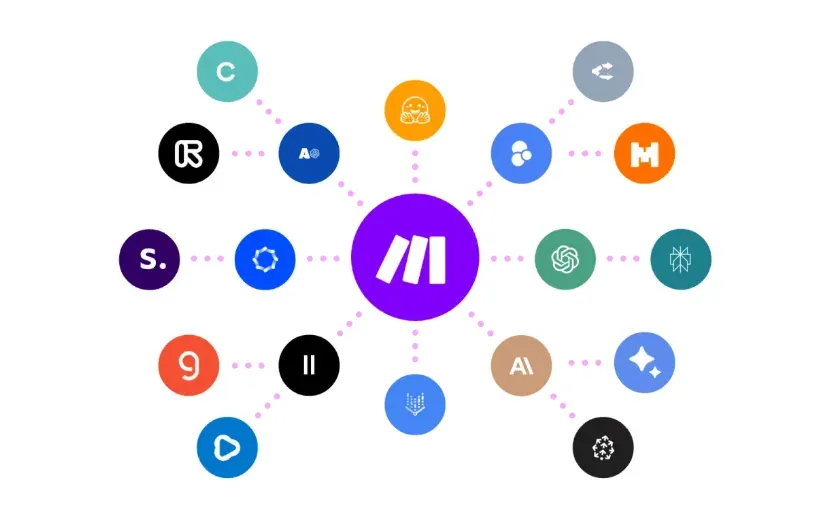
Make (formerly Integromat) is a no-code workflow automation platform that connects business apps into visual scenarios without the need to write code. The tool runs as a cloud-based SaaS application and supports over 1,800 integrations with popular tools, letting companies build complex business process automations through a drag-and-drop interface. The platform supports the automation of both simple and advanced workflows.
Source: make.com
Who Make is for
Make is aimed primarily at small and medium-sized businesses looking for effective ways to boost productivity without involving development teams. The platform works well for marketing, sales and admin teams, where repetitive tasks eat up a large share of working time. E-commerce companies use Make to automatically add new leads from contact forms into CRM systems, letting sales reps respond faster and convert more effectively.
The tool suits both beginners and advanced specialists. People without a technical background can build advanced automation scenarios thanks to a simple, visual editor. At the same time, Make offers advanced configuration options, letting you build complex logical conditions, loops and filters to fine-tune automations to specific requirements.
Key benefits of Make
Make's visual editor lets users build runnable workflows called "scenarios" by connecting app modules in an intuitive interface and configuring the data each app should receive and use. In practice, this means teams can build automations without writing code, dragging and dropping elements onto a virtual canvas.
The platform gives access to over 2,000 built-in integrations with popular apps. Users can connect Google Workspace tools (Gmail, Google Sheets, Google Drive), Slack, Salesforce, Asana, Trello, Monday.com and their own APIs. A library of ready-made automation templates speeds up getting started, letting you clone a template and adapt it to your own needs.
Make stands out for its ability to monitor automation runs in real time, analyse error logs and easily adjust scenarios. Features such as routers let you branch scenarios and process different sequences for different situations, for example sending a different email depending on whether an invoice is one day or one week overdue.
Limitations and drawbacks of Make
As a cloud-based solution, the platform requires a constant internet connection, and connectivity problems can affect automation performance and data access. The lack of a Polish-language interface is a barrier for some users, since the platform runs mainly in English.
Building complex automations can require deep knowledge of the systems and apps you're working with. Although the platform offers documentation, the setup process is not always straightforward, which can lead to frustration. Error messages can be cryptic, making problems harder to diagnose. Automations need regular reviews and updates, especially when integrations or third-party apps change, which means extra time and resources spent on maintaining the system.
Having to buy higher-tier plans for more advanced features can be a barrier for smaller companies with limited budgets. The platform can also run slower with large files or complex workflows. For companies looking for more advanced AI capabilities, such as predictive data analysis or large-scale machine learning, Make may not meet those requirements.
Make pricing
Make uses a pricing model based on credits (operations), where every module action in a scenario, such as adding a row to Google Sheets or fetching data from a Gmail account, counts as one credit.
The free plan offers up to 1,000 credits a month with no time limit, letting you test the platform with access to the visual automation builder, over 1,000 integrable apps and an unlimited number of users. Scenarios can run no more often than every 15 minutes.
The Core plan costs $9 a month for 10,000 operations, offering an unlimited number of active scenarios and access to 300+ Make API endpoints. The Pro plan, priced at $16 a month, adds priority scenario execution, custom variables and full-text search in the execution log.
The Teams plan, at $29 a month, adds teams and team roles, plus the ability to create and share scenario templates. The Enterprise plan offers custom pricing with a dedicated customer success manager, high-priority support and SSO access control.
Best ways to use Make
Email automation is a popular use case, where Make can automatically send email marketing campaigns and follow-ups. In practice, a scenario can periodically check for overdue invoices in Xero, fetch the invoice URL and download the PDF, then retrieve the contact's email address and send a personalised message with the attachment.
In project management, Make integrates various project management tools and automates tasks and notifications. Syncing data between platforms helps you avoid duplicate data and manual data entry. The platform also supports document workflows and document management within an organisation.
Customer service teams can use Make to automatically answer product questions, resolve issues and make purchasing easier. When someone signs up for a newsletter, Make automatically sends a welcome email, adds their data to the CRM and notifies the team about the new subscriber.
Automating data analysis processes covers collecting data from processes and creating reports and analyses. Companies can integrate web forms with CRM and email tools, generate reports based on marketing data and respond quickly to new events, such as new customers or support tickets.
Zapier: the simplest automation tool for beginners
More than 3 million businesses worldwide use Zapier, a no-code workflow automation platform that lets you connect apps without technical knowledge. The tool gives access to almost 8,000 integrations, making it the leader in terms of the number of supported connections between business apps. Zapier builds automations called "Zaps" on a simple "if X, then Y" rule, where a specific event in one app automatically triggers actions in another app, or several apps at once.
Source: zapier.com
Who Zapier is for
Zapier is aimed primarily at small and medium-sized businesses that need quick integrations between apps and have a budget for a subscription. The platform was designed with beginners in mind, letting you automate both simple and complex processes without writing code. Business owners automating processes, marketers running campaigns and teams that need tool integrations all find Zapier a good fit for their needs.
Zapier is a great choice for non-technical teams that want to move fast and integrate thousands of apps. The tool works well for task automation in both small businesses, including sole traders, and large enterprises. It supports online marketing, human resources management and control over many other operational activities. The platform is ideal for citizen developers, who can build advanced business process automation without any coding knowledge.
Key benefits of Zapier
Users confirm the platform's effectiveness: a significant majority agree that Zapier has improved their productivity. The widest integration library on the market, covering over 8,000 apps, spans CRM, marketing, productivity and many other areas. The platform connects with the most popular tools used by companies, from Google Sheets through Slack and Shopify to more niche solutions.
The drag-and-drop interface makes it possible for anyone to build automations, even without coding knowledge. The availability of ready-made templates and guides makes the tool friendly for non-technical users. Thousands of ready-made scenarios, such as "connect Google Forms with Mailchimp", can be switched on with a single click and adapted to your own needs.
Zapier lets you build multi-step automations called "Multi-step Zaps", where a single trigger runs several actions in sequence. In practice, this means that after a new order in your shop, you can automatically send the customer an email, add their data to the CRM and update a Google Sheets spreadsheet, all within one workflow. Conditional features let you fine-tune the flow and build smarter automations.
Zapier offers extensive documentation and an active user community, along with numerous guides and inspiring use cases. The platform runs 24/7, carrying out tasks even while your team is asleep or out of the office. Automated actions eliminate mistakes caused by manually copying information from one app to another.
Limitations and drawbacks of Zapier
Zapier charges for every single task, and its prices rise faster than those of other automation platforms. In Zapier's terms, a task is a single action carried out by the platform when a Zap runs. For example, if a Zap automatically sends form data to a CRM, each submission counts as one task. The free plan offers only 100 tasks a month, which makes it impractical for real-world workflows.
Costs rise sharply as the number of actions grows. The Professional plan, at around €17, includes only 750 tasks a month, which means that at larger scale you need to buy more expensive plans. Make uses a model based on operations, where every action, check or trigger costs credits, which makes usage harder to predict. With Zapier, however, although the model is more transparent, costs can turn out higher than expected, especially with a high volume of completed tasks.
Being cloud-only means it's not suitable for companies with strict compliance requirements. All data passes through Zapier's servers, which can raise concerns about privacy and compliance with regulations such as GDPR. Dependence on external services means integrations only work when those services are online, which can be a problem during outages.
Lower flexibility with complex workflows is another limitation. Although Zapier is simple, more complicated processes can be hard to build, sometimes requiring you to combine multiple Zaps, which increases cost and complexity. Companies with elaborate workflows will grow faster with Make or n8n. The limits of the free version include only two-step Zaps (one trigger and one action), with no access to multi-step automations, premium apps, filters, formatters or custom integrations.
Zapier pricing
| Plan | Monthly price | Tasks/month | Key features |
|---|---|---|---|
| Free | €0 | 100 | Unlimited Zaps within the task limit, two-step Zaps, access to Zapier Copilot |
| Professional | €16.60 | 750+ | Multi-step Zaps, premium apps, webhooks, live chat |
| Team | €57.30 | 2,000+ | For 25 users, shared folders, SAML SSO |
| Enterprise | Custom pricing | Up to 2 million | Unlimited users, audits, technical support |
The Professional plan costs €16.60 a month and offers advanced workflows, access to premium apps and live chat support. The higher the task tier, the lower the price per task. Advanced logic steps such as Filters and Paths don't count towards the task limit, letting you build more efficient workflows without watching the counter.
Zapier offers a 14-day free trial of the Professional plan with no credit card required. The platform now includes Tables and Forms in the Free, Pro and Team plans at no extra cost. Zapier AI, available to users on the Pro plan or higher, uses connections provided by the platform (OpenAI and Google Gemini), and its tasks cost the same as regular tasks with no extra charge.
Best ways to use Zapier
Customer service automation keeps tickets organised, keeps notifications in line and tracks responses. Zapier automatically creates tasks and sends custom notifications, whatever apps you use. Sales teams use the platform to automatically add new contacts from a website form to a Mailchimp mailing list.
In project management, Zapier automatically creates notes in Evernote based on emails received in Gmail. The platform adds new tasks to Trello based on tasks defined in Google Sheets. Email marketing automation covers campaign management and audience segmentation.
n8n: an open-source process automation solution
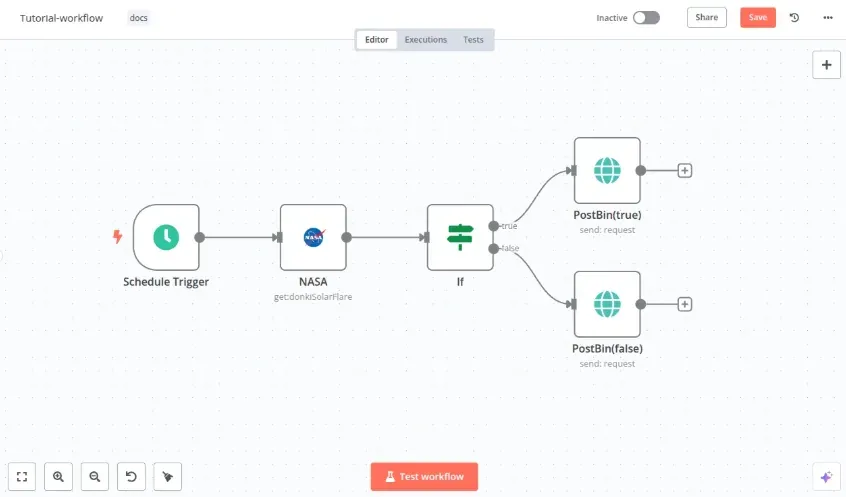
n8n stands out from the competition as an open-source process automation tool, offering a fair-code model that lets you use the software free of charge for both personal and commercial purposes when self-hosting. The platform combines workflow visualisation with the ability to write your own code, making it attractive for technical teams looking for flexibility without the limits typical of closed cloud solutions.
Source: community.n8n.io
Who n8n is for
n8n is aimed primarily at technical teams and professionals who need advanced, flexible and scalable automation solutions. The platform works well for developers and software engineers, IT specialists, DevOps engineers, data analysts and process automation specialists. Anyone comfortable working with technical concepts, needing to integrate custom APIs, or wanting to use AI capabilities in their workflows will find n8n a suitable tool.
In practice, n8n serves both small startups automating growth processes and data teams syncing and transforming information. Companies that need full control over their data and environment, or that already have server infrastructure, often choose the self-hosted version. For organisations with security or regulatory requirements, the ability to self-host behind their own firewall is a key advantage, ensuring maximum data security.
Key benefits of n8n
Combining visual building with code is a unique feature of n8n, offering an intuitive visual interface plus the ability to write custom code in JavaScript or Python. Developers can add npm or Python libraries for even more power, while less technical users work with ready-made nodes dragged onto the canvas. The platform also supports building bots for advanced automation scenarios.
Native AI capabilities let you build advanced AI agents and use language models in ways that go beyond what many traditional automation tools can do. The platform supports over 400 integrations with popular services, including Google Sheets, Slack, GitHub, PostgreSQL, HTTP and Webhooks. The community shares over 900 ready-made workflow templates, which speeds up deployment and shortens the time it takes to get started.
Full control and hosting flexibility ensure maximum security, privacy and control over your data. The self-hosted version lets you run n8n on your own infrastructure without licence fees, which often turns out cheaper than subscriptions to competing tools. Real-world results confirm the platform's value: StepStone sped up marketplace data-source integration 25 times over, cutting two weeks of work down to just 2 hours. Delivery Hero saved 200 hours a month thanks to a single ITOps workflow.
Limitations and drawbacks of n8n
For people without technical experience, working with n8n can be challenging. You need to understand the basics, such as web APIs, the JSON format and conditional logic in workflows, before configuring more complex processes. The node-based interface can be difficult for beginners at first, and making full use of its capabilities requires knowledge of programming and data handling.
Although n8n has a large library of connectors, there are fewer of them than with the biggest competitors, such as Zapier. For a niche tool, there may not be a ready-made integration module, requiring you to configure it yourself via an API or use the universal HTTP Request node.
The Community Edition has significant functional limitations. The lack of global variables available across all workflows makes it harder to manage multiple processes. Detailed system monitoring is much more limited in the free version, which can make diagnosing problems harder in elaborate workflows. On top of that, the lack of two-factor authentication, additional admin accounts and isolated environment features means the free version isn't suited to public use or team collaboration.
Running n8n on your own server requires knowledge of Docker, servers and HTTPS management. Basic infrastructure costs often reach as much as €230 a month, and additional spending on SSL certificates, monitoring and regulatory compliance can add further costs. A realistic self-hosting budget, including proper monitoring, backups and security, is usually between €230 and €690 a month, excluding the cost of your team's time. A sound automation strategy needs to factor these costs into budget planning.
n8n pricing
n8n uses a unique pricing approach based on full workflow executions, where you only pay when a workflow runs from start to finish. Every run, from the trigger to the last step, counts as one execution, regardless of the number of steps in between.
The cloud Starter plan costs €20 a month for 2,500 workflow executions, offering 5 concurrent executions, 320MiB of RAM and basic features. The Pro plan, at €50 a month, includes 10,000 executions and adds global variables, insights and admin roles.
The Business plan, available at €667 a month as a self-hosted option, includes 6 shared projects, SSO, SAML and LDAP, admin roles, version control, multiple environments and 30 days of insights.
Best ways to use n8n
LinkedIn prospecting automation, which n8n makes possible, can cut the time spent building a contact list and manually sending messages down to an hour a week. Integration with Sales Navigator eliminates the tedious work of reaching out to decision-makers. Similarly, automating email marketing with dedicated sending software can significantly shorten the time needed to run the process.
Notifications from AI chatbots go automatically to account managers on the company chat, including the full content of the conversation. Contact form automation checks that forms are filled in correctly and triggers a notification on the company chat, shortening response times.
Integrating the CRM with the email client saves every sales rep's email into the customer's contact history. Auto-filling CRM records removes the need to pay for additional subscriptions. In DevOps, n8n automatically creates tickets from alerts, manages release notes and syncs secrets and configuration.
Social media monitoring detects brand mentions, logs them in the CRM, tags them by sentiment and notifies the marketing team. Aggregating metrics from Google Analytics or custom APIs transforms the data and feeds BI tools or spreadsheets, keeping dashboards up to date without manual work.
Power Automate: process automation in the Microsoft ecosystem
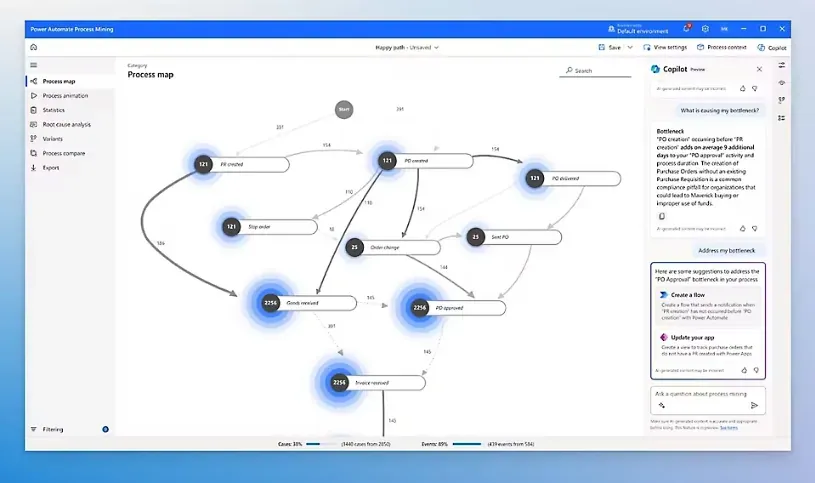
Microsoft Power Automate, formerly known as Microsoft Flow, is a business process automation platform designed specifically for organisations working within the Microsoft ecosystem. The service is part of the Microsoft Power Platform, which also includes Power BI, Power Apps, Power Pages and Copilot Studio. In practice, this means native integration with Office 365, Dynamics 365, Teams, SharePoint and Azure, which eliminates the compatibility issues typical of third-party tools.
Source: microsoft.com
Who Power Automate is for
Power Automate targets two groups of users. The first is people with basic technical knowledge who work with IT departments and can build automations themselves thanks to the simple interface. The second is IT decision-makers who give business partners more autonomy to build their own solutions, freeing up specialists to focus on advanced tools. Power Automate is enabled by default in every Office 365 app and includes around 150 standard connectors, meaning organisations that already have a Microsoft subscription can start automating without extra investment.
The tool works well in small, medium-sized and large companies that use Microsoft 365 for everyday work. HR staff, data analysts, and sales and marketing teams can streamline their tasks without involving IT resources. For businesses with security requirements and GDPR compliance needs, the platform offers built-in security, governance and 360-degree monitoring.
Key benefits of Power Automate
Easy integration with other apps is the platform's biggest strength, as its set of ready-made integrations covers over 1,000 apps, not just ones from Microsoft. On top of that, over 400 connectors are available, letting you easily automate work with third-party apps. Native environments within Microsoft 365, such as Teams, Excel and SharePoint, help you get more done in your favourite apps without leaving the interface.
The platform's high flexibility lets you build workflow automations and use its RPA module in both attended and unattended mode. Power Automate offers a Describe it to Design it feature, which lets you build flows by describing them in natural language. Copilot, an AI-based assistant, helps users create and improve flows, and built-in AI models enable smart automation of document and image processing.
Limitations and drawbacks of Power Automate
The complicated licensing model is a significant obstacle, especially when a company wants to scale automation and add more unattended bots. The system's architecture, which is hard to grasp from a business point of view, together with the lack of advanced reporting, makes it harder to manage processes. Implementation requires a solid understanding of the organisation's processes and how they flow.
For users without a technical background, the interface can be overwhelming. Power Automate works great for smaller, simple tasks, but with complex or high-volume flows, users often experience slow processing, errors or flow failures. The mobile app doesn't have the full functionality of the desktop version, and frequent flow maintenance can become tedious as business needs evolve.
API limits at the platform level are based on the user's licence. Every connector has its own throttling limit, and when a flow hits these limits, the service returns error code 429 with a rate-limit-exceeded message. On top of that, there's a limit of 100,000 actions per 5 minutes per flow, which can cause slowdowns or throttling under heavy use.
Power Automate pricing
| Plan | Monthly price | Key features |
|---|---|---|
| Free trial | $0 | 30 days of access to premium features, cloud flows with standard connectors |
| Power Automate Premium | $15/user | Cloud flows (DPA), attended desktop flows (RPA), process mining with 50 MB of data, a 250 MB Dataverse database and 2 GB of files |
| Power Automate Process | $150/bot | Cloud flows, unattended RPA, a 50 MB Dataverse database and 200 MB of files |
| Power Automate Hosted Process | $215/bot | Unattended RPA, a Microsoft-hosted virtual machine, a 50 MB Dataverse database and 200 MB of files |
Per-user licences let you run any number of automations under a single named user. Per-flow licences let you build automations for a larger team without licensing every user individually, though a single licence supports a maximum of 5 flows. To use AI capabilities, you need to add the AI Builder add-on separately.
Best ways to use Power Automate
Automating repetitive tasks lets you build flows for routine work, for example automatically moving email attachments into SharePoint folders. Integrating data from various sources uses connectors to automatically transfer information between systems, for example pulling data from a submitted form and adding it to an Excel file.
In HR, the platform automates onboarding for new employees, working time and leave management, training reminders and recruitment. Streamlining document flow includes automatic approval paths, where documents go to the right people for sign-off and are moved to the correct folders once approved. Automatically sending document packs and policies when a new employee is added to the system saves the HR department time.
Customer service uses automation to answer queries, manage service tickets and handle orders and payments. Power Automate with AI Builder allows automatic recognition of invoice content, sending data to accounting systems and archiving it in SharePoint.
Workato: advanced automation for enterprises
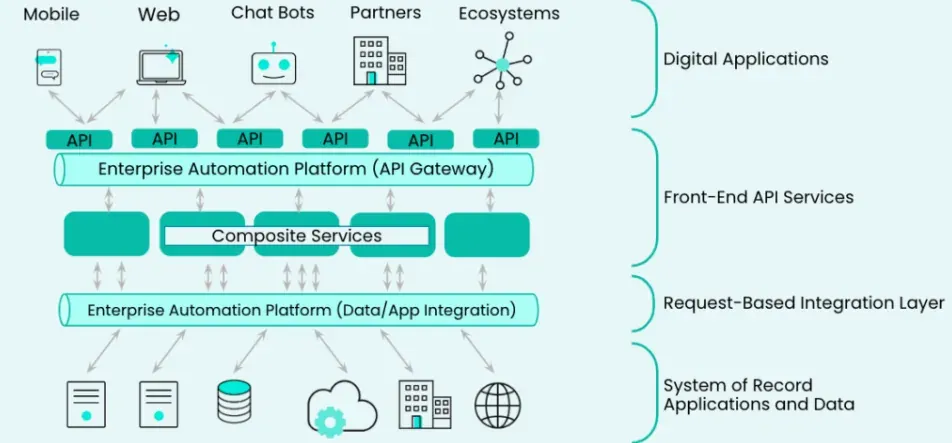
Workato was founded in 2013 as an enterprise-class iPaaS platform, combining app integration with business process automation and AI-based orchestration. The solution has been named a leader in analyst reports seven times, positioning it as a tool for large organisations that need advanced business process automation.
Source: workato.com
Who Workato is for
The platform is aimed at enterprises with extensive integration needs, requiring orchestration of complex workflows across a distributed app environment. Workato serves both IT teams and business users through a federated model, where a Centre of Excellence sets the security framework and distributed "Automation Factories" build their own solutions.
Key benefits of Workato
A library of over 1,000 native connectors, together with a low-code/no-code interface, lets you roll out automations in weeks instead of months, without involving large development teams. The platform lets you connect business systems, cloud apps and internal tools within a single, coherent integration environment.
Workato offers Enterprise MCP for AI agents, enterprise-grade security (SOC 2 Type II, GDPR, HIPAA) and an architecture built for regulated environments. Thanks to its high performance and scalability, it handles thousands of transactions per second, letting it grow alongside your organisation. Most users are able to launch their first automation within a week, which significantly speeds up getting real business value.
Limitations and drawbacks of Workato
A pricing model based on the number of connectors and jobs can be relatively costly for startups and smaller organisations, especially as the number of automations grows quickly. Advanced features, such as extensive process orchestration or enterprise-class integrations, often require training or support from a certified implementation partner. The platform offers no permanent free plan: access is limited to a 30-day trial. On top of that, a 10 MB limit on a single payload can be a constraint when working with large data sets or files.
Workato pricing
Workato uses a custom pricing model. The Core plan starts at $10,000 a year for 10 connectors and 125,000 jobs a month. Business offers 30 connectors and 1 million jobs, while Enterprise provides unlimited connections with a dedicated Customer Success Manager. Pricing for the Business and Enterprise packages, however, is worked out individually, only on request.
Best ways to use Workato
HR automation includes onboarding with predictive analytics. In sales and marketing, the platform automates lead scoring and personalised campaigns. Finance teams use real-time reconciliation, and IT operations use predictive system maintenance.
Comparing business process automation tools
Comparison table: key parameters
| Parameter | Make | Zapier | n8n | Power Automate | Workato |
|---|---|---|---|---|---|
| Number of integrations | Over 2,000 | Almost 8,000 | Over 400 | Over 1,000 | Over 1,000 |
| Hosting model | Cloud (SaaS) | Cloud (SaaS) | Cloud or self-hosted | Cloud (SaaS) | Cloud (SaaS) |
| Interface | No-code, visual drag-and-drop | No-code, drag-and-drop | Low-code/no-code with the ability to write code (JavaScript, Python) | Low-code with Copilot AI | Low-code/no-code |
| Who it's for | Small and medium-sized businesses, marketing, sales and admin teams | Small and medium-sized businesses, beginners, non-technical teams | Technical teams, developers, IT engineers, data analysts | Organisations in the Microsoft ecosystem, HR, sales, marketing | Large enterprises with extensive integration needs |
| Difficulty level | Easy to medium (suitable for beginners and advanced users) | Very easy (the simplest for beginners) | Medium to advanced (requires technical knowledge) | Medium (requires basic technical knowledge) | Advanced (requires training or partner support) |
Comparison table: pricing model
| Tool | Free plan | Basic plan | Mid-tier plan | Advanced plan |
|---|---|---|---|---|
| Make | 1,000 operations/month, scenarios every 15 min | Core: ~€7.40/month (10,000 operations) | Pro: ~€13.10/month | Teams: ~€23.80/month, Enterprise: custom pricing |
| Zapier | 100 tasks/month, two-step Zaps | Professional: €16.60/month (750+ tasks) | Team: €57.30/month (2,000+ tasks) | Enterprise: custom pricing (up to 2 million tasks) |
| n8n | Community Edition (self-hosted, limited features) | Starter: ~€19.30/month (2,500 executions) | Pro: ~€48.30/month (10,000 executions) | Business: ~€643.80/month (40,000 executions) |
| Power Automate | 30-day trial | Premium: ~€12.30/user/month | Process: ~€122.90/bot/month | Hosted Process: ~€176.10/bot/month |
| Workato | None (30-day trial only) | Core: from ~€8,190/year (10 connectors, 125K jobs/month) | Business: 30 connectors, 1 million jobs/month | Enterprise: unlimited connections |
Comparison table: key benefits
| Tool | Main strengths |
|---|---|
| Make | • Visual editor with routers and filters • Over 2,000 integrations • Real-time monitoring • Library of ready-made templates |
| Zapier | • The easiest to use for beginners • The widest integration library (8,000 apps) • Multi-step Zaps with conditional features • A large majority of users confirm improved productivity |
| n8n | • Open-source with self-hosting available • Combines visual building with code (JavaScript, Python) • Native AI capabilities • Full control over your data |
| Power Automate | • Native integration with the Microsoft ecosystem • Copilot AI for building flows • Attended and unattended RPA • Savings of up to 200 hours a year per employee |
| Workato | • Enterprise-class iPaaS platform • Enterprise MCP for AI agents • Security: SOC 2, GDPR, HIPAA • Scalability up to thousands of transactions/second • First automation live in as little as a week |
Comparison table: main limitations
| Tool | Key drawbacks and limitations |
|---|---|
| Make | • Requires a constant internet connection • No Polish-language interface • Complex automations require deep expertise • Cryptic error messages • Slower performance with large files |
| Zapier | • The most expensive pricing model (charges for every task) • Free plan: only 100 tasks/month • Cloud-only (no self-hosting) • Less flexibility with complex workflows • All data passes through Zapier's servers |
| n8n | • Requires technical knowledge (API, JSON, logic) • Fewer connectors than competitors • Community Edition: no global variables, 2FA or detailed logs • Self-hosting: infrastructure cost from €230 up to €690/month • Node-based interface is difficult for beginners |
| Power Automate | • Complicated licensing model • Slow processing with complex flows • API limits: 100,000 actions per 5 min/flow • Mobile app without full functionality • Overwhelming interface for non-technical users |
| Workato | • Very high price (from $10,000/year) • No free plan (30-day trial only) • Requires training or partner support • Payload limit: 10 MB • Not suited to startups and small businesses |
Comparison table: best use cases
| Tool | Recommended business scenarios |
|---|---|
| Make | • Email and marketing campaign automation • Project management (Trello, Asana, Monday.com integration) • Data sync between platforms • Customer service and onboarding • E-commerce: automatically adding leads to a CRM |
| Zapier | • Customer service and ticket automation • Integrating forms with CRM and email tools • Project management (Evernote, Trello, Google Sheets) • Email marketing and follow-ups • Data sync across thousands of apps |
| n8n | • LinkedIn prospecting with Sales Navigator • Email marketing with advanced personalisation • Notifications from AI chatbots • CRM integration with email • DevOps: automatic tickets, release notes, social media monitoring |
| Power Automate | • Automation within the Microsoft 365 ecosystem • HR: onboarding, leave management, recruitment • Document flow and approval paths • Customer service and service tickets • AI Builder: invoice recognition and archiving |
| Workato | • HR automation with predictive analytics • Sales and marketing: lead scoring, personalised campaigns • Finance: real-time reconciliation • IT operations: predictive system maintenance • Orchestrating complex workflows across distributed environments |
Comparison table: billing model
| Tool | Billing unit | Pricing logic |
|---|---|---|
| Make | Operations (credits) | Every module action = 1 credit. A transparent model, easy to predict costs |
| Zapier | Tasks | Every complete Zap run = 1 task. The fastest-growing costs as you scale |
| n8n | Workflow executions | A full run from start to finish = 1 execution, regardless of the number of steps |
| Power Automate | User or bot | Per-user licences (unlimited flows) or per-flow licences (max 5 flows/licence) |
| Workato | Connectors and jobs | Based on the number of connectors and monthly jobs. An enterprise model with a high entry threshold |
Comparison table: technical capabilities
| Parameter | Make | Zapier | n8n | Power Automate | Workato |
|---|---|---|---|---|---|
| Custom code | Limited | No | Yes (JavaScript, Python, npm) | Limited | Yes |
| Self-hosting | No | No | Yes | No | No |
| Own API | Yes (HTTP webhooks) | Yes (webhooks) | Yes (HTTP Request node) | Yes | Yes |
| RPA | No | No | No | Yes (attended and unattended) | Yes |
| AI/ML | Basic | Basic (AI power-ups) | Advanced (native AI agents) | Advanced (Copilot, AI Builder) | Advanced (Enterprise MCP) |
| Monitoring | Real-time, error logs | Basic | Detailed (on paid plans) | 360-degree | Enterprise-grade |
| Security | Standard SaaS | Standard SaaS | Full control (self-hosted) | SOC 2, GDPR | SOC 2 Type II, GDPR, HIPAA |
Tool recommendations by company profile
| Organisation profile | Recommended tool | Rationale |
|---|---|---|
| Startup/small business with no IT team | Zapier | The simplest to use, the fastest start, a wide integration library |
| Small/medium business with a budget for automation | Make | The best value for money, a visual editor, advanced features |
| Company with a technical team | n8n | Full control, the ability to write code, self-hosting, lower long-term costs |
| Organisation in the Microsoft ecosystem | Power Automate | Native integration with Office 365, Teams, SharePoint, Dynamics 365 |
| Large enterprise | Workato | Enterprise-grade scalability, advanced security, orchestration of complex processes |
| Company with GDPR/compliance requirements | n8n (self-hosted) or Workato | Full control over your data, or enterprise-grade certifications |
| E-commerce with many integrations | Make or Zapier | A wide connector library for sales platforms, CRMs and warehouses |
Which automation tool should you choose: key takeaways
Choosing the right tool for business process automation isn't just a budget question, it's part of a wider strategy for the direction in which business process automation should take your business. To implement process automation effectively, you first need to identify which of the company's business processes can be automated, where routine and repetitive tasks occur, and which areas are key to the business. Only then does digitalisation and process automation start to deliver real benefits.
Zapier works well for organisations that want to quickly launch their first workflow automation scenarios and streamline processes without involving the IT department. Make is a good choice for e-commerce companies and marketing teams that want to use automation to boost operational efficiency and cut task completion times. n8n suits technical teams that value making the most of technology, full control over their IT environment and flexible automation systems. Power Automate fits naturally into a Microsoft environment and supports rolling out business process automation in large organisations. Workato, meanwhile, is the solution for enterprises that want to scale robotic automation and build automated processes based on new technologies and advanced enterprise-class integrations, much like Blue Prism-type platforms in the RPA space.
Whichever tool you choose, it's worth understanding what business process automation actually means for your specific case. Business process automation doesn't just let you streamline processes and save time, it also improves the quality of task execution, reduces errors and increases customer satisfaction. The benefits of automation are especially clear in areas that used to rely on manual work moving data between systems.
A well-designed, automated process brings many benefits, from better control over the business, through the ability to focus on strategic activities, to higher operational efficiency. But implementing business process automation on its own isn't enough. What matters is a deliberate approach to optimising business processes and matching the tool to the organisation's real needs. Only then does digitalisation deliver real benefits and become genuine support for growing the business.
Read also: