














In this guide, we show you how to write a brief that works for both a human and a language model. You will learn what it should include, how to prepare it with AI in a few steps, and how to check whether the text created from it meets your business goals. At the end, you will find a brief template and an example you can use right away.
What Is a Content Brief and What Has AI Changed?
A brief is a short document in which the client gives the contractor the most important information about a task: the goal, the audience, the expected result and the constraints. The brief is a point of reference for both sides. When there is a dispute over whether a text is "good," you go back to the brief and check whether it delivers what was agreed.
What Is a Content Brief?
A content brief covers one specific piece of content: a blog article, a category description, website copy, a newsletter or a series of posts. It describes what the text is about, who it is for, what questions it should answer, what phrases it should rank for in search and what it should sound like. In content marketing, it is a basic working tool, because it connects brand strategy with the day-to-day process of creating content.
Copywriter Brief vs. AI Brief
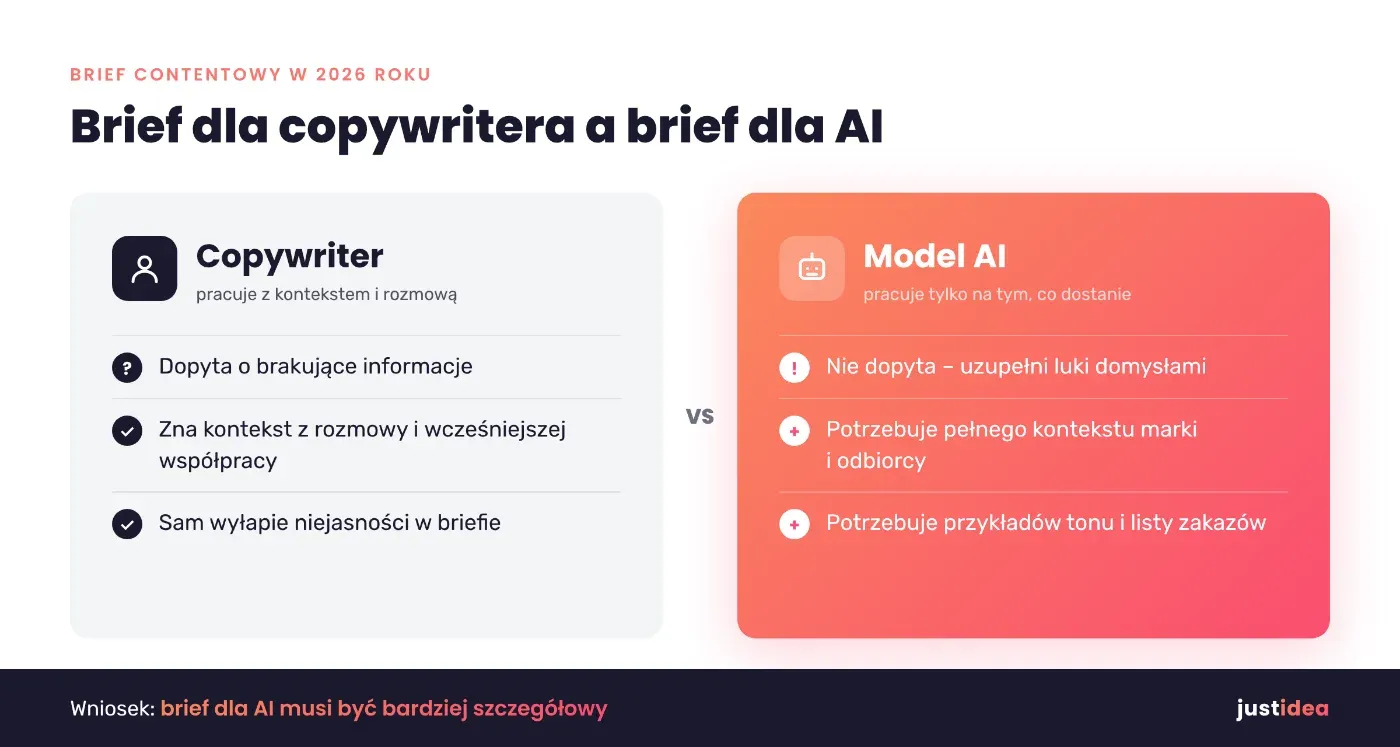
A copywriter who gets an incomplete brief will ask questions. An AI model will not. It fills the gaps with the most probable answers, which means whatever can already be found on the internet. That is why a brief in 2026 has to be more detailed than a few years ago. You need brand context, specific data, examples from practice and clear prohibitions, meaning information about what the text must not promise.
The way a brief is prepared has changed too. AI takes over the tedious part of research: it collects user questions, compares competitors' headings and proposes a structure. The decision about the goal, the angle on the topic and what the brand has to say for itself is still yours.
What Types of Marketing Briefs Are There?
In agencies, the word "brief" means several different documents. Each has a different level of detail and a different audience. Below are the most common types of briefs.
| Brief type | What it covers | Who uses it |
|---|---|---|
| Marketing brief | Business goals, market, target audience, budget and the marketing strategy for the whole campaign or collaboration | Client and agency at the start of the collaboration |
| Advertising brief | A specific campaign: message, channels, deadlines, KPIs | Campaign team, media planner |
| Creative brief | Insight, big idea, tone of communication and the desired emotional effect | Copywriter, graphic designer, creative director |
| Communication brief | Brand communication in a given channel, e.g. communication on social media | Social media manager, PR |
| Project brief | Scope, schedule, responsible people and the approval process | Project manager |
| Content brief | One piece of content: topic, audience, phrases, structure, sources | Copywriter, SEO specialist, AI model |
The marketing brief is the starting point for all the others. When there is no written communication strategy in a collaboration with an agency, even the best article brief will rely on guesswork. This guide focuses on the content brief, because it goes directly to the author of the text or into the AI chat window.
What Should a Good Content Brief Include?
An effective brief does not have to be long. It does have to answer the questions the author would ask themselves before starting to write.
Business Goal and Audience
First, define why the text is being written and how you will check whether it worked. "More traffic" is not enough. It is better to write: "the article should bring in traffic from phrase X and send readers to the page for service Y." Then describe the audience. Age and gender from a general target audience description are not enough. You need a description of the situation in which this person looks for an answer, what they already know and the decision they should make after reading. If the brand has a documented persona, paste its description into the brief in full.
SEO: Primary Keyword, Questions and Intent
This part tells the author how the text should be visible in Google and in AI search engines. Enter the primary keyword, several secondary keywords and user questions. The most important thing, however, is search intent: if guides dominate the results, a sales landing page has no chance, even with perfect keyword saturation.
Structure, Format and Tone of Voice
Give a preliminary heading structure, an approximate length and the format. Define the tone of voice: whether you address the reader directly as "you," how expert it should sound and whether humor is allowed. Include a passage of text that captures the brand's voice well. One example says more than three paragraphs of description.
Context, Sources and Constraints
This is the element that most often disappears from briefs, and when working with AI it is crucial. A complete brief for a copywriter or an AI model should also include:
- data, figures and brand case studies the author can use,
- external sources you consider reliable,
- prohibited promises and phrases (e.g. guaranteed results),
- internal links with target anchor text and the CTA at the end of the text,
- the person who approves the text for subject-matter accuracy, and the delivery deadline.
How to Write a Content Brief with AI Step by Step
The process below works both when a copywriter writes the text and when a model generates the first draft. The difference only concerns the last step.
Step 1. Gather Data Before You Open the Chat
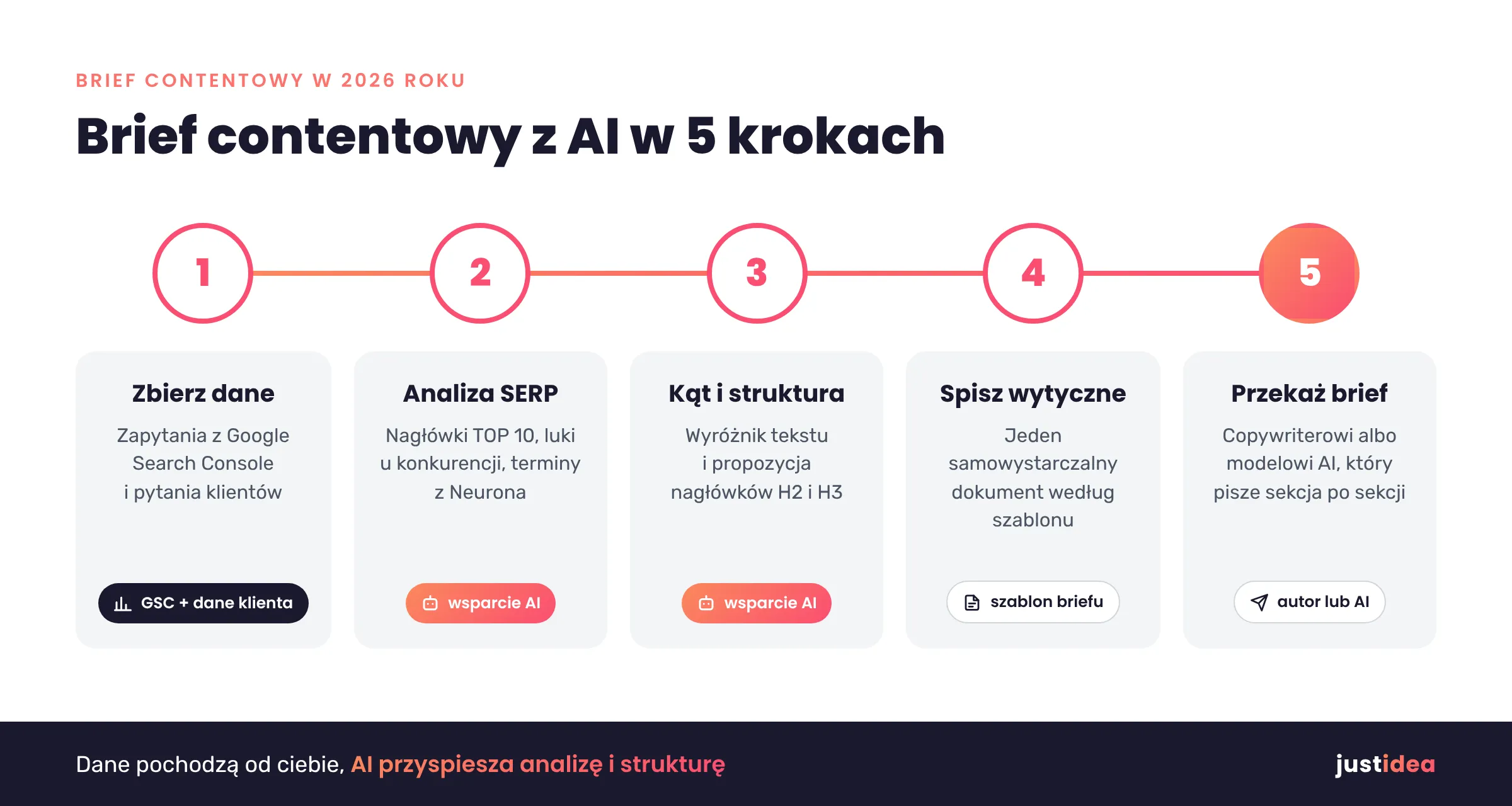
AI does not know your client or their results. So start with your own data. In Google Search Console, check which queries the site already appears for and which subpages are losing clicks. Go through the questions customers ask sales reps and the support team. This material gives the text something your competitors do not have.
Step 2. Analyze the SERP and Competitor Gaps
Now you can bring in AI. Paste the headings from the top ten results into the model and ask it to point out what is missing from all the texts. In parallel, run a keyword analysis in Senuto or Ahrefs and create a query in NeuronWriter. The tool will give you a list of NLP terms, a target length and questions from the "People also ask" section. An AI model is good at synthesizing this data, but the data itself must come from tools, not from its memory.
Step 3. Set the Angle and the Heading Structure
Based on the analysis, decide how your text will be different. It could be your own process, an example from a project or data nobody else has. Only then ask AI for a proposed H2 and H3 structure. Review it critically: models like to add sections such as "Pros" and "Cons" that contribute nothing.
Step 4. Put the Guidelines in One Document
Combine everything into one file using the template later in this article. It is important that the brief is self-contained: the author should not have to look for information across five emails and two forms.
Step 5. Hand the Brief to the Author or the Model
If a copywriter writes the text, send them the brief and set up a short call. If AI creates the first draft, paste the whole brief as context and generate the text section by section, not all at once. This makes it easier to control quality and catch repetition faster.
AI Prompts That Will Help You Prepare a Brief
A prompt works like a miniature brief: the more context you give, the less the model guesses. You can copy the prompts below and fill them in with your own data.
Competitor analysis:
You are a content strategist. Below I am pasting the H1-H3 headings from 10 articles ranking at the top of Google for the phrase [phrase]. Point out the topics that repeat across all the texts and the user questions that no text answers directly. Do not add information from outside the pasted material.
Audience and angle:
Based on the persona description [description] and the business goal [goal], suggest three different angles on the topic [topic]. For each one, state what decision the reader will make after reading and what proof from our side they will need.
Heading structure:
Prepare an H2 and H3 structure for the article [title] for the audience [description]. Each H2 should answer one user question. Use the phrases [list] in headings only where they sound natural. Do not create a summary section.
Checking the finished text:
Compare the text below with the brief. List the places where the text departs from the goal, repeats the same idea, states facts without a source or uses phrases from the prohibited list.
Content Brief Template and Example Brief
You can move the brief template to Google Docs, Notion or a form in your project management tool. It is important that every field is filled in with specifics, not generalities.
| Field | What to enter | Example |
|---|---|---|
| Topic and working title | The problem the text solves | How do you choose a heat pump for a house built in the 1990s? |
| Business goal | A measurable effect and the reader's action after reading | Traffic from the primary keyword, clicks on the quote calculator |
| Audience | Situation, knowledge, decision to make | A homeowner before a thermal upgrade, comparing offers |
| Primary and secondary keywords | The phrase, 5-10 secondary phrases, questions | heat pump for an old house; cost-effectiveness, capacity |
| Intent | The type of results in Google | Informational, guides |
| Structure | H2s and H3s for approval | 6-8 H2 headings, FAQ |
| Length and format | Character range, additional elements | 10,000-12,000 characters with spaces, comparison table |
| Tone of voice | Narration, expertise level, example | Direct "you," specific, no jargon |
| Sources and data | Own and external materials | Case study from a project, manufacturer data |
| Prohibitions | What not to write | No promises of specific savings |
| Linking and CTA | Addresses, anchor text, call to action | Link to the service page, CTA to the calculator |
| Approval | Who and by when | The client's technical expert, 5 business days |
A sample brief filled in this way takes one page, and yet it lets two different authors write texts that solve the same problem for the same reader. That is a good test for any brief.
The same pattern works for other formats. In a newsletter brief, instead of keywords you enter the list segment and the topic of the message. In a social media brief, you describe the channel, the format and the existing communication on social media.
A Brief for SEO and AI Search Engines
In 2026, a text competes not only for a position in Google, but also for citations in AI Overviews, ChatGPT or Perplexity. Your brief should take that into account. Ask the author to make the first sentence of each section answer the question in the heading directly. Point out places for definitions, tables and specific numbers, because such fragments can be cited without additional context. Also include the brand name and its services where the text naturally refers to them.
Do not treat the content score as a goal in itself. A NeuronWriter score shows whether the text covers the topic, but it will not tell you whether it is useful. If you want to go further, see what content optimization for AI involves.
How to Check a Text Written from a Brief
Before the text goes to the client, compare it with the brief point by point. Check whether it delivers the goal, answers the audience's questions and keeps to the brand's tone. For content created with AI, verify every number, name and date against the source. Models can cite a nonexistent report with complete confidence.
Read the text aloud. Repeated constructions, paragraphs of identical length and empty adjectives immediately give away text written on autopilot. Finally, hand the text to an expert who approves the subject-matter accuracy.
The Most Common Mistakes in Briefs Created with AI
- A brief based only on keywords, with no description of the audience's situation.
- All the research handed to a model that has no access to the client's data.
- No example of the tone of voice and no list of prohibitions.
- A single "write an article" prompt instead of working section by section.
- No person who approves the text for subject-matter accuracy.
FAQ: Content Brief
What Is a Creative Brief?
It is a document for the creative team. It describes the insight, the main idea of the campaign and the emotions the message should evoke. A content brief is more operational and covers one specific piece of content.
What Should a Brief Look Like?
A good brief usually fits on one page and has fixed fields: topic, business goal, audience, keywords, intent, structure, tone of voice, sources, prohibitions, linking and the person approving the text. It is easiest to prepare it as a table in which you fill in every field with specifics, not generalities. You will find a ready template with an example above, in the section "Content Brief Template and Example Brief."
Who Should Write the Brief?
Most often it is prepared by an SEO specialist or content manager on the agency side, based on information from the client. The client is responsible for data, facts and approval.
Can AI Prepare a Brief on Its Own?
It can prepare a draft: collect questions, compare competitors and propose a structure. The goal, the angle on the topic and the brand's data must come from you.
How Long Should a Brief Be?
One page is usually enough. A brief for a long guide or website copy can be longer, but every sentence must carry information the author cannot find on their own.
A Good Brief Saves Revisions, Not Just Time
AI has sped up writing, but it has not replaced thinking about why a text is being created. The content brief is where you write that thinking down. Start with the template from this article, fill it in for your next text and compare how many rounds of revisions it takes this time.