













In short
- A 301 redirect is an HTTP status code stating that a resource has been permanently moved to a new address. It helps the search engine link the old address to the new one, and according to a Google post it confirms that a 301 does not cause a loss of PageRank.
- It is used when changing an address, migrating a domain, moving to HTTPS, unifying the www and non-www versions and merging content. For a temporary change, use 302 or 307, and when there is no equivalent page, 404 or 410 is the right response.
- Typical mistakes are redirect chains and loops, a target ending in a 404 error or noindex, old internal links and sending everything to the home page. For a migration you need to prepare an address map and keep the redirects for at least a year.
Changing a subpage's address might look like a minor technical tweak, but to a search engine, the old and new URLs are two separate locations. If a user or Google's crawler visits the outdated address and hits a 404 error, the search engine has no way of knowing the content simply moved. That's exactly why you use a 301 redirect.
A 301 code tells the browser and search engine crawlers that a resource has been permanently moved to a new URL. The user automatically lands in the right place, and the search engine gets a clear signal about which address should eventually replace the old one in the index. This matters, among other things, when you change your site's structure, migrate a domain, roll out HTTPS or merge similar content.
Exactly how does a 301 redirect work, when is it worth setting up, and how does it differ from 302, 307 or 308? In this article, we go from the basics to practical implementation and the most common mistakes that can affect a site's visibility in search results.
What Is a 301 Redirect
A 301 redirect is an HTTP status code that signals a resource has been permanently moved to a different URL. This is how the server tells the browser, a search engine crawler or another tool that the previous subpage has moved, and that its new version should be used going forward.
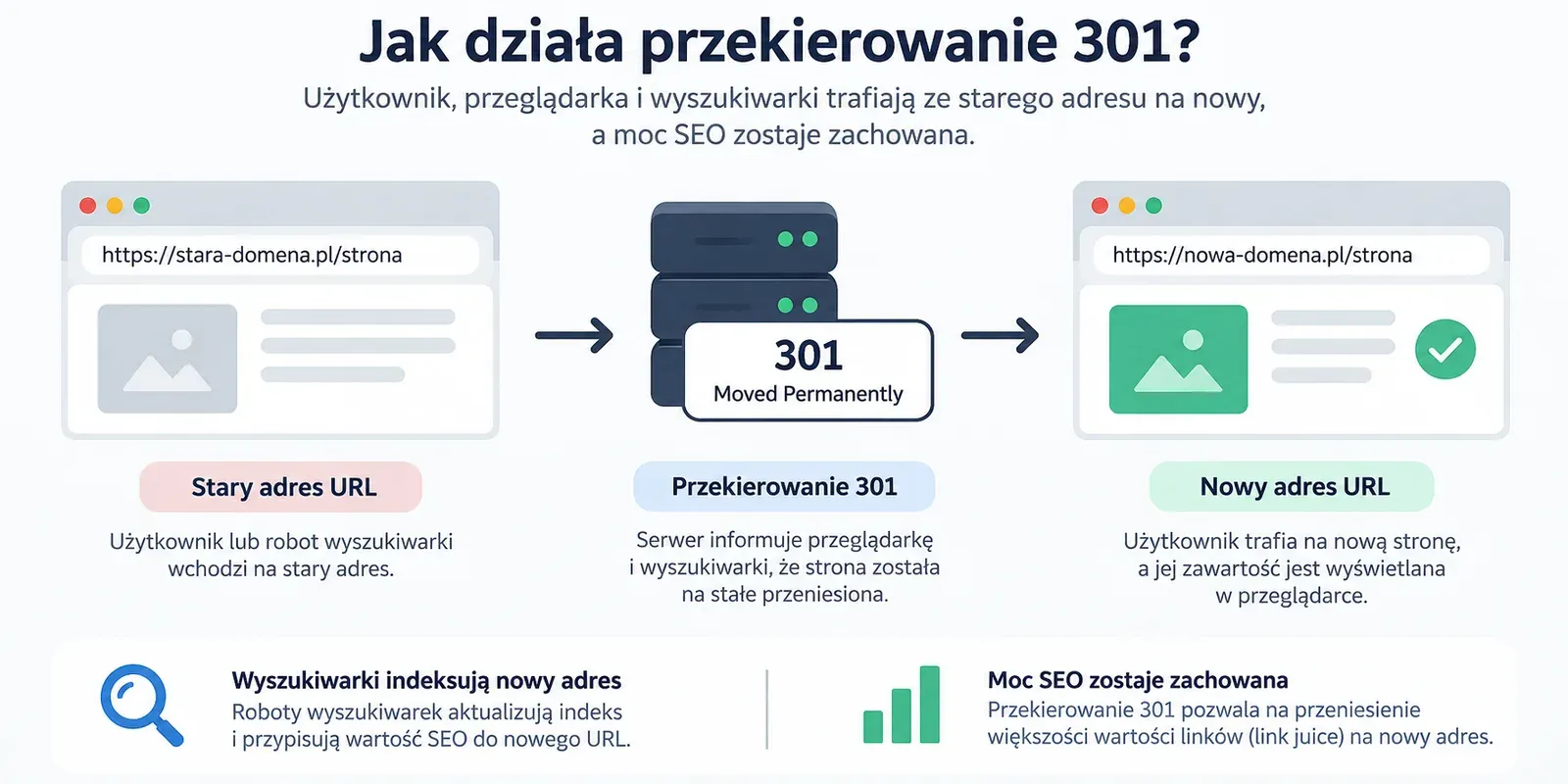
The name comes from the 301 Moved Permanently message. When a user opens the previous address, the server doesn't display the content that used to be there. Instead, it returns a 301 status code and points to the target URL. The browser reads this information and automatically moves to the new location.
For the user, the whole process is often practically unnoticeable. Clicking the old link can end with the new subpage showing up within a fraction of a second. From an SEO perspective, though, something more significant happens: a permanent redirect is one of the signals that helps a search engine work out which version of the address should be treated as canonical and shown in search results.
How a 301 Redirect Works
The mechanism is simple, though completely invisible to the user. Let's say a site had an article at:
https://example.pl/blog/stary-adres
After the site was rebuilt, the content moved to:
https://example.pl/poradnik/nowy-adres
If the redirect has been configured correctly, visiting the first URL triggers a server response with a 301 code. The Location header contains the information about where the next request should be directed. The browser then opens the new address, which in a correct scenario returns a 200 OK code.
From the user's point of view, this looks like a single visit to the page. Technically, though, it's two requests: the first to the old URL, and the second to the target address.
This is exactly what sets a 301 redirect apart from simply changing a link on the page. Updating internal linking helps users navigate the site, but it doesn't solve the problem of old addresses that may still be sitting in Google's index, users' bookmarks, social media, ad campaigns or other websites.
What Happens to the Old Address in the Search Engine
A 301 redirect tells Google that the change is permanent. During indexing, the algorithm can therefore treat the target URL as the address that should replace the previous one. This doesn't mean, however, that the old URL will disappear from the results immediately after the redirect is implemented.
Search engine crawlers need to revisit the existing URL, detect the 301 code, analyse the target page and update the information in the index. For a single subpage, this can happen relatively quickly, while for a large site migration the process can take longer. During larger migrations, visibility and rankings can shift temporarily before Google re-crawls and reprocesses the new URLs.
Why a 301 Redirect Matters for SEO
The importance of redirects in SEO stems mainly from the fact that a URL is one of the elements that identify a resource. If a valuable subpage has spent years building visibility and earning external links, and its address is then changed without a redirect, the new URL won't automatically be linked to the old address's history.
A 301 code helps carry the signals tied to the old address over to the target address, and reduces the risk of losing the visibility you've built up. Google confirms that 301s and other permanent redirects don't cause a loss of PageRank, so there's no need to assume that every move automatically “eats up” a set percentage of SEO power (1).
The term link juice is still widely used in the SEO industry, but it's worth treating it as a simplification. In practice, it isn't a single measurable “power” that can be converted into a percentage. Google uses many signals related to the address, links and canonicalisation. A permanent redirect helps consolidate these signals around the target page and maintain continuity in your SEO efforts.
A 301 redirect also helps maintain continuity in the user experience. If someone finds an article that's several years old in the search results, or clicks a link from an external site, instead of a 404 error they can automatically land on the current version of the material.
This doesn't mean, though, that every non-existent page should be redirected. Matching the old and new resource properly is what matters most.
When to Use a 301 Redirect
A permanent redirect should be used when you know the previous address will no longer be the primary location for a given piece of content. A redirect can cover a single subpage, an entire directory or a whole domain.
Changing a Subpage's URL
One of the most common uses is changing the address itself, for example from:
/uslugi-pozycjonowanie
to:
/pozycjonowanie-stron
The content stays the same or very similar, but its location changes. In this case, the 301 redirect should lead directly from the old URL to the new one.
Without a redirect, users relying on previously saved links can hit a 404 error, and the search engine has to process the new subpage separately.
Moving a Site to a New Domain
Changing domains is a much bigger operation, since it can involve thousands of addresses at once. Redirecting just the homepage isn't enough.
Every old URL should lead directly to the new address that corresponds to it most closely. According to Google's documentation, it's worth preparing a mapping of old URLs to their corresponding new addresses before launching a migration (1).
Switching From HTTP to HTTPS
After installing an SSL certificate, it's worth making sure traffic going to the HTTP version automatically switches to HTTPS. Otherwise, different variants of the address may remain accessible in parallel.
For a search engine, http://example.pl and https://example.pl are separate URLs. Google takes redirects and the HTTP/HTTPS protocol into account when choosing the canonical address.
We describe the technical way to configure this kind of redirect later in the article.
Unifying the WWW and Non-WWW Domain Versions
A similar rule applies to the versions:
https://www.example.pl
and:
https://example.pl
You should pick one preferred variant and consistently direct traffic to it. A domain redirect then helps you avoid a situation where the same page content exists under several addresses.
Merging Similar Content
A 301 redirect can be a good solution when consolidating content. If two articles answer practically the same intent and start competing for similar queries, you can create one more complete piece and permanently redirect the other address to it.
This doesn't mean automatically removing every similar subpage, though. First you need to assess whether they really serve the same user intent, and whether the target page will be a suitable replacement once the content is merged.
Reorganising Categories and Store Structure
In e-commerce, changes to categories, filters, how the catalogue is built or product paths often affect URLs. Removing a category or moving products without mapping can lead to a large number of 404 errors.
In that case, it's worth working out which new addresses correspond to the previous categories and products. If a suitable replacement page exists, you can use a 301. If it doesn't, a 404 or 410 code may be the right solution. Redirecting to a parent category only makes sense when it genuinely matches the user's intent.
Rebranding and Changing the Site's Architecture
Redirects also matter for bigger brand changes, a site rebuild or a move to a new CMS. If the URL structure changes at the same time, redirects need to be factored in at the project planning stage, not only after launch.
For large, complex sites, a redirect map becomes one of the basic elements of an SEO migration.

When Not to Use a 301 Redirect
A permanent redirect isn't the solution for every URL problem. If a change is temporary, using a 301 code sends the search engine a signal that doesn't match your actual intent.
An example would be a temporary unavailability of a subpage, a test, or briefly moving users to another resource. In such a situation, a 302 or 307 redirect would be more appropriate.
A 301 also shouldn't be used as an automatic response to every 404 error. If a product has been removed and there's no suitable replacement, you don't need to force a redirect. The same applies to an article or other content that's been permanently removed with no equivalent on the site: in that case, a 404 or 410 code may be the right solution. Google explicitly recommends letting subpages go when content has been permanently removed and has no equivalent.
You also shouldn't automatically send every removed URL to the homepage if it doesn't match their previous topic.
301, 302, 307 and 308: How These Redirects Differ
All of these codes belong to the 3xx response class, but they tell the client about a different type of change. The most important distinction is whether the move is permanent or temporary.
| Code | Nature | When to use it | Request method behaviour |
|---|---|---|---|
| 301 Moved Permanently | permanent | a permanent URL change, domain migration, permanently moving content | the method may change in some cases |
| 302 Found | temporary | a short-term move of a resource | the method may change in some cases |
| 307 Temporary Redirect | temporary | a temporary move that keeps the request method | the method is preserved |
| 308 Permanent Redirect | permanent | a permanent move that keeps the request method | the method is preserved |
The key difference comes down to whether the change is permanent, and whether the HTTP method (e.g. POST/GET) is preserved. You use 301 or 308 when the address changes permanently. Code 308 additionally preserves the request method. 302 or 307 are meant for temporary changes, when the source address is still meant to remain the primary location of the resource.
301 Redirects vs Canonical Tags, 404 and 410
Redirects, canonical tags and error codes solve different problems, even though in SEO they often come up in a similar context.
If the old address is going to stop being the right location for the content altogether, a permanent redirect is the natural solution.
If, on the other hand, two or more versions of a page remain accessible, but you want to point the search engine to the preferred variant, you can use rel="canonical". A canonical tag doesn't move the user. A person can still open the page that carries this tag. Google treats rel="canonical" as a strong signal when choosing the representative URL, but not as an instruction it must follow without exception.
A 404 code means the resource is missing, and a 410 means it's been permanently removed. If there's no suitable replacement page, you don't need to force a redirect at all costs.
So what decides the outcome is topical fit and the page's real business value. The mere fact that the old address exists isn't enough reason to point it at just any subpage on the site.
How to Set Up a 301 Redirect
The way you configure it depends on the technology the site runs on. Redirects can be set up at the server level, in the hosting configuration, in the CMS or in the application.
Where technically possible, it's best to use permanent redirects implemented server-side.
How to Set Up a 301 Redirect in .htaccess
On an Apache server, the rules can live in the .htaccess file, usually placed in the site's root directory.
For a single address, you can use, for example:
Redirect 301 /stary-adres https://example.pl/nowy-adresIf the configuration uses the mod_rewrite module, the rule might look like this:
RewriteEngine On
RewriteRule ^stary-adres$ https://example.pl/nowy-adres [R=301,L]
Changes to .htaccess need to be made carefully. A syntax error or a badly built rule can lead to a redirect loop or availability problems for the site. Before a bigger change, it's worth making a backup of the file and testing the configuration.
Redirecting HTTP to HTTPS
When switching to SSL, you need to take care not only of installing the certificate, but also of automatically redirecting users from the HTTP version to HTTPS.
The exact rule depends on your server configuration, so it isn't a good idea to copy random code without checking your environment first. Some hosting providers and admin panels let you enable this kind of redirect without editing files manually.
301 Redirects in WordPress
In WordPress, you can manage 301 redirects using a plugin or at the server level. Redirection is a popular solution, and redirect handling is also offered by, among others, Rank Math and selected Yoast SEO features.
This approach is convenient mainly for one-off changes made by editors. For a migration covering hundreds or thousands of addresses, it's better to prepare a central redirect map and agree the implementation approach with whoever is responsible for the site.
JavaScript Redirects and Meta Refresh
A redirect can also be done using JavaScript or the meta refresh mechanism, though these shouldn't be your first choice if a server-side redirect is possible. Google can interpret these solutions, but handling them is less direct than with an HTTP 301 response. In practice, it's worth treating them as a fallback, not a standard method for migrating addresses.
Redirecting on an Nginx Server
An Nginx server doesn't use .htaccess. Redirect rules live in the server configuration.
A simple example might look like this:
location = /stary-adres {
    return 301 https://example.pl/nowy-adres;
}
After changing the configuration, you need to check it's correct and reload the server. Without technical experience, it's safer to have an administrator or developer handle the configuration.
How to Set Up a Domain Redirect
When migrating an entire domain, a single universal rule isn't enough. The most important part of the process is mapping the relationship between old and new addresses.
If the structure of both domains is identical, some rules can be created automatically. If the site's architecture changes at the same time, more detailed mapping is needed.
For example, the old address:
stara-domena.pl/blog/przekierowania
might correspond to:
nowa-domena.pl/artykul/przekierowania
In this situation, mechanically swapping just the domain isn't enough.
Migration guidelines state that old addresses should lead directly to their corresponding new URLs, rather than all being pointed at the homepage. After launching the change, you also need to update your internal linking, sitemap and Search Console configuration.
How Long to Keep a 301 Redirect
Redirects shouldn't be removed as soon as the new address appears in the search results.
For a migration, Google recommends keeping them for as long as possible, and at least a year (1). This gives the search engine time to revisit the old URLs, carry the signals over and process the links pointing to the previous addresses. From a user's perspective, you can leave redirects in place even longer, especially if links to the old domain are still out there on the web.
At the same time, your own links on the site should be updated as quickly as possible. There's no point in sending users through an extra redirect if you can point them directly to the target URL.
The Most Common Mistakes With 301 Redirects
Simply using a 301 code doesn't mean the configuration is correct. Problems most often crop up when redirects are implemented without prior address mapping, or added in layers over several years.
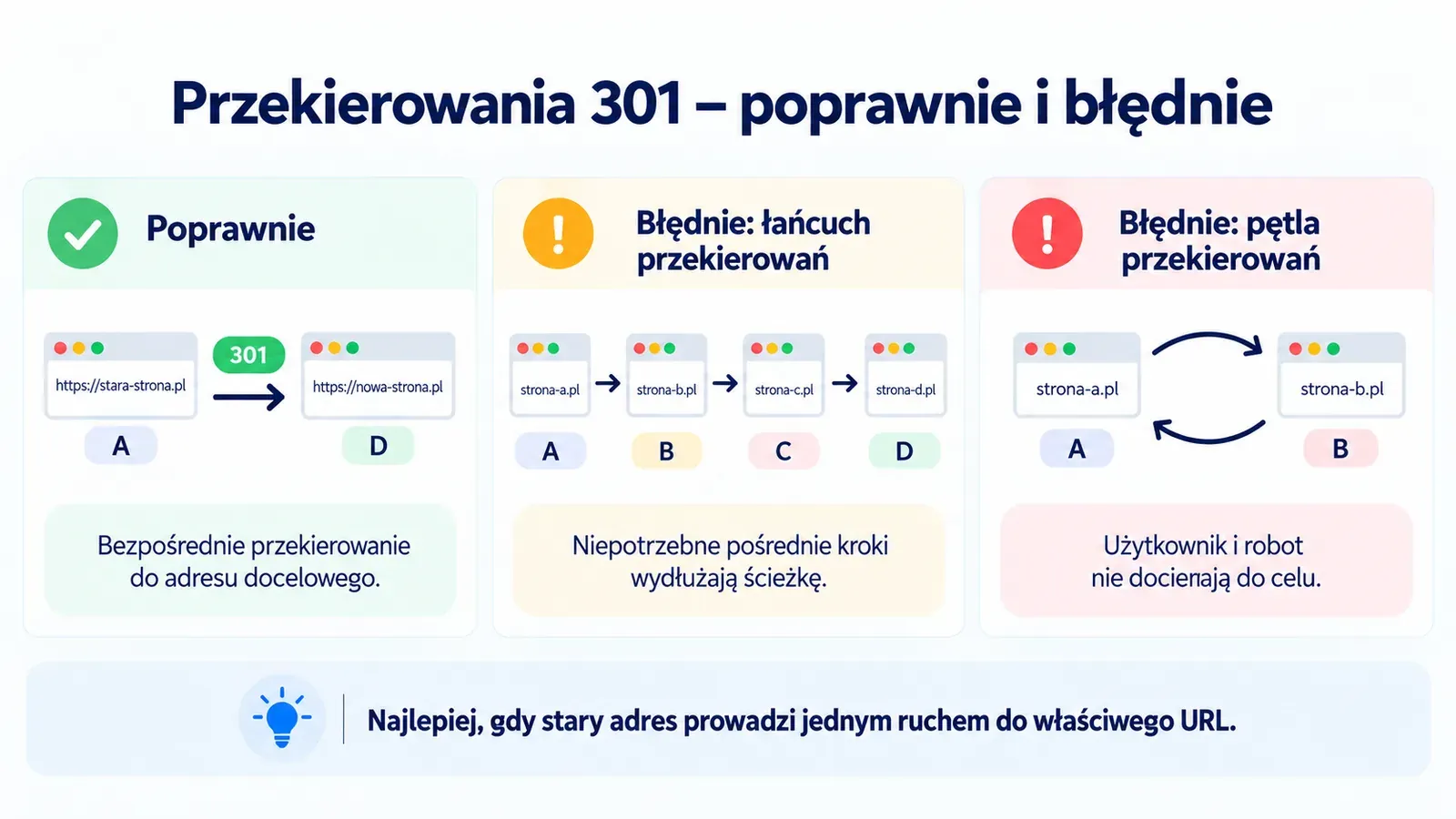
The first problem is redirect chains. If address A leads to B, B to C, and C to D, the user has to go through several consecutive server responses. Every extra hop adds delay on the user's side, which can be especially noticeable on mobile devices, and at larger scale it also needlessly lengthens the site's crawl path. Googlebot can handle such chains, but it's best to point the old URL directly to the final page and limit the number of consecutive redirects.
An even more serious mistake is redirect loops. These happen when A leads to B, and B leads back to A, or when a longer set of rules forms a closed cycle. In that case, the user can't reach the right page at all.
Another problem is pointing unrelated subpages at the homepage. If someone visits an old article about technical SEO, redirecting them straight to the homepage doesn't match their intent. A better solution is the most topically similar target address, or leaving the correct error code in place if there's no such replacement.
An error can also appear on the target side. The old address might correctly return a 301, but lead to a new URL that ends in a 404 error, carries a noindex tag or is blocked from crawlers. That's why testing shouldn't stop at checking the source URL's status alone.
Internal linking is often forgotten too. If the menu, blog content and other parts of the site still point to old addresses, the server performs an unnecessary redirect on every visit. After a migration, links should point directly to the new addresses.
How to Check Whether a Redirect Works
After implementation, you need to check not just whether the user ends up on the right page, but also what code each step of the path returns.
For a quick test of a single URL, tools like httpstatus.io or redirect-checker.org may be enough. In the browser, you can also use the Network tab in developer tools.
For a larger number of addresses, a crawler such as Screaming Frog is more practical. It lets you find 3xx responses, check their target addresses and identify chains or loops. During a migration, it's also worth using Google Search Console, especially URL Inspection and the indexing and sitemap reports.
A correct path should look as simple as possible:
old URL → 301 → correct new URL → 200
If the test shows several consecutive redirects, a 404 or 5xx error, or a loop back to an earlier URL, the configuration needs fixing.
How to Plan Redirects During a Site Migration
For a single change, one old and one new URL is usually enough. For a full site migration, the scale is completely different. You need to account for addresses from the sitemap, pages generating traffic, subpages with external links, categories, products, articles, files and other resources that matter to users and crawlers.
The safest approach is to prepare a map in a spreadsheet, where every old address is assigned a target URL. This document can later be used both by the developer for implementation and by the SEO specialist for testing.
It's worth running the process using a consistent checklist:
- Gathering data: collect outdated URLs from a crawl, the sitemap, Google Search Console, analytics and your external link profile.
- Mapping: assign the right new target address to each previous path.
- Test implementation: set up the redirects in a test (staging) environment.
- Verification: check the HTTP response codes and eliminate any redirect chains.
- Updating resources: after publishing, update the links in your internal linking,
canonicaltags and the sitemap. - Monitoring: track 404 errors, organic traffic, indexing of the new subpages and server logs.
- Search Console configuration: for a domain migration, add the new property in GSC and use the official change of address tool.
This approach matches migration guidelines: mapping URLs in advance, testing redirects, and monitoring both the old and new site after launch.
It's not worth combining a migration with several other big changes at once if they can be spread out over time. Changing the domain, the CMS, the URL structure, the design and all the content at the same time makes it harder to later work out which change is responsible for any visibility problems.
Does a 301 Redirect Always Preserve Your Rankings
A 301 redirect is one of the most important parts of safely changing an address, but on its own it doesn't guarantee identical rankings before and after a migration.
Visibility depends not just on the response code, but also on the target page. If a previously existing article gets redirected to material on a completely different topic, the mere presence of a 301 won't make the new URL take over the existing results.
What matters is content match, internal linking, the page's crawlability, its quality, and whether the search engine correctly recognises the relationship between the old and new resource.
For a larger migration, you also need to expect temporary fluctuations. Google needs time to revisit the addresses and update the information stored in its index.
That's why a correct 301 redirect isn't an “SEO hack” that transfers rankings with a single click. It's a technical signal that helps maintain continuity between resources and reduce the risk that comes with changing addresses.
A Good Redirect Takes the User Exactly Where They Should End Up
301 redirects are most often associated with SEO, but their basic logic is simpler: the old address should lead to the correct new place.
If the change is permanent and there's a genuine equivalent for the old resource, a 301 code lets you inform both the user and the search engine of that. For a single URL change, the configuration can be simple. For a structural rebuild or a domain migration, you already need precise mapping, testing and checking what happens after launch.
Most problems arise not because companies fail to use redirects at all, but because they implement them automatically without checking the relationship between the old and new address. A properly planned configuration shouldn't just “get rid of a 404”. It should preserve the sense of the site's previous structure and lead the user to the content they're actually looking for.
Changing URLs is one of those elements worth planning before implementation. During a site migration or a structural rebuild, JustIdea can help prepare a redirect map, verify it's correct, and secure the technical SEO elements.
FAQ: 301 Redirects
What Does a 301 Redirect Mean
A 301 redirect means a page or other resource has been permanently moved to a new URL. The server returns a 301 Moved Permanently code and points to the target address the browser can automatically send the user to.
Is a 301 Redirect Important for SEO
Yes. A 301 matters for permanent address changes, since it helps the search engine understand the relationship between the old and new URL. Google uses permanent redirects as a signal that the target address should be treated as canonical.
Does a 301 Redirect Cause a Loss of Link Juice
Google states that 301s and other permanent redirects don't cause a loss of PageRank. So it's not worth basing decisions on the once-popular percentage estimates of how much “SEO power” is lost with a redirect.
Does Every Page With a 404 Error Need to Be Redirected
No. A 301 redirect only makes sense when a genuine equivalent for the removed content exists. If it doesn't, the correct response may be a 404 or 410. Before deciding, it's also worth checking whether valuable external links point to the removed URL.
Can You Redirect All Old Pages to the Homepage
Technically you can, but from a user and SEO point of view, it's usually not good practice. Google advises against pointing a large number of old URLs at one unrelated address, such as the homepage, because such redirects can be treated as a soft 404.
What's the Difference Between a 301 and a 302 Redirect
A 301 code means a permanent move of the address: Google can then treat the new URL as the one that should replace the old one in the index. A 302 code signals a temporary change, indicating the source address remains the primary location of the resource.
How Does a 301 Differ From a 308 Redirect
Both codes mean a permanent move. Code 308 requires the request method, such as POST, to be preserved during the redirect. With a 301, the client can, in certain situations, change the method to GET.
How Long Do You Need to Keep a 301 Redirect
For a migration, a safe minimum is a year, but if old URLs still have external links or are used by customers, it's worth leaving the redirects in place longer. In many cases, they can run indefinitely.
How to Check a 301 Redirect
The simplest way is to check the response code in httpstatus.io, your browser's developer tools or a terminal. The command curl -I https://example.pl/stary-adres will show the HTTP status and the address given in the Location header. For a larger number of URLs, a crawler such as Screaming Frog will be more convenient.
Can You Set Up a 301 Redirect in WordPress
Yes. For individual addresses, you can use tools like Redirection or Rank Math. For a larger migration, though, it's better to prepare a full URL map and implement the rules centrally, rather than manually adding hundreds of redirects in the WordPress panel.
(1) https://developers.google.com/search/docs/crawling-indexing/site-move-with-url-changes