![404 Error Analysis in Google Analytics [GA4]](/_astro/szablon-11-8-1-8dfab41d.Dx0cGMJG.webp)













In short
- A 404 error means the server is working but cannot find the requested page. The cause is often a typo in the address, a deleted page or an address change without a redirect. It worsens the user experience and can raise your bounce rate.
- Frequent 404 errors can lower your pages' positions in search results, mask problems with internal and external links, distort analytics data and weaken your image as a professional brand.
- You can see addresses with a 404 error in GA4 in the Pages and screens report under Engagement. Select Page title and screen name, add the Page path and screen class view, and type 404 in the search box.
404 Error Analysis in Google Analytics [GA4]
404 errors, although often overlooked, can significantly affect the quality of user visits to your site and its position in search engines. In the new version of Google Analytics, known as GA4, we have even more advanced tools for tracking and analysing these unwanted events. Understanding how to locate and analyse 404 errors will not only improve navigation on your site, but also improve the overall user experience. In the article below, we'll show you how to effectively use GA4 to monitor 404 errors, and what steps you can take to minimise their occurrence and negative effects.

What is the Google Analytics tool?
Google Analytics is an advanced analytics tool that helps website owners and marketers understand user behaviour on their sites. With this tool, you can track a variety of data, such as traffic sources, time spent on the page, conversion rates, and the effectiveness of ad campaigns. Google Analytics offers a rich set of metrics and reports that help optimise websites and improve their usability. This tool is invaluable for making data-driven decisions that can lead to better user engagement and increased revenue.
What are 404 errors?
404 errors, also known as "Not Found", are server messages that tell users the page they tried to access doesn't exist. They appear when the server is able to communicate correctly with the requesting device but can't find the specific page. The causes can vary: from typos in the URL, through a deleted page, to a changed address without a redirect in place. These errors can negatively affect user experience and a site's SEO, which is why monitoring and managing them is key to the health of any website.
What risks can a 404 error cause?
404 errors, although they can seem like innocent technical shortcomings, carry a number of risks for websites. The first and most obvious risk is a negative impact on user experience. When visitors encounter a 404 error, they can feel frustrated and disappointed, which often leads them to leave the page. This, in turn, results in a higher bounce rate, which search engines can interpret as a sign that the site isn't sufficiently useful or appealing to users.
In the longer term, frequent 404 errors can affect a site's search engine positioning in search results. Search engines like Google aim to offer their users the highest-quality results, ones that are accurate and relevant. Sites where 404 errors occur frequently can be seen as less reliable, which can result in lower rankings.
What's more, 404 errors can also mask more serious technical problems on a site, such as poor management of internal or external links that have been deleted or moved without a proper redirect. This can lead to a loss of valuable traffic and reduced SEO effectiveness if the links pointing to the site stop working.
Another risk is the impact on analytics and analytical data. 404 errors can distort reporting, making it harder to accurately analyse user behaviour and content performance. As a result, managing the site becomes less effective, which can lead to suboptimal business decisions. When the numbers in your reports look suspicious, it's also worth checking the tracking setup: our free analytics scanner shows whether the tag manager and GA4 are working and whether page views are being counted twice.
Finally, there's a risk to brand image. A professionally managed website should minimise the occurrence of 404 errors. Sites that don't handle this problem well can appear less professional and untrustworthy in the eyes of customers and business partners.
Setting up a report in Google Analytics
To check traffic in Google Analytics for URLs generating 404 errors, follow the steps below:
Pages and screens
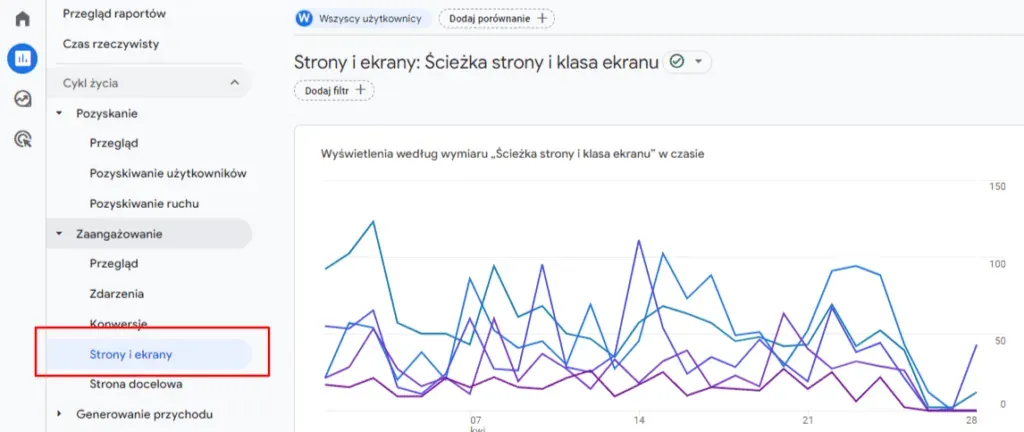
First, go to the Pages and screens report, found in the "Engagement" section:
Page title and screen name
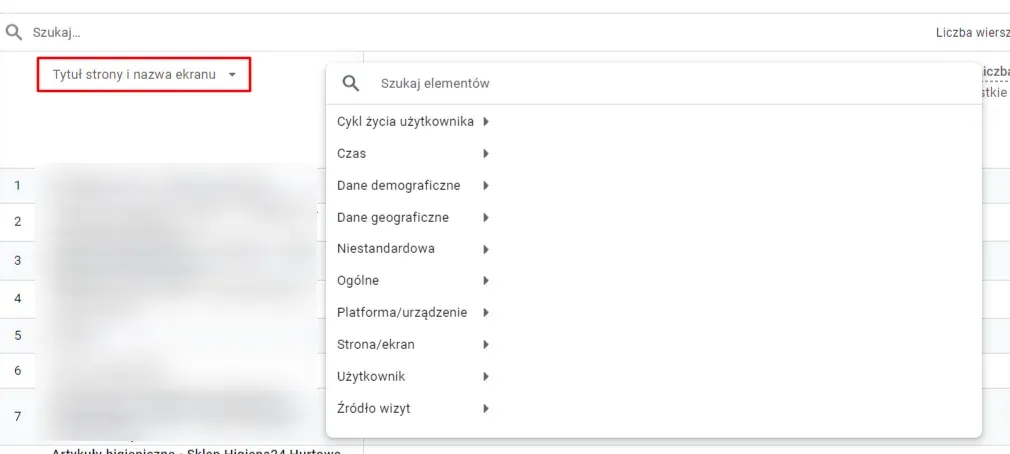
Next, select the Page title and screen name filter, as shown in the screenshot below:
Page path and screen class
To finish the setup, you also need to add the Page path and screen class view, to get the result shown in the screenshot below:

Search for URLs with a 404 code
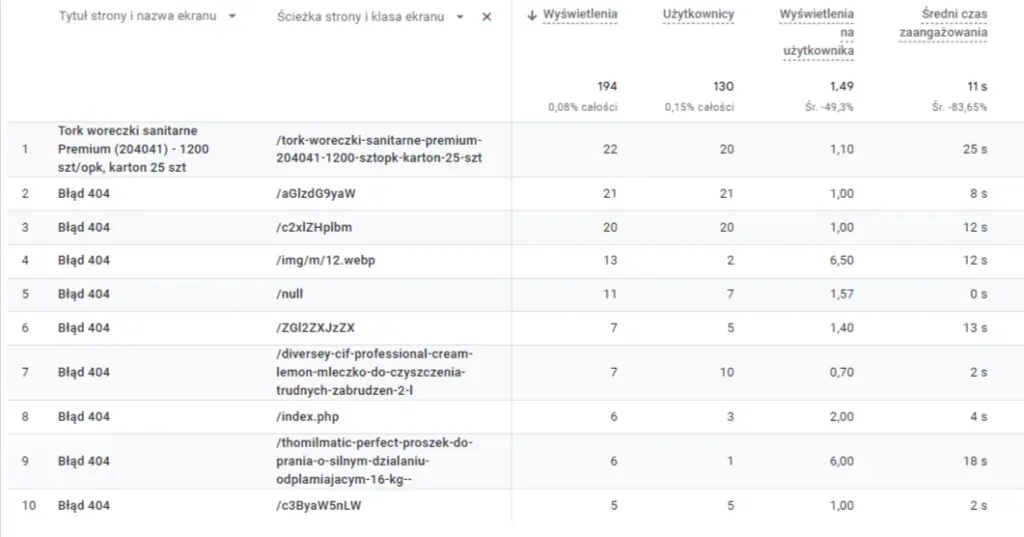
Finally, type 404 into the search box, which should bring up the URLs generating 404 error codes:

Result
The final result should look like this:
Summary
404 errors aren't just minor technical glitches; they can have serious consequences for how a website functions, its position in search engines, and the overall impression it leaves on users. Effectively managing and monitoring these errors in Google Analytics 4 is key to maintaining a site's technical health, optimising SEO, and protecting a good brand image. By regularly addressing 404 error issues, you can not only improve the user experience on your site, but also increase its visibility and effectiveness in attracting and retaining users.
Also read: