













In short
- Shoper store SEO combines technical optimisation (speed, indexing, URL structure), content optimisation (category and product descriptions) and link building. Shoper has built-in SEO settings, a sitemap, 301 redirects and Search Console integration.
- In the admin panel you optimise, among other things, meta tags (title 50-60 characters, description 150-160), ALT attributes with the product name, the WebP format, headings, robots.txt, canonical and noindex tags, and category descriptions of about 100-200 words.
- The cost depends on the size of the store, the number of categories and products, competition and the scope of work, so the article recommends starting with an audit. In a case study of a footwear shop, SEO generated €140k in revenue in six months, and the first changes are usually visible after 3-6 months.
What Is Shoper?
Shoper (a Polish SaaS e-commerce platform) is a well-established e-commerce platform that lets business owners efficiently build and manage online shops. Known for its intuitive interface and wide range of features, Shoper lets you launch a shop tailored to your individual business needs quickly. It's an ideal solution for small and medium-sized businesses that want to grow their online presence. Shoper allows integration with Google Search Console, and it also has built-in features for generating a sitemap and managing redirects.
The Shoper platform stands out thanks to a structure that's friendly to search engine optimisation. It offers advanced SEO settings, Google Analytics integration and the ability to edit metadata, which translates into effective search ranking for your shop. On top of that, the ability to integrate with popular sales channels and marketing tools makes it much easier to manage promotional campaigns and extends your reach to potential customers.
In summary, Shoper isn't just an e-commerce management platform: it's also a powerful tool that supports the optimisation and search ranking of your shop online, which makes it an attractive choice for business owners aiming for a strong presence in the digital world.
What Is Shoper Store SEO?
Shoper store SEO is a set of SEO activities aimed at increasing the visibility of your shop in Google's organic search results. In practice, this means combining technical optimisation (speed, indexing, URL structure), content optimisation (category and product descriptions) and link building.
The foundation of effective SEO on Shoper is a planned SEO strategy, meaning a specific schedule of activities, not random, one-off changes. Every shop on Shoper has access to built-in SEO settings, and on the Shoper Premium plan, to additional configuration options useful for more advanced optimisation.
The result of a well-implemented strategy is greater visibility for your shop in search results and more organic traffic. This practical guide will show you step by step how to carry out SEO for a Shoper online shop: we'll cover the Shoper software, the Shoper CMS and the key technical elements, among other things.
Advantages of a Shoper Store
A Shoper store offers a number of advantages that make it an attractive option for business owners wanting to establish themselves in the e-commerce world. Here are a few key benefits of this platform:
- Ease of use: Shoper is designed with simplicity and intuitiveness in mind, letting you launch and manage an online shop quickly, even without technical experience.
- Flexibility: the platform offers a wide range of templates and customisation tools, letting you tailor the look of your shop to your unique needs and preferences.
- SEO features: Shoper provides advanced SEO tools that help optimise your shop for search engines, which is key to increasing visibility and attracting traffic.
- Support for various payment methods: The platform supports many payment methods, making it easier for customers to buy and increasing conversions.
- Integrations with external tools: The ability to integrate with popular tools and applications, such as customer relationship management (CRM) systems, marketing tools and sales platforms, significantly extends your shop's functionality.
- support and security: Shoper offers solid technical support and ensures a high level of data security, which is key to maintaining customer trust.
- Mobile optimisation: Shops on the Shoper platform are optimised for mobile devices, which is essential in today's smartphone-dominated world.
- Extensibility: Thanks to its modular structure, the platform lets you scale your business, which matters for growing companies.
In summary, Shoper is a versatile e-commerce platform that combines ease of use, flexibility, effective SEO tools, various payment options, integration options, solid support and security, mobile optimisation and scalability, making it an ideal choice for companies of any size.
Disadvantages of a Shoper Store
Although Shoper is a well-regarded e-commerce platform, it also has certain limitations worth considering before deciding to choose it. Here are a few potential downsides:
- Customisation limits: Although Shoper offers a range of templates and personalisation tools, more advanced customisations may require technical knowledge or support from specialists, which can be a barrier for some users.
- Costs: For some small businesses, especially those at an early stage of development, the costs of using the Shoper platform, such as the monthly subscription fees, can be fairly high compared to other available options.
- Integration with external systems: Although Shoper offers integration with various tools and applications, some specific integrations may require additional configuration or may not be fully supported, which can be a challenge for some users.
- Scalability: Although Shoper is suitable for many companies, businesses with very high requirements for scale and custom solutions may run into limitations in the platform's scalability.
- Technical support: In some cases, technical support can be insufficient or slow to respond, which can be frustrating, especially in situations requiring immediate help.
- Functional limitations: Compared to other e-commerce platforms, Shoper may have fewer features when it comes to advanced analytics, custom reporting or specialist marketing tools.
In summary, while Shoper offers many benefits, you should also pay attention to potential limitations such as less flexibility in customisation, higher costs for smaller businesses, integration challenges, scalability limits, possible technical support issues and certain functional limitations.
Where Should You Start With Shoper Store SEO?
Starting the process of Shoper store SEO requires a strategic approach and an understanding of key SEO aspects. Here's a general guide to help you get started. The steps below are examples; in reality, the process of optimising and ranking a Shoper store is more extensive.
- Keyword Analysis: The first step is to carry out a thorough keyword analysis to understand which terms potential customers use most often in search engines. This lets you optimise your shop's content for those phrases.
- Page Optimisation: Make sure your shop's structure is search-engine friendly. This includes optimising titles, descriptions, headings and metadata, and making sure the site loads quickly and works well on mobile devices.
- High-Quality Content: Make sure the content in your shop, including product descriptions and blog posts, is valuable, unique and optimised for SEO.
- Link Building: Start building links pointing to your shop. This can include working with influencers, publishing guest posts on industry blogs, or getting links from other credible sources.
- Competitor Analysis: Understanding what your competitors are doing can provide valuable pointers for your SEO strategy.
- Monitoring and Adjusting: SEO is an ongoing process. Regularly monitor the effectiveness of your activities and adjust your strategy based on the data you collect and changing trends.
Shoper store SEO requires understanding and implementing fundamental SEO practices, such as keyword analysis, page optimisation, creating valuable content, link building, competitor analysis and ongoing monitoring of results. By taking these steps, you can effectively increase your shop's visibility in search results.
How Much Does Shoper Store SEO Cost?
You won't find a ready-made price list here, and that's deliberate. The cost of Shoper store SEO depends on too many variables to give one universal figure: the structure of the shop (the number of categories and products), how extensive the range is, how competitive the industry is, and the scope of work required. A quote looks very different for a shop with a few dozen products than for a catalogue with thousands of listings.
Instead of estimating costs by eye, it's worth starting with an SEO audit, which will show the real state of your shop and let you prepare a quote tailored to your specific situation, rather than a rigid package.
Case Study: How SEO Increased an E-commerce Store's Revenue by €140k
Effective online shop SEO isn't just theory: concrete results prove it. For one of our e-commerce clients (a shop in the footwear industry), over the course of six months we implemented technical changes, on-site optimisation and new category content based on keyword analysis.
The result: revenue generated from SEO of €140k, an almost twofold increase in organic traffic, and overall revenue growth of 107% over six months. The number of phrases ranking in the top 3 tripled.
You'll find the full description of the activities and results in our case study.
Shoper Store SEO
There's no denying that for an online shop to generate profit through sales, internet marketing is an essential element here. Today, agencies and specialists have a wide range of services at their disposal that can help grow your online shop. This article will describe the practices worth applying in the context of Shoper store SEO and its SEO optimisation. Shoper store SEO requires knowledge of both technical and on-site aspects. Later in the article, we'll describe specific steps worth implementing to attract additional users from Google's natural search results.
Are you interested in increasing sales in your Shoper store?
Meta Tag Optimisation for Shoper
Meta tag optimisation is an essential element of the SEO strategy for any online shop, including the Shoper platform. Meta tags, such as the page title (title tag) and meta description, play a key role in improving a page's visibility in search results and encouraging potential customers to visit the shop. Below is a short guide to optimising meta tags for Shoper:
Step 1: Log In to the Shoper Admin Panel
- Go to your Shoper store's website.
- Log in to the admin panel.
Step 2: Choose a Product or Category to Optimise
- Go to the 'Products' or 'Categories' section, depending on what you want to optimise.
- Choose a specific product or category.
Step 3: Edit the Meta Tags
- After choosing a product or category, find the 'SEO' section in the settings.
- In this section you'll be able to edit the 'SEO Title' (title tag) and 'SEO Description' (meta description).
Step 4: Optimise the SEO Title (Title Tag)
- Enter a title that includes the main keyword for your product or category.
- Make sure the title is concise (the recommended length is 50 to 60 characters) and describes the page's content.
Step 5: Optimise the SEO Description (Meta Description)
- Write a short, appealing description that includes the main keyword.
- The description should stay within 150 to 160 characters and effectively describe the page's content while encouraging clicks.
Step 6: Save Your Changes
- Once you've made your changes, save them by clicking the 'Save' or 'Apply' button.
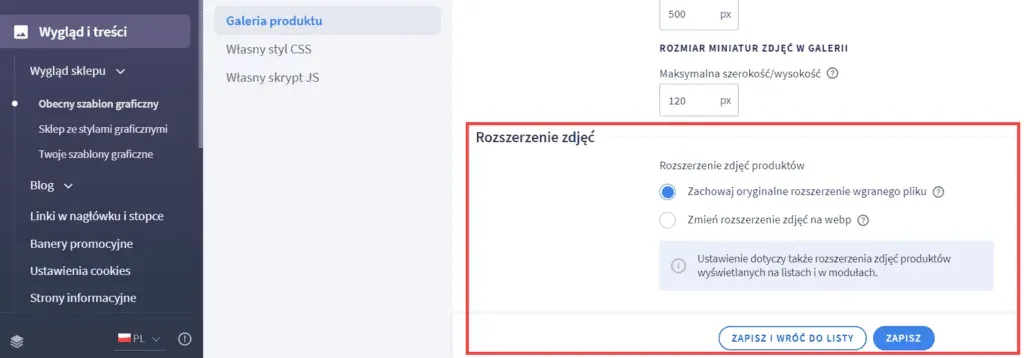
The WebP Format for Images in Shoper Store SEO
In the process of Shoper SEO, the image format plays an important role in optimising your shop, especially in terms of page load time and SEO. The WebP format, proposed by Google, offers significant benefits, such as a smaller file size while maintaining high image quality, which translates into faster loading of your Shoper store and a better position in search results.
Source: https://www.shoper.pl/learn/artykul/formaty-zdjec-produktow/
Optimising alt="" Attributes for Products in Shoper SEO
Shoper store SEO isn't just about traffic generated from Google Search. It's also worth taking care of users coming from Google Images. Nowadays, users also search for products, e.g. toys, in Google Images and then go to the online shop with an intent to buy. Optimising the ALT attributes of your images will have a positive effect on Shoper SEO. Below are guidelines on how to optimise alt attributes for products on the Shoper platform:
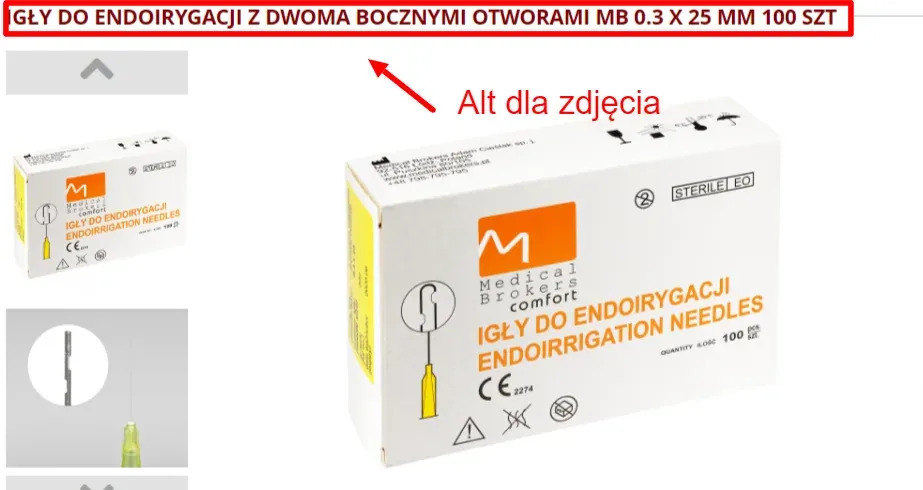
For products, it's worth modifying the template so the ALT attribute includes the product name. This change means every product card will automatically have optimised images, which will positively affect higher rankings in Google Images.
Shoper SEO and H1 Headings
The H1 heading in Shoper is created automatically based on the product name. To adjust it for SEO purposes, you need to use the options available in the product editing menu. The ability to create other headings, such as H2 to H6, is offered by the WYSIWYG editor. It lets you format content easily and effectively for every subpage of your shop, both categories and product pages. It's essential to include the right keywords in these headings, which is an important element of on-site work as part of your SEO strategy.
The robots.txt File in Shoper
The robots.txt file is a fundamental tool for any online shop, including users of the Shoper platform. It's a standard text file that tells search engine crawlers (such as Googlebot) which sections of a website should be indexed and which should be skipped. It lets you better control how search engines interact with your online shop.
Where to Find the robots.txt File in Shoper
In Shoper, the robots.txt file is available directly from the admin panel. You can find it in the SEO settings section, which makes it easy to access and edit.
When Is It Worth Editing the robots.txt File?
Editing the robots.txt file is recommended when you want to:
- Prevent specific parts of your shop from being indexed, such as login pages, the cart, or other sections that shouldn't appear in search results.
- Optimise your crawl budget, meaning the amount of resources search engine crawlers spend crawling your site, by excluding less important pages.
- Manage access to resources on the site that may be less important from an SEO perspective, such as image or style files.
Accessing the robots.txt File From the Shoper Panel
Shoper offers intuitive access to the robots.txt file directly from the admin panel. This makes it easy and quick to make changes, without needing to touch the site's code or access the server directly. This means even users without advanced technical knowledge can effectively manage how their shop is crawled and indexed by search engines.
Remember that properly configuring the robots.txt file can have a significant impact on SEO performance and the Shoper SEO process. It's worth approaching this task carefully, so you don't exclude content that's important for search engines.
301 Redirects in Shoper
301 redirects are crucial in Shoper, not only from the point of view of Shoper SEO, but also for user experience. They let you redirect customers away from subpages that no longer exist or that have changed their URLs, preventing them from hitting so-called 'dead links'. Shoper recently introduced a feature that automatically generates 301 redirects for changed URLs of products, categories and information pages, which makes managing the shop much easier. Now, instead of adding redirects manually for every modified subpage, the system does it automatically, saving time and minimising the risk of errors. Even so, users can still create 301 redirects manually via the 'Redirects' tab in the 'Configuration' settings, which is useful in cases such as a domain name change or removing outdated subpages. Properly configured 301 redirects are an important element of shop optimisation in Shoper, alongside other key aspects such as site loading speed or an SSL certificate
SSL Certificate
An SSL certificate is an essential element of any modern online shop, including those built on the Shoper platform. SSL (Secure Sockets Layer) is a security technology that encrypts the connection between the server and the user's browser. This is crucial for protecting customers' privacy and personal data, which matters hugely for building trust and credibility for your online shop.
The Importance of an SSL Certificate in Shoper In Shoper, the SSL certificate is an integral part of the platform, ensuring a high level of security for all transactions. Thanks to SSL, personal data and payment information are protected from access by third parties. This not only increases customer trust, but also improves SEO ranking, because Google favours secure sites with an SSL certificate.
How to Activate an SSL Certificate in Shoper
- Choosing an SSL Certificate: Shoper offers integration with various SSL certificate providers, letting you choose the option best suited to your shop's needs.
- Activation in the Admin Panel: In the Shoper admin panel, users can easily activate and manage their SSL certificate. This process is usually simple and requires just a few clicks.
- Configuration and Testing: After activation, it's important to run tests to make sure the certificate works correctly and the whole site is accessible over a secure HTTPS connection.
Benefits of Having an SSL Certificate in Shoper
- Increased Security: Data encryption protects customer information, which is especially important for online transactions.
- Credibility and Trust: A shop secured with an SSL certificate builds greater trust among users.
- Better SEO Ranking: Google and other search engines favour SSL-secured sites, which can improve your shop's visibility in search results.
In summary, an SSL certificate in Shoper is a key tool that not only secures your shop and protects customer data, but also contributes to better visibility and SEO for your shop online.
Category Descriptions and Shoper Store SEO
Category descriptions in an online shop play a key role in optimising and ranking a Shoper store in search engines. Well-written, optimised category descriptions not only help users understand what a category offers, but also have a significant impact on SEO.
The Importance of Category Descriptions for SEO
Category descriptions are more than just text: they're an element of your SEO strategy that helps search engines index your site better. Including the right keywords in category descriptions increases your chances of higher rankings in search results. This makes it easier for potential customers to find your shop and the products it offers.
How Do You Write Effective Category Descriptions in Shoper?
- Understanding Keywords: Identify the most relevant keywords for each category. They should reflect what potential customers might type into search engines.
- Creating Unique Content: Avoid duplicating content. Every category description should be unique and provide value for users.
- Length and Quality of Content: The ideal description length is around 100 to 200 words. Make sure the content is clear, informative and well written.
- Including Keywords: Place keywords naturally in the text, avoiding overusing them (so-called keyword stuffing).
Benefits of Optimising Category Descriptions
- Better Rankings: Optimised category descriptions can significantly improve your shop's visibility in search results.
- Improved User Experience: Clear, informative descriptions help customers better understand your shop's offer.
- Higher Conversion: Good category descriptions can persuade customers to keep browsing your offer and make a purchase.
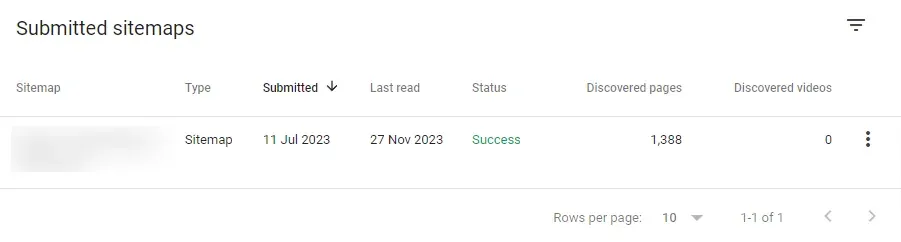
Adding a Sitemap From Shoper to Google Search Console
Integrating your shop's sitemap with Google Search Console is an important step in SEO optimisation and has a positive effect on Shoper store SEO. A sitemap, which is an XML file, lists all the pages of your shop, making it easier for Google to index them and understand your site's structure effectively.
The Process of Adding a Sitemap From Shoper to Google Search Console:
- Verifying Your Site in Google Search Console: Before adding a sitemap, make sure your site is verified in Google Search Console. You can do this by adding an HTML tag to the page or using a DNS record.
- Adding a Sitemap to Google Search Console: Log in to Google Search Console.
- Choose your site from the list.
- Go to the "Sitemaps" section in the menu.
- In the "Add a new sitemap" field, enter the full URL of your sitemap.
- Click "Submit" to send the sitemap.
- Monitoring Progress: After adding the sitemap, Google will start indexing your site. In Google Search Console you can monitor this process, which is key to understanding how Google sees your site and identifying potential errors.
Benefits of Adding a Sitemap to Google Search Console:
- More Effective Indexing: With a sitemap, Google can index your shop's pages more easily and quickly.
- Improved Search Visibility: Faster indexing means your pages appear in search results sooner.
- SEO Diagnostics: Google Search Console provides information about page errors, letting you fix them quickly and optimise your SEO.
Regularly updating your sitemap and monitoring its status in Google Search Console are important aspects of managing SEO for a shop on the Shoper platform.
Adding noindex,nofollow for Selected URLs
Using noindex,nofollow tags for selected URLs in a Shoper shop is an important SEO practice that lets you better manage which pages are indexed by search engines. These tags instruct search engine crawlers not to index a given page (noindex) and not to follow links from that page (nofollow), which is especially useful for pages that shouldn't appear in search results, such as login pages, the cart, or certain internal pages.
The Process of Adding noindex,nofollow Tags in Shoper:
- Identifying Pages to Mark: First, identify the pages in your shop that shouldn't be indexed. These could be pages that carry no SEO value, are duplicates, contain sensitive information, or simply aren't meant for a wider audience.
- Accessing the Page Editing Function in Shoper: Log in to the Shoper admin panel and go to the editing section for the page where you want to add the noindex,nofollow tags.
- Editing the Page's Metadata: In the page editing section you'll find an option for editing metadata, including fields for meta tags. Here you can add the <meta name="robots" content="noindex, nofollow"> tag to the HTML head section of the given page.
- Saving Your Changes: After adding the tags, make sure you save your changes. This is essential for the new settings to take effect.
- Testing and Monitoring: After applying the tags, it's worth testing whether they were implemented correctly. You can use tools such as Google Search Console to monitor whether the changed pages are still being indexed.
Why Is It Worth Adding noindex,nofollow?
- Control Over Indexed Content: These tags let you control which pages are visible in search results, helping you avoid indexing unwanted content.
- Crawl Budget Optimisation: Limiting the indexing of less important pages lets search engine crawlers focus on more important content, optimising the use of your crawl budget.
- Improved SEO: Removing pages that add no SEO value from the index can help improve the overall quality and search visibility of your Shoper store.
Using noindex,nofollow tags in Shoper is a simple but effective method for managing the content indexed by search engines, which is an important element of the SEO strategy for any online shop.
Shoper SEO and Canonical Tags
Canonical tags play a key role in SEO for a store on the Shoper platform, especially when it comes to dealing with duplicate content. A canonical tag (<link rel="canonical" href="...">) is an HTML element that tells search engines which version of a given page is considered the most authoritative and should be indexed. This is especially important in online shops, where the same product can appear under different URLs, e.g. in different categories.
The Importance of Canonical Tags in Shoper
In Shoper, using canonical tags correctly helps avoid problems related to duplicate content, which can negatively affect your shop's position in search results. Canonical tags let you clearly tell search engines which page should be treated as the main one, which matters for SEO.
How Do You Apply Canonical Tags in Shoper?
- Identify the Need for Canonical Tags: Check whether your shop has duplicate content, especially for products that appear in different categories or under different URLs.
- Accessing Page Editing: In the Shoper admin panel, go to the editing view for the page or product for which you want to set a canonical tag.
- Adding the Canonical Tag: In the HTML or SEO editing section, enter the canonical tag pointing to the preferred URL for the page.
- Save and Test the Changes: After adding the tag, save the changes and test whether they've been implemented correctly, e.g. using SEO analysis tools.
Benefits of Using Canonical Tags in Shoper
- Avoiding Duplicate Content: Canonical tags let you avoid problems with duplicates, which matters for maintaining a healthy SEO structure.
- Better Content Management in Search Engines: Canonical tags let search engines know which version of the page to index, which helps organise your content better.
- Ranking Optimisation: By using canonical tags, you can improve your shop's visibility and ranking in search engines, directing traffic to selected pages.
Canonical tags in Shoper are an important element of an SEO strategy that helps manage content effectively and improve your shop's ranking in search results.
The Most Common Mistakes in Shoper Store Optimisation
Each of the mistakes below has a negative impact on your shop's SEO, and fixing it has a positive impact on your rankings. It's worth understanding what can affect your SEO so you don't repeat the same mistakes as your shop grows: below we describe their impact on rankings and how to fix them.
- Leaving the default meta tags: unedited titles and descriptions generated automatically by Shoper instead of ones tailored to your keywords.
- Content duplication in category and product descriptions copied, for example, from the manufacturer.
- No 301 redirects implemented after changing the URLs of products or categories.
- Neglected image optimisation: no WebP format and empty ALT attributes on product photos.
- An unsubmitted sitemap in Google Search Console, which slows down the indexing of new subpages.
- Careless use of noindex/nofollow tags that accidentally block valuable subpages from being indexed.
Summary
This article has covered the key aspects of optimising and ranking a store on the Shoper platform, highlighting how important it is to understand and make effective use of the SEO tools available on this platform. We discussed important topics such as the importance of meta tag optimisation, the use of canonical tags, using the robots.txt file, managing 301 redirects, and the importance of an SSL certificate for security and SEO. We also highlighted the role of well-constructed category descriptions and explained the process of adding a sitemap to Google Search Console.
Each of these elements plays a fundamental role in building your shop's visibility online. By using them effectively, Shoper store owners can significantly improve their position in search results, which translates into more traffic and potentially higher conversions. It's important to remember that SEO is a continuous, dynamic process that requires regular monitoring, analysis and adjusting your strategy to changing trends and search engine algorithms.
In summary, effective Shoper store SEO requires a holistic approach to SEO, taking into account both technical and content aspects. This makes it possible not only to achieve a better position in search engines, but also to build trust and satisfaction among your customers.
FAQ: Frequently Asked Questions
How Much Does Shoper Store SEO Cost?
There's no single rate: the price depends on the size of your shop, the number of categories and products, and the scope of technical and content work required. It's best to start with an audit that will show the real scope of work needed.
How Long Do You Have to Wait for Shoper Store SEO Results?
The first changes in visibility usually appear after 3 to 6 months, with more significant, lasting results after 6 to 12 months: SEO is a long-term process.
Is It Worth Outsourcing Shoper SEO to an SEO Agency?
For a small shop, some activities (like editing meta tags) can be done yourself from the Shoper panel. At a larger scale, with more complex technical and content work, an agency experienced in e-commerce helps you avoid mistakes and achieve results faster.
Is Shoper a Good Platform for SEO?
Yes: Shoper offers built-in SEO tools (meta tag editing, a sitemap, 301 redirects, canonical tag support) that make basic optimisation easier, although more advanced work may require support from a specialist.
Also Check Out:
- Google Business Profile SEO
- What Is a Newsletter and How to Create One?
- How to Write an Effective Sales Offer? [Ready-made Template]
- Cloudflare Step by Step
- Which E-commerce Platform Should You Choose?
- How to Check Your Google Reviews
- Hashtags: What Are They, How to Use Them and What Do They Mean?
- PrestaShop Store: Ready-made Template or Custom Build?
- WordPress SEO: A Guide