













In short
- Image SEO for Google Images means optimising images so they appear high in the results for specific phrases, which can increase traffic, brand recognition and engagement. Google takes into account metadata (alt text, titles, descriptions), the visual content and the context on the page, and the role of AI and Google Lens is growing.
- The basics of optimisation are the right format (WebP, JPEG, PNG), compression and file size, a descriptive file name and a concise ALT attribute with keywords used naturally, without keyword stuffing. Lazy loading shortens the initial page load time.
- An XML image sitemap submitted in Google Search Console helps with indexing images. In Search Console you also monitor the results: impressions, clicks and the queries that lead to images.
Image SEO for Google Images is a significant aspect of a marketing strategy, letting brands increase the visibility of their products and services through visual search. In today's world, where imagery carries huge weight, optimising for Google Images opens new ways for companies to reach potential customers. Thanks to effective optimisation, images can become a powerful tool that drives traffic to a site, boosting brand recognition and product sales at the same time.
How Does Google Images Search Work?
Google Images is an image search engine offered by Google that lets users find images related to their queries. Image SEO for Google Images means optimising images on a website so that they appear high in the search results for specific phrases.
It works on the basis of advanced algorithms and image recognition technology that analyse and interpret the visual content and context of images published online. When a user types in a query, Google Images searches an enormous database of images, ranking them by relevance, quality and the context of the query. The search engine takes into account not only metadata and image attributes, such as alt text, titles and descriptions, but also analyses the visual content and how images relate to the content on web pages. The results are meant to best match the user's interests and search intent, presented in an easy-to-browse image gallery. Google keeps refining its algorithms to deliver the most relevant and useful results, which makes Google Images an invaluable tool for anyone looking for inspiration, information or specific images online.
Artificial intelligence and Google Lens are also playing a growing role in image SEO. Google Search is getting better at recognising what's in an image, analysing the context around it and how the photo relates to the content on the page. That's why properly optimising images, ALT attributes and captions around a graphic affects not only visibility in Google Images, but also in AI-based results.
Is It Worth Ranking Photos in Google Images?
Ranking photos in Google Images can bring significant benefits for any website, regardless of the industry it operates in. This is especially important given the growing role of the visual side of the internet and the tendency of users to search for content through images. Here are a few key reasons why it's worth investing in ranking your photos in Google Images:
- Increased site traffic, Well-optimised and well-ranked photos can generate significant site traffic. Users often browse Google Images looking for inspiration, products or information. Highly visible photos with an enticing description can effectively redirect them straight to your website.
- Stronger brand visibility, Images appearing high in the search results can significantly raise brand recognition. Visual elements are often remembered by users for longer, which can help build strong brand identity.
- Better site rankings, Google increasingly integrates results from Google Images into standard search results. Because of this, well-ranked photos can not only attract direct traffic from image search, but also indirectly support better rankings for the whole site in traditional search.
- Gaining an edge over competitors, In many industries, especially those linked to e-commerce, design, travel or food, high-quality and highly visible photos can be a significant competitive advantage. Users looking for inspiration or specific products often opt for offers that look attractive and are easy to find in image search.
- Increased engagement, Photos are a form of content that drives high engagement. Users are more willing to click on images that catch their attention. As a result, optimised photos can effectively increase click-through rate (CTR) and on-site engagement, which is an important signal for the Google algorithms assessing site quality.
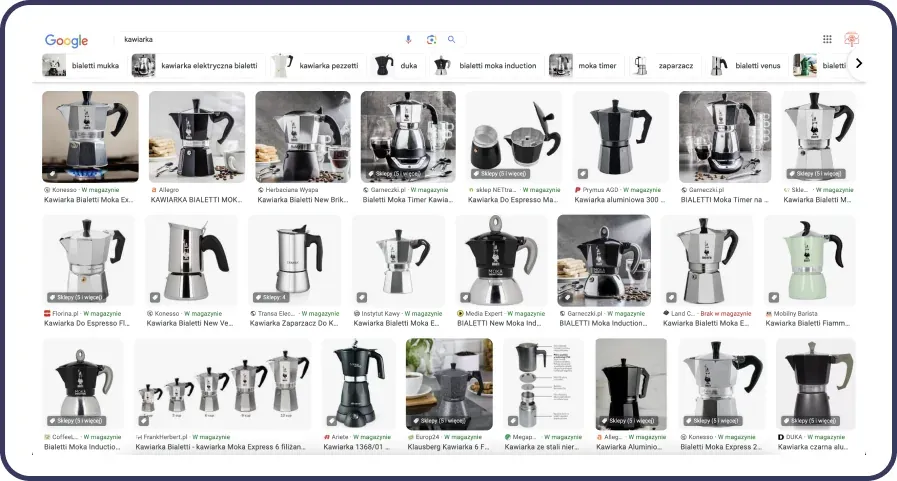
Image Optimisation, What Should We Keep in Mind?
Image optimisation is a key element of any marketing strategy. It's a comprehensive effort that has a direct impact on page load speed, its rankings in search engines and its overall accessibility to users. Properly optimised photos can significantly contribute to a site's success, both in the eyes of users and search engine algorithms.
There are a few key aspects we should pay attention to when adding photos to a site:
- using the right file formats
- using proper naming conventions and adding the alt attribute
- choosing photos in the right sizes
All these actions should be part of a well-thought-out image optimisation strategy, so that the site can achieve the best possible results in search engines while still giving users a positive experience.
Technical Image Optimisation, Which Photo Format Should You Choose?
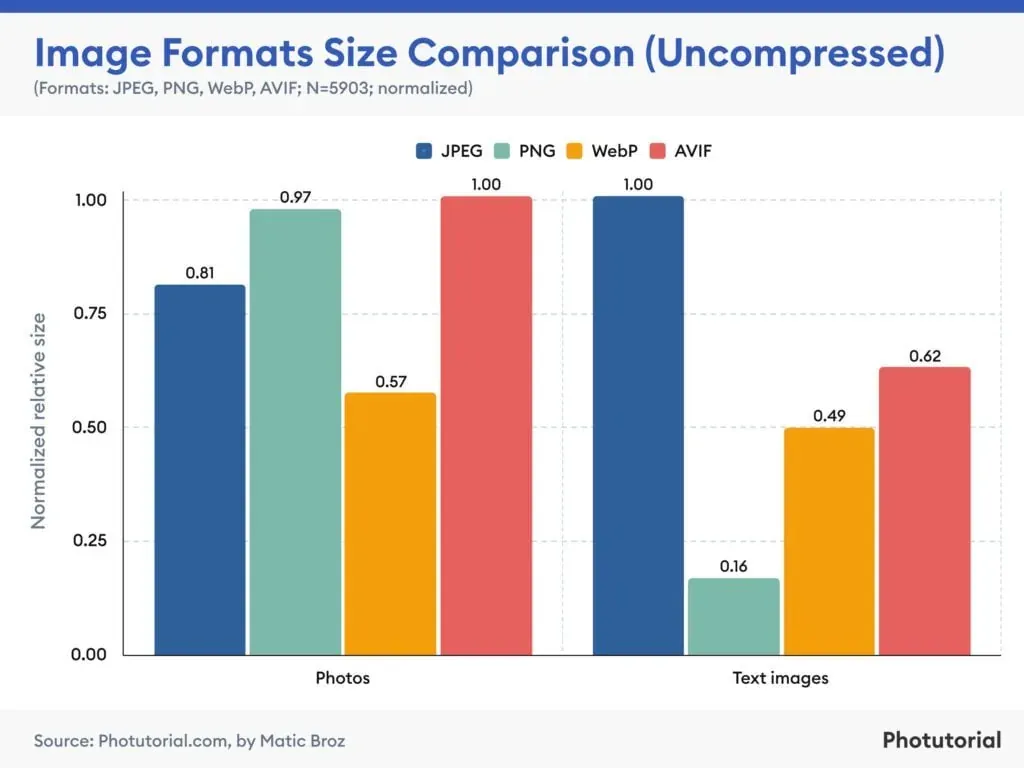
When adding photos to a website, choosing the right format is crucial for optimising loading speed and visual quality. The most popular formats include JPEG, PNG, GIF and WebP.
- JPEG is ideal for photos and images with a rich colour palette, offering a good compromise between quality and file size thanks to lossy compression.
- PNG is preferred for images that need transparency (e.g. logos) or where lossless compression matters, although the files can be larger than JPEG.
- WebP, a modern format developed by Google, offers significant file size savings while maintaining high image quality, and supports both lossy and lossless compression as well as animations, making it a universal solution for a site's various visual needs. The right image format, such as WebP, can positively affect site speed and Core Web Vitals metrics, which are among the factors influencing rankings in Google.
- GIF is used mainly for simple animations and images with a limited colour palette, but its role is shrinking in favour of newer formats.
So when choosing a format, it's worth considering both visual needs and users' expectations around loading speed. The right compression, file size and loading time for images on a page affect not only user comfort, but also visibility in Google Search. Optimised JPG, JPEG, PNG or WebP files can support effective image ranking in Google and improve indexing of images in Google Images.
The ALT Attribute in Ranking Photos and Images in Google
The alt attribute, also known as alt text, is an attribute in an HTML tag used to describe the content of images on websites. Its main job is to provide a description of the image for screen readers, used by people with visual impairments, and in situations where an image can't be displayed for some reason (e.g. due to internet connection issues or page loading errors).
The alt attribute is extremely important from an accessibility standpoint, since it lets people using screen readers understand the content of images on a site. From an SEO (Search Engine Optimization) perspective, alt text helps search engines better understand the context and content of a page, which can contribute to better rankings in search results.
How to Write Effective ALT Text for Images in Google Images
Best practice requires the alt text to be concise and descriptive, accurately reflecting what the image shows, and to include relevant keywords, if that's natural and relevant to the content of the image. Proper use of the alt attribute not only raises the overall quality and accessibility of a site, but also supports its online visibility. A well-prepared alternative description of an image helps the image search engine better understand the content of the graphic and can increase the visibility of photos in Google Images.
The alt text should be a short, but precise description of the content and context of the image, letting someone understand its content without having to view it. It's important for it to be directly related to the image, while also including key keywords related to the topic of the page, but without overloading it (so-called keyword stuffing).
How to Check Whether a Photo Has an Alt Attribute Added
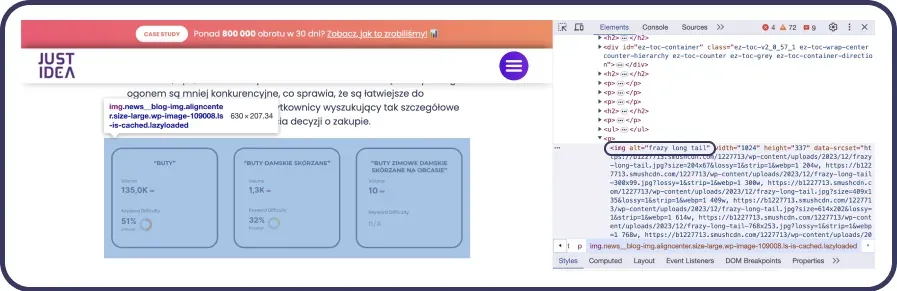
Checking whether a photo on a website has an alt attribute added is fairly simple and can be done in several ways. One of the simplest is to use the source-code inspection tool available in most web browsers.
Just right-click on the photo you're interested in and select "Inspect" (the name of the option may vary depending on the browser), which will open the developer tool with the HTML code for that image highlighted. Then, you need to look for the <img> tag responsible for displaying the image and check whether it has an alt attribute with a description.
Another method is to use SEO tools that analyse the whole site for the presence of alt text and other optimisation practices. These tools often offer detailed reports, pointing out images without an alt attribute, which is very helpful when optimising larger sites. Checking the alt attribute is an important step in taking care of a site's accessibility and SEO, so it's worth regularly checking that all images are properly described.
Lazy Loading and Image Ranking and Site Speed
Lazy loading is a website optimisation technique that involves delaying the loading of objects, such as images, videos or iframes, until they're actually needed. Instead of loading all elements of a page at once when it opens, lazy loading loads those elements gradually, usually as the user scrolls down and gets close to a given object.
This method significantly affects site speed, because it reduces the initial loading time, cuts data usage (which is especially important for mobile users with limited data plans) and lowers server load. As a result, users gain quicker access to the visible content of a page, which improves the overall browsing experience and can positively influence a site's rankings in search results. Implementing lazy loading is therefore a key practice in the process of optimising a website's performance, with a direct impact on its speed and on users.
XML Image Sitemaps and Ranking Photos in Google Images
In the context of SEO, a sitemap is an essential tool that helps search engines index the content found on a website. For image-rich sites, such as online shops, photography portfolios or travel sites, additional value can come from a sitemap dedicated specifically to images, namely an image sitemap. Including an image sitemap in your overall SEO strategy can significantly affect the visibility of your photos in Google Images, which translates into the overall visibility of a site online.
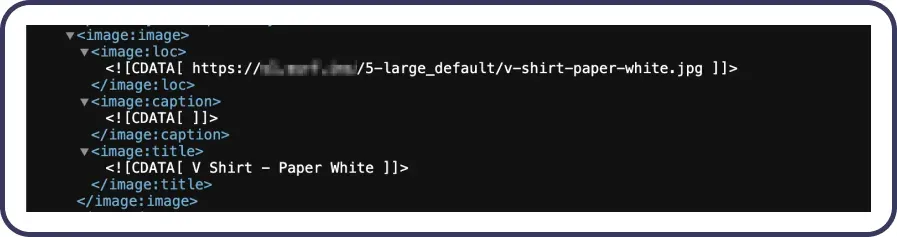
An image sitemap is a specific type of sitemap that contains the locations (URLs) of images available on a site. Like traditional sitemaps, it's in XML format and is used to inform search engines about the location of specific media, making it easier to index them. This way, search engines can more easily find and index images, which in turn increases the chances of them appearing in Google Images search results.
Why Does an Image Sitemap Affect Image Rankings?
- Better indexing: An image sitemap gives search engines direct paths to your photos, making indexing them easier and faster.
- Increased traffic from Google Images: Correctly indexed and optimised photos have a better chance of appearing in Google Images search results, which can significantly increase site traffic.
- Optimisation for specific queries: An image sitemap lets you include extra information about each image, such as a title, description or alt tags, which improves their optimisation for specific target phrases.
- Better content accessibility: Making it easier to index photos means visual content becomes more accessible in search engines, which is particularly important for sites where images are a key part of the offer.
How to Create an Image Sitemap for Google Images
An image sitemap is an XML file that can be created manually or with a sitemap generator. The XML file should contain entries for each image, in line with the data you've prepared. An entry for a photo should consist of the image's location, its title and, optionally, additional information.
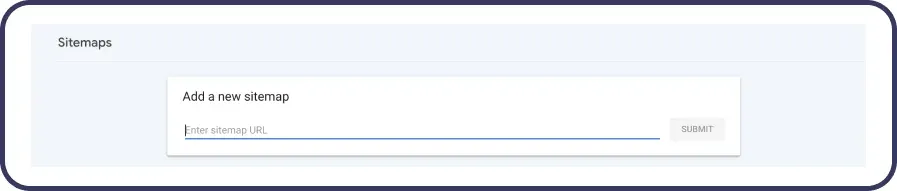
Once you've created the XML file, you need to place it in the root of your website. The file must be publicly accessible so search engine crawlers can easily find it. To make sure search engines index the images, it's worth submitting the newly created image sitemap through Google Search Console. You can do this by adding the URL of the XML file in the "Sitemaps" section.
How to Monitor the Results of Your Google Images Rankings
Monitoring the results of your rankings in Google Images is an important part of your SEO strategy, letting you assess the effectiveness of your optimisation efforts and identify areas that need improvement. Effectively tracking your progress in Google Images requires using several tools and methods that allow for an in-depth analysis of the visibility and traffic generated by your images.
Google Search Console is a fundamental tool in the arsenal of every SEO specialist, offering rich data on indexing, visibility and optimisation issues on a site. When it comes to images, GSC lets you track how often your photos appear in search results, which queries lead users to your images, and how many clicks individual photos generate. Analysing this data helps you understand which images are most effective at attracting traffic.
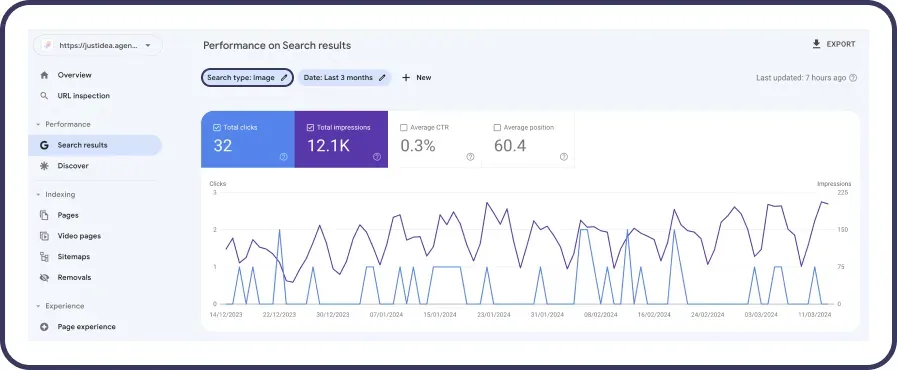
Image SEO for Google Images, Summary
To sum up, optimising images for Google Images is a complex process that requires attention to many details, from selecting and preparing images, through optimising their attributes, to the technical aspects of how they're presented on a page. Carefully following the tips above can significantly increase the chances of high visibility for your images in search results, driving more traffic to your site and supporting your business goals in the process.
FAQ, the Most Common Questions About Ranking Photos in Google Images
How Does Ranking in Google Images Work?
Ranking images in Google Search works by optimising images and photos so they can appear high in Google Images search results. This is influenced by factors including the ALT attribute, file name, image format, content context and page loading speed.
Do Photos Affect a Site's Rankings in Google?
Yes, properly optimised photos can positively affect SEO and increase a site's visibility in Google search results. Images also generate additional traffic from Google Images and support the user experience.
Does an Image's Format Affect Rankings in Google?
Yes, an image's format can affect a page's loading speed, file size and the visibility of images in Google Images. The most commonly recommended formats are WebP, JPG and PNG.
Does the Image File Name Matter?
Yes, the file name is one of the factors affecting how images rank in Google. It's best to use descriptive file names containing keywords, e.g. image-seo-google.webp instead of IMG123.jpg.
How Can You Increase the Visibility of Images in Google?
You can increase image visibility by optimising your images, using ALT attributes, improving site speed, using an XML image sitemap and creating valuable content around your images.
Does Lazy Loading Affect SEO?
Yes, lazy loading can improve page loading speed and the user experience, which indirectly affects SEO and the ranking of your photos in Google Images.
How Can You Monitor the Results of Ranking Your Images?
To monitor results, it's worth using Google Search Console. The tool lets you check the number of impressions, clicks and queries leading to your images in Google Images.
Read Also: