![Gemini AI: A Complete Guide to Google Gemini and Its Features [2026]](/_astro/szablon-9-4-1-c6dc923e.BLhAIiMg.webp)













In short
- works as an AI assistant in the browser, in the mobile app and on the desktop,
- uses models from the Gemini 3 series, including 3.1 Pro and the latest Flash versions,
- processes text, images, files, audio, video and code,
- integrates with Google Workspace tools,
- lets you analyse PDF files, spreadsheets and code repositories,
- offers modes such as Gemini Live, Canvas and Deep Research,
- lets you create your own instructions, specialised Gems and skills, which are replacing them,
- offers free access with a Google account and paid Google AI Plus, Pro and Ultra plans,
- is also available to developers through the Gemini API, Google AI Studio and Google Cloud.
Gemini AI is a family of artificial intelligence models developed by Google DeepMind, plus the Gemini app built on them. You can use the tool to work with text, images, code, files, audio and video. It is also tightly integrated with the Google ecosystem, including Gmail, Docs, Sheets, Drive and Calendar.
Gemini debuted as a family of models in December 2023, and in 2024 the app replaced the earlier Bard. Since then, Google has steadily expanded the platform's capabilities. Today you can use it through the browser at gemini.google.com, the mobile app for Android and iOS, the desktop app for macOS and Windows, and directly in selected Google services.
The tool's biggest strength is the combination of a multimodal AI model with Google's services. So you can not only generate text or code, but also analyse a PDF file, summarise a document, work with data, hold a voice conversation, run extensive research or create an image or a video.
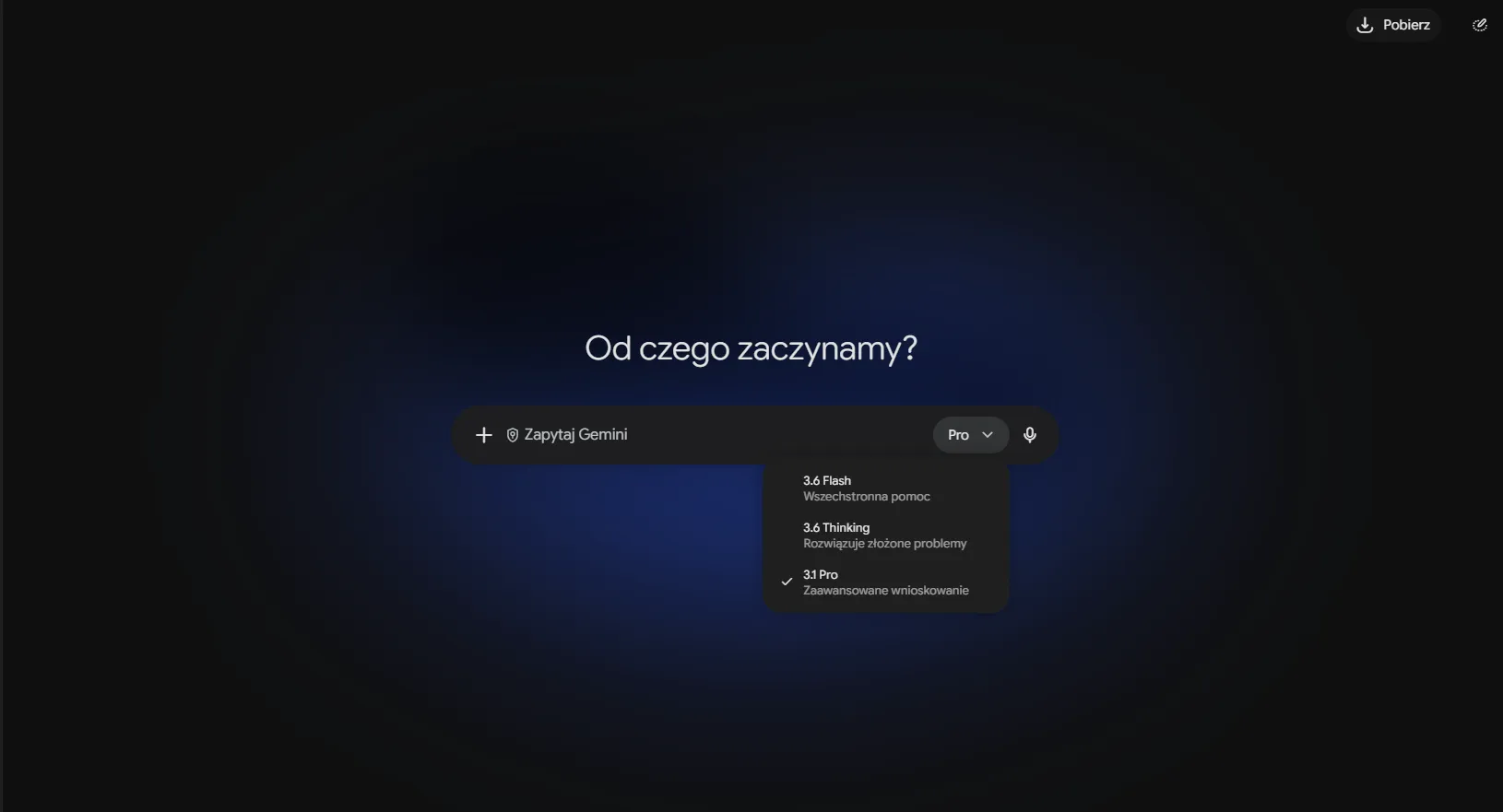
What Is Google Gemini and How Does It Work?
Gemini AI is a modern artificial intelligence tool that goes well beyond traditional solutions of this kind, especially in natural language processing. It supports not only text generation, but also image creation, understanding of context and voice interactions.
Thanks to deep learning technology, it generates answers that are accurate and fitted to the context of your query. It supports you in everyday tasks, such as preparing a report or a presentation, and acts as an AI assistant integrated with Google apps such as Gmail, Calendar or Sheets.
Today, Gemini doesn't mean just one AI model. The name covers a whole family of models, the Gemini app and AI features built into Google services. This means you can use Gemini in different ways, from a simple conversation in the browser to analysing company data or building automations with the API.
How Much Context Can Gemini Process?
One of the tool's more important features is its large context window, meaning the amount of information the model can analyse within a single task. This matters especially when you upload long documents, large PDF files, extensive code or several sources at once.
In the app, the size of the available context depends on the plan. In the paid Google AI Pro and Ultra plans it reaches 1 million tokens, or about 1,500 pages of text or a code repository of up to 30,000 lines. That doesn't mean every conversation should be as long as possible, but it lets you work with materials that would take many hours to analyse by hand.
The Origins of Gemini AI: From Google Bard to Gemini
Google DeepMind is responsible for developing the Gemini family of models. It is the unit of the company that works on research and development in artificial intelligence, machine learning and advanced AI models.
Gemini was unveiled in late 2023. In February 2024, Google renamed its conversational assistant Bard to Gemini, joining the product with the model family it was developing.
One concept is worth clearing up here: Bard was not “Google's first AI model”. It was a service and conversational interface that used models developed by the company. Gemini, on the other hand, is both the name of the model family and of the app you can talk to.
So the rename was more than a simple rebrand. Google started building a broader ecosystem around Gemini, covering the mobile app, Google Workspace, developer tools and features integrated with search.
How Does Gemini Differ from Bard?
One of the main differences is the ability to carry out more advanced contextual analysis. Unlike its predecessor, which tended to give more general answers, Gemini takes the deeper context of a query into account and delivers more precise information, matched to your needs and situation.
Another important difference is integration with Google services. Bard had only basic connections to them, while Gemini is an integral part of Google Workspace and the company's other products. This means you can use it not only to generate text, but also to automate processes, manage time and analyse data.
The Technology Behind Gemini AI: the AI Model and Transformer Architecture
At the heart of Gemini AI is the Transformer architecture, which underpins many modern AI models, including OpenAI's GPT models and Google's BERT. This technology allows much faster and more precise processing of text in real time. A Transformer works on the principle of the so-called “attention mechanism”, which lets the model focus on the most important parts of a text, resulting in a better understanding of queries and more precise answers.
Unlike many earlier models, Gemini was trained on several types of data at once from the start: text, code, images, audio and video. That is why it is called a natively multimodal model.
It uses advanced language models trained on a broad set of texts and data from different fields. This means it can not only answer simple questions, but also hold a contextual dialogue in which it remembers earlier questions and answers. In the settings you can also turn on the memory feature (previously “past chats”), which lets the assistant draw on your earlier conversations and saved preferences.
These technologies let it perform tasks such as generating code or building complex formulas in Google Sheets, which previously required advanced development tools. Since Gemini increasingly answers the user directly instead of showing a list of links, a brand's presence in those answers becomes a separate task, namely AI SEO.
Gemini Models in 2026: Pro, Flash, Deep Think and Nano
Google keeps developing Gemini, introducing new versions and features. After the release of Gemini 1.0 in December 2023 came version 1.5 (February 2024) with a context window of around a million tokens, then Gemini 2.0 (December 2024), designed for agentic tasks, and in 2025 version 2.5 with built-in “thinking”, meaning step-by-step reasoning. In November 2025, Google introduced the Gemini 3 series, which is the basis of the app today.
Several models with different purposes now run under the Gemini name. You choose them in the model menu in the app, and developers choose them in the API.
| Model | What it's good for | Where to find it |
|---|---|---|
| Gemini 3.1 Pro (February 2026) | Complex reasoning, maths, code, analysis of long documents | App (the “Pro” option), higher limits in paid plans; API |
| Gemini Flash (latest versions 3.6-3.8, July-September 2026) | Everyday tasks, fast answers, analysis of a few documents, prototypes in Canvas | App (the default model in the free version); API |
| Gemini Flash-Lite | The cheapest, high-volume tasks in apps and automations | API, Google AI Studio, Vertex AI |
| Gemini 3 Deep Think | The hardest scientific, engineering and mathematical problems; the answer arrives after a few minutes | Google AI Ultra plan |
| Gemini Nano | AI features running directly on the phone, without sending data to the cloud | Selected Android smartphones |
The latest Flash versions now achieve results that a year earlier were reserved for Pro models. So you choose a Pro model mainly when the task requires long, multi-step reasoning or a very large context.
How Does Gemini Work with Files and PDFs?
Gemini lets you add materials directly to the conversation. This way you don't have to retype the contents of a document into the prompt.
For example, you can upload a PDF file and ask for a summary, a search for specific information or a comparison of several passages. In business work, this is useful for analysing reports, offers, documentation and training materials, among other things.
You can work in the same way with spreadsheets, images or code. Instead of asking an abstract question, you give the assistant a specific piece of material and ask it to analyse the contents.
You can add files to the conversation from your device or directly from Google Drive:
- documents: PDF, DOCX, Google Docs, text files,
- data: XLSX, CSV, Google Sheets (the model will calculate statistics and prepare a chart),
- images and photos, for example a screenshot with an error or a photo of notes from a whiteboard,
- audio recordings and video files, as well as links to YouTube videos,
- code: single files or a whole repository folder.
You can also point to files as a source for Deep Research, in which case the report combines your materials with information from the internet.
Sample prompt:
“Analyse the attached PDF file. List the five most important conclusions, all information about costs and three issues worth verifying further. For each point, indicate the passage of the document that the conclusion comes from.”
The Most Important Features and Uses of Gemini AI
Gemini AI is a tool with a wide range of uses that changes the way you use artificial intelligence in your private and professional life. Thanks to integration with Gmail, Calendar, Docs and Sheets, you can use it not only to answer questions, but also to create content, analyse data or generate images.
Important: Gemini directly in Gmail, Docs or Sheets on a personal Google account works in paid plans (from Google AI Plus). In the free version, you can connect the app to Gmail or Drive and ask about their contents from the chat. In a company, access depends on the Google Workspace plan.
Using Gemini AI to Create and Process Content
One of the tool's key uses is creating and processing content in a variety of forms. Thanks to its advanced features, it can support you in generating text that is not only grammatically correct, but also relevant and consistent with the context. This feature is particularly useful when working with documents, emails, reports and any other forms of text.
Tips on how to use Gemini AI for creating and processing content:
Working in Google Docs
- Suggesting corrections and improvements: while working on a document, open the Gemini side panel (the icon in the top right corner) or the writing help option. The assistant will suggest grammar, punctuation and style corrections and rewrite the selected passage. You will save time and avoid checking for mistakes by hand.
- Generating content: you can ask for help generating part of a document. For example, if you're writing an article about modern technology, you can ask for help creating an introduction, points to develop the topic, or a conclusion. The tool can generate proposals based on the topic you give it, which can speed up the whole content creation process.
Creating reports in Google Sheets
- Generating formulas: Gemini will suggest a formula based on a description of what you want to calculate. You'll find more examples below, in the section on data analysis.
- Data analysis: another use is help with analysing data. You can ask the AI to carry out a basic analysis, such as calculating a sum or an average, or analysing trends in a dataset. It can also point out potential inconsistencies in the data or suggest other analysis methods.
Creating presentations in Google Slides
- Title and content suggestions: while creating a presentation, ask Gemini for suggested titles and key points for individual slides. Instead of starting from scratch, you just give the general topic of the presentation, and the tool will offer content that can be used on the slides, which will help you save time.
- Choosing visuals and graphics: the tool will advise which visual elements best suit the content of the presentation and generate a graphic directly onto the slide. You can ask for suggestions for charts, diagrams or photos that will best illustrate a given topic.
Writing emails and communicating in Gmail
- Personalising messages: Gemini in Gmail will help you write a message tailored to the recipient, summarise a long thread and suggest a ready reply. You can ask for help replying to a more difficult query or writing a meeting invitation.
Creating and editing content with context in mind
- Contextual suggestions and personalisation: in Google Docs, the assistant fits its suggestions to the content of the document you're working on and to the Drive files you point to as a source. This keeps new content consistent with the rest of the text.
With these tips, you'll prepare content faster, both at work and in everyday tasks.
Data Analysis and Code Generation with Gemini AI
Gemini AI works well not only for generating content, but also for data analysis and generating computer code. Whether you need to carry out a complex data analysis in Google Sheets or write code in Python or another programming language, the model will provide solutions that make your work easier. It supports developers in building algorithms, which speeds up application development and solving programming problems.
Data analysis in Google Sheets
- Generating formulas: if you have a complex data table and need to calculate an average, a sum or other statistics, the model will help generate the right formulas. Instead of spending time looking for the correct function, you can ask: “Help me calculate the average of this data” or “Write a formula to calculate the sum in this column”. You'll get a ready function that automatically runs the calculation on your data.
- Trend analysis and forecasting: if you have data on sales or other variables, Gemini will analyse trends based on it. You can ask: “What are the trends in this data over the last three months?” or “Based on this data, what's the predicted sales growth for next quarter?” This way, the tool helps you get quick conclusions from the data you've collected.
Generating computer code
- Help building functions and algorithms: if you're working on a development project, Gemini will write code for you in various programming languages, such as Python, JavaScript or R. For example, if you need a function for a mathematical calculation, instead of writing it from scratch, you just ask: “Write a Python function that calculates the average of a list of numbers”, and the tool will give you ready-to-use code.
- Code optimisation: developers often run into difficulties optimising their code. The assistant will suggest more efficient solutions. You can ask: “How can I optimise this code to run faster?” to get suggested changes that will improve performance.
- Debugging code: the tool is also useful for debugging. If your code contains errors, instead of searching through documentation, you can ask: “Why isn't this code working?” or “How can I fix the bug in this function?”, and it will help identify the source of the problem and suggest fixes.
Creating reports based on data
- Generating reports based on data analysis: once you've finished analysing data in Google Sheets, ask Gemini to prepare a professional report. For example, type: “Write a report on this data, including the changes over the last 6 months”. The model will draw conclusions from the data and create a clear, concise report that can easily be used in presentations or documents.
- Report automation: if you regularly produce reports based on similar data, use scheduled actions in the app. You enter a command once, for example “every Monday, summarise unread emails from clients and this week's calendar events”, and Gemini carries it out automatically. The feature is available in the Google AI Pro and Ultra plans and in selected Google Workspace plans.
Support for coding data analysis algorithms
- Coding data analysis algorithms: if you're working on a project that requires data analysis algorithms (such as sorting, classification or regression analysis algorithms), the tool will prepare code that implements them. You can ask: “Write an algorithm to sort data in ascending order” or “Help me build a linear regression algorithm in Python”, and you'll get a solution you can use in your project.
Interactive Q&A about data analysis
- Fast interaction with your data: to make the analysis process even smoother, you can ask questions on the fly, based on preliminary results. For example: “Does this data show any irregularities?” or “Is there a relationship between these two variables?” Thanks to its natural language processing capabilities, Gemini will interpret your questions and answer with your data in mind.
The assistant helps you save time and effort in your everyday work with data and programming. Used well, the tool will boost your efficiency and get you to accurate conclusions faster.
Gemini AI's Multimodality: Image Generation and Voice Interactions
One of Gemini AI's distinctive features is its ability to work across different data formats, known as multimodality. Thanks to this, it can not only process text and data, but also generate images from text and support voice interactions. This makes it a tool with a much broader range of uses, which can be applied across industries, from art to customer service.
Images are generated and edited by the Nano Banana model (technically: Gemini Flash Image), and in paid plans also by the more accurate Nano Banana Pro, which handles text on graphics better. You can also upload your own photo and ask to change the background or style, or to combine several photos into one.
Generating video and music. In paid plans, Gemini creates short videos with sound from a description or a photo. It uses the Veo models and Gemini Omni, which lets you edit video in conversation, combining text, photos and recordings. Gemini can also generate a short piece of music.
Video analysis. You can upload a video file or paste a link to a YouTube video and ask questions about its content, for example ask for a summary broken down by minute or a list of steps from a tutorial.
These features open up new possibilities in marketing, creating visual content and interacting with AI in a more natural way.
Generating AI Images in Gemini
- Creating visuals for products and services: if you need a visual for a product or service, just describe it in words and you'll get a suitable image. For example, if you want to create an image for a new product in your range, write a short product description and a command such as: “Create an image showing a modern smartwatch with a health-monitoring feature.” Based on that description, Gemini will generate a graphic you can use on a website, in an ad campaign or in marketing materials.
- Creative projects and illustrations: if you're working on an artistic project, such as a book illustration, an album cover or a visual for a presentation, you can quickly generate a graphic based on the topic you describe.
Using image generation in marketing and advertising
- Creating visual materials for marketing campaigns: if you run marketing activities, Gemini AI will help you create ad graphics quickly. By describing a product or service, you'll get images you can use in ad campaigns, on websites, on social media or in printed materials.
- Adapting images to campaign goals: you can also use it to adapt generated images for different purposes, such as promoting an offer, or creating visuals for websites or sales presentations. For example: “Create an ad banner for a smartphone promotion, including our company logo and advertising slogan.”
Gemini Live: Real-Time Voice Conversation
Gemini Live is a mode of free-flowing voice conversation with the assistant on your phone. You speak naturally, and you can interrupt an answer mid-sentence and change the subject. Since 2026, Live has been built into the regular chat, so you switch smoothly between typing and speaking. Live works well for rehearsing a presentation, preparing for a job interview, learning a language or hands-free work.
Managing everyday tasks by voice: you can use your voice to set reminders, create notes or schedule meetings in Google Calendar. Just say: “Hey Google, remind me about the 3pm meeting” or “Add a meeting with the team on Friday at 10am to the calendar”, and Gemini will recognise the command and carry out the right action.
Searching for information by voice: you can also use Google Search by voice. Instead of typing a query into the search bar, just say: “Hey Google, what's the latest research on artificial intelligence?”, and the assistant will recognise the question and deliver answers as text or visuals.
Integration with Google apps
- Help creating content and managing projects: thanks to its connection with services such as Docs, Sheets, Slides and Google Calendar, Gemini can support you in creating content, planning projects and managing a team, all through voice interactions. You could, for example, say: “Create a new spreadsheet to track project progress”, and the assistant will create the file and organise the data.
Thanks to these features, creating visual content, managing tasks and searching for information become more intuitive.
Gemini Features Worth Knowing: Gems, Canvas and Deep Research
Gems and Skills: Your Own AI Assistants
Gems are your own personalised versions of Gemini, prepared for a specific task. They work like GPTs in ChatGPT. You create a Gem once: you give it a name, write instructions (for example tone of voice, answer format, steps to follow) and add the files it should use, such as a price list, a brand book or a database of answers to customer questions. Then you launch it with one click, without retyping a long prompt.
Gems come in handy for repetitive processes in a company, such as:
- writing product descriptions to a single template,
- answering typical customer queries,
- checking texts against brand guidelines,
- preparing meeting notes in a fixed format.
You can share your Gems with colleagues just like a file on Google Drive. Google also offers ready-made Gems, for example for learning, planning or writing.
An important change (September 2026): Google has introduced skills to the chat: saved sets of instructions that Gemini launches automatically when your prompt matches the task. You can combine several skills at once, for example a writing style and brand guidelines. According to the announcement, skills will replace Gems, and existing Gems will be moved over automatically.
Sample instructions for a Gem:
“You are a copywriter for a coffee shop. You write product descriptions of 80-100 words, addressing the reader as ‘you’, with no exclamation marks. You always give the country of origin, the roast level and 3 tasting notes. Use only data from the attached ‘Product Card’ file.”
Canvas: a Text and Code Editor in Gemini
Canvas is a work panel next to the chat in which you create and refine documents and code together with Gemini. Instead of copying successive versions of an answer, you work on a single file. You select a passage and ask for a change to just that part, and with quick buttons you change the tone, length or formatting of the text.
In Canvas you can also:
- build a working prototype of a page or a simple app and preview it straight away,
- turn a text or a Deep Research report into an infographic, a quiz, flashcards or a web page,
- generate an audio summary in the form of a conversation between two hosts,
- export the text to Google Docs.
Deep Research: Advanced Research in a Few Minutes
Deep Research is a mode in which Gemini plans the research on its own, browses hundreds of websites and prepares a multi-page report with sources. Before it starts, it shows you a plan that you can edit. You can also add your own files as a source.
Deep Research works well for market and competitor analysis, reviewing industry trends or preparing for a conversation with a new client. You can open the report in Google Docs or turn it into a presentation or an infographic in Canvas. The feature is also available in the free version, with lower limits.
Sample prompt for Deep Research:
“Prepare an analysis of the specialty coffee market in Poland in 2026: the biggest players, price ranges, sales channels and trends. At the end, add a comparison table of the 5 biggest online shops.”
Remember: a Deep Research report is a starting point, not a ready source of truth. Open the key links and check the numbers before you use them in an offer or a publication.
The Gemini Mobile App: How to Use Gemini on Android and iOS Devices
You can download the app for free from Google Play and the App Store. You sign in with your Google account, and your conversation history syncs between your phone, browser and computer.
Android. On Android phones, Gemini replaces Google Assistant. You launch the assistant by holding the power button or by saying “Hey Google”. It opens in an overlay on top of the app you're using, so you can ask about what's currently on your screen: an article, a YouTube video or a screenshot. It also works in Android Auto, where it helps while you drive, and in Google Messages.
iOS. On iPhone, you use a separate app with Gemini Live, image generation and access to Google apps such as Gmail, Maps or YouTube.
Camera and screen. In a Gemini Live conversation, you can turn on the camera and show the assistant your surroundings, for example a product label, a fault in a device or an exercise from a textbook. On Android you can also share your screen.
Computer. Gemini has apps for macOS (shortcut Option + Space) and Windows (shortcut Alt + Space). You call up Gemini over any program, share the window and ask for help with what you see.
Sample prompt for your phone:
“I have a photo of a receipt from a client meeting. List the items, the net total and the VAT, and prepare a short description from it for expense reimbursement.”
Gemini AI in Business: How to Use Google's Artificial Intelligence in Your Company
Gemini AI changes not only the way you communicate with technology, but also the way work is done in a company. Integration with Google services makes it an assistant in everyday tasks: it helps automate processes, increase productivity and keep project management in order, whatever the size or industry of the company. If you want Gemini to recommend your company in its answers, see what ranking in Gemini AI involves.
Gemini AI at Work: Applications in Google Workspace
The assistant integrates with Google Workspace, so you use its features in Google Docs, Sheets, Slides, Gmail and Calendar. It helps with managing tasks and collaborating as a team.
In Google Docs, it streamlines creating and editing text. Instead of writing a long article from scratch yourself, you ask for an introduction, headings and the most important points.
Gemini's integration with Calendar also allows efficient meeting planning. Gemini will suggest convenient times, check attendees' availability and remind you of important events. In Google Meet, it prepares meeting notes with a list of decisions and tasks.
Companies use Gemini as part of Google Workspace plans or the separate Gemini Enterprise service. In company versions, conversations and documents are not used to train models, and an administrator decides who has access to which features (more in the section on privacy).
Gemini API, Google AI Studio and Vertex AI: Gemini for Developers
You can use the Gemini models not only in the app, but also in your own tools and automations. Google offers three routes for this:
| Platform | Who it's for | What you can do with it |
|---|---|---|
| Google AI Studio | Developers, marketers, people testing ideas | You test prompts and models in the browser, generate an API key and download ready code. Getting started is free, with limits |
| Gemini API | Developers | You connect the model to your own app, shop, CRM or automation (for example in n8n or Make). You pay for the tokens used |
| Vertex AI (Google Cloud) | Companies and IT teams | You deploy models at a larger scale, with control over data, permissions and a business agreement |
In practice, the API lets you, for example, automatically generate product descriptions from data in a spreadsheet, classify customer requests or summarise conversations from the support team. We implement such scenarios as part of marketing automation. For developers there is also Antigravity, a platform for working with AI agents on code.
Sample prompt in Google AI Studio (system instruction):
“Based on the product data in JSON format, write a title of up to 70 characters and a description of up to 300 characters. Reply only in JSON format with the fields ‘title’ and ‘description’.”
Privacy and Data Security in Gemini
What happens to your data depends on the type of account.
Personal Google account. By default, your conversations are saved in Gemini Apps Activity. Google can use them to improve its services, and selected conversations may be reviewed by humans. In the settings you can turn off activity saving, set automatic deletion and delete your history. For one-off questions, use a temporary chat: such a conversation doesn't go into your history and isn't used to train models.
Company account (Google Workspace, Gemini Enterprise). Conversations, files and data from Gmail or Drive are not used to train models and are not read by humans. An administrator decides in the console which features are turned on for the team.
Connected apps. You turn on the assistant's access to Gmail, Calendar, Photos or search history yourself, and you can withdraw it at any time.
A few rules worth adopting in your company:
- don't paste customers' personal data, passwords or confidential contracts into a personal account,
- use a company account with data protection to work with company data,
- set a policy for using AI tools in your team,
- before deploying, read Google's privacy policy and the Gemini Apps Privacy Hub.
Gemini's Limitations: What You Need to Keep in Mind
Gemini is a versatile tool, but it is not infallible. Before you base an important decision on it, take a few limitations into account:
- Hallucinations. The model can give false information, invent a source or mix up numbers. Check data, quotes and dates, especially in published texts and reports for clients.
- Usage limits. Every plan has a limit that depends on the complexity of your prompts, the features you use and the length of the chat. It renews every 5 hours, until you reach the weekly limit.
- Uneven feature availability. Some novelties (for example the Gemini Spark agent, Daily Brief or Personal Intelligence) arrive first in the USA and in English. The Polish version sometimes has to wait.
- Age requirement. Paid plans and some features are available only to people aged 18 or over.
- Code. Generated code may work in a simple test but contain bugs or security holes. Review and test it before deployment.
- Generated images and video. They contain an invisible SynthID watermark. Before using them in advertising, check the platform's rules and image rights.
- Up-to-date answers. Gemini connects to Google Search, but doesn't always use it. For questions about prices, regulations or recent events, ask for sources explicitly.
Gemini AI Compared with the Competition: ChatGPT, Claude, Copilot and Perplexity
Gemini AI is one of the main players in the artificial intelligence market, competing with tools such as ChatGPT (OpenAI), Claude (Anthropic), Perplexity and Microsoft Copilot. The rise in popularity of AI in recent years, especially in natural language processing and content generation, has led to strong competition. In this part, you'll look at the key differences between these solutions.
All these tools work on similar technology, so the differences show mainly in integrations, extra features and price.
Comparing Gemini AI with Its Competitors
1. Gemini AI vs ChatGPT (OpenAI)
Features: ChatGPT is one of the most popular AI assistants. It generates text and images, holds voice conversations, and lets you create your own GPTs and work in projects. Gemini has similar capabilities, but differs from ChatGPT through its deeper integration with Google services such as Gmail, Docs and Sheets, and a context window of up to 1 million tokens in paid plans.
Integration with services: Gemini is the better fit if you work in Google Workspace every day. ChatGPT has a huge user base, a rich library of GPTs and integrations with many external apps.
2. Gemini AI vs Claude (Anthropic)
Features: Claude is an AI assistant from Anthropic, valued for its natural writing style, analysis of long documents and work with code. The company puts a lot of emphasis on AI safety. Gemini stands out from Claude with its built-in image and video generator and its integration with the Google ecosystem.
Integration with services: Claude connects to external tools through connectors and lets you organise work in projects.
3. Gemini AI vs Microsoft Copilot
Features: Microsoft Copilot is a tool integrated mainly with Microsoft products, such as Microsoft Word, Excel and PowerPoint. It helps with creating documents, analysing data and preparing presentations.
Advantages: the choice between Gemini and Copilot depends mainly on which ecosystem you work in. Copilot has stronger integration with Microsoft apps and is the natural choice for companies on Microsoft 365. Gemini is the better fit for companies that use Google Workspace.
4. Gemini AI vs Perplexity
Features: Perplexity is an AI-based search engine that answers questions with clearly stated sources and uses models from various providers. Gemini is a broader assistant: besides search, it creates images and video, works on files, holds live conversations and works inside Google apps.
Advantages: if you need a quick answer with a list of sources, Perplexity is more convenient. If you work on files and in Google apps, Gemini is the better fit.
The most important differences at a glance:
| Feature | Google Gemini | ChatGPT | Claude | Microsoft Copilot | Perplexity |
|---|---|---|---|---|---|
| Main strength | Google ecosystem and a 1 million token window | Popularity, GPTs, versatility | Writing style, document analysis and code | Integration with Microsoft 365 | Answers with sources |
| Voice conversation | Gemini Live | Voice mode | Voice mode in apps | Copilot Voice | Voice mode |
| Image generation | Yes (Nano Banana) | Yes, built in | No built-in generator | Yes, built in | Depends on the plan |
| Your own assistants | Gems / skills | GPTs | Projects and skills | Agents in Copilot Studio | Spaces |
Free Gemini or a Paid Plan: Google AI Plus, Pro and Ultra
Gemini AI offers both a free version and paid subscription plans that give access to more advanced features. The free version is enough if you need basic AI help, such as content generation or simple data analysis. The paid Google AI Plus, Pro and Ultra plans give higher limits, wider access to the 3.1 Pro model, video generation, Gemini in Gmail and Docs, and more cloud storage. Thanks to this flexibility, the tool suits both personal use and professional work.
The free version is a good place to start if you want to try out what AI can do. All you need is a Google account. The Google AI Pro plan (formerly Gemini Advanced) is meant for people and companies that work with large files, generate complex content and use advanced AI features every day. You can check current prices on the Google AI plans page.
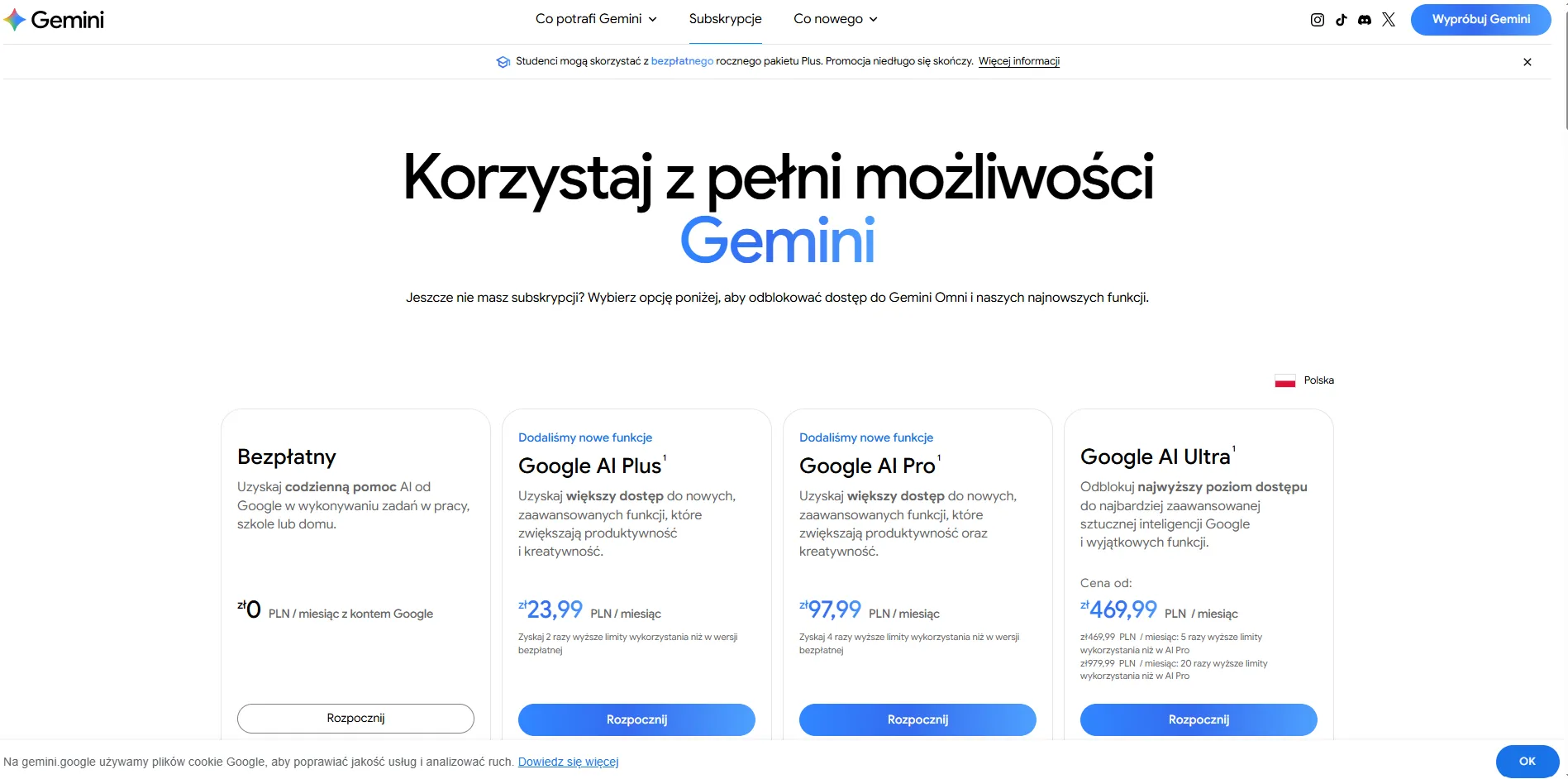
Comparing Gemini Features: the Free Version and Paid Plans
Prices and plan contents in Poland according to Google's website (as of 6 October 2026, prices converted to euro):
| Feature | Free | Google AI Plus | Google AI Pro | Google AI Ultra |
|---|---|---|---|---|
| Price | €0 | about €5.48 / month | about €22.4 / month | from about €107 / month (about €224 for the highest limits) |
| Limits in the Gemini app | basic | 2x higher than in the free version | 4x higher than in the free version | 5x or 20x higher than in AI Pro |
| Models | Gemini Flash, limited access to 3.1 Pro | wider access to 3.1 Pro | wider access to 3.1 Pro, 1 million token window | highest access, Deep Think |
| Deep Research, Canvas, Gemini Live, Gems | yes | yes, higher limits | yes, higher limits | yes, highest limits |
| Image generation | yes | yes | yes | yes |
| Video generation | not in the Gemini app (limited access in Google Flow) | yes | yes | yes, highest limits |
| Gemini in Gmail, Docs and other services | no | yes | yes | yes, highest limits |
| Cloud storage | 15 GB | 400 GB | 5 TB | from 20 TB |
| Extras | none | none | YouTube Premium Lite, Antigravity | YouTube Premium, Project Genie, Gemini Spark agent (in selected countries) |
You can fit the plan to your needs. The free version gives access to basic features, and paid plans give higher limits and advanced capabilities. If you use the assistant a few times a week, start with the free version. If you work with it daily on large files and in Gmail or Docs, choose Google AI Pro.
Gemini AI as a Tool for the Future
Gemini AI changes the way you use technology every day and opens up new prospects for work, learning and technological development. Thanks to natural language processing, multimodality and integration with Google apps, it is becoming a versatile tool, from automating everyday tasks to supporting complex analytical and creative processes.
Google releases new model versions every few weeks, and each of them understands context better, answers faster and costs less to run in the API. The direction of development is clear: Gemini is meant not only to answer questions, but to carry out tasks on your behalf.
The Future of Gemini AI: New Features and Capabilities
Some features that were only announcements not long ago already work. Here are the directions in which Gemini is developing fastest:
- AI agents: Gemini Spark and Gemini Agent carry out multi-step tasks for you: they organise files, prepare documents, browse websites and work in Gmail or Calendar. Before an important action, such as sending an email or making a purchase, they ask for confirmation. For now they are available in the top plan and in selected countries.
- Generating and understanding multimedia: Gemini already creates images, videos with sound and music from text. Future versions are meant to deliver longer material and more precise editing in conversation, which opens up uses in video production, marketing and education.
- Personalisation and adapting to the user: Gemini uses your memories, saved preferences and, if you allow it, data from connected Google apps to propose answers and actions tailored to you. You decide which data it can access.
- Integration with new technologies: it works in cars with Android Auto, in headsets and glasses running Android XR, and in Google home devices. This lets you use it where a keyboard is inconvenient.
FAQ: Common Questions About Google Gemini
Is Gemini free?
Yes. All you need to use Gemini is a free Google account. In the free version you get access to the Gemini Flash model, limited access to 3.1 Pro, image generation, Deep Research, Canvas, Gemini Live and Gems. Paid plans raise the limits and unlock, among other things, video generation and Gemini in Gmail and Docs.
How much does Gemini cost in Poland?
Google AI Plus costs about €5.48 a month, Google AI Pro about €22.4 and Google AI Ultra from about €107 a month (as of October 2026).
Does Gemini Advanced still exist?
Not under that name. In 2025, Google replaced Gemini Advanced with the Google AI Pro plan, and the earlier Google One AI Premium package was also renamed Google AI Pro.
How does Gemini differ from ChatGPT?
Both tools write texts, generate images, analyse files and hold voice conversations. Gemini stands out for its integration with Gmail, Docs, Sheets and Android, and a context window of up to 1 million tokens in paid plans. ChatGPT has a larger user base and a rich library of GPTs.
Does Gemini work in Polish?
Yes. The app, the answers and most features work in Polish. Some novelties, for example agents or Daily Brief, arrive first in the English version and in the USA.
Does Gemini use my conversations to train models?
Yes, if you have Gemini Apps Activity turned on, and by default it is on. You can turn it off or use a temporary chat. On Google Workspace company accounts, data is not used to train models.
How do I get access to the Gemini API?
Go to Google AI Studio, sign in with your Google account and generate an API key. To start with, you get a free request limit. For company deployments on a larger scale, use Vertex AI in Google Cloud.
Can I use Gemini on a computer?
Yes. Gemini works in the browser at gemini.google.com and in apps for macOS and Windows.