













In short
- Traffic from ChatGPT and other LLMs is often invisible in GA4: without a source parameter and with an anonymous referrer, it lands in the “Direct” or “(not set)” channel as dark traffic. Companies may therefore not know that AI models are recommending their site.
- To track it, tag links with UTM parameters (for example utm_source=chatgpt), create dedicated landing pages or URL aliases, build segments in GA4 and analyse behaviour patterns such as fewer page views and shorter sessions.
- You can track AI bots in Cloudflare: Bot Management recognises known and lesser-known bots, and you can analyse HTTP logs in tools such as Kibana or Grafana. This lets you assess the scale of AI bot traffic and its impact on your statistics and server load.
In the age of rapid growth in artificial intelligence, tools based on large language models, such as ChatGPT, are becoming increasingly common in everyday use. People use them not only to gain knowledge, but also to explore products and services, and to visit websites through generated answers containing links. This phenomenon opens up new opportunities for digital marketing, but at the same time poses a serious challenge for web analytics specialists. Traditional analytics tools, such as Google Analytics 4, are not built to easily detect and classify this type of traffic, which leads to the emergence of so-called dark traffic: visits with an unknown or distorted source.
So how can you effectively measure and analyse traffic from ChatGPT and other LLMs? How do you tell a user who clicked a link in an AI-generated answer apart from a classic visit from a search engine or social media? In this article, we answer these questions by presenting proven tracking methods, tagging techniques and ways to report data in GA4 and other tools. You will learn why measuring LLM traffic is becoming a new skill in the modern marketer's toolkit, and how to prepare for the further development of this technology. If you want to stay one step ahead of the competition and effectively analyse AI traffic on your website, this guide is for you.
What Is LLM Traffic and Why Is It a Challenge for Analytics?
The growing popularity of large language models (LLMs) such as ChatGPT, Bing Chat and Claude is radically changing the landscape of digital interaction. More and more users treat these tools as an alternative to classic search engines. As a result, instead of typing phrases into Google, they ask AI questions, and the AI not only answers them conversationally but also suggests links to specific websites. These clicks are exactly what we mean by LLM traffic: a new channel for acquiring visits that classic web analytics models have not accounted for until now.
The problem is that most analytics tools, Google Analytics chief among them, do not recognise this kind of source as a separate channel. The lack of a dedicated UTM parameter, no assignment to a traffic source, and an anonymous referrer mean that this traffic ends up in the "Direct" category or gets classified as dark traffic. For marketers and analysts, this means one thing: it is hard to assess what share of conversions or visits comes from AI and what share comes from classic online marketing. This significantly distorts campaign results and makes it harder to draw accurate conclusions.
In addition, LLMs implement link redirection differently. Sometimes they open the link in the system browser, other times they copy it for the user, who then pastes it in manually. This way of working deprives analysts of source data entirely, unlike standard clicks from ads, social media or newsletters. In practice, even though AI traffic on your website is growing, analysing it remains limited.
From the perspective of a business owner or SEO specialist, this means having to redefine your approach to measurement. You need to understand not only where the traffic comes from, but also which paths users take to reach your site through AI models. Is it through generated recommendations? Or through prompts written by specialists? Proper link tagging and the use of tools that can detect unusual user behaviour become key here. You will find out how to do this step by step in the following sections of this article.
What Is Dark Traffic from AI?
The term dark traffic appeared in the world of digital analytics several years ago and refers to web traffic whose source cannot be clearly identified. In traditional scenarios, it mainly involved users pasting links directly into the browser, clicking links from private messages (e.g. WhatsApp, email), or using mobile apps that do not pass on source information. However, with the growth of artificial intelligence and the popularity of LLMs such as ChatGPT, a new category has emerged: AI dark traffic.
Language models generate answers containing links that users can open or copy. In most cases, these actions carry no referrer information, are not opened in a browser context, and do not pass on any data about the source of the visit. For Google Analytics, this means one thing: such traffic ends up in the "Direct" or "(not set)" channel, completely erasing any trace of where it really came from. As a result, businesses may not realise that their website is gaining popularity thanks to AI recommendations, simply because this information is missing from the analytics data.
In the context of online marketing, this is a serious challenge. Analytics relies on the ability to attribute traffic to campaigns, sources and channels. When this data is hidden or distorted, it is hard to make rational decisions. AI dark traffic blurs the effectiveness of SEO, social media and content marketing campaigns, because some users arrive at the site "from nowhere", even though in reality AI directed them there.
How can you counter this? First and foremost, it is worth introducing practices for actively measuring LLM traffic. This means using custom UTMs when linking content in prompts or expert publications, monitoring unusual user paths, and analysing behaviour patterns typical of visits from AI models. Some companies build dedicated landing pages for LLM traffic, which makes it easier to track the effectiveness of this channel. In the following sections, we show you how to do this effectively.
Monitoring and Attributing Traffic from ChatGPT
In the era of conversational tools based on LLMs such as ChatGPT, traditional attribution models are no longer enough. A user who clicks a link in an AI-generated answer does not always land on the site with a source parameter attached, which means that without extra effort on our part, it is hard to tell that a given visit actually came from ChatGPT. Effective monitoring and tracking of ChatGPT traffic requires proactive action from marketers and website owners.
One of the most effective methods is to use unique UTM parameters in links that you publish or recommend for use by AI models. An example? If you prepare a ChatGPT prompt that includes a link to your site, add a dedicated UTM tag to it, e.g. ?utm_source=chatgpt&utm_medium=ai&utm_campaign=awareness. This way, in Google Analytics reports, this traffic will be attributed to a specific source and can be tracked separately. This is the first step towards telling AI traffic apart from other channels.
It is equally important to use dedicated landing pages or URL aliases. By creating separate addresses just for AI traffic, you can precisely monitor its effectiveness. For example, a link included in a ChatGPT answer could lead to a page such as example.com/chatgpt-landing, which clearly identifies the source. This approach is now used by companies that understand the importance of LLM traffic attribution.
Another useful approach is analysing user behaviour patterns. Traffic from ChatGPT is often characterised by fewer pageviews, shorter session duration, or the absence of a prior ad click. Using heatmap tools (Hotjar, Clarity) and analysing so-called "device fingerprinting" can help spot visitors who behave differently. Ultimately, though, the most important thing is being aware that AI traffic exists, and that measuring it requires a different approach than classic digital marketing.
How to Track LLM Traffic in Google Analytics
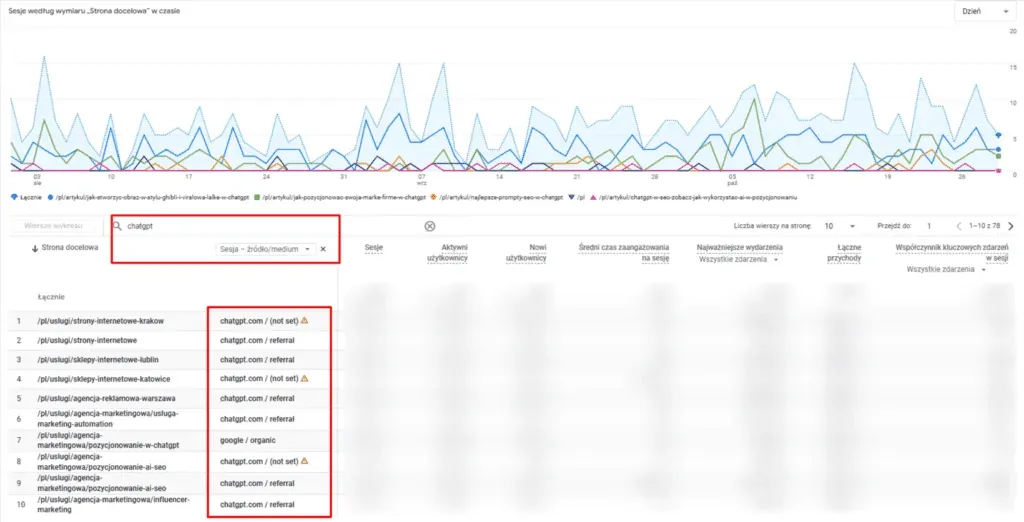
Contrary to appearances, traffic from ChatGPT can be visible in Google Analytics reports, though not always, and not in an obvious way. It all depends on how the user opens the link generated by the AI model. If the click happens in an environment that passes on referrer data (e.g. the ChatGPT Plus browser with active browsing), the traffic may be recorded as coming from a specific source, such as "openai.com". More often, though, when the user copies the link and pastes it into a new tab, or when the AI does not pass on source data, such traffic ends up in the "Direct" or "(not set)" category.
That is why, to effectively track LLM traffic in Google Analytics, you need to implement proactive solutions: from tagging links with UTMs, through building user segments, to analysing distinctive behaviour patterns. Below, we show you how to configure GA4 and additional tools to get a fuller picture of AI traffic on your website. Before you start separating out AI traffic, make sure GA4 counts correctly in the first place: our free analytics scanner shows whether the Google tag loads after consent and whether page views are counted twice.
Tracking AI Bots in Cloudflare
As language models such as ChatGPT, Copilot and Claude become more widespread online, the activity of automated AI bots that crawl websites to train models, index content or generate answers for users is also growing. For site owners, this means increased non-human traffic that can affect website statistics, server load, and skewed readings in analytics tools. That is why it is worth implementing mechanisms for tracking AI bots in Cloudflare, one of the most effective solutions for securing and monitoring site traffic.
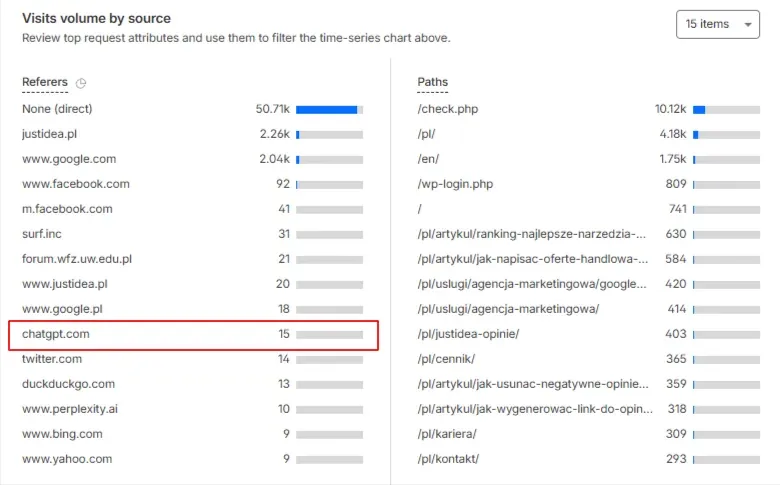
Cloudflare offers a set of tools based on so-called Bot Management, which automatically recognises known bots (e.g. Googlebot, Bingbot) and can detect lesser-known, custom scripts, including those coming from AI systems. Using machine learning technology and a broad set of network data, Cloudflare can determine with high confidence whether a given request was made by a human, a crawler, or an AI. Within Cloudflare, you can set up rules or use dedicated bot activity logging, giving you precise LLM traffic measurement at the infrastructure level.
Importantly, Cloudflare allows you to export HTTP log data, which lets you analyse the behaviour of suspicious user agents or IPs that are not associated with traditional search engines. Combined with tools such as Kibana or Grafana, you can build dashboards showing the scale and quality of AI-generated traffic. This is especially useful when you want to understand which content on your site is being indexed or cited by AI in generated answers, which can affect your visibility on Google and your brand's authority in the world of LLMs.
Additionally, Cloudflare lets you build conditions based on Fingerprint JS, browser, operating system, or the speed of requests made, which makes it possible to identify unusual traffic that may come from AI systems operating under the guise of regular users. You can also use the so-called "Threat Score", which lets you assign a risk level to a given visitor and block access, delay it, or require a CAPTCHA. This is not only a matter of protection, but also a way to tell ChatGPT traffic apart in GA4 using external logging systems. The same protection can also turn away the crawlers of language models that want to read your site, and our free AI visibility checker shows whether that is happening to you.
Summary
The growth of large language models (LLMs) is changing how users reach websites. ChatGPT, Bing AI and Claude are becoming new sources of visits that remain invisible from the perspective of traditional analytics. This phenomenon, known as AI traffic on your website, can account for a significant share of your organic traffic while being completely missed in GA4 reports. That is why it is so important to deliberately implement strategies for monitoring and attributing this new type of traffic.
From using dedicated UTM tags, through building user segments, to using analysis support tools, each of these actions brings you closer to a better understanding of user paths and conversion sources. What is more, it lets you plan your marketing strategy more effectively and better match content to your current outreach channels. If you want to find out how tracking ChatGPT traffic can boost the effectiveness of your online business, it is worth investing time and resources into the right analytics setup.
Need help implementing effective LLM traffic measurement? Get in touch with JustIdea Agency. Our specialists will help you implement the right solutions and show you how to use the potential of artificial intelligence to grow your business.
Also Check Out