












In short
- The myth that marketing automation is only for corporations comes from the history of expensive platforms. Today subscriptions start at around ten euros a month, and simple sequences, such as welcoming new contacts or a basket reminder, deliver the first results.
- The benefits for a small business are saved time, scalability without a proportionate rise in costs, and personalisation. In e-commerce the return can be visible in the first months, in B2B it usually takes three to six months, and recovering abandoned baskets usually brings back 5 to 15% of transactions.
- Typical mistakes are funnels without a contact base, automating processes that need a human, no testing, "set and forget", and skipping consents and GDPR. It's best to start with one process and measure it after a few weeks.
Marketing automation sounds like a tool reserved for corporations with large IT departments. That's one of the biggest myths in Polish digital marketing. A well-chosen system genuinely pays off in a small business too, because it lets you operate effectively without a proportional increase in headcount. In this article, we show how it works in practice.
What is marketing automation, and where does the corporate myth come from?
Marketing automation refers to systems and processes that automatically respond to customer behaviour. It saves time, increases sales, and builds better relationships with recipients through tailored messages. The system carries out actions according to predefined rules or based on user behaviour, without the need for manual intervention every time.
Where did the myth about a tool only for big players come from?
Partly from history. The first automation platforms were expensive, complicated to implement, and designed for corporate marketing departments with teams of dozens of people. Their prices started at several thousand dollars a month, and implementation alone required months of consultants' work. For the owner of a one-person service business, it genuinely didn't make sense.
Today the market looks different: advanced software has become widely available, affordable, and easy to use for companies of any size. Features that cost a fortune a decade ago are now included in subscriptions starting at around ten euros a month.
Two levels of marketing automation
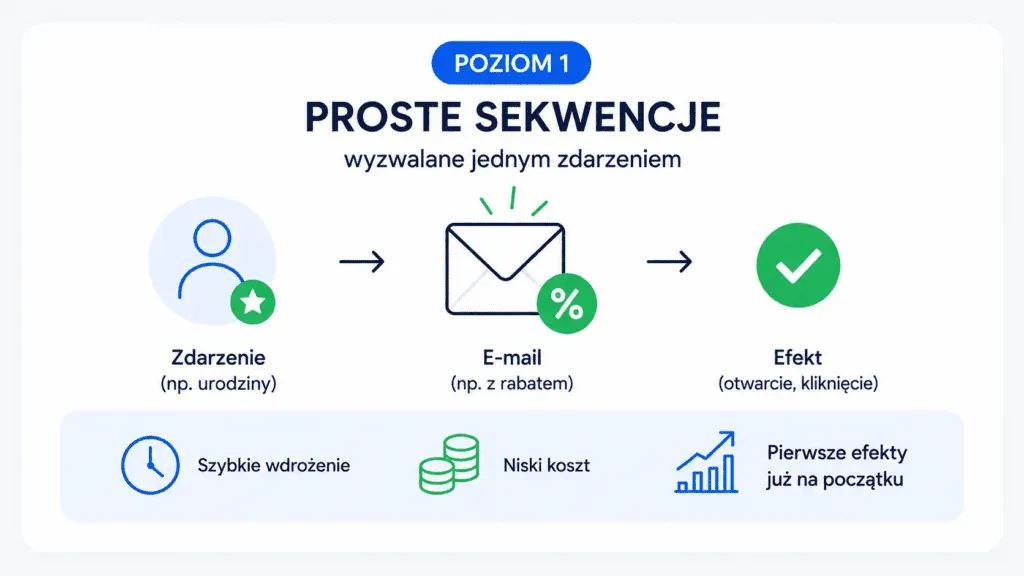
To start, it's worth distinguishing two levels of sophistication. The first is simple sequences triggered by a single event: a birthday email with a discount, a reminder about an expiring subscription, or a request for a review after a purchase. The second level is elaborate lead funnels, dynamic segmentation, and multichannel campaigns responding to the whole user journey.
You don't have to jump straight to the second level, and that's exactly what often gets lost in discussions about this technology. The first results appear much earlier and more cheaply than most business owners assume.
Is it worth implementing marketing automation?
It's worth stating upfront that marketing automation isn't a solution for everyone, and not in every situation. Too often the topic is described either as a cure-all for every marketing problem, or as an unnecessary expense for a microbusiness, when in fact it all depends on the specifics of the company itself.
The main benefits for a small business
Three benefits usually tip the scales in favour of implementation:
- Time savings: the owner of a small business is often the salesperson, marketer, and customer support all at once. Every hour the system handles instead of them is an hour won back for strategic work. Payment reminders or follow-ups after a purchase that go out on their own are hours you get back.
- Scalability without a proportional rise in costs: a small business handling a hundred contacts and one handling ten thousand often use the same tool. A well-built system lets you maintain communication quality as your database grows, without hiring more people.
- Personalisation at a scale you can't achieve manually: if the system knows that a specific recipient has opened a message about product X several times but hasn't bought it, it can automatically send them extra information or a special offer.
Real limitations to keep in mind
Implementation takes time before the first results appear. You also need a contact database: without one, even the best system has nothing to work with. Poorly configured sequences can do harm by sending the wrong messages at the wrong moment, which is why getting started requires a well-thought-out strategy.
How marketing automation works in a small business in practice

This is best illustrated with practical examples. Below are two scenarios from different industries, connected by the same mechanism.
Example 1: a photography studio (B2C, services)
A customer finds the site through Google, downloads a free guide to family photo sessions, and signs up for the newsletter. They automatically receive a series of four messages over two weeks: the first delivers the guide, the second shows previous work, the third explains the booking process, and the fourth contains a special offer. The photographer doesn't send any of them manually.
Example 2: a running accessories shop (e-commerce)
The system sends a reminder about an abandoned cart an hour after it's left behind, and if the customer doesn't complete the purchase, another message reaches them after 24 hours, this time with a discount code. Industry benchmarks show that a well-designed cart recovery sequence typically recovers 5 to 15% of abandoned transactions (StickyDigital, 2026 data). For a shop generating dozens of abandonments a day, that's significant revenue that would simply be lost without this mechanism.
Which processes should you automate first
Not every process is suitable for automation from the start. With a small business's limited resources, it's crucial to prioritise implementation by the value it will bring.
The highest-priority processes
The highest priority is usually welcoming new contacts: a message sent automatically after someone joins a list or fills in a form. Its open rate can be many times higher than standard campaigns, because it reaches the recipient at the moment of greatest interest.
The next step is an onboarding sequence: a series of three to five messages spread over two to three weeks. Once written, it works for months without any intervention.
Behaviour-triggered scenarios are also highly valuable: clicking a link, visiting a specific page, downloading a file, or a certain period of inactivity. It's precisely this layer (reacting to individual recipient actions in real time, rather than sending the same message to everyone on a schedule) that sets true marketing automation apart from ordinary email marketing.
At a later stage come advanced lead scoring, multichannel campaigns (SMS, push notifications), and dynamic content personalisation on the site.
How do you choose a marketing automation tool for a small business?
When choosing a tool, the first thing to check is whether it can integrate with your existing online store or CMS: without that, the system won't be able to reach the data it needs to work on. Ease of use without involving an IT department also matters, especially in a company where one or two people handle everything. In that situation, the quality of technical support becomes your safety net. Finally, there's the ability to scale, so that a year from now, once the company has grown, you won't need to move the whole database to another tool.

How much does marketing automation cost for a small business?
The real cost of marketing automation isn't just the subscription; the implementation time and the pace at which the system starts paying for itself matter too.
Direct cost: the platform subscription
The cost depends primarily on the size of your contact database, the available features, and the solution you choose. The most affordable options start at around ten euros a month. For example, Mailchimp offers packages from about EUR 11 a month, while GetResponse starts at around €11 net. More extensive systems such as ExpertSender are priced individually depending on the scale of activity and the company's requirements, with rates starting at around €380 net a month for 10,000 contacts. A detailed comparison of the features, capabilities, and fees of individual solutions is available in our marketing automation tools ranking.
Hidden cost: implementation time
Preparing the strategy, writing the email sequences, and configuring and testing the paths takes anywhere from a dozen or so to several dozen hours. For an owner doing everything themselves, that means weeks of work.
When does the investment pay off?
In e-commerce, the payback tends to be fastest, often within the first few months of launch. For a nurturing sequence in a B2B model, the horizon is longer, usually three to six months, but the value of a single recovered lead can cover the cost of the whole implementation many times over.
How do you measure the effects of marketing automation
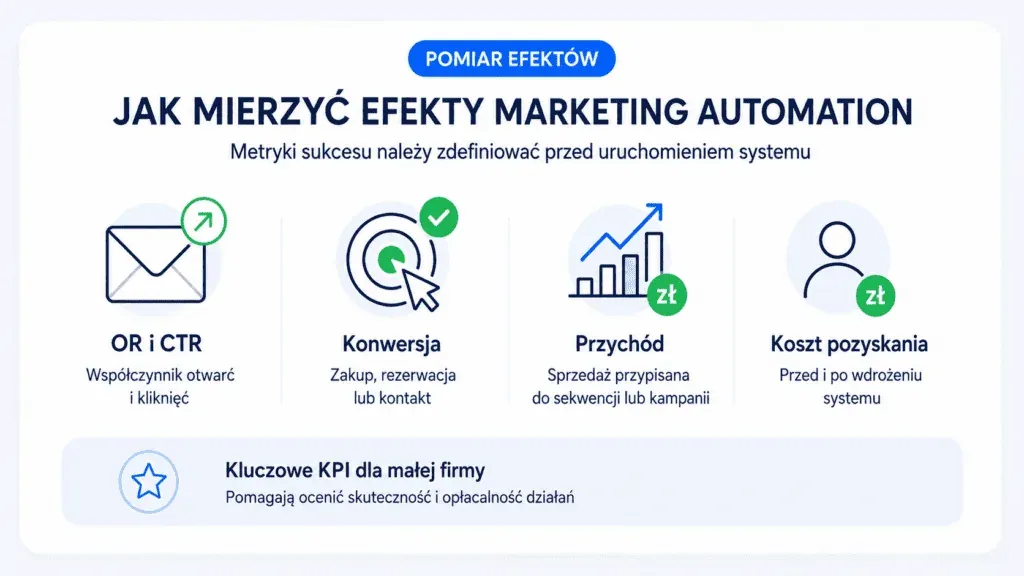
Implementing a system without measuring its effects is flying blind. Success metrics should be defined before the system goes live.
Key KPIs for a small business
A set of KPIs that work best for a small business:
- Email open rate (OR) and click-through rate (CTR) for individual sequences,
- Conversion from a sequence to a specific action (purchase, booking, contact),
- Revenue attributed to a sequence or campaign: sales linked to a specific scenario,
- Customer acquisition cost before and after implementation, showing cost efficiency.
How to analyse email sequence results
You need to track where recipients unsubscribe or stop reacting. If the first three messages have an open rate above 30% and the fourth drops to 15%, that's a signal that something in it isn't working: maybe it's too long, too sales-heavy, or arrives at the wrong moment.
How long should you wait for results?
Measurement shouldn't be done too early. Sequences only build a statistically reliable sample after a few weeks. The minimum reliable sample is anywhere from a dozen or so to several dozen people going through a given path. Depending on how fast you acquire contacts, that can take anywhere from a few weeks to a couple of months.
The most common mistakes small businesses make when implementing marketing automation
Mistakes made when implementing marketing automation tend to repeat themselves. Knowing them can save you time, money, and frustration.
Mistake 1: building funnels without a contact database
A company with no forms on its site, no active lead generation, and no organic traffic builds elaborate sequences with nobody to send them to. The system amplifies what's already working, but it doesn't replace the fundamentals of acquiring traffic and contacts.
Mistake 2: automating the wrong processes
Not every email should be sent automatically. If sales rely on a deep relationship and an individual approach, an automatic sequence can do harm by creating an impression of mass communication where the customer expected to feel special. That's why you should first map out which contacts in the funnel need a human touch and which are routine.
Mistake 3: no testing before launch
A sequence with a personalisation error (for example, a blank field instead of a name), sent to an empty segment, or containing broken links, damages your reputation. Every path should be tested on yourself or on an internal test account.
Mistake 4: set it and forget it
An implemented system isn't a project that ends on launch day. Content ages, offers change. A welcome sequence written two years ago may contain outdated prices or a stale message. A schedule for regularly reviewing active sequences is just as important as writing them in the first place.
Mistake 5: overlooking legal issues and GDPR
Sending marketing messages requires the recipient's consent, both under the Act on Providing Services by Electronic Means (Poland's law governing digital communication) and under GDPR. Adding a database to your communications without verifying the legal basis for processing can lead to serious consequences. This is an area you should always consult a specialist about.
Where to start: a step-by-step implementation plan
Step 1: Audit your current situation
Before deciding which tool to choose, you need to answer a few questions. How many contacts have you already collected, and in what form? Which marketing activities repeat regularly and take up the most time? At what point in the sales process do contacts drop off, and why? The answers set the priorities for implementation.
Step 2: Choose a tool
At this stage, the full set of criteria described earlier in the “How do you choose a marketing automation tool for a small business?” section comes back into play: integration, ease of use, support quality, and scalability. You choose a platform so that its features and price match the company's real needs, with room for further growth.
Step 3: Choose the process to implement
Of the processes identified earlier as priorities, it's best to pick one and see it through, rather than building several paths at once. A well-implemented process delivers measurable results and becomes a reference point for the next ones.
Step 4: Prepare the content
Writing the messages, defining segmentation rules, preparing forms: this is the most time-consuming stage. The tool is only a channel; the results are decided by the content and logic of the sequence. You should spend more time on this stage than seems necessary.
Step 5: Launch, monitoring, and optimisation
For the first few weeks after launch, you need to check the statistics often to quickly catch any configuration errors. Over time, reviews can become less frequent, and attention shifts to optimisation: testing message subject lines, the order of steps, and send times. It's these small, month-by-month adjustments that improve results.
Consistency builds an advantage, not budget
The biggest obstacle in marketing automation is rarely money; more often it's a lack of patience. The first sequence won't pay for itself right away, but each subsequent one already builds on what the previous one set up: it gives back some time, closes a few sales, and shows you what to improve. After a year of this work, a small business has something you can't buy with any subscription: its own proven system for communicating with customers. And that advantage can't be caught up with a single implementation by the competition.
If the topic of marketing automation for small businesses has caught your interest, check out related articles on our blog:
- Email Marketing: A Complete Guide for Your Brand
- Marketing Automation vs Email Marketing: What's the Difference and Why It Matters
- The Best Marketing Automation Strategies That Really Increase Sales
FAQ
Do you need a large contact database for marketing automation?
No, but without a database the system has nothing to work with. Before you build elaborate paths, make sure you have a steady flow of new contacts: forms, sign-ups, site traffic. Automation strengthens what's already working; it doesn't replace acquiring an audience.
Is marketing automation GDPR-compliant?
Yes, provided that sending is based on the proper legal basis and the recipient's consent. Before adding a database to your communications, you need to verify the basis on which you're processing the data; this is a question best consulted with a specialist.
Will marketing automation replace an employee?
No. The system takes over repetitive, routine tasks (sending messages, reminders, segmentation), but it won't replace strategy or decisions about what to communicate and to whom. It delivers the most value where someone supervises its results and refines the scenarios.

Have a question about this article? Write to us.