












In short
- Marketing automation automates communication based on behaviour, preferences and data in the system. Emails, SMS messages and push notifications reach the right people at the right moment, without handling each contact by hand.
- Each journey consists of a trigger, a condition and an action. Effectiveness depends on data quality and segmentation, and the best scenarios combine time-based rules with a reaction to what the recipient actually does.
- Typical scenarios are reactivating inactive contacts, a post-purchase cycle, a reaction to behaviour on the site and a back-in-stock notification. It is worth starting with one scenario, most often a welcome for new contacts.
Marketing automation is often associated with a "self-running" system that sends messages and handles leads without any human involvement. But what does this look like in practice? See what a single automation workflow consists of, what actions can trigger it and how the system responds to user behaviour.
What is marketing automation?
Marketing automation is technology that automates communication with recipients based on their behaviour, preferences and the data collected in the system. It makes it possible to automatically send emails, SMS messages, push notifications and other communications at the right moment to the right people. It responds to signals such as a newsletter sign-up, a visit to a particular page, an abandoned cart or a product purchase, without manually handling every contact. Put simply, it lets you run personalised communication at scale, making sure everyone receives content matched to their stage in the buying journey. We cover the comparison with classic email sends in the article Marketing automation vs email marketing: what's the difference and why it matters.
How marketing automation works: the anatomy of automation
Whatever tool you use, every automation is based on the same pattern. Although scenarios can look complex at first glance, in practice they consist of a few basic elements that decide what gets sent, when and to whom.
Trigger, condition, action: what a workflow is built from
A single workflow, also called a flow, consists of three elements:
- Trigger - the event that starts the workflow: a form sign-up, a link click, visiting a given page, crossing a points threshold or a set amount of time passing.
- Condition - a question the system answers with "yes" or "no" to branch the path further: did the contact open the previous message? do they belong to the business segment? have they bought in the last thirty days?
- Action - what the system actually does: sending a message, applying a tag, moving the contact to a different group, adding points, notifying a salesperson or waiting a set number of days.
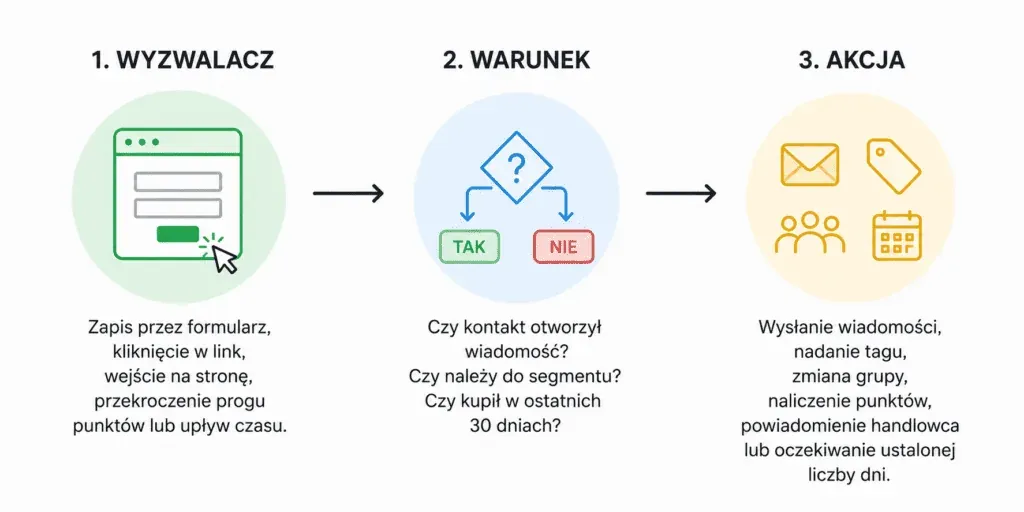
These three elements are combined into a chain of actions. A single trigger can lead to several branches, and each branch can end in a different action. This means the same scenario can guide thousands of people down completely different paths at the same time.
Data and segmentation: the fuel behind the whole mechanism
The effectiveness of marketing automation depends above all on the quality of the data the system works with. Every user action, opening a message, clicking a link, visiting the site or making a purchase, can be recorded and used at later stages of communication.
This is the basis for segmentation: dividing recipients into groups with shared traits or behaviours. This means different people can receive different content, recommendations or communication scenarios, even though they're in the same contact database.
The more valuable data flows into the system, the more precisely it can tailor its actions to recipients.
Rules versus behaviour: two ways to trigger a workflow
Automation workflows can be triggered in two ways. The first is based on rules and time, for example sending a message on the anniversary of a sign-up or running a scenario on a set schedule. The second is based on user behaviour: the workflow only starts once the user takes a specific action, or fails to take it within a set time.
The most effective scenarios combine both approaches: they use rules as the basis for communication and then adjust its course based on the recipient's actual actions. This means communication doesn't rely solely on static data but responds to users' real interests and activity.
Marketing automation: real-world examples
The mechanism is easiest to understand through examples. Below are four scenarios from different business models, each showing a different type of workflow.
Example 1: winning back inactive contacts
A coffee shop notices that some recipients haven't opened any message in 90 days. The system automatically launches a re-engagement campaign: it sends a short message asking whether the recipient still wants to receive content. People who click the message go back to regular communication. If there's no response over the following two weeks, the contact is unsubscribed. This keeps the database up to date and stops inactive addresses from harming campaign deliverability. This is known as list hygiene.
Example 2: post-purchase cycle and upselling
A coffee machine manufacturer starts an automatic post-purchase workflow after every sale. First it sends the manual and tips on using the device, after a week it asks for a review, and after a month it suggests matching accessories or complementary products. The communication is matched to the model, so the recipient gets relevant recommendations without anyone having to prepare each message by hand.
Example 3: responding to on-site behaviour
An online course platform records that a user has visited a course page several times without deciding to buy. This triggers an automatic workflow that sends the user a message answering the most common questions about the course, along with an additional, time-limited incentive. The communication reflects the user's genuine interest, instead of going out to the whole database in the same form.
Example 4: back-in-stock notifications
An online clothing store sells a popular shoe model that's temporarily out of stock in some sizes. For the unavailable variant, there's a "Notify me when it's back" option. When a size comes back into stock, the system automatically sends a message to everyone who signed up for that specific size.
The message includes information that the product is back in stock along with a direct purchase link. This means it only reaches interested people, and at the moment when the likelihood of a purchase is highest.
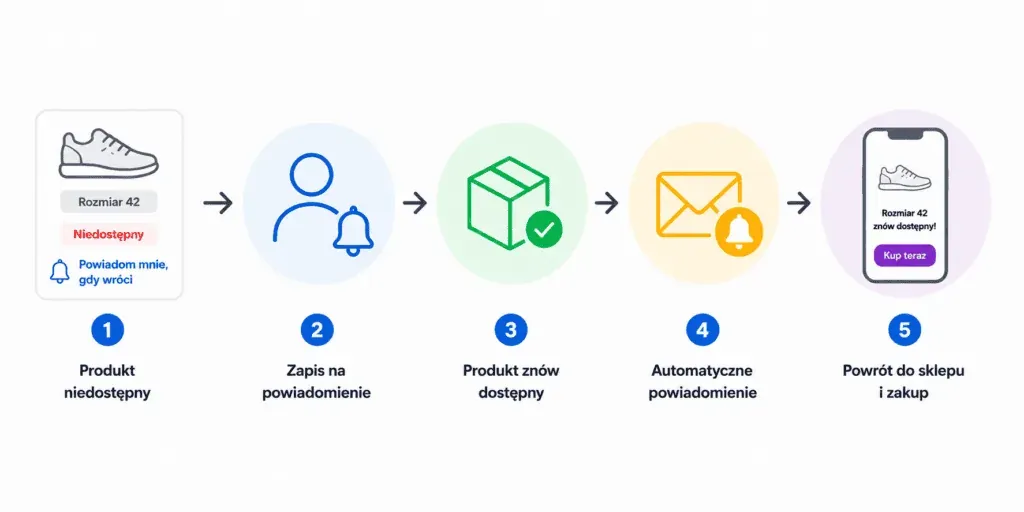
All these scenarios have one thing in common: the starting point is the recipient's action. This is exactly what allows automation to deliver more relevant, better-matched communication, and well-designed workflows can run for a long time without daily management.
Marketing automation platforms
The mechanism itself is universal: only the platforms that offer it differ. There are many solutions on the market, from simple email marketing tools with automation features to comprehensive systems combining marketing, sales and CRM.
Which platform works best depends on your business model, the size of your contact database and the systems it needs to integrate with. We've put together a detailed comparison of solutions in our marketing automation tools ranking.
Whichever you choose, one thing remains key: the platform has to integrate with the data source it's going to work with. This is usually done through ready-made plugins for e-commerce platforms and CMS systems, or via an API. Without a smooth flow of data, even the most advanced tool won't reach its full potential.
Automation is a process, not magic
Marketing automation can seem complicated, especially at first. In practice, though, it's based on a simple pattern: trigger, condition and action. These elements are used to build workflows that can grow increasingly sophisticated as your database and knowledge of recipients develop.
It's best to start with one specific scenario that addresses users' real needs, then gradually build out further elements of communication. The underlying mechanism stays the same: only the degree of matching to recipients' behaviour and expectations changes.
It's a way of organising communication so the right content reaches the right people at the right moment, without having to carry out every action by hand. It lets you run more effective communication and save your team's time.

See other articles related to marketing automation:
- Marketing automation vs email marketing: what's the difference and why it matters
- Best marketing automation strategies that actually increase sales
- 6 most common marketing automation mistakes and how to avoid them
FAQ section
Does marketing automation work with a small contact database?
Yes, although the results grow along with the database. Even a single simple workflow, for example a welcome or post-purchase flow, can run for months without any management. The mechanism is the same regardless of scale.
Do you need an IT department to implement marketing automation?
No. Most platforms integrate with e-commerce or content management systems through ready-made plugins, and scenarios are built in a visual editor. Technical support is usually only needed for more complex API integrations.
How long does it take for marketing automation to start delivering results?
The first results from simple workflows are usually visible within a few weeks, once enough people have gone through the scenario. More elaborate nurturing scenarios take longer to gather data before showing their full effect.
What's the best place to start?
With one scenario that addresses a real need, most often welcoming new contacts. A well-implemented first workflow becomes the benchmark for the ones that follow.

Have a question about this article? Write to us.