












In short
- n8n is an automation platform built on trigger and action nodes, combining no-code with your own code in JavaScript or Python. It works on the fair-code model, and you can self-host the Community Edition for free and with no limit on executions.
- The platform has more than 400 official integrations, including HubSpot, Salesforce and Slack, and for apps without a node there is the HTTP Request node. Built-in AI nodes let you build agents, and errors are handled by the Error Trigger and the "On Error" and "Retry On Fail" options.
- Example uses are recruitment and onboarding in HR, invoice flow with OCR, lead scoring, an IT helpdesk and order fulfilment from Shopify and WooCommerce shops. Self-hosting gives you control over your data and makes GDPR compliance easier.
Did you know that the n8n repository holds over 2,000 ready-made workflows with 365 unique integrations?
This means the tool lets you automate business processes without writing code, from handling emails and generating leads to integrating with AI. In practice, this means saved time, fewer errors and a more effective team. Automation in n8n usually only pays off once it's backed by a well-thought-out customer contact scenario, in other words marketing automation.
In this article you'll learn what n8n is, how workflow automation works, what the platform offers, and how to build your first automation step by step.
What is n8n and how does it work: the basics of the automation tool
What n8n is and its underlying philosophy
n8n is a workflow automation platform built on a node-based architecture. The name comes from "Nodemation", a blend of "node" and "automation". The tool lets you connect apps, services and APIs without writing extensive code.
n8n's philosophy is based on the fair-code model. The platform's source code is publicly available, and you can modify it and self-host it free of charge. The Functional Source License only restricts commercial resale of the tool as a hosted service, while preserving freedom of use in other scenarios.
Every automation step is represented by a single node. These nodes are visually connected into workflows, creating both simple data syncs and advanced business processes. Nodes fall into two basic types:
- Trigger nodes - start a workflow based on a schedule, an event in an app, or a webhook
- Action nodes - carry out specific tasks, such as updating a CRM, sending a message, or writing to a database
n8n combines a no-code approach with pro-code options. Business users build automations using the visual editor without writing code, while developers can insert custom JavaScript or Python directly into a workflow.
Key features of the n8n platform
The visual workflow editor is the heart of the platform. The results of every step are visible right next to its settings, allowing you to quickly intervene and debug. The interface never limits what you can do: the Code node lets you write custom data transformations in JavaScript or Python.
The platform offers more than 400 pre-built integrations with popular services, including CRM systems (Salesforce, HubSpot), communication tools (Slack, Microsoft Teams), cloud platforms (AWS, Google Cloud, Azure) and databases (PostgreSQL, MySQL, MongoDB). For apps without a ready-made node, you can use the HTTP Request node to connect to any REST API.
n8n supports up to 220 workflow executions per second on a single instance. Built-in AI nodes let you summarise documents, answer questions and build intelligent agents. You can choose from a range of models to suit your needs, or run an LLM locally for full control.
Data security is backed by a SOC 2 audit and regular external penetration testing. A projects-and-roles mechanism lets you grant your team access to collections of workflows and credentials instead of sharing each element individually.
Why companies choose n8n for process automation
The ability to self-host sets n8n apart from the competition. You run the platform on your own infrastructure, so data never leaves your servers. This feature can be key for organisations in regulated industries, such as finance or healthcare, and for companies that need to comply with GDPR.
A pricing model based on workflow executions, rather than individual steps, generates savings for complex automations. A single execution is counted from the moment a workflow starts to when it finishes, regardless of how many steps it contains. The self-hosted Community Edition is completely free, with no execution limits.
Unlimited customisation is another strength. You can install nodes built by a community of more than 55,000 members, or modify n8n's source code to suit your own requirements. The active community shares more than 600 ready-made workflow templates that you can import and adapt to your needs. The platform's scalability lets you run it on your own server or in the cloud.
Source: wikipedia.org
Key n8n features for workplace automation
Visual workflow editor
The n8n editor interface is split into three areas: a side panel for managing projects, a top bar with workflow options, and the canvas, the grey grid where you build automations. The canvas holds buttons for running a workflow, adding nodes (the + icon), creating notes, and opening the AI assistant.
You can add nodes in three ways: by clicking the + in the top-right corner, selecting the + next to an existing node, or pressing the N key. The node panel changes its contents dynamically; when adding the first step, it shows trigger categories, and then it shows AI nodes, data transformation nodes and app action nodes.
To see the execution, deactivation and delete icons, hover over a node. In a node's settings, you can control behaviours such as "Always Output Data" for returning empty items, "Execute Once" for processing only the first item, or "Retry On Fail" for automatic retries.
Integrations with business applications
The platform offers more than 400 official integrations maintained by the core team, and the community has added a further 5,800+ nodes. Popular apps include Google Sheets for storing data, Gmail for email communication, Slack for team notifications, and OpenAI for AI-powered text processing.
CRM systems such as HubSpot and Salesforce integrate with n8n through nodes that handle contacts, deals and leads. MongoDB and Microsoft SQL databases can be connected directly for read and write operations. For apps without a dedicated node, you need to use the HTTP Request node to call any REST API.
Authenticating with external services requires saving data as credentials in n8n. The system encrypts this data before saving it to the database, using a random key generated on first run and stored in ~/.n8n/config. Only nodes with the specified access rights can use the stored credentials.
Triggers and action nodes
Every workflow starts with a special trigger node that defines the moment it runs. Triggers fall into schedule-based (a Cron node running at a specific time), app-event based (a new email in Gmail), and webhook-based, generating a unique URL for HTTP requests.
Action nodes carry out specific tasks: reading from a database, sending emails, updating CRM records or posting messages in communication apps. IF logic nodes route a workflow down different paths based on conditions, Switch handles multiple paths at once, and Merge combines data from different branches.
Error handling and monitoring
Workflows with errors can be handled through a dedicated workflow with an Error Trigger node. In the main workflow's settings, you assign an error workflow that runs automatically on failure. The Error Trigger receives error data, including the execution ID, the URL, the node name and the error details.
At the node level, you can also configure an "On Error" option with modes: "Stop Workflow" halts everything, "Continue" carries on with the last valid data, and "Continue (using error output)" passes the error information onward. A retry mechanism allows automatic retries after a failure.
Execution logs in the interface show the exact input and output data for every node. For advanced monitoring, you need to integrate n8n with Prometheus, Grafana or the ELK Stack via REST API nodes.
AI and intelligent agent capabilities
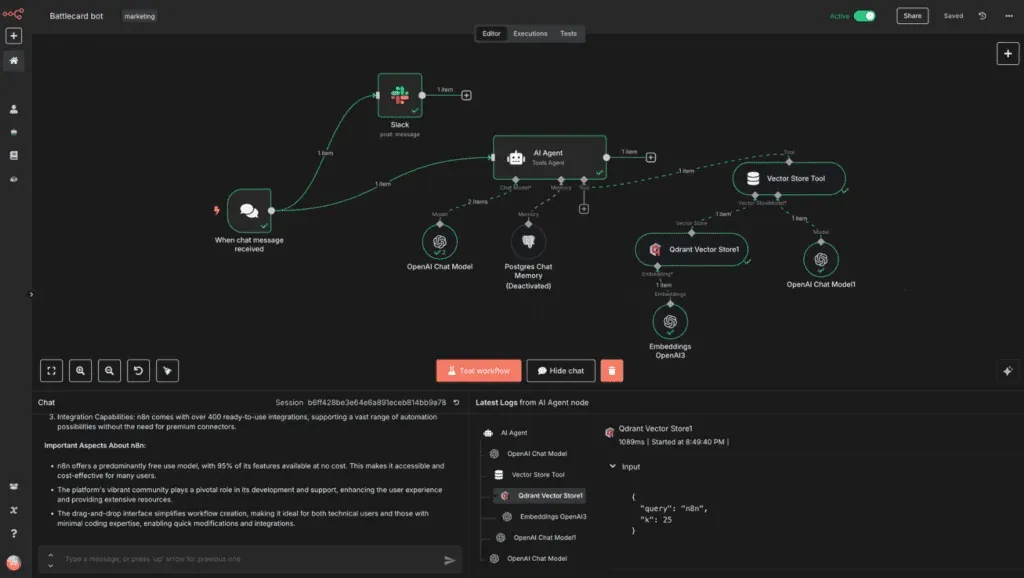
The AI Agent node is the core of autonomous, AI-driven workflows. The agent listens for input from the "On Chat Message" trigger, and its behaviour is defined through system prompts. Parameters can be adjusted using presets or JavaScript, and you can also add authentication for access control.
AI agents make decisions, interact with apps and carry out tasks without constant human involvement. They use memory, goals and tools (search, database access) to reason step by step. n8n mitigates the risk of hallucinations and uncontrolled loops through step-by-step workflow control, rate-limiting, memory limits and manual-approval nodes.
Examples of automation across company departments
HR process automation
Recruitment and onboarding processes take up a significant share of HR teams' time. A workflow in n8n can automate CV analysis by extracting data from submitted documents, checking candidates' qualifications against the role profile, and saving the results to Google Sheets. The system pulls out education, employment history, skills and contact details, and then AI scores how well the candidate fits and assigns a score.
Onboarding new employees with n8n can also significantly cut HR's workload. A workflow creates email accounts, adds the user to Slack and company tools, sends a welcome package, schedules training, and assigns a mentor. The system automatically generates reminders before the first day of work and schedules check-ins after 30, 60 and 90 days. Managing leave, performance reviews and gathering documentation can also run without manual intervention.
Improvements in the finance department
n8n lets you build a virtual finance department inside the platform. A central CFO agent based on the O3 model interprets financial requests, works out a strategy and delegates tasks to specialist agents using GPT-4.1-mini. The system includes a financial planning analyst who builds budgets and forecasts, an accounting specialist handling compliance, a treasury analyst managing liquidity, and an internal audit specialist.
On top of that, invoicing automation eliminates manual data entry. A workflow monitors a Google Drive folder for new invoice PDFs, extracts information via OCR, saves the data to Google Sheets and sends notifications via Telegram. Daily financial reports are generated automatically from Stripe, PayPal and bank account data, calculate KPIs, detect anomalies using AI, and distribute results to stakeholders via email and Slack.
Marketing and lead management
With n8n, you can capture leads from Jotform, Typeform or HubSpot web forms and sync them directly with your CRM without manually copying data. A workflow enriches contact profiles via Apollo.io, checks lead quality using AI, and automatically sends personalised messages via Gmail. A properly configured system monitors changes in lead status and triggers follow-up sequences tailored to the level of engagement.
Automatic handoff of leads between marketing and sales eliminates delays. n8n also continuously tracks lead scores and intent signals, sends alerts when a lead qualifies for contact, attaches the context of recent activity, and assigns an owner at the right moment. Two-way sync between marketing tools and your CRM keeps data consistent for both teams in real time.
Support for the IT department
Helpdesk automation can route tickets directly to the right people, eliminating manual ticket assignment. At the same time, a workflow pulls new tickets from the Zendesk or Freshdesk API every 5 minutes, filters them by priority and category, posts notifications in Slack and updates the ticket status. A single workflow can help IT teams save a large number of hours a month.
Support chatbots use existing help centre portals instead of duplicating the knowledge base. To do this, an AI agent connects to the support portal's search API, retrieves articles matching the user's query, and puts together an answer without replicating the entire documentation into a vector store. Password resets run automatically once a user submits a self-service request.
E-commerce and sales operations
Order fulfilment in n8n triggers the moment an order is placed in Shopify or WooCommerce. The workflow then generates a shipping label via the carrier's API, saves the tracking number in the system, and sends the customer an SMS confirmation via Twilio. Order processing time drops from 15 minutes to a few dozen seconds.
Stock synchronisation between sales platforms works in real time, eliminating overselling. Two-way sync updates inventory everywhere, regardless of where the sale happens. Automatic post-purchase follow-ups send review requests at the optimal moment, personalising messages based on the product bought. Competitor price monitoring detects changes immediately and sends notifications to Slack, allowing a fast market response.
How to build your first n8n workflow step by step
Choosing an n8n version: cloud vs self-hosted
Getting started with n8n means choosing between the cloud and self-hosted versions. n8n Cloud gives you an instant start with no need to manage servers, updates or scaling. Workflow data is hosted in the European Union, which you'll want to verify against your internal compliance requirements. A free trial lets you validate ideas without delay.
Self-hosting gives you full control over data residency, security and performance. However, it requires DevOps skills, including managing Docker, security, backups and monitoring. A server with 2 CPUs and 4GB of RAM is enough for small deployments. Self-hosting removes execution limits, and costs grow only with infrastructure, not with the number of workflows.
Setting up your first workflow
When you open n8n, you'll see a welcome window with a "Start from Scratch" button, or a list of workflows on the Overview page. Choose "Create Workflow" for a new flow. First, you add a trigger node via "Add first step". For example, you could use Schedule Trigger, setting the interval to "Weeks", entering "1" in "Weeks Between Triggers", and choosing the day and time to run.
Next, connect an action node by clicking the "Add node" connector on the Schedule Trigger. Choose the right app, for example NASA, and select the "Get a DONKI solar flare" operation. Every node that needs access to an external API requires credentials. Choose "Create new credential" from the dropdown, paste in the API key you received from the service, and save. You'll add an IF node for conditional logic, checking values in the input data by dragging a field into "Value 1" and setting a comparison operation.
Testing and activating your automation
You start testing a workflow with the "Execute Workflow" button in the top bar. n8n runs the flow, showing the progress of each step, with results displayed directly next to each node. The execution log contains detailed input and output data, letting you debug.
You publish a workflow by clicking "Publish" in the navigation. By default, new workflows aren't published and need manual activation. Once published, the flow runs automatically on every trigger. The "Executions" tab shows a run history with the workflow name, start date, status (Waiting, Running, Succeeded, Cancelled, Failed) and execution time.
Best practices for building workflows
A modular structure splits complex workflows into smaller sub-workflows connected by the "Execute Sub-workflow" node. A single flow with more than 25 nodes needs to be split up to keep it maintainable. Validating data at the start of a workflow via an IF node prevents errors that are hard to trace later. Error handling on every node that calls an external API should use "Retry on Fail" with exponential backoff, or an Error Workflow sending Slack notifications. Descriptive workflow names following the pattern "[Area] - Description - Version", along with nodes described by what they do rather than their type, eliminate chaos months down the line.
Source: n8n.io
Scaling capabilities and advanced uses of n8n
Integration with AI systems
Scaling automation requires flexibility in choosing AI models. n8n supports multi-agent configurations and RAG (Retrieval-Augmented Generation) systems, letting you use multiple cloud or offline models at once. Support for MCP (Model Context Protocol) integrates with legacy systems while preparing infrastructure for future solutions. Structured input and output data controls the flow of information to and from AI steps, while human-in-the-loop mechanisms combine automatic approvals with business rules to limit what AI can do.
Complex business processes
Advanced n8n workflows use branching logic, multi-stage orchestration and error-recovery mechanisms instead of simple trigger-action sequences. Flows evaluate data at multiple stages, choosing different paths based on values, thresholds or business rules, so the automation responds differently for high-value customers, urgent matters or incomplete data.
Data security and GDPR compliance
n8n aligns its security programme with the SOC 2 standard, undergoing annual audits by independent auditors. The platform encrypts traffic between the client and services in transit, as well as data at rest, using Azure Storage with AES256 and a FIPS-140-2-compliant implementation. Self-hosting in EU regions eliminates the cross-border transfer issues required under GDPR.
Performance optimisation for large companies
Horizontal scaling across multiple n8n instances behind a load balancer distributes workflow executions, preventing overloads. The Split In Batches node splits lists into smaller chunks, reducing 10,000 API calls down to 100 batch operations. Workload isolation assigns high-priority workflows to dedicated workers while batch processes run separately.
Key takeaways
Automation is becoming one of the key drivers of company growth today. Platforms such as Zapier or Make show just how much demand there is for workflow automation, but it's n8n's open-source approach, and the ability to run the tool on your own infrastructure, for example on a VPS or in a Docker environment, that sets it apart. This lets you keep full control over your data and adapt the system to your own needs.
n8n is an automation platform that lets you connect different apps and services and automate repetitive tasks without building complicated code. The drag-and-drop interface means even people with no technical experience can build workflows and integrate data between systems. At the same time, you can add your own code or script whenever you need to extend a workflow's capabilities.
Automations are increasingly using AI tools too. Integrating n8n with AI models such as ChatGPT lets you build more advanced marketing automation scenarios, data analysis or automatic handling of customer queries. This means business process automation doesn't just cut down on routine tasks, it genuinely increases the effectiveness and scalability of your teams' work.
Automation with n8n delivers real time savings and fewer errors in everyday business processes. Whether you run a small company or manage a department in a corporation, the platform adapts to your needs through self-hosting or a cloud solution.
In reality, getting started doesn't require programming skills. You use ready-made community templates, adapt them to your own processes, and get automations running within hours, not weeks.
Start with one simple workflow in your department. Test, optimise, and gradually roll automation out to further areas. The results will come faster than you think.
Read more: