













In this roundup we compare five tools that SEO specialists use in 2026. For most shops and company sites, Screaming Frog is enough. You'll prepare a report for the board better in Sitebulb, and with hundreds of thousands of URLs you'll reach for a cloud crawler.
What is a crawler and how does it differ from Googlebot?
An SEO crawler is a program that goes through a site the way a search engine robot does. It starts from the homepage or a list of URLs, downloads the HTML, records the server response code and follows every link it finds. After a few minutes or a few hours you have a full map of the site: which pages exist, how they're connected and what they return.
Googlebot does the same, but with a different purpose. Its job is indexing the site, while an SEO crawler only diagnoses. The difference matters in practice. Googlebot has a limited crawl budget and decides for itself which URLs to visit. Your crawler will go through everything you allow it to, so it will also show pages that Google never reaches.
The second difference is rendering. Googlebot runs a page through the Web Rendering Service (WRS), the search engine's version of the Chromium browser, which executes JavaScript. An SEO crawler reads raw HTML by default. You have to switch JS rendering on yourself, as we'll see in a moment.
What will a crawler check in a technical audit?
A crawler covers the part of a technical audit that concerns the structure of the site itself. You'll find the full list of audit areas in our post on the technical SEO audit. The tool detects 404 and 5xx errors, redirect loops and chains, pages with a noindex tag and URLs blocked in robots.txt. From the same data you can read the meta title, description, H1 heading and canonical URL of every page.
A crawl also shows the architecture. You see click depth, that is, the number of steps from the homepage, and orphan pages that no internal links lead to. Duplicate content comes to light when several URLs have the same title or almost identical content.
What won't a crawler show? Googlebot's real behaviour and users' experience in live traffic. For that you need data from Google Search Console and server logs, as covered below.
Top 5 SEO crawlers in 2026
The order shows how often a given tool is useful in a typical audit of a shop or company site.
1. Screaming Frog SEO Spider: the standard in technical audits
Screaming Frog SEO Spider is a desktop application for Windows, macOS and Linux that most agencies use. The free version handles up to 500 URLs in one crawl. That's enough for a company site, but not for a shop. A one-year licence costs €245 per seat (when buying one to four licences).
The paid version unlocks the features people buy the tool for. You can render JavaScript and save the raw and rendered HTML side by side. You can connect Google Search Console, GA4 and PageSpeed Insights to see clicks, sessions and page speed results next to every URL. Custom extraction lets you pull any element out of the code, for example price, availability or a product's structured data. You can schedule crawls to recur and compare them with each other, which makes monitoring after every release easier.
The downside is the barrier to entry. The output is tables with dozens of columns, and you set the priorities yourself. With very large sites you're also limited by your computer's memory, although the database storage mode pushes that limit a long way out. Server log analysis requires a separate program from the same vendor, the Log File Analyser.
2. Sitebulb: the crawler that explains errors
Sitebulb crawls a site much like Screaming Frog, but presents the result differently. Instead of raw tables you get “Hints”: described problems with a priority, an explanation and a list of URLs. There are more than 300 of them in the Pro plan. On top of that come interactive link maps and a comparison of audits over time.
It's a good choice when the report goes to someone outside SEO: a shop owner, a developer or the board. The desktop version costs from $18 a month (Lite) to $42 (Pro), and Sitebulb Cloud for teams starts at $245 a month. It does less well on non-standard tasks: its configuration options are more limited than in Screaming Frog.
3. Ahrefs Site Audit: an audit combined with traffic data
Ahrefs Site Audit is a module of the Ahrefs platform, so it mainly makes sense if you already pay for it. The crawler runs in the cloud, checks more than 170 types of problems and shows organic traffic and external links next to every URL. This way you can see at once whether an error affects a page that earns money or a dead page with no traffic.
Always-on Audit crawls the site continuously and sends an alert when a new problem appears. The limitations? Page limits depend on the plan, and crawl configuration is more basic than in desktop tools.
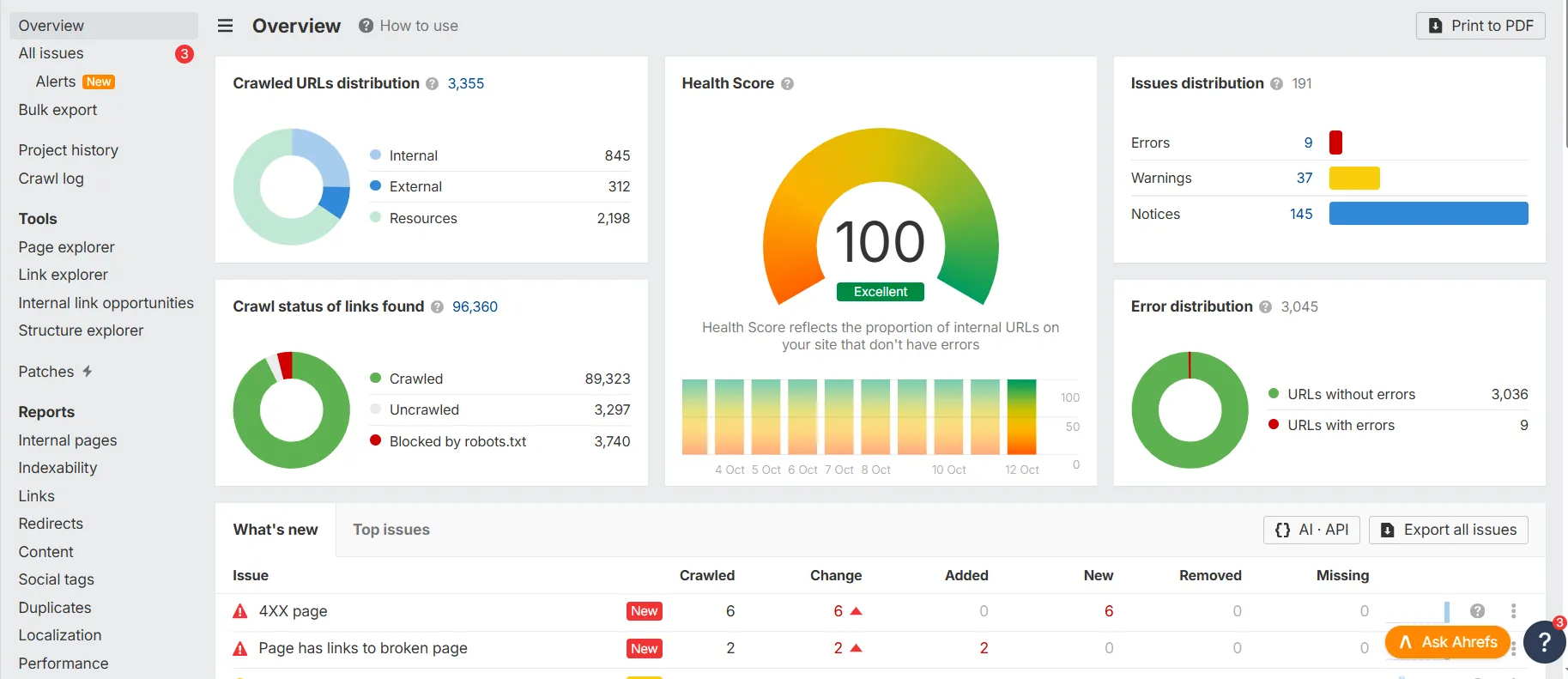
4. Semrush Site Audit: a simple start for a marketer
Semrush Site Audit has the lowest barrier to entry in this roundup. You enter a domain, choose a page limit and after a moment get a Health Score broken down into errors, warnings and notices. The tool checks more than 140 items and re-crawls the site on its own after you've implemented fixes.
It suits an in-house SEO team at a smaller company that uses Semrush for keywords and competitors. A technical SEO specialist will hit the ceiling quickly, though: there's not enough freedom in data extraction and in working on raw HTML.
5. JetOctopus: a cloud crawler with log analysis
JetOctopus is an option for large e-commerce shops and portals where the number of URLs runs into hundreds of thousands. The crawl happens on the vendor's servers, so your computer doesn't limit you, and the same dashboard accepts server logs. You can then set what is on the site against what Googlebot actually visits.
The price depends on the page limit and the log module, so with a small site you'll overpay. Alternatives in this class are Lumar (formerly DeepCrawl), Oncrawl and Botify, aimed mainly at large companies.
Crawler comparison: which one to choose?
Desktop and cloud crawlers differ in what limits the scale of a crawl. Screaming Frog and Sitebulb in their desktop versions work on your computer: you pay for a licence, and the number of URLs you can get through is set by RAM and disk space. Ahrefs, Semrush and JetOctopus crawl on the vendor's servers, so your computer doesn't matter, but the page limit depends on the subscription. In return you get recurring crawls and alerts without launching a program.
| Tool | Type | Free limit | JS rendering | Log analysis | Price (October 2026) | Best for |
|---|---|---|---|---|---|---|
| Screaming Frog SEO Spider | desktop | 500 URLs | yes, in the licence | separate program | €245 a year | SEO specialists, agencies, shops |
| Sitebulb | desktop and cloud | trial period | yes | no | from $18/month | reports for clients and the board |
| Ahrefs Site Audit | cloud | limited | yes | no | included in an Ahrefs subscription | companies with Ahrefs, ongoing monitoring |
| Semrush Site Audit | cloud | limited | yes | no | included in a Semrush subscription | marketers, small teams |
| JetOctopus | cloud | trial period | yes | yes, in the dashboard | quote based on page limit | large e-commerce and portals |
Have a shop with up to 50 thousand URLs and want to audit it yourself? Buy a Screaming Frog licence. Does someone without technical knowledge have to understand the report? Add Sitebulb. Already paying for Ahrefs or Semrush? Set up ongoing monitoring in it, and do deeper analysis with a desktop crawler. Consider JetOctopus or Lumar only for a site you can't get through on a single computer, or when log analysis is meant to be a regular part of the work.
JavaScript rendering: crawling through the eyes of Googlebot and AI bots
Shops on modern templates and apps written in React, Vue or Angular load part of their content with scripts. Descriptions, product links and sometimes even the canonical tag appear only after JS runs. A crawl of the HTML alone won't see such elements.
That's why you run two passes in an audit. The first without rendering, the second with JavaScript rendering switched on. In Screaming Frog you set this under Configuration → Spider → Rendering. The differences between the results are a list of elements that exist only on the browser side: missing internal links, empty headings, structured data added by a script.
In 2026 this test has a second meaning. Googlebot renders pages in its Web Rendering Service, but GPTBot, ClaudeBot and PerplexityBot read mainly raw HTML (study by Vercel and MERJ). Content visible only after rendering may therefore never make it into AI chat answers. A crawl without JS using an AI bot's user agent will show what from your site reaches these systems, and the robots.txt file will tell you whether you let them in at all. We write about this at more length in connection with the AI Search audit.
How to crawl an e-commerce shop without collecting junk
An online shop can generate more URLs than it has products. Every filter, sort order and tracking parameter creates a new URL. A crawler with default settings will collect tens of thousands of them, and instead of an audit you'll get a report full of duplicates that hide the real problems.
Before you click “Start”, limit the scope. Exclude sorting and pagination parameters with regular expressions, and if you only want to check categories, load a list of URLs from the sitemap instead of a full pass along the links. Set a speed to suit the server: on shared hosting, start with 2-3 requests per second. A crawl that's too fast can slow the shop down for customers, and 429 or 503 responses will distort the results.
In PrestaShop and WooCommerce, it's worth checking three places straight away. Product variants are sometimes separate URLs with no shared canonical URL. Layered (faceted) filters create indexable combinations that should have noindex or a block in robots.txt. Old categories end in a 404 error or a redirect chain after changes to the range, while menu links still point to them. A crawler will show all three in a single report if you set its scope correctly.
Crawler in practice: logs, GSC, Core Web Vitals and migration
Server log analysis
A crawl tells you what is on the site. Server logs tell you what of it Google's robot has visited. Every Googlebot request is stored in a file with the date, URL and response code. From log analysis you learn which sections the bot visits daily and which it hasn't seen for months, and whether it wastes time on URLs with parameters and old redirects. For large sites, this is the strongest evidence in the whole audit, because it shows the search engine's actual behaviour, not a simulation.
Google Search Console data
The indexing report in GSC adds Google's decisions to the crawl: which pages were rejected, treated as duplicates, or discovered but not indexed. Screaming Frog's integration with Search Console adds this information to every URL, so you see the error and its effect in one row.
Core Web Vitals and page speed
A crawler connected to PageSpeed Insights will measure LCP, INP and CLS for selected URLs, but that's lab data. Field data on users' experience is in the Core Web Vitals report in GSC.
Migration and monitoring after release
In a shop migration, a crawler is useful twice. Before the move you crawl the old domain and save the full list of URLs. After the new version goes live, you load that list in List mode and check that every old URL redirects with a 301 to the right equivalent, with no chains and without landing on the homepage. Another crawl a week later will catch what the release broke along the way.
Crawl checklist before you hand over the report
Before you pass the report on, go through this list. You can check every item in one of the tools described.
- The crawl scope excludes sorting, filter and tracking parameters.
- You have two passes: without rendering and with JavaScript rendering.
- The list of 404 and 5xx errors includes the sources of the links that lead to them.
- Redirects don't form chains or loops.
- Every indexable page has a correct canonical URL.
- H1 headings, descriptions and meta titles aren't repeated across multiple URLs.
- Robots.txt doesn't block resources needed for rendering or bots you want to let in.
- Important pages are no more than three clicks from the homepage.
- The crawl has Google Search Console data connected, so that traffic is visible next to every error.
- A crawl run with the user agent of Googlebot and of an AI bot gives the same results as the default one.
- The results are saved so you can compare them with the next crawl after fixes go live.
FAQ: common questions about SEO crawlers
Is the free version of Screaming Frog enough for an audit?
For a company site that fits within 500 URLs, yes. A shop will exceed this limit on product pages alone. The free version also doesn't render JavaScript and doesn't connect to GSC or GA4, so for a more serious audit the licence pays for itself after the first project.
How often should you crawl an online shop?
A full crawl once a month and additionally after every major change: a template update, a new filter module, a migration. Ongoing monitoring in Ahrefs or Semrush will catch sudden failures between full passes.
Can a crawler overload a server?
It can, if you send dozens of requests a second to a server on weak hosting. Set a speed limit, crawl outside peak sales hours and warn the administrator so that they don't block your IP address, taking the traffic for an attack.
Screaming Frog or Sitebulb?
Screaming Frog gives more control and is better for diagnostics. Sitebulb gets you to conclusions faster and looks better in a client report. Many agencies use both.
Which crawler to start with in 2026?
Start with the free version of Screaming Frog on a section of the site and see how many errors you find in the first hour. If the list grows quickly, buy a licence or commission a professional technical audit, in which we combine the crawl with server logs, Google Search Console data and Core Web Vitals measurements. A tool will find problems, but a shop's visibility in search depends on whether the fixes actually get implemented.