













In short
- A profile's position in local results is determined by relevance (categories, description, services), distance (a precise address, consistent NAP data) and prominence (reviews, mentions, interactions). Google doesn't publish official guidelines; the factors have been established from practice and industry tests.
- Optimisation is ongoing: a name matching the registered one with no artificial keywords, categories, a unique description, photos, services and products, regular posts and up-to-date details. Typical mistakes are an incomplete profile, no updates, ignoring reviews and duplicate profiles.
- Reviews affect rankings and customers' decisions: their number, freshness, content and the company's replies all count. You measure the results in the profile dashboard (impressions, clicks on "Call" and "Directions"), with UTM tags in Google Analytics and with tools such as Localo.
Why Is It Worth Taking Care of Your Google Business Profile?
Nowadays, having a business presence online is an absolute must. However, a website alone is not enough: a Google Business Profile, also known as Google My Business, plays a key role in local SEO. It is often the first thing a potential customer sees when searching for services or products in their area. A Google Business Profile not only increases your business's visibility in search results, but also builds trust in the eyes of customers. It contains all the most important information: opening hours, location, contact details, customer reviews, photos, and even a product range. Thanks to it, users can decide to contact a business without having to visit its website. Taking care of your Google profile is an investment that pays off many times over: it affects your position in Google Maps results, makes it easier to win new customers and improves your brand image. In this article, we will show you how to effectively rank your Google Business Profile, so you can get ahead of the competition and make the most of local SEO.
What Is a Google Business Profile (Google My Business) and How Does It Work?
A Google Business Profile, officially known as Google Business Profile (formerly Google My Business), is a free tool that lets businesses manage their presence across the Google ecosystem, in Search and on Google Maps. Through it, you can reach customers looking for products or services in your area, even if they have never heard of your brand before. The profile contains the key business details: name, address, phone number, opening hours, a link to your website, your location on the map, photos, and customer reviews. You can also publish updates, add products and services, answer user questions and monitor statistics on views and interactions. A Google Business Profile works on the basis of local search results, the so-called Local Pack: a section that appears above the organic results, containing a small map and 3 recommended businesses. This is exactly where users land when they type local queries, such as “dentist Krakow” or “coffee shop near me”. A well-optimised profile increases your chances of making it into this elite trio, which can significantly increase the number of website visits, phone calls and in-person visits.

Factors That Affect Ranking a Business Profile in Google Maps
The visibility of a Google Business Profile in local search results and in Google Maps is closely linked to several key ranking factors. Google does not publish official guidelines on exactly how business rankings are determined, but industry practice and numerous tests have made it possible to identify the elements that have the greatest impact on a profile's position. Understanding these factors is the foundation of effective local SEO. They can help you not only increase your visibility, but also attract more customers, improve conversion and build a strong reputation in your region. Remember that Google's algorithm works dynamically: it rewards active, up-to-date profiles that provide users with valuable information. Below we present the most important factors that affect a profile's position in Google Maps:
1. Relevance: Matching the User's Query
Whether your business appears in search results depends on how well its profile matches the user's intent. Relevance includes:
- Choosing the right business categories: the main one and additional ones.
- An optimised business description with keywords woven in naturally.
- Accurately marking the services and products you offer.
- Answers to frequently asked questions (FAQ) on the profile: these help match the profile better to user queries.
2. Distance: The User's Location Versus the Business Address
For local queries, Google analyses how close a given business is to the searcher's location. The closer, the better. What matters is:
- A precisely entered address and map pin.
- Defining a service area, particularly for mobile businesses or those covering larger regions.
- Consistency of address data across the web (NAP): the same information on the website, in directories and on external profiles.
3. Prominence: Reputation and Online Presence
This factor relates to a business's overall popularity and authority online. It includes, among other things:
- The number, quality and frequency of reviews left by customers.
- The business's presence in local directories, industry databases, articles or blogs.
- Mentions of the business on social media or in local news outlets.
- The frequency of user interactions with the profile: for example, clicks on the phone number, getting directions, visiting the website.
4. Reviews and Ratings: Social Proof of Trust
Positive reviews not only attract customers, they also affect a profile's ranking. What counts is:
- The number of reviews and how fresh they are: new reviews signal that a business is active.
- The average rating: Google promotes businesses with a rating above 4.0.
- The quality of reviews: longer, more detailed reviews are more valuable.
- How engaged the business is in responding to reviews: especially negative ones.
5. Profile Completeness and Activity: A Signal of Engagement and Freshness
Google rates highly the businesses that have not only filled in every section of their profile, but also use it regularly. Take care of:
- Adding posts, photos, offers and updates: activity increases visibility.
- Filling in the “Products” and “Services” sections: this not only increases completeness, but also improves the match to search queries.
- Regularly updating your data: for example, opening hours, seasonal promotions and so on.
Comprehensive Google Business Profile Optimisation
For a Google Business Profile to perform as well as possible in local search, filling in the basic information once is not enough. What's needed is comprehensive, well-thought-out optimisation that takes into account both the technical aspects of the profile and its value to the user. It is precisely the quality and completeness of the information that determines whether Google considers your business credible and worth showing. Optimising a profile is an ongoing process. The more consistent, up-to-date and active your profile is, the better results you will achieve. What's more, a well-optimised profile not only improves your position in results, it also increases conversion: it makes more users choose your business over the competition. Below you'll find the key elements you should optimise in your Google Business Profile:

1. Business Name
- It should match the name in your registration documents and other online sources.
- Don't artificially add keywords: Google may treat this as spam.
2. Business Categories
- Choose one primary category that best describes your business.
- Add additional categories if you offer a variety of services.
3. Business Description
-
Write a unique, engaging description with keywords woven in naturally.
-
Include your location and the distinctive features of your offer.
-
Don't copy content from your website: focus on authenticity.
4. Opening Hours
- Fill in your standard opening hours.
- Update them for holidays, seasonal changes or renovations.
- Add information about unusual hours (for example, emergency night services).
5. Contact Details
- Your phone number should be active and, ideally, local.
- Make sure the number and email address match those on your website.
6. Link to Your Website
- Use your site's main URL or a relevant subpage (for example, “/contact”).
- Check that the site works correctly on mobile devices.
7. Photos and Graphics
- Add high-quality photos: exterior, interior, team, products/services.
- Update the gallery regularly: Google rewards fresh visual content.
- Use file names with keywords and geotagging (where possible).
8. Products and Services
- Fill in this section in detail: describe each service separately.
- Add prices, turnaround times, photos and keywords.
Comprehensive optimisation of a Google Business Profile is not a one-off task, but a process that requires attention and commitment. Every element you complete increases your chances of a higher position in results and builds a positive user experience. A well-optimised profile not only attracts more traffic, it also convinces potential customers to choose your business specifically. The more information you provide, the more you become a trusted partner in the eyes of both Google and users.
The Role of Reviews and Ratings in Profile Ranking
Customer reviews are one of the most important elements affecting how well a Google Business Profile performs, both for SEO and for purchasing decisions. Reviews are what's known as social proof, and they can determine whether a user decides to contact your business or chooses the competition instead. What's more, Google's algorithms treat reviews as one of the main ranking factors in local search results. Reviews matter enormously for building trust. Even if your business is less well known than the competition, a sufficiently large number of reliable, positive reviews can significantly improve your visibility and convince a user to use your offer. It is therefore worth taking care not only of the quantity, but also the quality and regularity of reviews. Below we present the key aspects worth implementing in your review management strategy:

1. Encouraging Customers to Leave Reviews
- After finishing a job, ask customers for a review: in person, by email or by text message.
- You can also prepare a dedicated link to your Google profile to make it easier for them to add a review.
- However, avoid mass requests in exchange for discounts: this can be treated as artificial activity and reduce credibility.
2. Review Quality: Content Matters, Not Just Stars
- Reviews with just a rating (for example, 5★ with no text) are worth less than detailed reviews.
- Encourage customers to describe specifically what they liked: Google analyses the content for context and keywords.
- Detailed reviews mentioning service names and locations have a positive effect on matching search queries.
3. Regularity and Freshness of Reviews
- Google's algorithm pays attention to how recent reviews are: businesses with new reviews are seen as active and trustworthy.
- Plan a strategy to gain reviews systematically, for example several times a month.
- It's also worth analysing the competition: if your rivals have fresh reviews, make sure you keep up.
4. Responding to Reviews: Show That You Listen to Customers
- Every response to a review is an extra signal to Google that the business cares about its relationship with customers.
- Thank customers for positive reviews and respond politely to negative ones, trying to offer a solution.
- Responses can also include keywords and the location name, which further supports ranking.
5. Negative Reviews: How to Handle Them?
- Don't ignore criticism: respond calmly, factually and with empathy.
- Offer compensation if the situation calls for it, but avoid public arguments.
- If a review breaks the rules (it's fake or offensive), you can report it to Google.
6. Using Reviews in Other Channels
- It's also worth showcasing your Google reviews on your website, on social media or in advertising materials.
- This not only builds trust, it also supports brand consistency across every customer touchpoint.
Reviews and ratings are one of the most powerful tools in the local marketing arsenal. Managing them well translates directly into visibility, reputation and sales. Businesses that actively take care of this element gain an advantage that is hard to match with technical SEO work alone.
The Importance of Regularly Updating Content and Photos
One of the most frequently overlooked, yet remarkably effective ways to improve a profile's ranking in Google Maps is regularly updating content and adding photos. Google rewards active businesses that consistently provide users with fresh, valuable information. This works not only at the algorithm level, but also psychologically: users are more likely to trust businesses that appear “alive”, up to date and engaged. Regular activity on a profile shows that the business is operating, growing and cares about staying in touch with customers. Updates can cover many areas: from photos of the premises and products, through changes to opening hours, to publishing informational posts or seasonal promotions. Each of these actions affects the profile's credibility and visibility in search. Below we present the most important reasons why it's worth regularly updating content and photos in your profile:
1. Content Freshness Affects Ranking
- Google favours profiles that aren't static: the algorithm sees them as more current and useful to the user.
- New photos, posts and changes to information signal that the business is active and engaged.
- Regular activity keeps up “profile activity”, which is taken into account when determining ranking.
2. A Better User Experience
- Up-to-date opening hours, information about days off or promotions save customers time and frustration.
- Photos of the current decor, team or offer let people better assess a business before using its services.
- Consistency of information between the Google profile and other channels (website, social media) increases trust.
3. Increasing Conversion Through Visual Appeal
- Profiles with attractive, professional photos get more clicks and phone calls.
- Photos of food, interiors, products or finished work stir emotions and help users make a decision.
- Google lets you add different types of photos: exterior, interior, team, logo, products; it's worth filling in each of these categories.
4. Building a Competitive Advantage
- Many business owners set up a profile and then forget about it. Regular activity gives you the chance to stand out from passive competitors.
- If a user sees that a profile is updated every few days or weeks, they immediately see the business as modern and trustworthy.
5. Supporting Other SEO Activities
- Content published on the profile (for example, posts, offers) can include keywords that further support local SEO.
- Posts with a link to your website improve traffic and the time users spend on the site, both of which are also SEO factors.
Managing a Google Business Profile is not just a form you fill in once, but a dynamic process worth treating as a communication channel with your customers. The more up to date and rich in content your profile is, the greater the benefits it will bring your business, both in terms of visibility and the number of conversions.
Regularly Adding Posts: How Does It Increase Visibility?
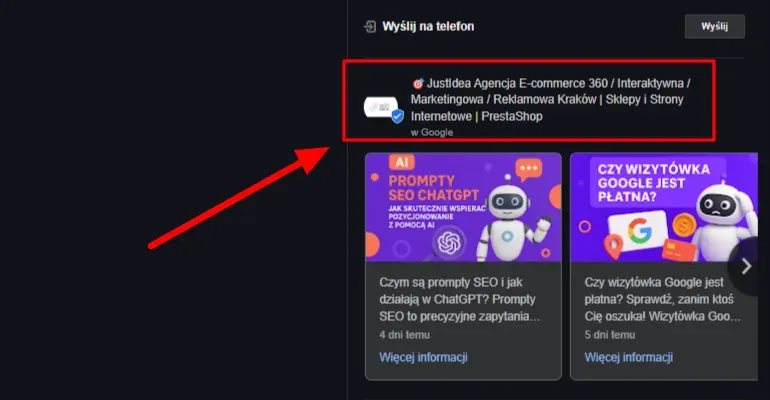
Posts on a Google Business Profile are one of the most underrated, yet effective, ways to improve a local business's visibility. Through them, you can give customers the latest information about your offer, promotions, events or organisational changes, all directly in search results. Google treats published posts as an indicator of a profile's activity and freshness, which translates into a higher position in Google Maps and search. At the same time, users are more likely to engage with businesses that share content and “live” online.
1. The Algorithm Rewards Activity
Google evaluates not only quality, but also the frequency and freshness of published content. Posts are one of the elements that let you keep your profile “active”, and that translates directly into ranking. For Google, this is a signal that the business is operating, is trustworthy and cares about its customers. It's therefore worth treating posts as part of a regular SEO strategy.
- Frequent posting is a clear signal of business activity.
- It strengthens the profile's “freshness”, which is rated positively by algorithms.
- Content from posts can appear not only on the profile, but also in search results.
2. Better User Engagement
Users expect not just dry information, but also valuable content and calls to action. Posts are a great place to make first contact and grab the attention of potential customers. Thanks to the ability to add photos and CTA (Call to Action) buttons, you can guide users straight to action, for example a purchase, a booking or getting in touch. It's a small element that can make a big difference to conversion.
- A graphic, a short message and a CTA make for an effective piece of content.
- Users can react immediately, for example by calling or checking the route.
- Businesses that post regularly are seen as professional and engaged.
3. Support for Promotional Activities
Posts work brilliantly to support promotions without having to invest in paid ads. You can instantly inform your audience about new arrivals, discounts or special events. What's more, these posts have a set duration, which creates a sense of “urgency” and can increase their effectiveness. This gives your marketing activities an extra distribution channel.
- Let people know about promotions, sales, events or new services.
- You can publish your business's achievements, for example certificates, awards, event highlights.
- It's a fast way to reach your audience without having to build entire ad campaigns.
4. Increasing Time Spent Interacting With Your Profile
The time a user spends on your profile can affect their purchasing decision, as well as how Google assesses the quality of the profile. Posts extend the time a user spends in your information ecosystem, showing them more than just contact details. It's a chance to build a relationship and convince them to choose your business specifically. Enriching your profile with visual and text content works like a mini landing page.
- Well-prepared posts grab attention and build a positive first impression.
- A user spending longer on your profile can affect UX metrics, which Google takes into account.
- You show that your business is more than just an address and a phone number.
5. Extra Space for Keywords
From an SEO perspective, every new post is a chance to include additional keywords and location terms. This helps the profile match user queries better, especially more specific ones. Content from posts can answer customers' specific questions and increase the chance that your business is the one that gets found. It's a simple but effective way to enrich your profile with contextual content.
- Use location names, service names and seasonal keywords.
- Posts can be optimised for specific phrases, for example “new PVC window collection in Krakow”.
- Combined with the right graphic, a post can act as a mini-ad in search.
In summary, regularly adding posts to your Google Business Profile is a simple way to increase visibility and user engagement at no extra cost. Treat this feature as a marketing tool that works 24/7 and supports your business exactly where customers look for it most often: in Google Search.
Adding Services and Products: Build a Complete Profile
One of the key elements of an effective Google Business Profile is its completeness. The more information you make available to users, the greater your chances that they will use your offer. The “Services” and “Products” sections in your Google profile are places where you can present your range in an organised, clear and attractive way. What's more, this data is indexed by Google, which affects the profile's visibility in response to specific queries. A well-filled-in products and services section is not only an SEO benefit, but also enormous value for the customer. People browsing a business's profile very often make their purchasing decision before even visiting the website. By showing your offer directly on your profile, you shorten this decision path and increase the chance of conversion. Below you'll find the main reasons why it's worth adding products and services to your Google Business Profile:
1. Increasing Visibility for Specific Queries
Described products and services appear in search results, even if the user doesn't know your business name. This section works like a mini-catalogue that increases the chance of matching queries containing specific phrases. It's the perfect place to include keywords and locations that match the intent of potential customers.
- Every product or service is an extra opportunity to get keywords indexed.
- Descriptions can answer questions such as “where to buy X in Krakow?”.
- Google analyses this data in the context of how relevant it is to the user's query.
2. Presenting Your Offer Directly in Google Results
This feature lets you present your offer without having to send the user to your website. This is especially important for small businesses, or those without an extensive e-commerce setup. A user can see a photo, name, price and description, which significantly speeds up the decision-making process.
- Your offer becomes instantly available and visible directly from search.
- You can add a link to buy or book.
- This increases the chance of a customer getting in touch with the business straight away.
3. Improving User Experience (UX)
An organised structure of products and services makes it easier for users to find what they're looking for. Thanks to categorisation and an attractive visual presentation, the profile gains professionalism and usability. This is an element that significantly affects how positively the brand is perceived.
- Users don't have to guess what you offer: they see everything straight away.
- A professionally prepared offer inspires greater trust.
- It also helps you stand out from the competition.
4. Greater Control Over Your Marketing Message
The “Products” and “Services” sections let you write descriptions that fully align with your communication strategy. You can highlight strengths, unique selling points, the scope of your services or promotions. This gives you space to communicate the value of your offer precisely, in a way that's consistent with your brand.
- You can write descriptions in benefit-driven language, taking your target group's needs into account.
- You have control over the hierarchy of information, from the most important to supplementary details.
- This section works like a mini sales brochure, supporting your commercial activities.
In summary, filling in the products and services section of your Google Business Profile is not optional: it's the foundation of effective local marketing. The more detailed, attractive and well-matched your offer's presentation is, the greater the chance that a potential customer will choose your business specifically.
How to Choose and Use Keywords in Your Profile?
Google Search works by matching content to user intent, and keywords are a basic element of this process. In the case of a Google Business Profile, well-chosen, well-placed keywords can significantly increase its visibility in local results. This isn't just about what a user types into the search box, it's also about how Google interprets the content of your profile and matches it to the query. Unlike a website, a profile has limited space for text, so choosing and placing keywords needs to be well thought out. It's not about stuffing in phrases, but about weaving them naturally and contextually into the content, so that they make sense to both the user and Google's algorithm. Below we show where and how to use keywords effectively in your profile:
1. Business Description
This is the main section where you can strategically place your most important phrases. It should be written naturally, but include specific information about what you do and where you operate. It's one of the first places the algorithm analyses.
- Include phrases describing your services, for example “computer repairs in Katowice”.
- Avoid repetition and an artificial style: Google recognises unnatural language.
- Combine keywords with your USP (unique selling point), for example “mobile air conditioning service available 24/7 in Warsaw”.
2. Product and Service Names
Here you have full control over the content, so it's worth using specific service names combined with a location or specialisation. This is a very effective spot from an SEO perspective.
- Instead of “Consulting”, write “Tax consulting for businesses Krakow”.
- Use names that match the real queries users type.
- Avoid generic terms: precision works in your favour.
3. Posts and Updates
Every post is extra space where you can include keywords. It's worth publishing updates using language that matches the queries of potential customers.
- Example: “New energy-efficient windows available from today, installation across the whole Silesian province”.
- Weave in local terms (district, city, street) and service names.
- Avoid overdoing it: less is more if the content is logical and useful.
4. Reviews and Responses to Them
Although you don't have full control over what customers write, you can influence the content of your responses. Google analyses these fragments for semantics and context.
- When thanking a customer for a review, you can refer to the specific service and location.
- Example: “We're glad you were happy with our washing machine repair in Ursynów”.
- Don't spam: stick to natural, human wording.
5. Categories and Tags (Where Available)
Choosing the right categories is fundamental. It's on this basis that Google “understands” what you do.
- Choose the main category that fits your core business as closely as possible.
- Add a few additional categories that don't conflict with each other.
- Avoid overdoing it: 3 to 5 categories is usually the optimal solution.
In summary, using keywords effectively in a Google Business Profile is the art of combining user language with the algorithm's requirements. The key is naturalness, locality and precision: only then will your profile not just rank well, but genuinely help customers find what they're looking for.
Local Links and Citations: How Do They Strengthen Visibility?
In local SEO, one of the key, and often underrated, elements affecting a Google Business Profile's ranking is what are known as citations and local backlinks. Even though Google increasingly relies on behavioural and quality data, consistency of business information across various external sources remains the foundation for building credibility and brand recognition online. Citations are mentions of your business that include its name, address and phone number (NAP, Name, Address, Phone), even if they aren't linked. Local links, on the other hand, are links to your site from sources connected to a given location, for example city portals, industry directories or local news sites. Both elements matter enormously for local SEO: they not only affect how Google assesses your business's authority, they also help the algorithm match your profile to geolocal queries. Below you'll find details on how to use citations and local links effectively in your SEO strategy:
1. NAP Data Consistency Across the Web
Google compares the information on your profile with data available in other sources. The greater the match, the greater the algorithm's trust in your business. Consistency means an identical format: no differences in the name, abbreviations, punctuation or phone number.
- Keep a consistent format for your data on your website, in directories, on social media and on maps.
- Regularly audit your data on external services (for example Panoramafirm, PKT, Cylex).
- If your address or number changes, update the information across all sources.
2. Presence in Local Directories and Business Databases
Registering your business in local directories is not just a source of traffic, it's also an important ranking signal. Google treats such listings as confirmation that a business genuinely operates in a given region.
- Add your business to popular local and industry directories (for example zumi.pl, pkt.pl, firmy.net).
- Make sure the listing includes complete details, your business category, a description and a link to your site.
- Use directories connected to your industry, not just general ones.
3. Building Local Backlinks
Links from locally focused sites are very valuable to Google, especially when they come from trusted sources. Their presence confirms that a business is active in a given community and has authority.
- Build relationships with local bloggers, media and events, and ask for a link.
- Sponsor local initiatives and ask for a mention with a link on their site.
- Exchange links with businesses in complementary industries (for example a hairdresser and a beautician).
4. Increasing the Number of Citations From Different Sources
The more sources mention your business, the better, even if they don't include a link. Google analyses patterns of brand presence online as part of building recognition.
- Add your business to maps, topical portals and service aggregators.
- Encourage customers to write reviews on platforms other than Google too (for example Facebook, Oferteo).
- Remember that quality matters: avoid spammy directories and link generators.
In summary, citations and local links are the pillars of local SEO that support ranking your Google Business Profile, while also building your business's credibility and authority online. Using them well can be exactly what gives you an edge over local competitors.
The Most Common Mistakes in Managing a Google Business Profile
A Google Business Profile is a powerful marketing tool, provided it's managed properly. Unfortunately, many businesses make mistakes that limit its effectiveness, and sometimes even harm their position in search results. Worse still, some of these mistakes are hard to spot at first glance and can go unnoticed for a long time. Poorly structured information, a lack of updates, inadequate review management or skipping important profile features: these are just a few examples of actions that can reduce trust with both users and Google's algorithm. That's why it's so important to regularly audit your profile and avoid the most common traps that can undo the results of even the best-planned local SEO strategy. Below we present the most commonly made mistakes in managing a Google Business Profile, along with brief tips on how to avoid them:
1. An Incomplete Profile
Missing basic information significantly limits a profile's effectiveness. A customer who can't find key details may decide not to get in touch.
- Skipping categories, descriptions, opening hours or an address weakens the profile's relevance.
- An incomplete profile looks unprofessional and can arouse distrust.
- Fill in every available field, even ones that seem less important.
2. Not Updating Your Data
Contact details, opening hours and your offer must always match reality. Outdated information is one of the main causes of customer frustration.
- Changing your working hours? Update it in your profile straight away.
- An outdated phone number can cost you dozens of lost customers.
- Use the “special hours” feature, for example over the holiday period.
3. Ignoring the Reviews Section
Businesses that don't respond to reviews (especially negative ones) lose users' trust. Not reacting can be read as a lack of engagement.
- Always respond to reviews, both positive and negative.
- In your responses, you can work in keywords and your location name.
- Be professional: every response is a public showcase for your brand.
4. No Photos or Low-Quality Graphics
A profile with no photos looks abandoned. Poor-quality photos, on the other hand, can put off potential customers.
- Add professional photos of the interior, exterior, team and offer.
- Update the gallery regularly: fresh content is rewarded by Google.
- Avoid stock images: focus on authenticity.
5. No Activity: No Posts or Updates
Google rewards activity. A lack of posts signals that a business doesn't care for its profile, or may no longer be operating.
- Plan a posting schedule, for example once or twice a week.
- Use posts for promotion, education and updates.
- Treat your profile as a local communication channel with customers.
6. Choosing the Wrong Business Categories
The wrong categories mean your profile may not appear in results for the right queries. This is one of the most common technical mistakes.
- Check which categories the top 3 competitors use.
- Choose a precise main category and the most relevant possible additional categories.
- Avoid categories that are too general or inconsistent.
7. Duplicate Profiles
Sometimes a business accidentally creates several profiles: this not only confuses customers, it also scatters traffic and can cause ranking problems.
- Regularly check whether other profiles of your business appear on Google Maps.
- Ask Google Support to remove or merge duplicates.
- Make sure your data is unique: name, address, NIP (Polish tax identification number).
In summary, avoiding these basic mistakes is the first step towards effective profile ranking. Regular checks and active profile management not only help improve your position in search, they also help build a strong, credible image for your business online.
Tools That Support Ranking Your Profile
Ranking a Google Business Profile can seem time-consuming, especially if you're running a business with limited resources. Fortunately, there are many tools, both free and paid, that support the process of optimisation, monitoring and profile management. They let you automate many actions, analyse effectiveness and react to changes faster. Choosing the right tools not only increases the efficiency of your SEO efforts, it also gives you better insight into user and competitor behaviour. Used properly, they can become your everyday support in building a strong local presence in Google Maps and search. Below we present the most effective tools to help you manage and rank your profile:
1. Google Business Profile (Management Dashboard)
This is the basic tool where you manage your profile. It lets you edit your details, publish posts, respond to reviews and monitor basic statistics.
- Check regularly whether Google has suggested any changes (for example editing your hours).
- Analyse your data: number of views, clicks, user actions.
- Set a schedule for updating content and publishing posts.
2. Google Search Console
Although it doesn't relate directly to your profile, Search Console shows which phrases bring users to your site, which can help you optimise the description and posts on your business profile.
- Analyse queries related to your location and services.
- Check which subpages get clicked and how that affects visibility.
- Monitor indexing issues on the website linked to your profile.
3. Google Analytics
Combined with your profile, it lets you track conversions: clicks from your profile to your site, phone enquiries or requests for directions. This makes it easier to assess the effectiveness of your local activities.
- Track where users come to your site from: Maps, organic results, direct traffic.
- Measure the effectiveness of specific posts or changes to your profile.
- Work out which actions generate real business value.
4. Localo
A Polish local SEO analysis tool that, among other things, lets you track your profile's position based on the user's location and compare it with the competition.
- Check your visibility on Google Maps from different points across the city.
- Analyse keywords and get optimisation recommendations.
- Track position changes after making changes to your profile.
5. Whitespark / BrightLocal
Foreign tools that specialise in managing citations (NAP) and monitoring reviews. Ideal for building data consistency across different directories.
- Automate adding your business data to local directories.
- Monitor the appearance of new reviews and mentions.
- Make it easier to track local competitors.
6. ReviewTrackers / Podium
Review management tools, ideal for businesses receiving lots of reviews. They let you manage customer feedback centrally and respond to reviews from multiple platforms.
- Let you collect reviews via text message or email.
- Notify you about new reviews and analyse their sentiment.
- Help build brand reputation through active review management.
In summary, using the right tools lets you take control of every aspect of your profile: from contact details, through content, to reviews and analytics. It's not just a time saver, it's also a chance for much better results with less effort.
How to Measure the Results of Ranking Your Profile?
Ranking a Google Business Profile is a process whose effectiveness can (and should) be monitored. Otherwise, it's hard to tell which actions are working and which need adjusting. Fortunately, Google offers a range of tools and metrics that let you assess whether your profile is doing its job: grabbing attention, generating traffic and driving conversions. Analysing data helps you better understand customer behaviour, optimise content, identify the most profitable traffic sources and make more informed marketing decisions. Monitoring results is also a way to stay ahead of the competition: businesses that react quickly to changes build a stronger position in local search results. Below we describe the key metrics and ways to measure how effective your Google Business Profile is:
1. Statistics in Google Business Profile
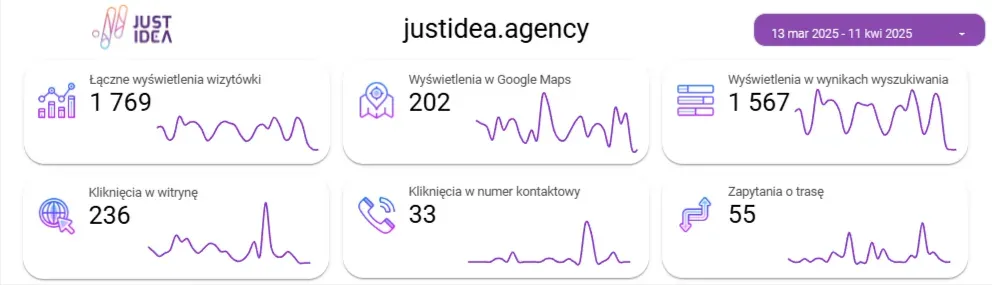
Basic data available directly in your profile management dashboard. It shows how users interact with your profile.
- Number of views: how many times your profile appeared in results.
- Number of clicks: how many people clicked “Call”, “Directions” or “Visit website”.
- Search types: whether the user searched for your specific business name, a category or a location.
2. Setting Up UTM Tags and Tracking in Google Analytics
With special UTM tags, you can track traffic from your profile in Google Analytics. It's a way to precisely measure how many users visit your site from the “Google Maps” or “Google My Business” source.
- Create dedicated links with tags (for example utm_source=gmb).
- Track conversions attributed to your profile, for example form enquiries, orders.
- Compare your profile's effectiveness with other channels (SEO, social media, advertising).
3. Tracking Calls and Direction Requests
In the Google dashboard, you can check how many people clicked the “Call” and “Directions” buttons. This data is extremely important, especially for brick-and-mortar and service businesses.
- Regularly compare these numbers month on month.
- If your business is seasonal, analyse the data year on year.
- Treat growth in interactions as the main indicator of your profile's effectiveness.
4. Monitoring Reviews and Their Impact on Visibility
Positive reviews affect not just your reputation, but also your profile's position in Google Maps. By analysing their number and quality, you can track how your reputation-building activities affect SEO.
- Track the rate at which reviews grow: gaining them systematically is better than a one-off spike.
- Analyse review content for keywords and locations.
- Make sure your response rate stays at 100%.
5. External Tools for Analysing Position and Competitors
Apps such as Localo, BrightLocal or Whitespark let you monitor your profile's position on Google Maps from different locations. This lets you know how visible your business is to customers in different parts of the city.
- Check your position for your most important keywords.
- Compare your visibility with direct competitors.
- Track changes after adding new content, posts or reviews.
In summary, measuring the results of ranking your profile isn't optional, it's essential. The data you can gather and interpret is invaluable for optimising your local SEO strategy. With regular analysis, you know what's working, what's worth improving and how to develop your profile effectively.
Take Care of Your Local Visibility
A Google Business Profile is more than just a listing: it's a local channel for sales, communication and building trust. A well-optimised profile can attract customers 24 hours a day, 7 days a week, even when you aren't running any ad campaign. As we've shown in this article, effective profile ranking is the sum of many small actions: from filling in contact details, through gathering reviews, to publishing posts and analysing results. Remember that local SEO is a process: it requires consistency, analysis and regular updates. Creating a profile and forgetting about it isn't enough. Those who treat their Google Business Profile as a strategic marketing tool gain a real competitive edge. Don't leave it to chance. If you want your Google Business Profile to be visible, professional and deliver measurable business results, get in touch with us. The JustIdea team will help you plan and implement an effective local SEO strategy, tailored to your industry and goals.
See Also:
- Google Business Profile Audit: What to Look For?
- How to Remove Negative Reviews from Google?
- Google Business Profile Ranking
- Google Review Link: How to Generate One? A Guide
- Have Your Google Reviews Disappeared? Here's How to Get Them Back!
FAQ: Frequently Asked Questions About Ranking a Google Business Profile
Can I Have Several Google Business Profiles for One Business?
You can have several profiles if your business has branches in different locations. However, each one must have its own physical address and serve customers on site. Duplicating profiles for the same location is prohibited and can result in Google removing the profiles.
How Long Does It Take Before a Profile Starts Appearing in Results?
A newly created profile can appear in results after just a few days, but you usually have to wait several weeks or months for stable, high rankings. This is influenced by the profile's activity, the number of reviews, local competition and content optimisation.
Can a Google Business Profile Be Suspended?
Yes. Google can suspend a profile if it breaks the rules, for example by containing false information, spammy content, suspicious links or unauthorised locations. It's worth regularly checking your profile's status and following the platform's guidelines.
Does a Google Business Profile Only Work Locally?
A profile works best in a local context, but it can also appear for general queries if a user is searching for services outside their own location. However, the algorithm will always favour businesses closest to the person searching, so being local remains key.
Can I Promote My Google Business Profile in Google Ads?
Yes, you can integrate your profile with a Google Ads campaign as what's known as a location extension. This lets your ad appear together with your address, a link to the map and your contact details, which significantly increases conversion in local campaigns.
How Do I Regain Access to a Google Business Profile If I Don't Have the Login Details?
You can start the access recovery process through Google's form by clicking “Manage this profile” and selecting “Request access”. If the current owner doesn't respond within 7 days, Google will allow you to take over the profile after identity verification.
Is It Worth Outsourcing Profile Management to an SEO Agency?
Definitely, especially if you lack the time or knowledge of Google's algorithms. A professional agency, like JustIdea, will take care of continuous optimisation, data analysis, review management and content strategy, which will genuinely translate into visibility and customers.