













In short
- A Google review can be removed only if it breaks the rules: it is fake, spam, a conflict of interest or prohibited content. A genuine negative review will not be removed just because the business disagrees with what it says.
- You report a violation from search, Google Maps or the Business Profile panel, after securing evidence. A review usually takes a few days, and after a refusal you get one appeal, in which you can include up to 10 reviews.
- Google prohibits offering a discount, money or a service in exchange for changing or removing a review, and you should not pay anyone who demands money. Genuine criticism is best handled with a substantive reply and contact outside Google.
Negative reviews on your Google Business Profile (formerly Google My Business) can significantly affect your brand's reputation, often deciding whether a prospective customer chooses to use your services.
Reviews are visible in both Google Maps and search results, so an unfavourable comment, especially a fake one, one posted by a competitor, or one that breaks Google's rules, can become a real reputational problem.
Can you remove a negative review from Google
Yes, if it violates Google's policies: for example, it's fake, counts as spam, stems from a conflict of interest, or contains prohibited content. However, you can't remove a genuine negative review yourself just because you disagree with it.
How to respond to a negative review on Google
The first step after receiving a negative review is to stay calm and quickly assess its nature. Before you take any action, work out what kind of review you're dealing with:
- A genuine review (a real customer): if the comment describes a real, if negative, experience, don't try to force its removal. The best strategy is to keep your emotions in check, respond in a factual manner, and try to resolve the problem outside the Google panel.
- A dishonest review (spam, a competitor, bots): if the entry is fake, contains profanity, or comes from someone who was never your customer, don't get drawn into a discussion. Instead, refer the matter straight to Google for verification.
How to check who wrote a review on your Google listing
Because of its privacy policy, Google doesn't provide direct tools for identifying who wrote a review. However, you can try contacting the reviewer by replying to their comment or through their user profile (if it's public). Users are often open to further communication, which gives you a chance to better understand their experience and the frustration that may have led to their negative rating.
To find out who left a review on your Google listing and get more information about that person, you can try going to the reviewer's Google profile (if it's public):
- Sign in to your Google account: make sure you're signed in to the account you use to manage your listing.
- Open your listing: search for your business on Google and click its name to open your Google Business Profile.
- Go to the reviews section: it's usually right below the basic business information, such as the address and opening hours.
- See all reviews: click “See all reviews” or a similar option to display the full list of reviews.
- Select the review you're interested in: browse the list and pick the review whose author you want to check.
- Click the username: every review is signed with the user's name or handle. Click it to go to that user's Google profile.
- Browse the Google profile: clicking it takes you to the user's Google profile, where you can check their publicly available information and activity.
- Check the user's activity: if the user is active on Google, you'll see more details about their activity, such as the number of reviews, photos, or places they've rated. If you notice the user has no reviews, or very few, and most of them are negative, this could point to unfair competition. A profile like this can be verified faster by Google's staff if you report it as spam.
Many user profiles now hide their full rating history and location. If an account was created purely to attack a business (a so-called ghost account or bot), you usually won't see any earlier reviews on it.
When to report a negative review
You can report a negative review when you see a specific breach of the platform's policy. Don't pick a reason for the report at random: match it to the actual problem.
Pay particularly close attention to:
- spam;
- impersonation;
- fake engagement;
- rating manipulation;
- conflicts of interest;
- content unrelated to the business;
- harassment or hate speech;
- content that breaks the law.
If you want to report a negative review on Google, first save a copy of its content and check which part of the policy best matches the situation.
Which reviews violate Google's policies
According to Google's guidelines, reviews should reflect real experiences related to a specific place or business.
Among other things, Google prohibits:
- reviews not based on a genuine experience;
- content published in exchange for money or other benefits;
- manipulating the average rating;
- entries arising from a conflict of interest;
- reviews from competitors published to harm another business;
- repeated spam;
- impersonation;
- offensive and hateful content;
- certain personal data;
- material unrelated to the location in question.
This applies to both standard comments and reviews on Google Maps.
Don't offer a discount, money, a free service, or any other benefit in exchange for changing or removing a negative review either. This kind of behaviour can also be treated as rating manipulation.
How to report a review on Google (Business Profile, Maps, Search)
Regardless of which part of the web you're using, a request to remove a comment goes to the same Google verification system. You can report a review in three ways: choose whichever is most convenient for you.
Before you start, make sure you're signed in to the Google account linked to managing your business listing.
Method 1: Reporting from Google Search (the fastest method)
This is currently the simplest way to manage reviews directly from the search results (the so-called New Merchant Experience).
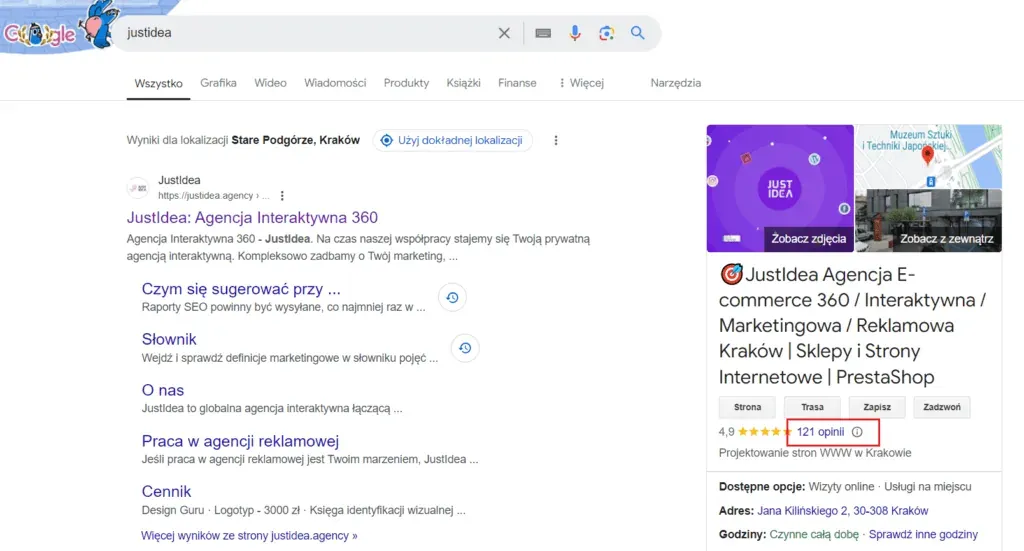
- Type your business's exact name into Google Search, or search for “my business”.
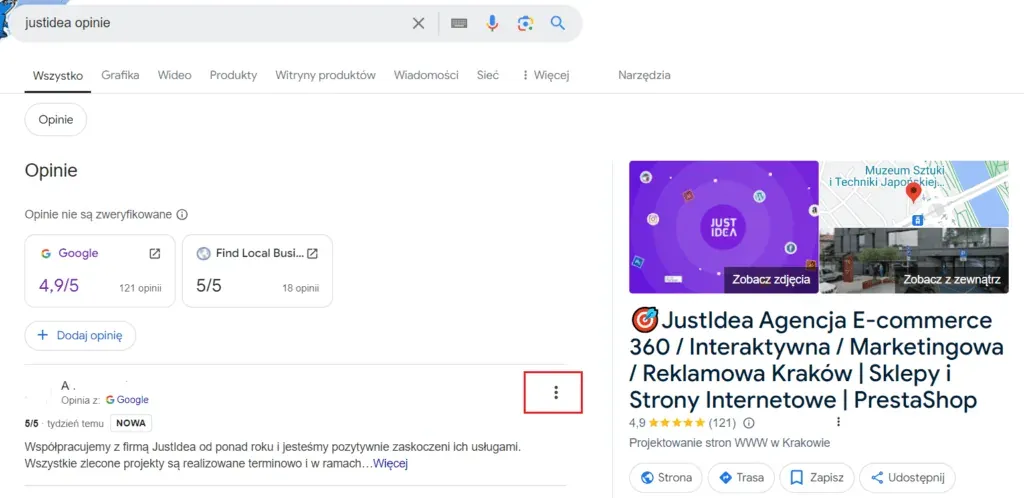
- In the management panel that appears above the search results, click Show reviews (or go to the reviews section in the listing on the right).
- Find the negative comment, click the three-dot icon next to it, and select Report a policy violation.
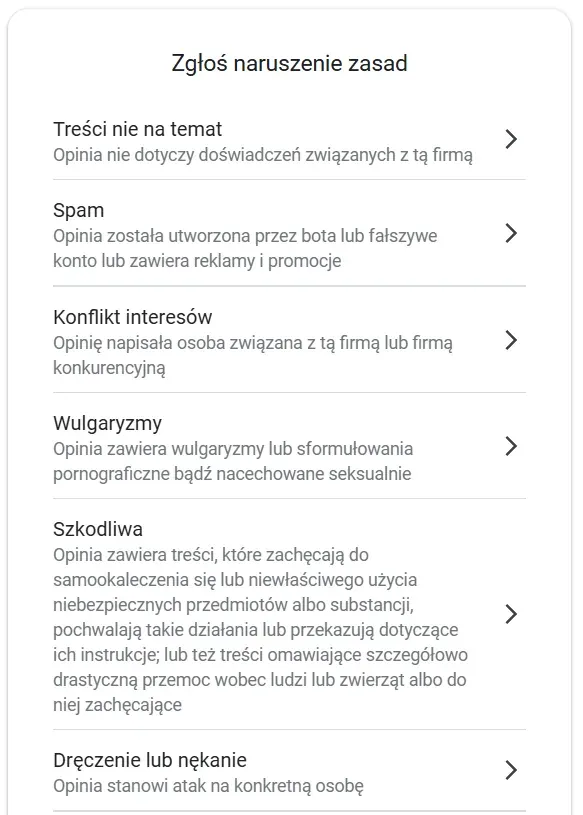
- Indicate the violation category (e.g. Spam, Conflict of interest, Offensive content) and confirm the report.
Method 2: Reporting via Google Maps (mobile app and desktop)
The ideal route when you're using the phone app or browsing Maps on a computer.
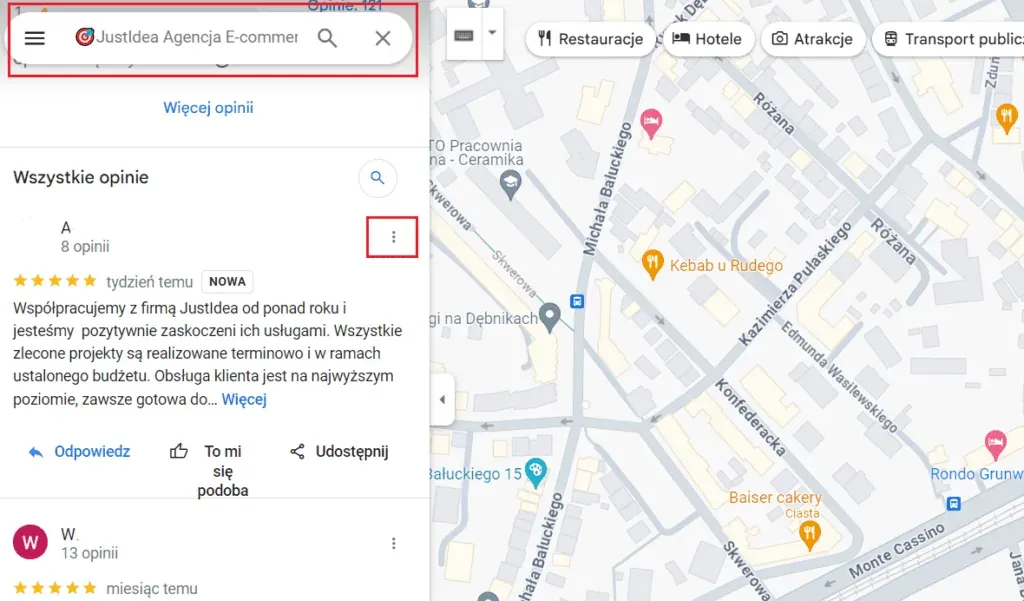
- Open Google Maps and search for the Business Profile.
- Go to the Reviews tab and find the comment that breaks the rules.
- Click the three dots in the top-right corner of that review's card.
- Select Report review, choose the reason for the content policy violation from the list, and submit the report.
Method 3: Reporting through the Business Profile manager panel
If you manage multiple locations or prefer a dedicated admin panel:
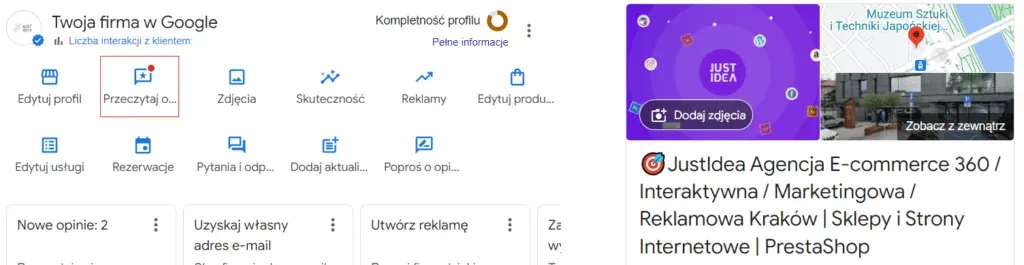
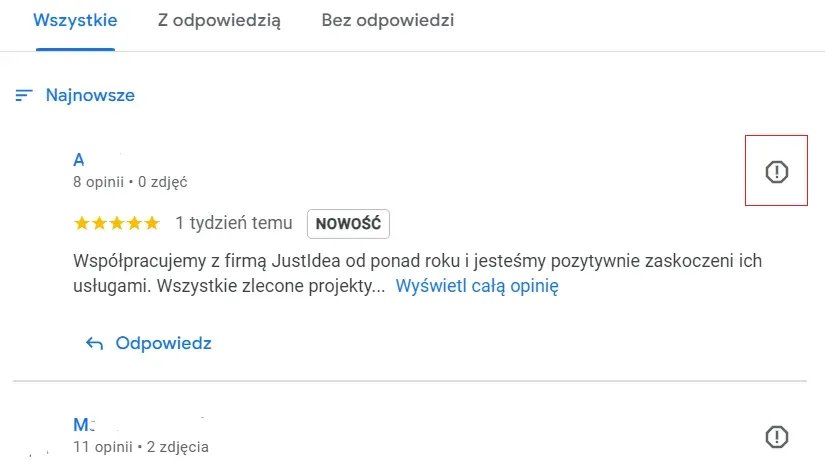
- Sign in to your manager account in Google Business Profile.
- From the menu on the left (or from the list of listings), select the Reviews section.
- Next to the review you want, click the three dots ➔ Report a policy violation.
- Choose the right reason from the list and submit the form.
Fake Google reviews: how to spot them and remove them effectively
Fake reviews are one of the most common problems business owners face. They're usually published in a moment of anger, as an unfair attack by a competitor, or as a result of automated bots. Understanding how to tell a dishonest entry apart from genuine criticism is the first step towards removing it effectively.
How to spot a fake review
Before you submit a report to Google, analyse the situation carefully. Examining the circumstances in which the comment was left will help you choose the right justification in line with Google's policies on the report form.
- No transaction history: the author doesn't appear in your CRM system, order database, or booking register.
- Factual inconsistencies: the description mentions details about services or products that were never part of your offer.
- Abnormal author profile: the user's account has no other ratings, or only extremely negative reviews were published within a short period.
- Anonymity or a string of characters: the username is a random string of letters or an obvious pseudonym.
Remember: the mere absence of a customer from your CRM database isn't conclusive proof for Google (the customer could have used the service under a different name or in someone else's company). You need to demonstrate a specific breach of the guidelines.
How to report a fake review step by step
- Secure evidence: take screenshots of the review, and note its publication date and a link to the author's profile.
- Analyse the reason for the report: selecting the “Misleading/false content” or “Spam” category usually gets the best results for fake accounts.
- Submit a request for verification: use the options icon next to the review in your Business Profile or on Google Maps.
- Prepare arguments for an appeal: if your first report is rejected, present evidence (e.g. work schedules, a list of services offered, screenshots showing no connection to the reviewer) using the official appeals panel (the Review Appeal Tool).
How to report a review from a former employee
A former employee may have a conflict of interest with your business. Google lists current and former employees as examples of such connections.
If you recognise the author:
- take a screenshot of the review;
- note the publication date;
- keep documentation confirming the earlier professional relationship;
- report the entry;
- keep the material in case you need to appeal.
Don't publicly disclose HR information just to “prove to customers” that the author was an employee.
How to report a review from a competitor
If you have reason to believe a comment comes from a competitor, check whether you can demonstrate that connection.
Google prohibits publishing content about a competing business in order to undermine its reputation.
Prepare:
- a screenshot of the comment itself;
- the publication date;
- public information pointing to a connection between the author and a competing business;
- links to the author's profile;
- information about similar entries.
However, don't call every bad review a “competitor attack”. Without evidence, that claim is just speculation.
Can you remove a one-star rating with no comment
A one-star rating with no text at all can be especially frustrating, since it's hard to work out what it was about.
A low rating alone, however, doesn't mean there's been a violation.
If a user genuinely had contact with your business, they can leave one star without a comment. Reporting it makes more sense when additional circumstances come into play, for example many ratings in a very short time, a conflict of interest, or other signs of profile manipulation.
How to deal with negative reviews during review bombing
Review bombing is a situation where a wave of negative ratings appears on a profile in a short space of time. Sometimes it's the result of a real event, but it can also be an attempt to manipulate a business's rating.
Google notes that an excessive number of reviews, or an unusual pattern in how they're published, can indicate rating manipulation.
If you notice a sudden attack:
- take screenshots of all the suspicious entries;
- note the times and dates;
- collect links to the authors' profiles;
- compare the content of the comments;
- check whether the users are describing real experiences;
- document how quickly successive entries appeared on the profile;
- keep all the documentation in case you need to appeal.
Not every wave of negative reviews is review bombing: if many people genuinely had contact with the business in connection with the same event, their comments may be authentic.
How to report the profile of someone posting fake reviews
If the problem isn't limited to a single entry and the user regularly posts suspicious content, you can also report the author's entire profile.
This is particularly useful when the account:
- publishes many similar comments;
- posts spam;
- engages in impersonation;
- takes part in a larger campaign against businesses;
- repeatedly violates the content policy.
This doesn't automatically mean all of the user's entries will be removed. Google assesses the reported activity on its own.
How to check the status of a reported review
After submitting a report, you don't have to guess what's happening with the case. Google lets you check the status of a review you've already reported. Google's official help resources state that the assessment usually takes a few days.
You can see whether the case is still being reviewed or whether Google has already made a decision.
In older guides, you might find advice to follow up 4 days after reporting a review. Don't treat four days as a guaranteed deadline, though. Google's current materials use the phrase “a few days”.
The status also lets you find out whether the case ended with the review being removed or the report being refused.
How to appeal a Google decision
If Google decides that the reported comment doesn't violate its policies, check whether you can appeal.
Google allows a one-time appeal against a decision on a reported review, if the case qualifies for one.
So don't keep sending the same report over and over. Instead:
- check the decision on your report;
- go to the available appeal option;
- select the correct entry;
- clearly describe which rule it breaks;
- provide additional context;
- add any available material that supports your position.
A good appeal shouldn't be based on emotion. A statement like “this review is a lie” is worth less than specifically pointing out a conflict of interest, a transaction that never happened, or a pattern of organised attack.
You can only submit an appeal once for an eligible review, so gather all the relevant information and evidence before sending it. If the problem affects a larger number of entries, Google lets you select up to 10 eligible reviews when submitting an appeal.
What evidence to prepare for an appeal
If your first report was rejected, prepare material that will help provide context.
Depending on the situation, gather:
- screenshots;
- publication dates;
- a link to the review;
- a link to the author's public profile;
- your contact history with the customer;
- order documentation;
- information showing that the described service never took place;
- documents confirming a former employee's relationship with the business;
- public information indicating a connection between the author and a competitor;
- screenshots of other reviews that form a common pattern;
- messages related to any possible extortion attempt.
If you give Google evidence of a rule violation, you'll give the person reviewing the case more context than a simple claim that the review is fake.
If, on the other hand, you provide Google with evidence of a legal violation, the case will follow a different path than a standard content policy report.
Reporting a legal violation (the legal route)
If a negative review goes beyond a simple rule violation and amounts to defamation or an infringement of your company's personal rights, a standard report in the panel may not be enough. In such cases, the matter is handled by Google's legal team. You need to submit a request through the official Google Legal Removal Requests form.
Need help with your Google Business Profile
If you have several problematic reviews, aren't sure whether they qualify for reporting, or want to improve your whole profile, we can help you with that.
As part of our GMB / Business Profile support, we can analyse:
- problematic reviews on your profile;
- how you respond to reviews;
- your local visibility;
- how complete your listing is;
- activities that help you gather genuine comments;
- elements that affect how customers perceive your brand.
This way, you're not just focused on a single review, but building a profile that supports customer acquisition in the long run.
Check out our Google Business Profile management service
When to use Google's support
If you've already used the standard report and the available appeal, and the problem persists, you can look for further help through official channels.
If you have previous experience with Google My Business support, keep in mind that the service now operates as Google Business Profile.
In certain cases, the next step may require contacting Google support, but before reaching out, prepare a link to your profile, your business address, a link to the review, and any materials related to the case.
What to do if someone demands money to remove a review
A particular case is an attack combined with a demand for money, goods, or a service in exchange for deleting negative entries.
Google has a separate procedure for this kind of extortion and recommends that you don't pay the person responsible and secure evidence straight away.
Keep:
- screenshots of the messages;
- the phone number;
- the email address;
- the perpetrator's profile details;
- links to the entries;
- the date the attack started;
- the date you received the demand.
Don't try to buy your peace of mind. Paying doesn't guarantee the comments will disappear, and it may encourage the perpetrator to try again.
Why a discount for removing a review is a bad idea
Don't offer a customer a discount, a free product, or any other benefit in exchange for changing or deleting a review.
Google explicitly prohibits offering money, discounts, free products, or services in exchange for publishing, changing, or removing a negative entry.
You can solve the customer's problem and later ask them to reassess the situation, but don't make compensation conditional on whether they change their review.
What to do if a review can't be removed
Not every request to remove a review will succeed. If the comment is genuine and complies with the policies, change your strategy instead of fighting Google endlessly.
You then have several options:
- reply to the comment;
- explain the situation;
- offer the customer direct contact;
- fix the actual problem;
- draw lessons for your customer service;
- regularly monitor new reviews;
- encourage genuine customers to share their experiences.
Resolving the problem outside Google's system like this can sometimes lead the customer to change or delete the comment themselves.
At the same time, build a broader picture of your brand. Earning positive reviews from genuine customers means a single critical entry doesn't define your whole profile.
Should you reply to negative reviews on your Google business profile
As we mentioned at the start of this article, replying to negative reviews is an important part of managing your online reputation. It's worth responding to them in a factual, professional way that shows your business cares about its customers and is open to constructive criticism. A reply can also be a chance to clear up misunderstandings and present your services in a positive light. Don't ignore negative reviews, since a lack of response can be read as a lack of care for the customer.
Below are a few proven ways to respond to an unfavourable review on behalf of your business:
- Thank the customer for their review: start by thanking the customer for taking the time to share their opinion. This shows that you value their feedback and are open to suggestions.
- “Thank you for sharing your feedback.”
- “We appreciate you taking the time to write this review.”
- Apologise for the negative experience: express your regret over the customer's negative experience.
- “We're sorry to hear we didn't meet your expectations.”
- “We apologise for any inconvenience you experienced.”
- Offer a solution or explain the situation: if possible, explain what might have happened and propose a way to resolve the problem.
- “We'd like to learn more about this situation and find a way to resolve it.”
- “Please contact us directly so we can discuss this and find a satisfactory solution.”
- Highlight your commitment to improvement: show that you care about improving the quality of your services.
- “We value our customers' feedback and are constantly working to improve our services.”
- “We're committed to providing better service and doing everything we can to avoid similar situations in the future.”
Template 1: A genuine customer (justified or partly fair criticism)
Hello [Customer's name], thank you for sharing your feedback. We're sorry that the quality of our service didn't meet your expectations regarding [name of the issue, e.g. turnaround time]. A high standard of service matters to us, so we've already reviewed this situation with our team to prevent similar incidents in the future. Please get in touch directly at [email address] or [phone number]: we'd like to discuss the details and propose a satisfactory solution. Best regards, The [Company Name] Team
Template 2: Suspected fake review (no customer in the CRM database / fake review)
Hello, we take every review very seriously; however, after carefully reviewing our customer database and service records, we couldn't find any transaction linked to your profile. If this was a mistake, please contact us directly at [email address] and provide your order details so we can verify the matter. If we don't hear from you, we'll treat this entry as false and report it to Google for verification. Best regards, [Company Name]
Template 3: An emotional entry with no detail (just a high/low rating or a vague comment)
Hello [Customer's name], thank you for taking the time to leave a rating. We're committed to constantly improving the quality of our services, so we'd be grateful if you could share more detail about your experience. Please send us a message at [email address] so we can understand what went wrong and how we can put it right. Kind regards, [Company Name]
If I delete my Google My Business profile, do I get rid of negative reviews
Deleting your Google Business Profile won't automatically remove negative reviews. Google reviews can still be visible in other parts of search, so it's important to try reporting and removing them in line with the rules first. Deleting your profile should be a last resort, and you should consider all the consequences this could have for your business.
How to protect your business's image by removing reviews from Google
We hope this article has helped you understand why reporting inappropriate reviews is one part of building a positive image for your business online. Regularly monitoring and responding to negative comments helps maintain your business's good reputation and e-PR.
It's also worth actively encouraging satisfied customers to leave positive reviews. Caring about the quality of your services and staying open to feedback are key elements in building customer trust and loyalty.
These steps will help you manage your Google reviews effectively, minimise the negative impact of unfavourable reviews, and build a strong, positive reputation for your business online.
FAQ: Google reviews and removing a negative Google review
How long does removing a review take
Google states that verifying a report usually takes a few days. There's no guaranteed deadline for resolving a specific case.
Can a genuine negative review be removed
Yes, if, despite reflecting a genuine experience, it contains an element that breaks the rules. Genuine criticism alone, however, doesn't qualify for removal just because it's unfavourable to the business.
Can a one-star rating with no comment be removed
A low rating alone isn't enough. You need additional grounds, such as a conflict of interest or a broader pattern of manipulation.
Can a former employee leave a review for a business
Google identifies former employees as an example of a potential conflict of interest, so a review like this may qualify for reporting.
What to do after Google refuses a report
Check the decision, prepare additional context, and use the available one-time appeal if the review qualifies for it.
Can you report a user's entire profile
Yes, if the problem involves the account's broader activity rather than a single review.
Do mass reports help
The sheer number of reports doesn't turn a compliant review into a prohibited one. Pointing out an actual violation matters far more.
Can you pay a customer to change their comment
No. Google prohibits offering benefits in exchange for publishing, changing, or removing a negative review.
What to do if the comment comes from another site
Check the source of the review and the rules of the site it came from. Depending on the source, reporting it may require contacting that platform directly.
What to do if you're getting both good and bad comments
Don't try to remove every piece of criticism. Analyse the feedback, solve real problems, and consistently build up positive Google reviews through good service and natural requests for reviews.
Check out also: