













That's why SEO KPIs shouldn't be a collection of everything that can be measured. They should form a hierarchy. At the top is the business result, below it the indicators that signal a change in it, and further down the diagnostic data needed mainly when something stops working.
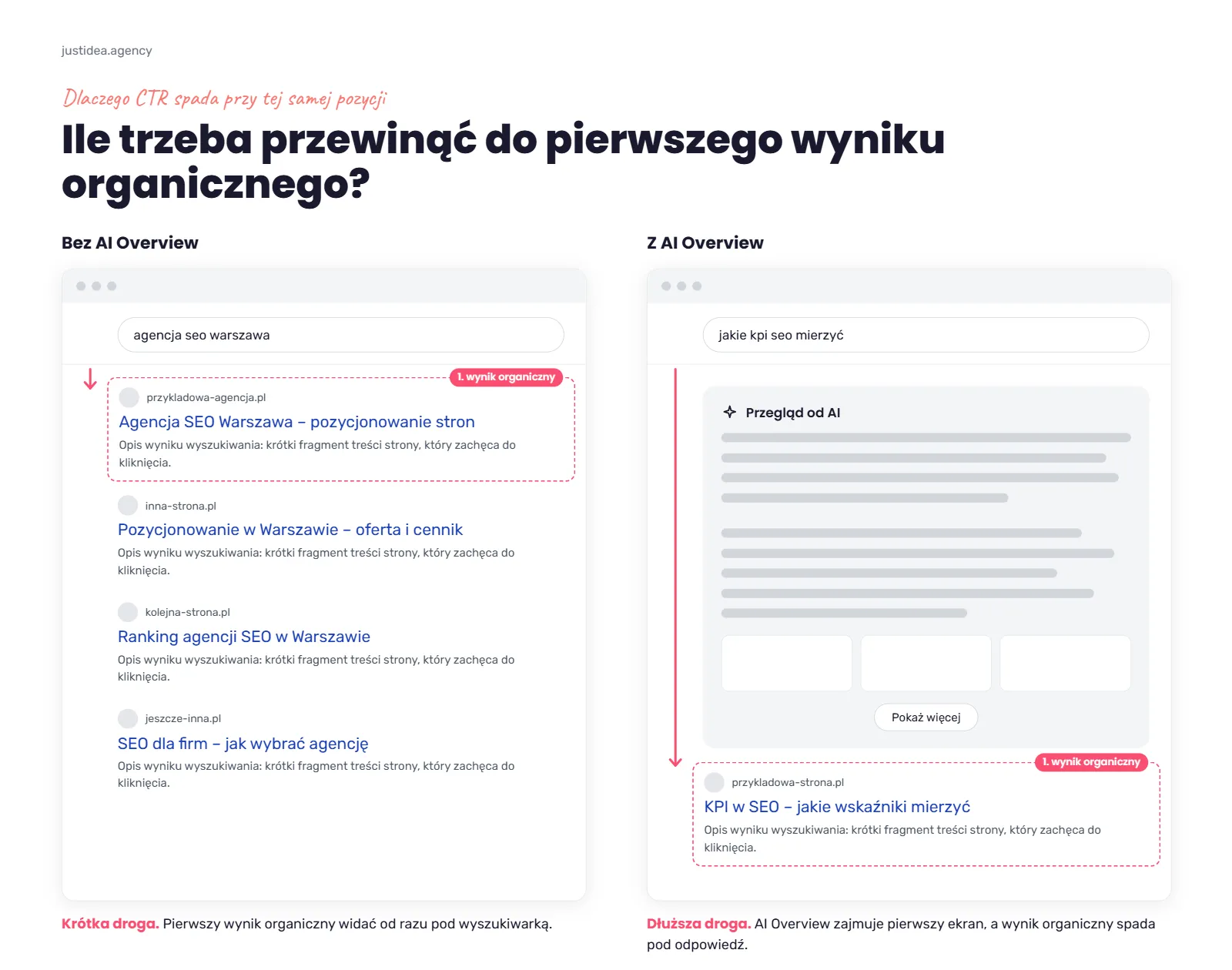
On top of that, search itself has changed over the last dozen or so months: AI Overviews and AI Mode mean that the same position in Google no longer has to bring as many clicks as before.
In short
| If you're checking… | Look first at… |
|---|---|
| the business result | revenue, transactions, leads, lead quality, acquisition cost, ROI |
| SEO growth | non-brand clicks, visibility of commercial keywords, traffic to offer pages and categories |
| changes in Google | CTR, AI Overviews, visibility in generative features |
| technical problems | indexing, Core Web Vitals, technical errors |
| report quality | conclusions, causes of changes, work done and the plan for the next period |
Metric vs KPI: why they're not the same thing
A metric describes a phenomenon. A KPI tells you whether you're achieving a specific goal. The number of organic sessions, clicks or keywords in the top 10 is not a KPI in itself. It becomes one only when it is tied to a business goal, a target value and the period in which the result is to be achieved.
If a report says the site gained 18% more sessions from organic results, that's a change in a metric. You still don't know whether the growth matters for the business. Traffic may have grown on guide articles that don't generate enquiries, while service pages stand still.
A KPI looks different: “increase the number of qualified leads from non-brand organic traffic by 20% year on year”. You know what you're measuring, why, and what you'll judge the result against.
A good KPI should therefore answer three questions: what should change, by how much and by when. The SMART principle is useful precisely for keeping things this specific. A few indicators directly tied to the company's results are enough.
The SEO KPI pyramid: 4 levels of indicators
The most important SEO KPIs are the ones closest to money or a valuable conversion. Visibility, positions and clicks explain how the result comes about, but they don't replace revenue, transactions or leads. A report is easier to read when you arrange the indicators in four levels: hold to account, monitor, diagnose, and don't judge out of context.
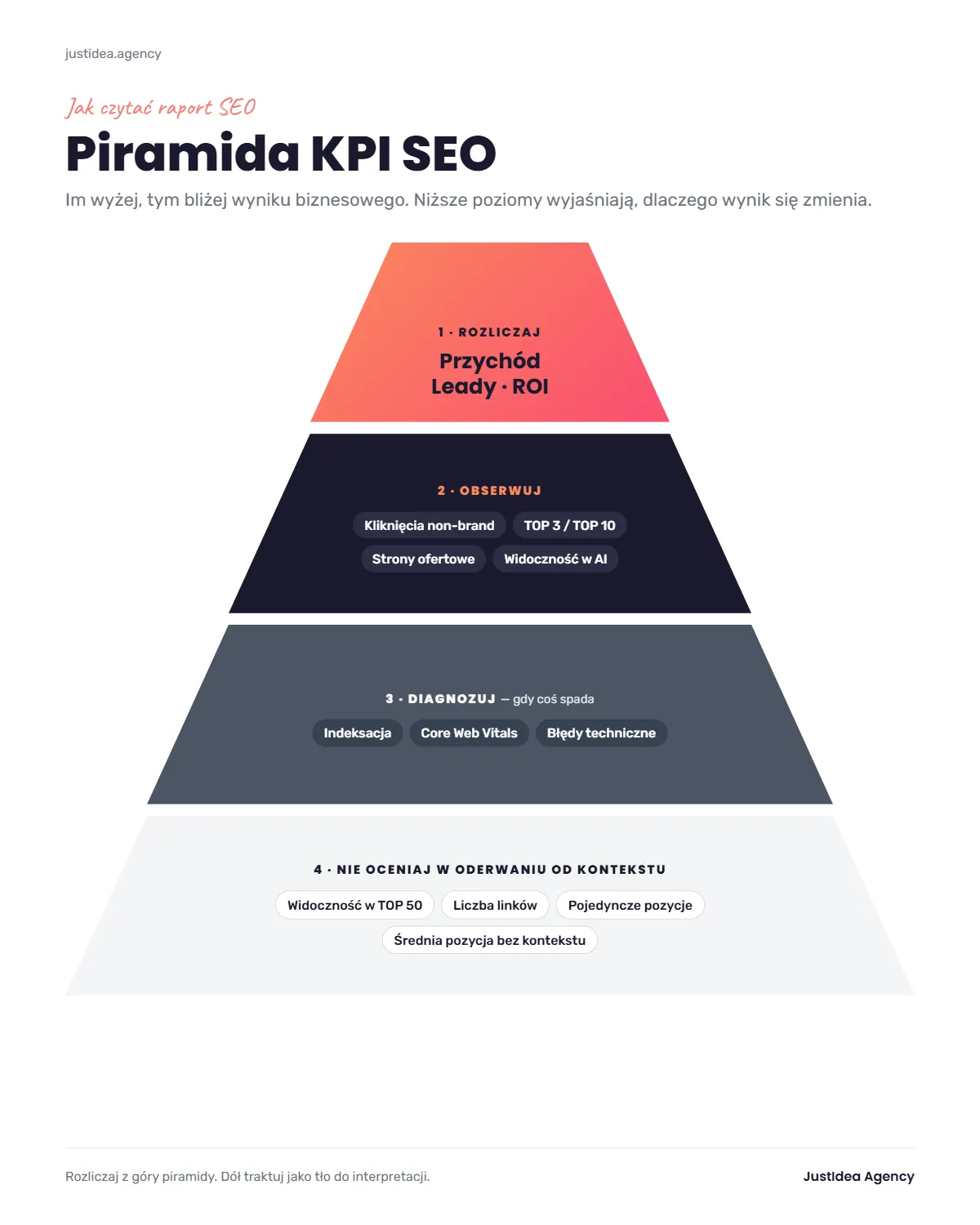
Level 1: Hold to account (business KPIs)
In e-commerce, these will mainly be revenue and the number of transactions attributed to organic traffic. In a lead-based business, the number of forms alone is not enough. If you can connect marketing data with your CRM, the report should also show the quality of contacts. Ten enquiries from companies that match your customer profile are worth more than fifty random forms.
This group also includes the cost of acquiring a customer from SEO and ROI. When calculating ROI, include the full cost of the work: the agency retainer, content, link building, development work and any other resources spent on SEO.
ROI = (profit from organic traffic - SEO cost) / SEO cost × 100%
Level 2: Monitor (leading KPIs)
The business effect appears later than the first signs of improvement. So also keep an eye on the second layer of the report.
What matters most is clicks from non-brand queries, top 3 and top 10 visibility for keywords tied to your offer, traffic to product categories and service pages, and changes in branded searches.
The split between brand and non-brand is particularly important. If clicks are growing because more people type the company name after a TV campaign, a conference or a paid campaign, don't credit all of the growth to SEO.
In 2026, visibility in Google's generative features and other AI environments joins this layer. It doesn't replace business results, but it shows how the way a brand is exposed in search is changing.
Level 3: Diagnose (technical data)
The number of indexed URLs, crawling problems, Core Web Vitals, technical errors and the link profile help you find the cause of a change. They shouldn't replace the business goal, though.
If sales from organic traffic are growing, you don't need to spend the meeting discussing that the number of valid URLs in one of the technical reports changed by 4%. If sales and clicks start to fall, begin the diagnosis with the technical data.
Level 4: Don't judge without context (vanity metrics)
“We have 300 new keywords in the top 50” sounds impressive, but you don't know whether any of them has a chance of bringing in a customer. The same goes for the sheer number of links, the positions of a few hand-picked keywords or the average position of the whole domain.
Google calculates average position from the positions recorded at impressions. It's an indicator averaged across thousands of queries, so it can rise even when important keywords fall.
Be just as careful with time on page or bounce rate as main SEO KPIs. In GA4, bounce rate is the inverse of engagement rate, and an engaged session has its own definition: by default it lasts more than 10 seconds, includes a key event or has at least two page or screen views.
Which SEO KPIs to choose for your business
The same set of KPIs doesn't suit an online shop, a B2B company and a content site. The right indicator follows from the business model. First establish which action has value for your company, then identify the behaviours that lead to it, and only then choose the data source.
| Business type | Outcome KPIs | Leading KPIs | Main data sources |
|---|---|---|---|
| e-commerce | organic revenue, transactions, margin, acquisition cost | non-brand clicks to categories and products, top 3/top 10 for commercial keywords | GA4, shop system, CRM, GSC |
| B2B lead generation | number of MQLs/SQLs, pipeline value, cost per lead | non-brand clicks, traffic to services and case studies | CRM, GA4, GSC |
| local services | calls, forms, booked appointments | local visibility, visits to offer pages, queries with local intent | CRM, GA4, GSC, Google Business Profile |
| content site | revenue from traffic, subscriptions, sign-ups | non-brand clicks, topical reach, returning users | GA4, GSC, subscription system |
If you run a shop, don't stop the analysis at revenue. Data on margin, returns and cancelled orders, if you have it, gives a fuller picture.
In B2B, the most important thing is connecting SEO with your CRM. High-quality traffic doesn't have to generate hundreds of leads. It has to generate contacts that move on to the next sales stages.
When to expect changes in individual KPIs
SEO doesn't improve all indicators at once. First you see the work implemented and the search engine's reaction, then changes in exposure and clicks, and last the business effect. That's why you should judge a report from the first months differently from a report after a year of developing the domain.
In the first 0-3 months, the emphasis usually falls on diagnosis, technical implementations, tidying up indexing, a keyword map and the first changes in non-brand impressions. If the site has a lot of technical debt, this stage takes up a large part of the work.
Between 3 and 6 months, clicks, new entries into the top 10 and traffic growth on URLs directly tied to the offer gain importance. With a well-developed domain, some changes will appear earlier; with a new site and strong competition, later.
Between months 6 and 12, conversions, enquiries and revenue should carry more and more weight. These ranges are a framework for judging the stage of the project, not a promise of results or an SLA. Market competitiveness, the starting state of the site, the domain's history and the pace of implementation on your side change the order and pace of effects.
What changed in SEO measurement in 2025 and 2026
Visibility is no longer a simple equivalent of traffic. AI Overviews and AI Mode have changed the results page, in September 2025 the picture in part of the Search Console data changed, and in 2026 Google added separate reporting of visibility in generative AI features. So when reading a report, you need new reference points.
AI Overviews reduce clicks at the same visibility
AI Overviews have been available in Poland since March 2025, and AI Mode since October 2025. For queries where an AI answer appears, the CTR of organic results falls noticeably, even if the position doesn't change. We described this in detail in our post on how Google AI Overview changes SEO.
If positions stay similar while CTR falls, don't assume straight away that SEO has stopped working. First check what the results page looks like and whether elements have appeared on it that answer the query without a click through to a site.
September 2025 changed how some GSC data should be interpreted
In mid-September 2025, industry analyses recorded sharp drops in impressions and changes in average positions in Search Console after support for the &num=100 parameter was withdrawn. Data from the analysed sites indicated that some of the earlier impressions were linked to tools and crawlers automatically fetching extended results.
Don't read an impressions chart that spans the period before and after mid-September 2025 as one continuous series. In a good report, this date should carry an annotation.
Search Console now shows visibility in generative AI
In June 2026, Google launched new reports on a site's visibility in generative AI features. At first the feature reached only some sites, but according to Google's update, from 31 August 2026 it has been rolled out to all sites worldwide. The report shows, among other things, impressions, pages, countries, devices and changes over time. It doesn't include a separate clicks metric for this view.
This is an important change. Visibility in AI is no longer an indicator reconstructed solely with external tools.
GA4 has a separate channel for traffic from AI assistants
On 13 May 2026, Google Analytics introduced the AI Assistant channel. Recognised traffic from tools such as ChatGPT, Gemini or Claude gets the medium ai-assistant and appears in a separate channel of the default channel group.
So don't lump organic traffic, AI traffic and branded searches into one bucket. Each of these signals describes a different part of the journey.
What an SEO report should contain and how to read it in 15 minutes
A good SEO report contains a summary with conclusions, a month-on-month (MoM) and year-on-year (YoY) comparison, the business result from organic traffic, Search Console data split into brand and non-brand, changes on the most important pages, a list of work done with URLs and a plan for the next month.
Elements of a good report:
- summary: 3-5 sentences on what changed and why
- period and baseline: MoM and YoY comparison, with annotations on Google updates and measurement changes
- business result: revenue, transactions or leads from organic traffic
- Search Console data: clicks, impressions and CTR, separately for brand and non-brand queries
- visibility of commercial keywords: top 3 and top 10 for keywords tied to the offer
- pages and keyword groups: what grew, what fell and why
- AI visibility: the generative AI report in Search Console and the AI Assistant channel in GA4
- technical state: only the changes that affect the result
- work done: specific URLs and the scope of changes
- plan: 2-3 priorities for the next month with reasoning
- data sources: which tools and for what period
Reports are most often built in Looker Studio (formerly Google Data Studio). It's a free Google tool that combines data from Search Console, GA4 and other sources in an automatically updated dashboard. The dashboard is only half of a report, though: without commentary, conclusions and a plan, all you have is a set of charts.
Once you know what should be in a report, read it from result to cause. First check what changed in the business. Then look for data that explains the change, then the work done, and finally the plan. If you have to dig through dozens of slides before the first conclusion appears, the report isn't doing its job.
| Order | What to check | What to ask |
|---|---|---|
| 1 | key conclusions | what exactly changed this month and why? |
| 2 | comparison period | are MoM and YoY shown, and is seasonality taken into account? |
| 3 | business result | what happened to revenue, transactions or leads from organic traffic? |
| 4 | GSC | how did brand and non-brand clicks and impressions change? |
| 5 | URLs and keyword groups | which areas of the site account for the growth or the drop? |
| 6 | work done | which specific URLs and elements were changed? |
| 7 | next month | what are the three top priorities and what problem does each solve? |
Typical situations in an SEO report and what they really mean
A single chart is rarely enough for a diagnosis. The same symptom has several possible causes, which is why a report should combine data from different sources. What matters most is not just “what changed” but “why it changed and what decision follows”.
| Situation | What to check | What to ask the agency |
|---|---|---|
| positions stable, clicks falling | CTR, AI Overview, SERP changes, seasonality | has the look of the results changed for the most important queries? |
| impressions falling since September 2025 | effect of the &num=100 change, keywords, URLs |
does the report take the change in measurement into account? |
| traffic growing, conversions flat | landing pages, intent, brand/non-brand | which pages generated the extra traffic, and do they matter for sales? |
| growth comes mainly from brand | brand vs non-brand queries | what is happening with the keywords of people who don't yet know the brand? |
| traffic falling, leads stable | traffic quality, offer pages | did the lost traffic have any business value at all? |
| GSC shows growth, GA4 doesn't | tool definitions, consents, tracking, landing pages | is there a problem with analytics, or is it a normal difference between systems? |
In the last case, checking the implementation is especially important. If you don't trust the data in GA4, comparing successive reports won't solve anything. First sort out your measurement.
What a good and a weak SEO report slide look like
A good report slide answers three questions: what changed, why, and what will be done next. A weak one shows a number with no point of reference. A chart is a tool for presenting a decision, not decoration or proof of effectiveness in itself.
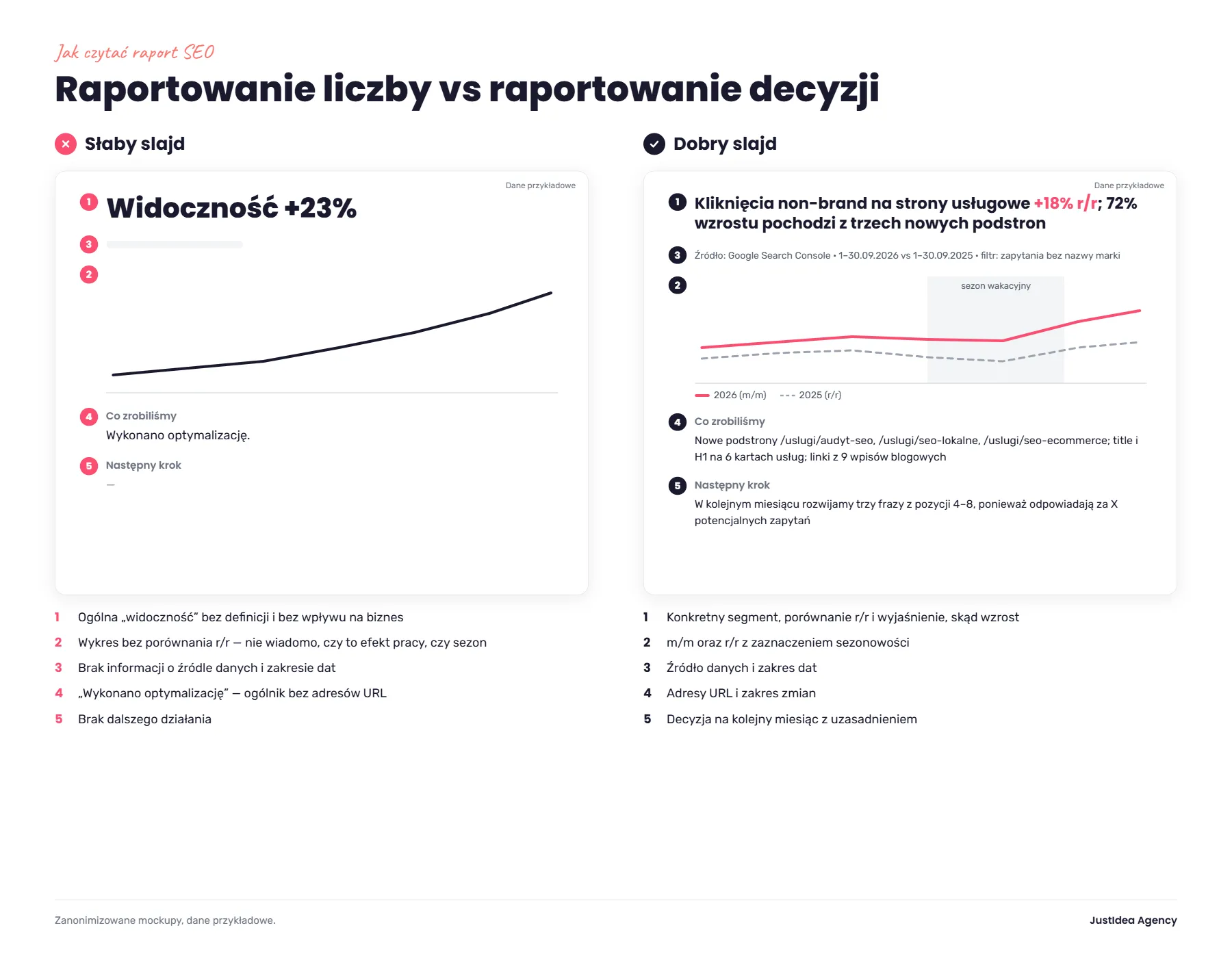
- Weak: “Visibility +23%”. Good: a specific segment, a YoY comparison and an explanation of where the growth came from, e.g. “Non-brand clicks to service pages +18% YoY; 72% of the growth comes from three new pages”.
- Weak: a chart with no comparison. Good: a MoM and YoY chart with seasonality marked.
- Weak: no information on the data source. Good: data source and date range, e.g. “Google Search Console, 1-30 September 2026 vs 1-30 September 2025”.
- Weak: “optimisation carried out”. Good: URLs and the scope of changes, that is, what exactly was done and where.
- Weak: no further action. Good: a decision with reasoning, e.g. “Next month we'll develop three keywords from positions 4-8, because they have the biggest query potential”.
Red flags in SEO reports
A red flag doesn't automatically mean bad SEO work. It means the report doesn't give enough data to judge that work. The more such signals appear at once, the harder it is to check what you're paying for and how the work relates to the result.
| Red flag | Why it's a problem |
|---|---|
| you have no access to GSC and GA4 | you can't check the numbers yourself |
| the report shows almost only positions | a position doesn't tell you whether traffic or sales resulted |
| no brand/non-brand split | growth in brand awareness can be wrongly credited to SEO |
| “visibility” with no definition of the tool | different platforms calculate it differently |
| a list of new links with no quality assessment | the number of links alone says nothing about their value |
| an identical comment every month | the report doesn't explain current changes |
| “page optimisation” with no URLs | you can't check the scope of the work done |
| selectively shown keywords | a few green positions don't describe the whole domain |
| no plan for the next month | the data doesn't lead to action |
| promises of a specific top 1 | an agency doesn't control Google's algorithm |
If the problem isn't just the report but also not being sure what is happening technically with your site, start with an independent SEO audit.
10 questions worth asking your agency about the SEO report
A conversation about the report doesn't have to be grilling the specialist on every number. The point is that you and the agency see the same goal, compare the same data and plan the next month based on the previous one.
- Which three KPIs best show SEO's impact on my business today?
- What share of the growth comes from brand queries and what share from non-brand?
- Which pages account for the biggest growth and the biggest drop?
- Is the change in traffic down to positions, CTR, seasonality or changes in how Google looks?
- How do AI Overviews and AI Mode affect the queries that matter most to me?
- What exactly was done this month, and on which URLs?
- Which actions from last month brought a measurable effect?
- Where do the data from GSC, GA4 and the rank tracker diverge, and why?
- Which three actions have the highest priority for next month?
- What would have to happen for the current SEO strategy to change?
How we report SEO at JustIdea
Reporting makes sense to us when you can check every number in your own tools and link our work to the result. At JustIdea, we base the report on traffic, queries and revenue from the organic channel, and treat position as a means to that result.
We set up Google Search Console and GA4 accounts under your company's details, and they stay with you after the collaboration ends. A report shouldn't be the only place where you see your data.
If you want to compare your current way of reporting with an approach based on queries and sales, see what our SEO service looks like.
FAQ: SEO KPIs and agency reports
What are the most important KPIs in SEO?
The most important are KPIs directly tied to the company's goal: revenue and transactions in e-commerce, or valuable leads in service businesses and B2B. Clicks, visibility and positions mainly serve to explain where the result comes from and where a problem appears.
How often should an agency send an SEO report?
A monthly report is the standard for ongoing collaboration. That doesn't mean every metric has to be judged month on month. In seasonal businesses, a year-on-year comparison is often more valuable, supplemented by the current trend and commentary on the work done.
What should an SEO report contain?
A report should answer three questions: what changed, why, and what we're doing next. In practice, that means the business result from organic traffic, Search Console data split into brand and non-brand, changes on key pages, a list of work with URLs and a plan for the next month, always with the data source and period.
Why do the data in Google Search Console and GA4 differ?
Because the two tools measure different stages. Search Console shows impressions and clicks in Google results. GA4 records behaviour after the visit and works according to its own rules for measuring sessions, users, consents and traffic sources. A discrepancy is not in itself a sign of error.
Why hasn't my position changed but traffic has fallen?
Check CTR and what the results page looks like. AI Overviews, other SERP elements, seasonal changes and user behaviour can limit the number of clicks despite a stable position.
Does a rise in visibility in Senuto (a Polish SEO tool) mean SEO is working?
It's a positive signal only if keywords and pages that matter to the business are growing. A rise in hundreds of informational queries or in top 50 positions doesn't replace growth in clicks, conversions and revenue.
How long until SEO results show up in a report?
The first signals usually concern implementations, indexing and visibility. Clicks and traffic come later, and the business result needs even more time. At the start of a project, judge different KPIs than after several or a dozen or so months.
Are you entitled to access to your site's GSC and GA4?
Yes. The accounts should belong to your company, and the data must not be available only through a PDF prepared by the contractor.
How do I measure a site's visibility in AI?
For Google, the starting point is the generative AI report in Search Console, which has been rolled out globally since 31 August 2026. It shows mainly impressions and the pages appearing in generative features of Search and Discover. You can analyse traffic from recognised AI assistants in parallel in GA4, in the AI Assistant channel. If you also want to measure visibility in ChatGPT, Perplexity or Gemini, you need external tools. We compared them in our ranking of tools for measuring AI visibility.
An SEO report should lead to decisions, not to looking at charts
You don't need to know every SEO indicator to judge an agency report. It's enough to keep to the right order.
Business result first. Then clicks, visibility and the behaviour of the most important areas of the site. Then the diagnostic data that explains deviations. Last, the work done and a specific decision for the next month.
If a report stops at the number of keywords, a visibility chart and a few green arrows, it shows only a fragment of the picture. If it combines data from Search Console, GA4 and the business, separates brand from non-brand, takes AI-related changes into account and explains what the data means, it becomes a tool for managing your SEO investment.
Want to check whether your current SEO report answers the right questions? See how we run website SEO or start with an SEO audit.