













In short
- Google Discover is a personalised, mainly mobile feed with no typed query: Google suggests content based on the user's activity, search history and behaviour in Google services. Traffic can be spiky: it may appear suddenly and disappear just as fast.
- Your chances go up with a clear topical profile, a credible source, a title with an honest promise and no clickbait, a large, distinctive image and content written for people. Stuffing in keywords is not enough, and nothing guarantees that you will appear in the feed.
- You check results in Google Search Console, in a separate report that becomes available once you reach a certain level of impressions, analysing topic clusters rather than individual articles only. Discover is an additional layer of distribution, not the foundation of a strategy.
Google Discover is a channel that can bring a big jump in visibility to your site, but it works differently from a classic search engine. Here, the user doesn't type a query, doesn't pick a keyword and isn't looking for a specific answer. Google itself suggests content matched to their interests, activity and context. If you run a website, a company blog, a portal or a shop with guide-style content, it's worth understanding Discover, because it can become an important source of traffic outside standard SEO. In this article, we explain what Google Discover is, which content has a chance of appearing there, and how to write to increase your chances of showing up in the feed.
What is Google Discover?
Google Discover is a personalised content feed shown to users mainly on mobile devices. Unlike a classic search engine, it doesn't work by answering a specific query. The user doesn't type a phrase, they simply browse content Google judges to be potentially interesting based on their activity, search history, behaviour across Google services and topics that have caught their attention before.
Put simply, Google Discover shows content before the user actively starts looking for it themselves. That could be a how-to article, a news piece, an analysis, lifestyle content, a review, an expert piece, or content linked to the user's interests.
For publishers, bloggers and businesses, Google Discover is a chance to reach an audience earlier than in the classic search process. A user may not know your brand, may not be looking for a product yet, and may have no clearly defined need, but they might still click on content if the topic matches their interests.
That doesn't mean Google Discover is a simple channel for "padding out" your traffic, though. It's a highly volatile environment, dependent on personalisation, content quality, visual appeal, source authority and users' current interests. Traffic from Discover can appear suddenly, and disappear just as quickly.
How does the Google Discover algorithm work?
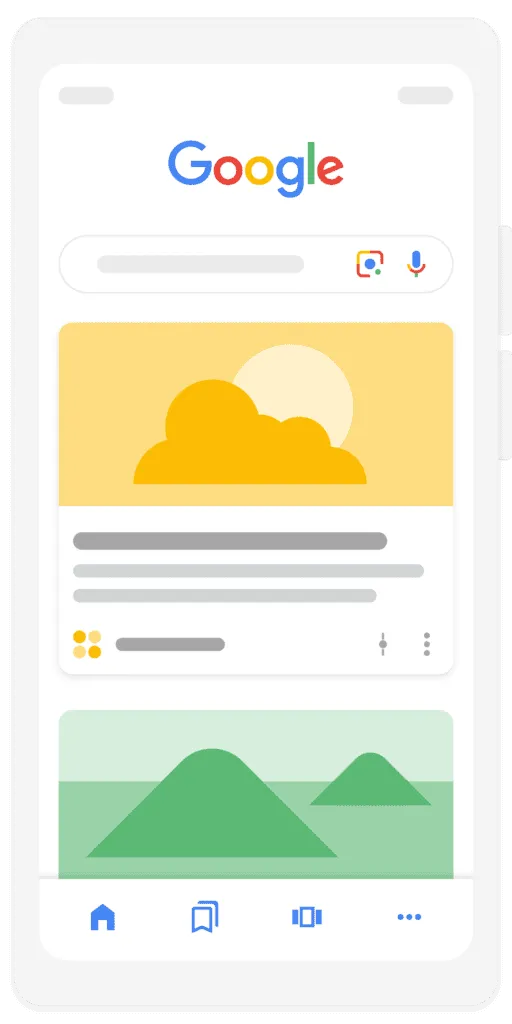
The Google Discover algorithm works differently from the algorithm behind classic search results. In Search, the starting point is the user's query. In Discover, the starting point is the user's interest profile and a prediction of what content might be valuable to them at that moment. That means the same piece of content might show up for one person but not another, even if both use the same language and are in the same country.
Google Discover analyses many signals related to user activity. What matters includes what they've searched for, which topics they've browsed, which content they've interacted with, which sources they've ignored, which items they've hidden, and which areas of interest keep coming up regularly. Based on this, the system tries to predict what might interest the user before they even type a query into the search engine.
Personalisation based on user behaviour
Personalisation is the foundation of Google Discover. The feed isn't the same for everyone. A user interested in finance might see more market analysis, someone who follows sport will get content about teams and events, and someone who often watches cooking content might get recipes, restaurant reviews or nutrition guides.
In practice, Discover builds a picture of interests based on activity across the Google ecosystem. This can include searches, pages visited, content watched on YouTube, interactions with content within Discover itself, and topics the user follows or hides. If a user regularly returns to a particular topic area, Google may suggest similar content to them more often.
For creators and publishers, this means one thing: optimising for a keyword alone isn't enough. Content has to genuinely match your audience's interests. The more consistently a site publishes valuable material in a given area, the easier it builds topical recognition. Discover doesn't reward randomness. Consistent quality and a clear topical profile for your site matter a great deal.
A different logic from classic SEO
In classic SEO, keywords, search intent, page structure, internal linking, structured data and matching content to the query all matter a great deal. In Google Discover, these elements can still help, but they aren't the core of the whole process. There's no keyword for the user to type here, so Discover doesn't need to match a result to a specific phrase.
This changes how you should think about creating content. An article doesn't need to start with the question "which keyword do we want to rank for?". It's better to start with: "is this topic interesting to our audience, and can we present it in an attractive, concrete and credible way?". Discover favours content that matches the user's interests, has strong context and is presented in a way that encourages a click.
Quality signals and source authority
Google Discover actively suggests content to users, so the quality and credibility of the source matter a great deal. If the system is going to "push" an article to someone who wasn't looking for it, it needs a reason to consider it valuable. That's why signals related to the author's experience, expertise, the site's authority and trust in the published material are all important.
In practice, this means specific, authentic content that's well grounded in its topic performs better. An article written by someone who knows the industry, shares their own observations, explains the context and doesn't use a misleading headline is worth more than a generic text. This matters especially in topics related to health, finance, law, safety and other areas where incorrect information could genuinely harm the user.
Authority isn't built with a single article. It's built through consistently publishing good content, transparent authorship, up-to-date information, a clear editorial policy, and avoiding headlines that promise more than the text actually delivers. Discover can bring a lot of traffic, but it also quickly exposes the weaknesses of content written purely for clicks.
What kind of content makes it into Google Discover?
Google Discover can feature many different types of content, but not every publication has the same chance. Material that combines an attractive topic, good visual presentation and clear value for the user works best. Discover is a feed, so it works much like many other scroll-based products. Users make their decision quickly. They see the image, the title and the source first, and only then decide whether to click.
News content does well in Google Discover, but it's not the only type. News stories have a natural advantage because they respond to users' current interests. If a topic is fresh, widely discussed, or closely tied to a particular community, it has greater distribution potential. Being timely isn't enough on its own, though, if the text just repeats information with no context, adds nothing new, or relies purely on sensationalism.
How-to guides also have a lot of potential. Content in the "how to do", "how to choose", "what to watch out for" or "what does X mean" style fits Discover well, as long as it answers a real user problem. The difference from classic SEO is that a guide doesn't have to be purely an answer to a typed-in phrase. It can appear in the feed because the user previously showed interest in the topic and is likely to want to go deeper.
Lifestyle, inspirational and visual content also works well. Topics related to travel, food, interiors, fashion, consumer technology, healthy habits or entertainment often have a natural advantage, because they're easy to show with an appealing image. In Discover, the image isn't an add-on to the article. Very often, it's the image that stops the user in their tracks.
It's worth remembering that Discover isn't only for big portals. Smaller sites can also appear in the feed if they publish high-quality content, have a clear topical focus and can capture attention without manipulating the user. At the same time, there's no guarantee that a specific piece of content will make it into Discover. Even a good article might generate no traffic if the topic doesn't currently match the interests of the right audience.
How to write with Google Discover in mind
Writing with Google Discover in mind takes a different approach from classic SEO writing. It's not about abandoning optimisation, but about not starting with mechanically stuffing in keywords. In Discover, you first need to grab the user's attention, then quickly prove the click was worth it, and keep the content quality high enough that the reader doesn't immediately bounce back to the feed.
A good piece written for Discover should have a clear topic, strong context and a concrete promise. The user needs to understand straight away why it's worth clicking. At the same time, that promise has to be honest. If the title suggests important information and the text doesn't deliver it, the user will quickly feel let down. That damages not just the single article, but the whole source.
A title without clickbait, but with a clear promise
The title is one of the most important elements in Google Discover. It doesn't need to be stuffed with keywords, but it does need to be clear, specific and appealing. A good title tells the user what they'll learn, without manipulating their curiosity. The difference between a good title and clickbait is that a good title builds interest, while clickbait makes a promise the content later fails to keep.
Instead of a title like "You won't believe what Google shows users", it's better to make a concrete promise: "Google Discover: how the feed that can bring extra traffic to your site works". A title like that still encourages a click, but tells the reader straight away what the article is about. This matters especially in Discover, because the user often doesn't know the brand and judges the content based on the few elements visible in the card.
The title should be consistent with the lead and the content. If the article promises a guide, the reader should get practical tips. If it promises an analysis, the text needs to explain the mechanism, the causes and the consequences. If it suggests it's up to date, the piece should genuinely be grounded in the current context.
Images that grab attention in the feed
In Google Discover, the image matters enormously. The feed is visual, and users often react to the image first, only reading the title afterwards. That's why the image shouldn't be random. It needs to be large, good quality, clear and connected to the article's topic. Ideally, it should help convey the emotion, context or main theme of the text.
In practice, it's worth avoiding bland stock photos that could fit any topic. If the article addresses a specific problem, the image should reinforce it. In how-to content, images showing a real-world use case, a result, a person, an object or the context tend to work well. In expert content, clean, legible visuals that match the topic but aren't overloaded with text tend to work well.
People-first content instead of writing for the algorithm
The most important rule for writing for Google Discover is: the text must be created for people, not for the algorithm itself. That's not an empty slogan. A user on Discover often clicks out of curiosity, but only stays if the content delivers value quickly. If, after clicking, they land on a long intro with no substance, a chaotic structure, or text full of obvious statements, they'll go back to the feed.
People-first content answers the reader's real questions. It explains the topic in plain language, without forcing it to be shallow. It shows context, gives practical tips and takes the reader through the topic logically. Shorter paragraphs, strong subheadings, clear transitions between sections and concrete examples all tend to work well. It's not about writing less, it's about not forcing the user to wade through filler. It's also worth keeping content up to date. Discover often responds to users' current interests, so older material may need refreshing.
How to check your Google Discover results
The best place to check your Google Discover results is Google Search Console. If your site reaches a sufficient level of impressions in Discover, a separate performance report can appear in the panel. That's where you can analyse clicks, impressions, CTR, your best-performing pages and how traffic changes over time.
You do need to remember, though, that Discover data is interpreted differently from classic Search data. In search, the user types a query and the page answers a specific intent. In Discover, content is suggested to the user without a query, so traffic can be much spikier. A single article can generate a high volume of traffic for a short time, then suddenly disappear from the feed. That's normal behaviour for this channel.
When analysing Discover, it's worth looking not just at individual articles but also at topic clusters. If traffic drops, the problem might affect one specific category, not the whole domain. A site can perform well in one area while lacking enough authority or relevance to user interests in another. That's why asking "why has our overall Discover traffic dropped?" is often too broad a question. It's better to check which topics have lost visibility, which are still performing, and whether the change affects fresh content or a specific format.
Drops in Google Discover traffic can have many causes. Sometimes user interest shifts. Sometimes a topic stops being current. Sometimes competitors publish better material. In other cases, the problem lies in image or title quality, the on-site user experience, or the site's overall credibility. Discover traffic is volatile, so it shouldn't be diagnosed the same way as the stable traffic from classic organic results.
Why is it worth appearing in Google Discover?
It's worth appearing in Google Discover because this channel lets you reach users outside the classic search model. You don't need to wait for someone to type a specific phrase. If the topic matches their interests, your content can appear in the feed earlier, at the discovery, inspiration or casual-browsing stage.
For brands and publishers, this is a big opportunity. Discover can boost recognition, support building authority and drive traffic to content that would need more time to gain visibility through classic SEO. This applies especially to timely, expert and how-to articles, and those with strong visual context.
It's not worth building a strategy purely around Google Discover, though. It's a volatile channel, dependent on algorithms, trends and personalisation. It might bring high traffic today and none tomorrow. That's why the best approach is to treat Discover as an additional layer of content distribution, not as the foundation of your whole business. A stable strategy should combine SEO, content quality, the technical health of your site, brand building and data analysis.
If your company invests in digital marketing, Google Discover can be one of the areas worth including in a content audit. Especially when you publish guides, news, expert content or educational material, but still don't see their potential showing up in the feed. Sometimes the problem isn't the topic, but the way it's presented, the image, the title, the structure, or a lack of clear topical authority.
Summary: should Google Discover be part of your SEO strategy?
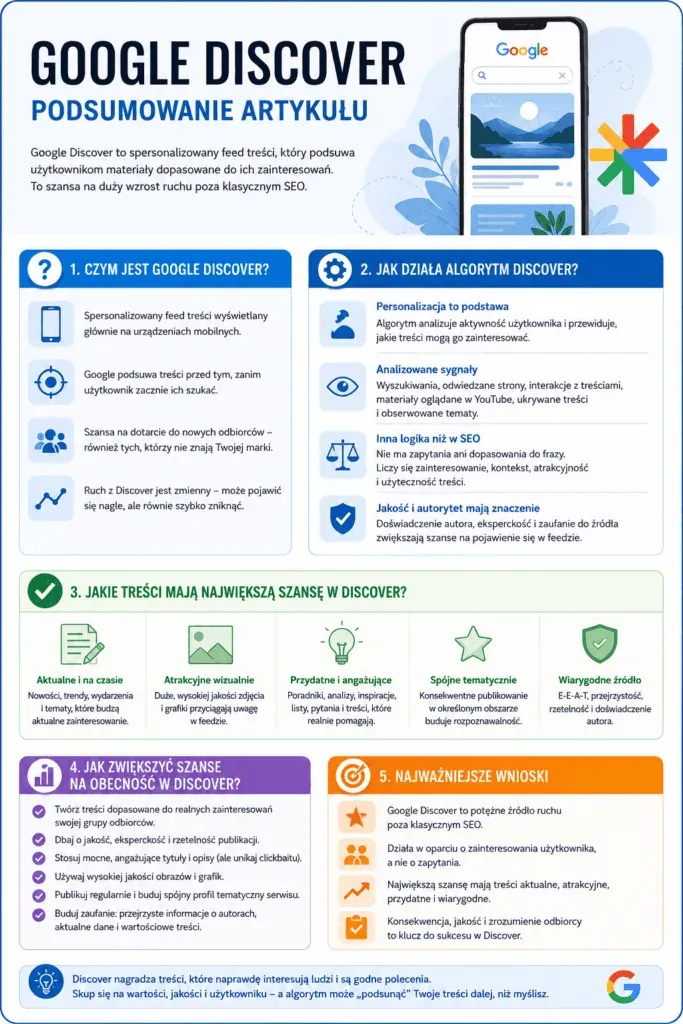
Google Discover should be part of your SEO strategy, but it shouldn't replace classic optimisation. It's a channel that runs on a different logic from a search engine. It isn't based on a typed-in phrase, but on the user's interests, personalisation, source quality and how appealing the content is in the feed.
The key thing to understand is that Discover doesn't reward stuffing keywords alone. What matters is the topic, freshness, image, title, credibility and real value for the reader. Sites that publish specific, authentic, well-presented content have a better chance of appearing in the feed than sites that churn out mass text with no clear point of view.
FAQ: Google Discover
How does Google Discover differ from Google News?
Google Discover shows content matched to a specific user's interests, while Google News focuses mainly on news and current events. Discover can show news stories, but it isn't limited to them. Guides, lifestyle content, analysis, reviews and evergreen material can also appear there, as long as they match the user's interest profile.
Why did my Google Discover traffic suddenly drop?
Google Discover traffic can drop suddenly because this channel is more volatile than classic organic results. A drop can result from shifting user interests, seasonality, algorithm updates, weaker titles and images, technical problems, or losing topical relevance. When analysing this, it's worth looking not just at the whole domain, but also at specific topics, articles and content types.
Do you need to use keywords for Google Discover?
Keywords can help describe a topic clearly, but they aren't the main axis of Google Discover. In Discover, the user doesn't type a query, so the topic, context, content quality, title, image and match to the reader's interests all matter more. The text should be clear and well organised, but it shouldn't be written purely for keywords.
Which images work best in Google Discover?
Large, clear, good-quality images that are strongly tied to the article's topic work best. The visual should grab attention in the feed, but it must not be misleading. It's worth avoiding random stock photos that don't reinforce the content. The image should help the user quickly understand the topic and encourage them to click.
Can any site appear in Google Discover?
Not every site will appear in Google Discover, even if it's correctly indexed. Google itself decides which content it shows users in the feed. Your chances improve with high-quality content, good technical site health, appealing images, source credibility, clear authorship and topics that match users' interests.
Read also: