













In short
- YouTube SEO is the optimisation of videos and a channel for YouTube search: choosing keywords, titles, descriptions and thumbnails, and actions that affect engagement and watch time. Simply putting phrases in the title, description and tags is not enough, because the system also assesses relevance and quality.
- The title and thumbnail should encourage a click without promising what is not in the video, and you check CTR and retention in YouTube Analytics. The video's topic should match the title within the first 30 seconds, and the length depends on the topic and viewer behaviour.
- Visibility is also supported by a description with chapters and links, cards, end screens, playlists, subtitles and a consistent company channel. It is worth promoting videos outside YouTube, for example on your website, blog and in a newsletter, because video also appears in Google search.
YouTube SEO is the practice of optimising videos and a channel so as to increase their visibility in YouTube search results and reach users interested in a particular topic. It covers keyword selection, optimising titles, descriptions and thumbnails, and actions that affect viewer engagement and watch time.
Effective YouTube ranking, however, isn't just a one-off matter of filling in a video's settings. The whole process matters: from choosing a topic and preparing the recording, through publishing and optimising the material, to analysing its results. Below, we show which elements are worth paying attention to.
Video category ideas
-
Descriptive videos covering a given product, service, exercise or concept, together with professional visual presentation.
-
Lifestyle videos: show a specific activity, event or situation in a more natural form. They can be filmed without a tripod, handheld, or by another person while moving.
-
Talking-head videos: a format where sound quality and the content delivered matter the most. The presenter might be at a desk, outdoors, or in a car, for example. The content delivered is what matters most. The visual layer is less important, but the audio should be high quality.
Recommendations for filming videos
-
It's worth taking care of proper lighting for your video. Artificial light, meaning any kind of lamp, works well when filming indoors. Daylight is variable, and a recording lasting an hour or two can look different at the start, at the end of the video, and between cuts.
-
All the technical aspects below are important, but the most crucial thing is holding the viewer's attention for as long as possible and user interaction through likes, subscriptions, or clicking a link placed in the video, on the end screen, or in the description.
-
It's good to bring up the video's subject right at the start, within the first 30 seconds, so that it matches the title.
Technical YouTube optimisation
How to choose keywords and determine user intent for YouTube SEO?
-
The VidIQ tool: available in a free version and in paid plans. It lets you view and select keywords, shows tips on what else can be optimised in a video for SEO, gives the video a score on a 0-100 scale along with what's worth improving to get the highest possible score, and lets you view other videos and channels, their keywords and scoring.
-
It's worth choosing keywords based on what users are actually searching for, using SEO tools and some tools dedicated to YouTube.
-
Google Trends can be used to compare the popularity of keywords.
How does YouTube video ranking work in search results?
Ranking videos on YouTube shouldn't be limited to placing keywords in the title, description and tags. The YouTube search system takes into account how relevant the material is to the query, engagement, and quality. It also analyses how well the title, description and the content itself match what the user is looking for.
That's why, before preparing your material, it's worth identifying keywords and the intent behind the query. You then need to optimise the video content so that it genuinely answers the user's need, rather than merely containing a chosen keyword.
Matching keywords to the title, description and content can help YouTube understand the video's subject and match the material to the right queries. The goal shouldn't be mechanically stuffing the content with phrases, though, but better ranking by combining the material's relevance with good audience reception.
A well-optimised piece of material has a better chance of appearing on the search results list for relevant queries. More elements affect the position in search results, though, than just keyword use, which is why a video's SEO should also be analysed through the lens of audience behaviour.
How to optimise your title and thumbnail to increase video visibility on YouTube?
-
Placing a well-chosen keyword in the title is one of the important elements of video optimisation.
-
Thumbnails should fit your industry: it's worth analysing the thumbnails used by competing channels and checking which solutions are typical for a given industry. It's best not to place text in the bottom right corner, because that's where the video's duration is displayed, and important information could end up hidden.
Video CTR: how do title and thumbnail affect visibility?
The title and thumbnail should above all encourage viewers to choose your video over other options. Catchy titles are a good solution, as long as they don't promise something the user won't later find in the video.
In YouTube Analytics, you can analyse thumbnail impressions and the click-through rate of impressions, i.e. CTR. If a piece of material is shown to users frequently but few people decide to watch it, it's worth testing a different title or thumbnail.
So it's not only about optimising for SEO. The title and thumbnail also need to catch viewers' attention and clearly communicate the benefit of watching the material. Getting them better matched can translate into greater interest in the video.
How to optimise a video's description, tags and keywords for SEO?
-
At the end of the description, you can add a few relevant hashtags related to the material's subject, e.g. #fitness #gym #trainer.
-
In the description, you can use keywords as well as links to your website, social media, and other relevant places. A good approach is to prepare a universal template that's then adapted for each specific video.
-
Internal linking between videos is a good solution, including placing 2-3 links to related material. This makes it easier for the user to keep watching content on the channel.
An example of a good YouTube video description
The template below can be treated as a starting point and adapted to the subject of each subsequent video:
[Main phrase / video topic]: key information
In this video, we show you how to [short explanation of the problem or issue]. You'll learn, among other things, how to [benefit 1], [benefit 2] and [benefit 3].
If you're interested in [the channel's main subject], this video will help you better understand [the video's specific topic].
In this video: 00:00 - Introduction 00:45 - [Topic of the first part] 03:20 - [Topic of the second part] 07:10 - [Topic of the third part] 10:30 - Summary
See also: ▶ [Title of related video] - [link] ▶ [Title of related video] - [link]
Useful links: 🌐 Website: [link] 📘 Facebook: [link] 📸 Instagram: [link] 💼 LinkedIn: [link]
If you found this video helpful, you can subscribe to the channel and check out other videos about [the channel's subject].
#[hashtag1] #[hashtag2] #[hashtag3]
A template like this keeps the description organised, lets you put the most important information at the top, and makes it easier to consistently use linking between videos. Fixed elements, such as the link to your website or social media profiles, can stay unchanged, while the introduction, chapters and recommended material should be adapted to each specific video.
Example description:
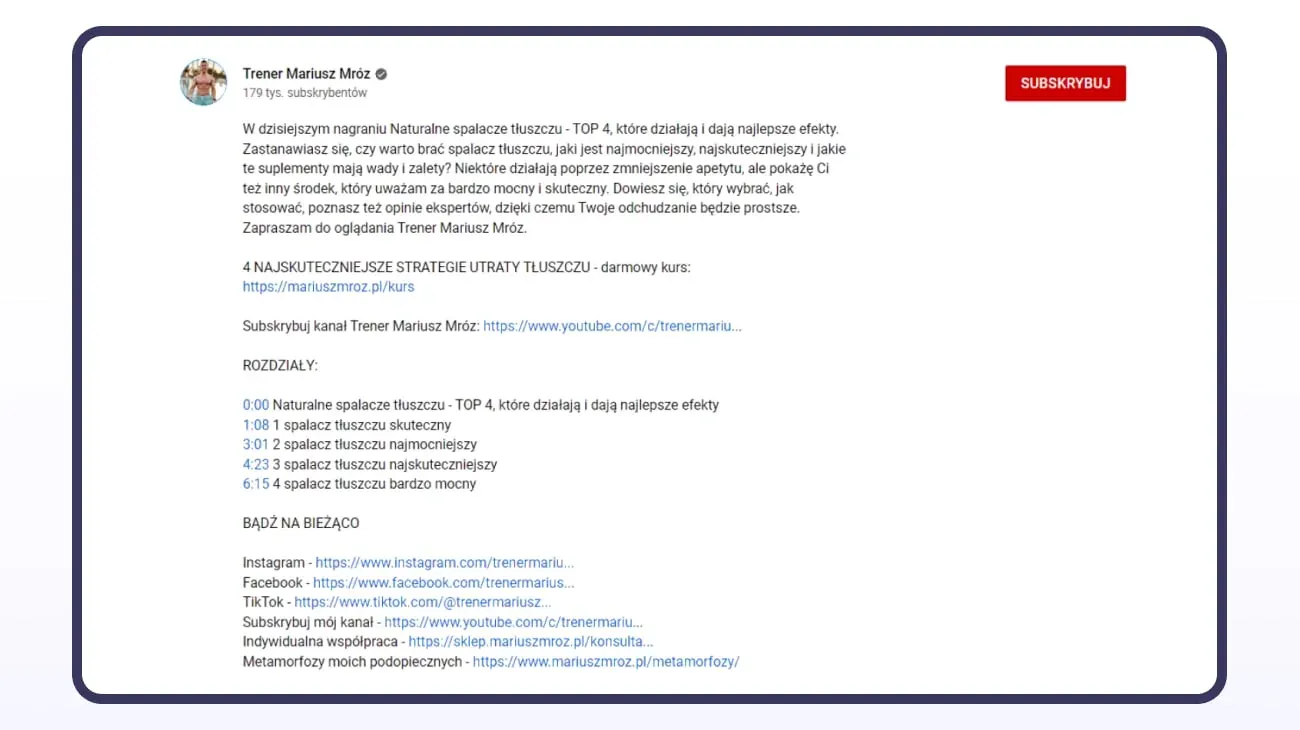
The description is clearly divided into sections. The most important information comes first, and the whole thing is rounded out with emojis, internal and external links, keywords, hashtags, and an interactive table of contents.
Viewer retention: how to optimise video and increase watch time?
-
Video length should depend on the subject. It can help to analyse the length of competing material, but the final video length should primarily follow from the scope of the topic and audience behaviour. It's a good idea to test both short and long formats.
-
Videos can be longer if they hold the viewer's attention the whole time and deliver value. There's no single universal length of material that works for every industry and every topic. It's worth testing different formats and analysing watch time and retention to determine which length best matches the expectations of a specific audience.
-
The first seconds of the video should contain a summary of what the video will be about and get the viewer interested enough to stay longer.
-
It's good to also naturally use the most important terms related to the video's topic in what you say. YouTube's algorithm can better recognise the video's subject thanks to the material's content and its transcript.
-
Adding subtitles to videos, whether as graphics when nothing is said in the video or as text when someone discusses a topic, also increases the material's accessibility.
Viewer retention and the recommendation system: how does YouTube's algorithm increase video visibility?
Clicking on a video alone isn't enough. It also matters whether the material holds viewers' attention once playback starts. That's why it's worth analysing watch time, average view duration, and the percentage of the video watched.
YouTube's algorithm takes into account how users respond to the content suggested to them. What matters is whether they choose the video, how long they watch it, and whether the material matches their interests. That's why viewer engagement and holding their interest matter more than artificially padding out the material.
YouTube doesn't work solely like a search engine. Users also discover material on the homepage, in suggested videos, and in other parts of the recommendation system. That's why it's worth optimising content not only for YouTube search but also for further watching and audience reactions.
There's no single optimal video length for the whole of YouTube. Material should last as long as it takes to present the topic in a valuable way. In practice, it's worth checking the retention graph and the points where users stop watching. This lets you find sections that need improvement and, in future material, increase watch time and achieve greater engagement.
To improve a video's chances of being recommended further, you can also use cards and end screens, playlists, and links to further material. This makes it easier for the user to move on to the next video on the channel.
Cards and end screens: how to build a channel and increase video visibility?
-
You can add cards during a video with links, for example to another video or related material. A card appears while the video is playing and can direct the user to further content.
-
It's good to match end screens to a CTA, such as: "Watch the next video", "Check out the whole series", "Subscribe to the channel". A good example is encouraging the user to watch another video or subscribe to the channel.
-
It's good to add videos to your own playlists. It's worth grouping thematically related material and making it easier for the user to move on to further videos. Some viewers will happily watch a whole series of videos if the subject interests them.
-
You can also encourage viewers to subscribe to the channel, like the video, or turn on notifications. Actions like these increase the number of interactions and help build an engaged community around the channel.
Optimising a company channel: how to optimise a YouTube channel for SEO?
-
You can add keywords to the channel name (school, trainer, travel, etc.)
-
Fill in the "About" section. It's worth using keywords right at the start of the description that clearly describe what the channel is about. This helps both the user and YouTube understand the channel's subject.
-
A company channel is best built around a specific subject. The name, description, videos and playlists should form a coherent whole and clearly communicate to the user what they can expect from the channel.
How to add and optimise a video on YouTube step by step?
1. Fill in the title, description and thumbnail
First, prepare the title, description and thumbnail in line with the earlier recommendations about keywords and user intent. Also make sure the video file has a clear name that describes its content.
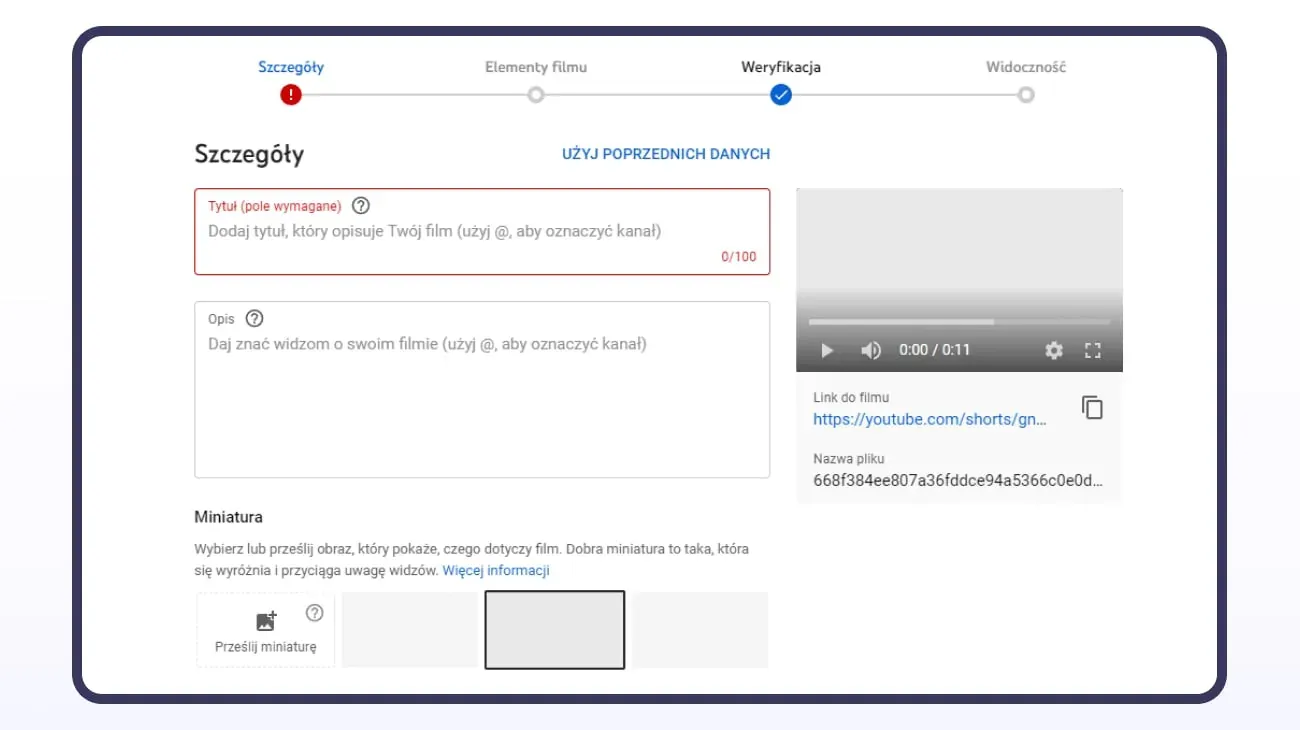
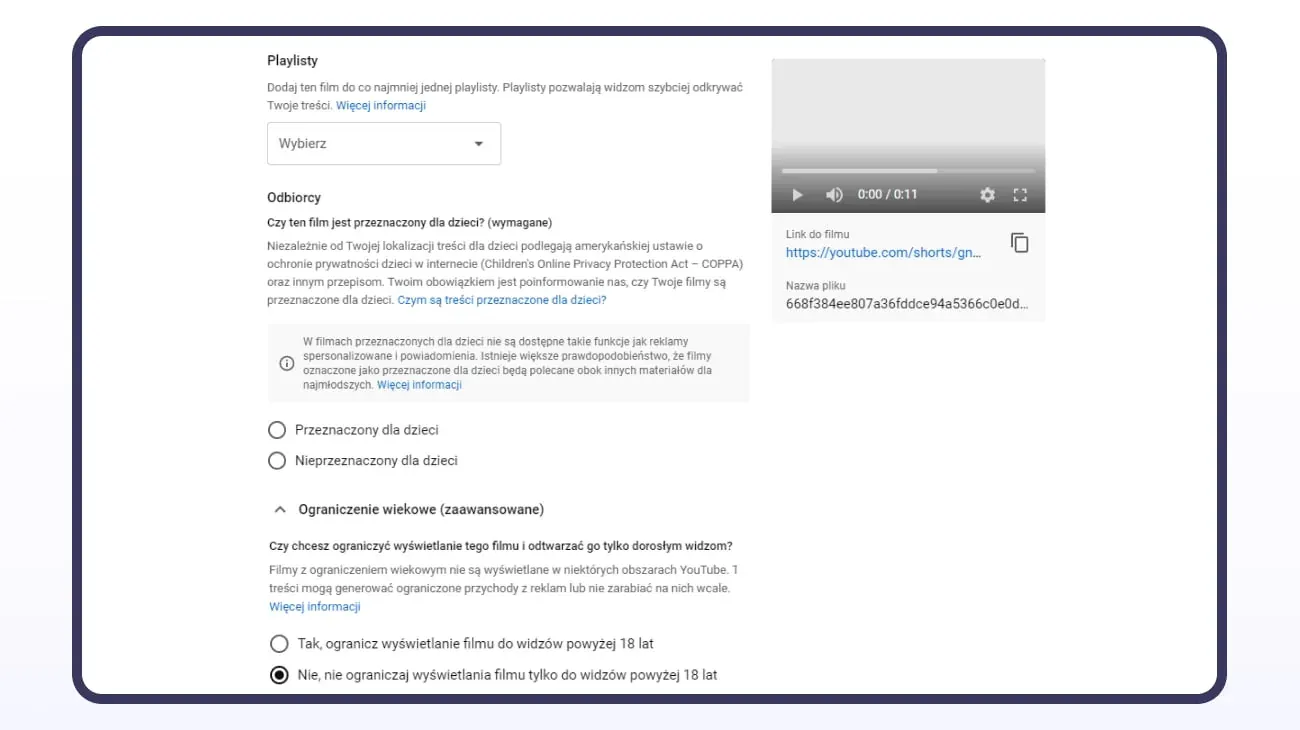
2. Choose a playlist and set your audience
Assign the video to the right playlist, so the user can more easily move between material on the same topic.
Specify whether the material is intended for children and configure any age restrictions in line with the nature of the video.
3. Mark paid promotion, if applicable
Adjust the paid promotion setting to match the actual nature of the material. If the video contains a paid partnership, product placement, sponsorship, or another form of commercial promotion requiring disclosure, mark it during setup.
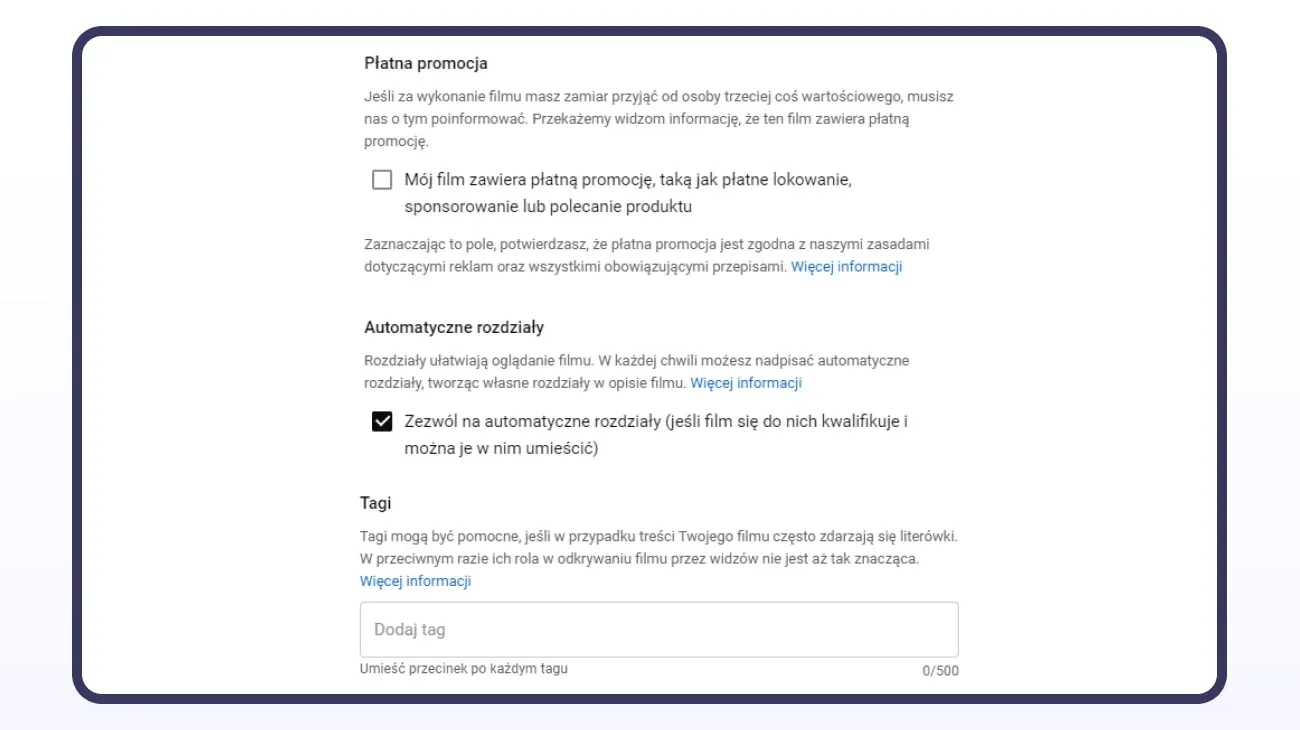
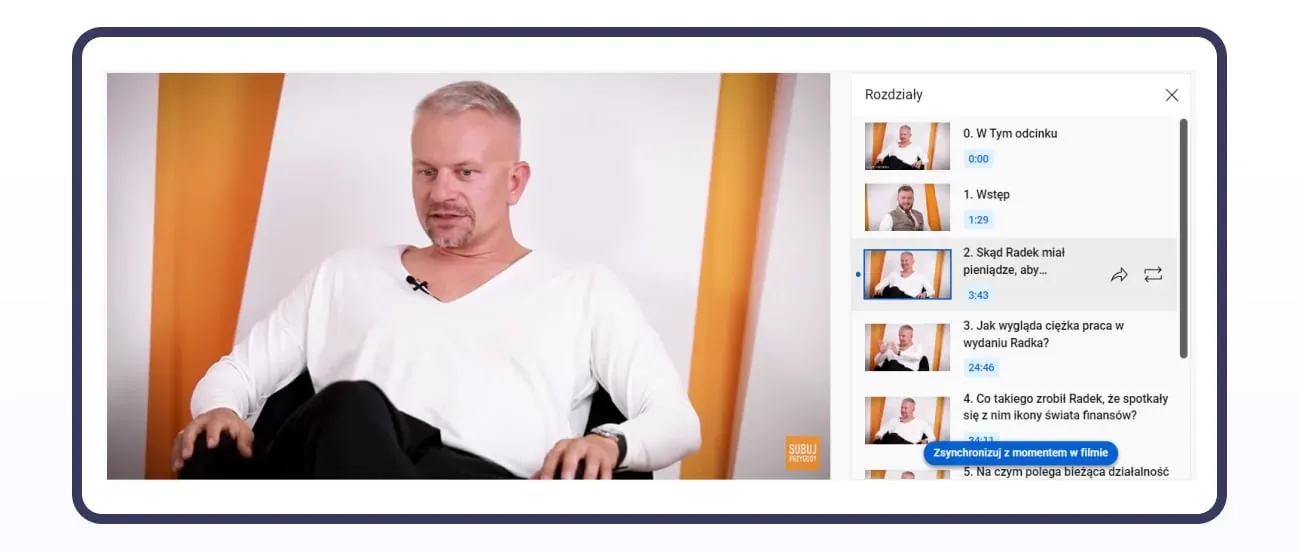
4. Add video chapters
Add chapters, especially in longer material. They divide the video into specific sections and let the user quickly jump to the part that interests them.
Chapter names should clearly indicate what a given part of the material covers.
5. Fill in tags
Tags should be related to the video's subject and genuinely describe its content. You can use the most important words and phrase variants related to the material in them.
6. Set the video's language
Set the video language to match the language of the recording: for Polish-language material, this will be Polish.
Fill in other information, such as the date or place of recording, when it's relevant to the given material.
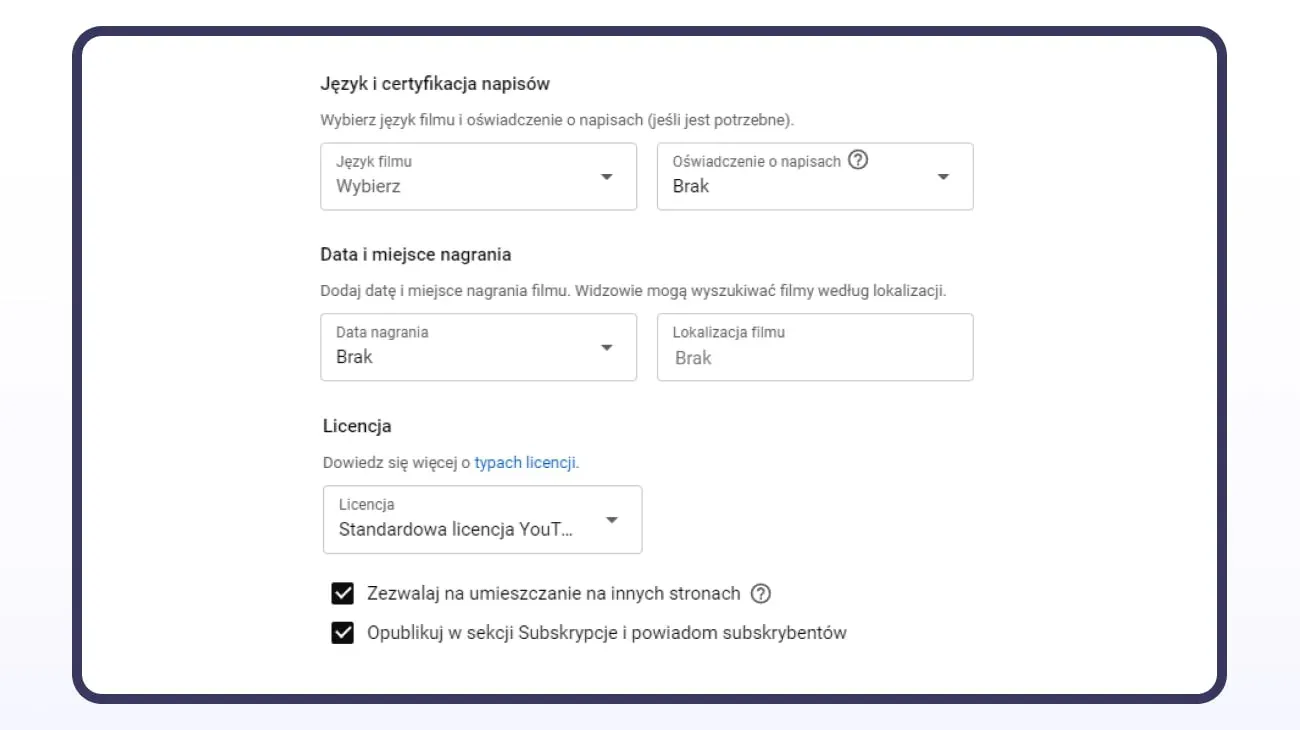
This information can be displayed instead of hashtags above the title
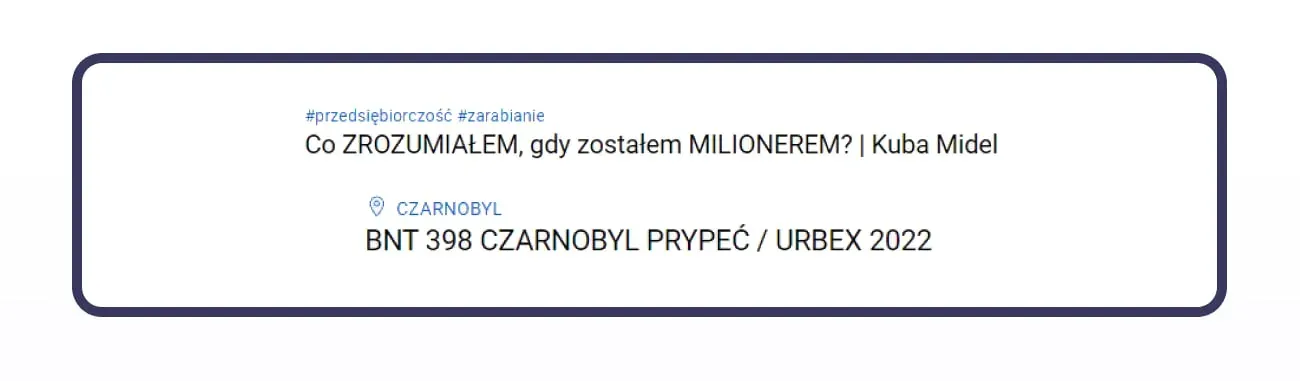
Use hashtags when they help further describe the video's subject. The recording location, on the other hand, matters more in material where a specific place is an important part of the content, for example travel videos or local guides.
7. Configure the licence and how the material can be used
Check the settings for the licence and how the content can be used, then match them to your publishing approach and channel strategy.
8. Decide whether to use Shorts
Shorts can be an additional format that lets you reach audiences who prefer short-form video. Don't assume in advance, though, that users watching Shorts will automatically move on to longer material or subscribe to the channel.
Test this format and analyse the results in YouTube Analytics. Check the number of views, new subscriptions, and whether short-form material helps audiences discover other content on the channel.
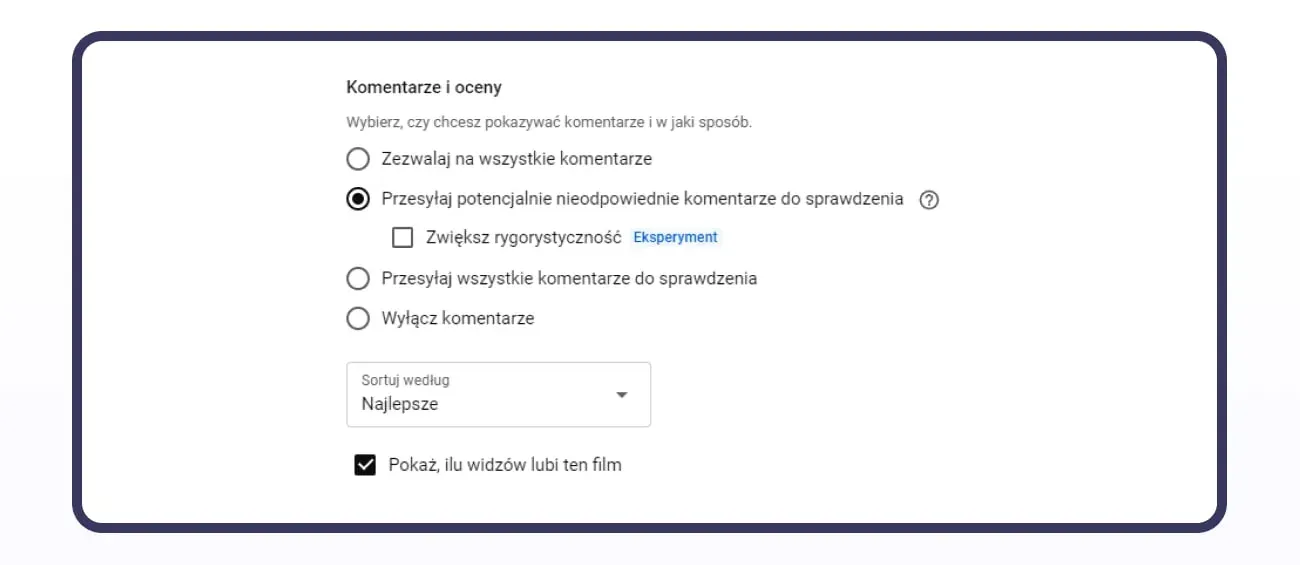
9. Turn on comments and like counts
Unless your channel strategy dictates otherwise, turn on the ability to comment on videos. Comments create additional space for interaction with your audience and can provide insight into which topics interest viewers.
Also make the number of likes on the material visible.
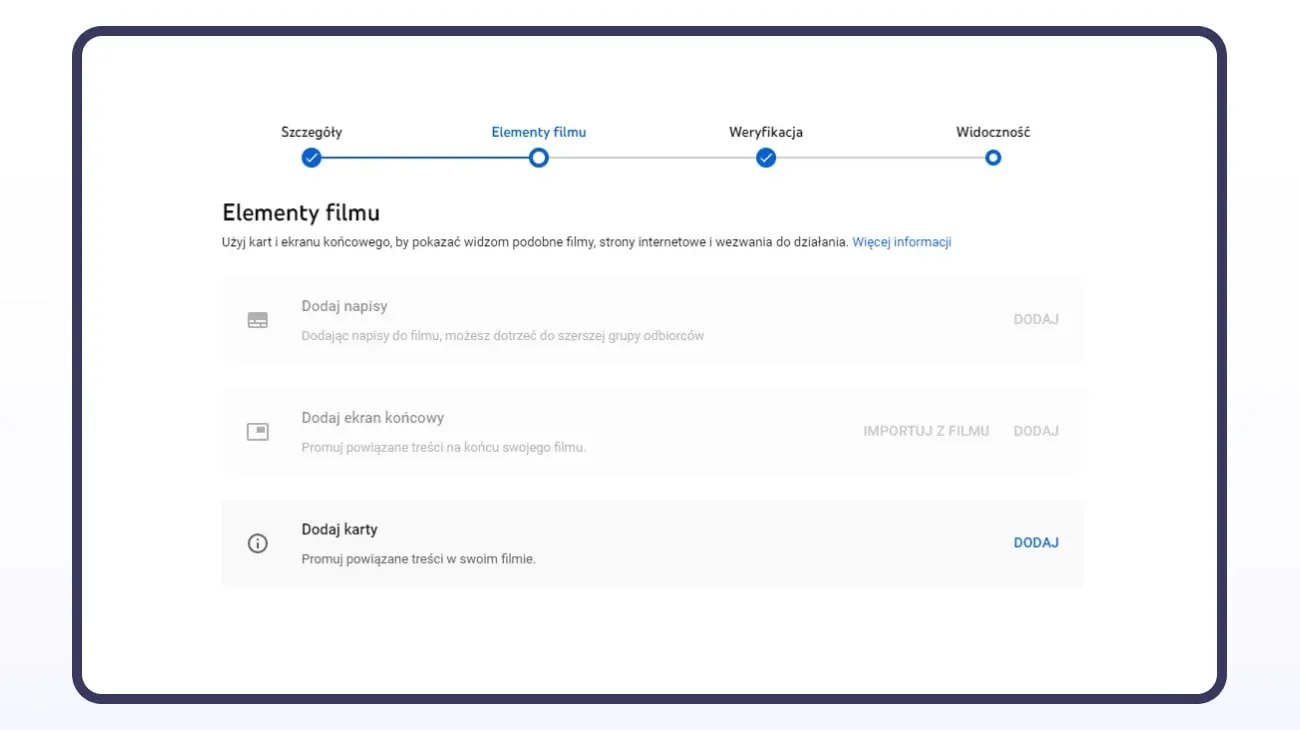
10. Add subtitles, an end screen and cards
Add subtitles to the video: they increase the content's accessibility and help users watching material without sound.
In the end screen, include another video, a playlist, and a button encouraging users to subscribe to the channel. During the material, you can use cards that direct the user to a related video.
11. Check the video before publishing
Before publishing, YouTube runs automatic checks on the material, including for potential issues related to copyright. Wait for the verification to finish and check its result before publishing.
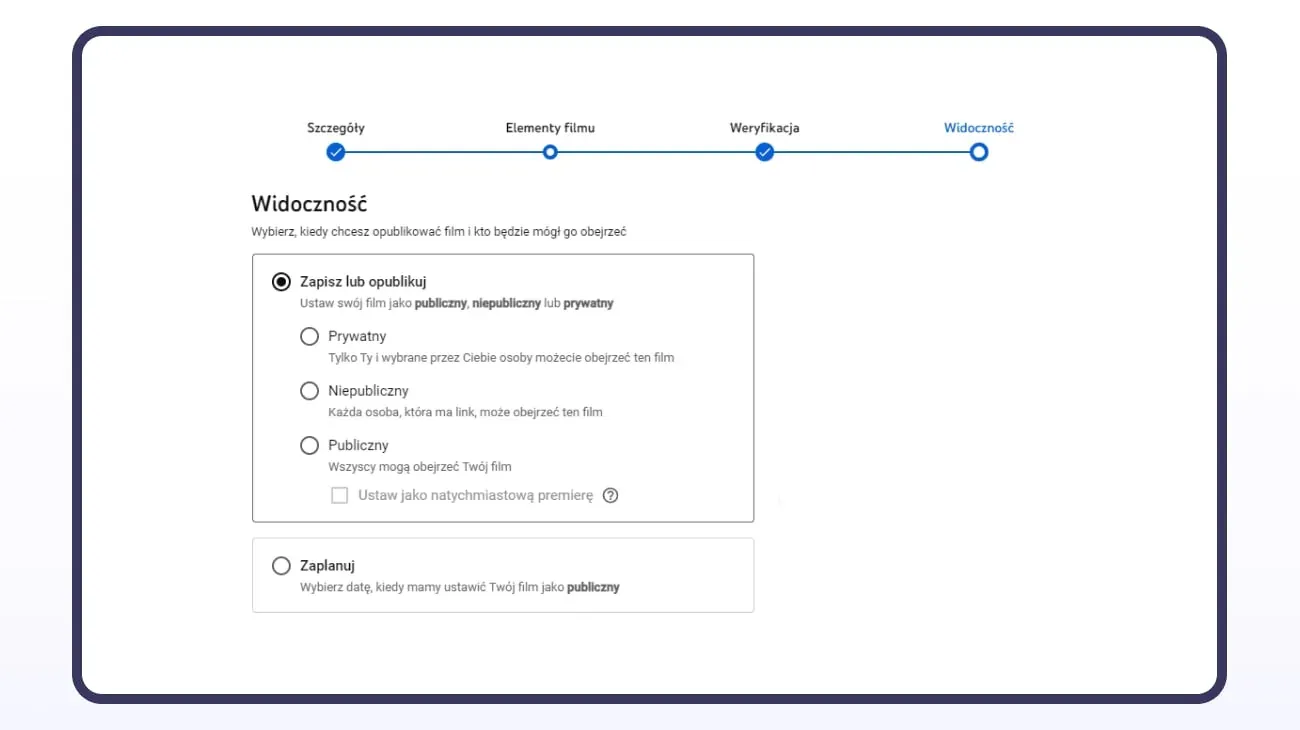
12. Set visibility and the publication date
In the final step, set the video's visibility. The material can be published immediately, scheduled for a specific date, or, depending on your needs, released as a premiere.
Promoting videos outside YouTube
YouTube search doesn't have to be your only source of viewers. A brand that uses video in its marketing activities can also promote its material through its own website, blog, newsletter and social media. Videos can be embedded in articles thematically related to the published content, letting users find them from outside the platform too.
Video material also appears in Google search, so it's worth planning a video's content more broadly than just for YouTube search itself.
Paid campaigns can be an additional source of traffic. YouTube lets you promote material using the Promote tool, which uses Google Ads infrastructure. Advertising can help you reach new audiences, but paid views shouldn't be treated as a way to improve a video's organic results.
The best results come from combining SEO, valuable content, external distribution, and analysis of user behaviour. This lets you gradually increase the visibility of your material, both on YouTube and potentially in Google search.
Start by optimising one video
YouTube SEO consists of many elements, but you don't need to implement all the changes at once. A good starting point can be analysing a single video: its title, thumbnail, description, retention, and how it leads the user to further content.
If you want to find out what can be improved on your YouTube channel and how to use SEO to increase your videos' visibility, we can take a look at it together.
We handle this as part of our video production and content marketing services. Get in touch with us, and we'll go through your channel video by video.
Check out these too: