













In short
- The article compares five tools. Gamma AI creates a presentation from scratch in 30-60 seconds, but exporting to PPTX needs some tidying up. Canva Magic Design works from templates, Beautiful.ai adjusts the layout automatically, SlidesAI turns text into slides, and Slidesgo AI uses ready-made templates.
- On free plans, Gamma gives 400 starter credits that don't renew (a presentation costs 40), Canva 10 lifetime Magic Design uses, Slidesgo 3 presentations a month and SlidesAI 12 a year. Gamma's Plus plan costs €9.41 a month.
- Your needs decide: Gamma suits generating from scratch, Canva suits simplicity, and SlidesAI suits converting text. The tools shorten slide production, but they won't replace the decision about what to say and to whom.
AI presentations can cut the design process by as much as half. Once upon a time, building a presentation was a tedious, time-consuming job. Today, AI presentation tools automatically choose layouts, typography and graphic elements, eliminating the hours you used to spend on slides. Gamma AI offers automatic presentation generation from a prompt, and other tools such as Canva or Beautiful.ai have also boosted productivity. In this article you'll meet the five best AI presentation generators you need to know in 2026.
Gamma AI: the best generator for building presentations from scratch
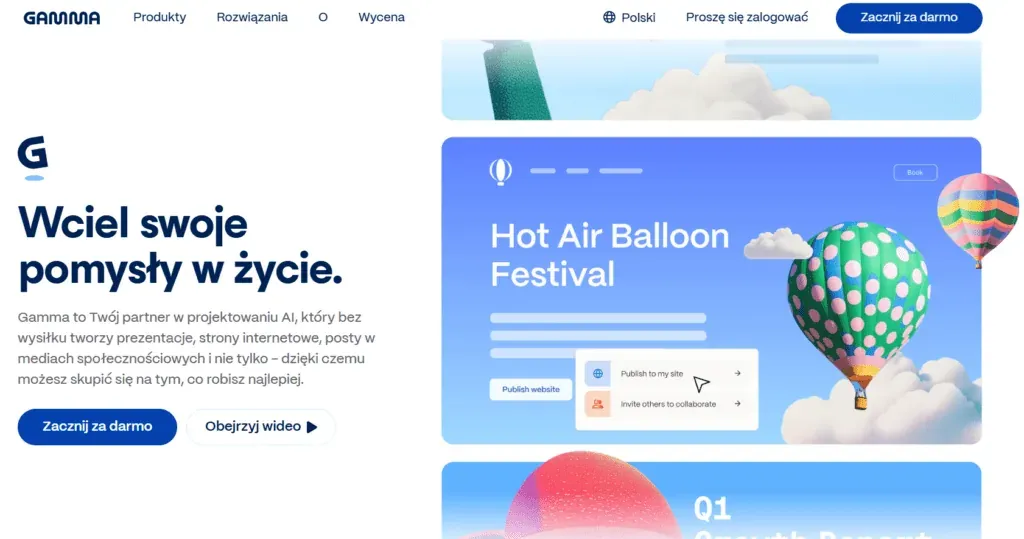
Gamma stands out from the competition with its ability to generate a complete presentation from scratch in under a minute. The tool, built by Grant Lee, Jon Noronha and James Fox, runs in the browser and supports a Polish interface, removing the language barrier for Polish users. Since March 2023, when its creators introduced an AI-based workflow, the platform has generated more than 250 million presentations, websites and documents.
Source: gamma.app
Key features of Gamma AI
The generator works on a card system instead of traditional slides. Cards are flexible and expand automatically to fit their content. You start a new presentation by typing a prompt, pasting text, importing a file or entering a URL. Gamma reads the source material and structures the slides automatically, choosing layouts, writing the copy and adding visuals without your involvement. The first version of the presentation appears within 30 to 60 seconds. Tools like this speed up slide production, but they won't replace the decision about what to say and to whom, and that's where a marketing agency helps.
The AI system supports two types of commands. Under the Writing category you'll find Improve writing, Fix spelling & grammar, Translate, Make longer, Make shorter, Simplify language and Be more specific. The Layout category offers Try a different layout, Make this more visual, Add an image and Convert to timeline. You can also open a ChatGPT-based chat window that lets you request changes without editing manually.
Gamma integrates with AI image generators (DALL-E, Imagen, Flux, Ideogram) and stock photo libraries. You can choose whether graphics are generated automatically, pulled from stock libraries, or come from animated GIFs. The tool also supports embedding YouTube and TikTok videos, Spotify tracks and interactive elements such as charts and galleries.
You can export finished presentations to PDF, PowerPoint (PPTX), Google Slides or PNG. You can also share them as a public link without anyone needing to download a file. Real-time collaboration lets several users work on a project at once, with commenting and version history tracking.
Advantages
Gamma saves an average of 4 to 6 hours a week per employee that used to go into designing slides. Startups can save around 10 to 15 hours building a pitch deck, removing the need to hire an outside designer. The tool automatically matches the design to the content and keeps the whole project visually consistent when you switch themes with a single click.
The Free plan gives you enough access to test the platform and build several presentations without adding a payment card. Built-in analytics track who viewed the presentation, how long they spent on each section and where they lost interest. That information is particularly valuable in a business or marketing context.
The card system looks excellent on every device, from a desktop computer to a mobile phone. Presentations are responsive and naturally adapt to mobile screens. As a result, the material works as an interactive website rather than a static file.
Limitations
Exporting to PowerPoint is the main problem. Layouts that look perfect in Gamma often appear in PPTX with overlapping text boxes, missing fonts or shifted images. Cleaning that up takes 30 to 45 minutes per presentation. PDF export and online publishing work flawlessly, but PPTX files remain problematic.
On the Free plan, credits don't renew automatically each month. You get 400 starting credits, enough for 8 to 10 full generations, since one presentation uses 40 credits. Once you've used up the limit, you have to move to a paid plan or refer the app to friends to earn extra credits.
The automatic layout saves time, but sometimes needs adjustments on more complex projects. You have less control over the details than in traditional software. The AI's decisions reset when you convert between formats, so final polishing is faster if you start from the right output mode.
Pricing
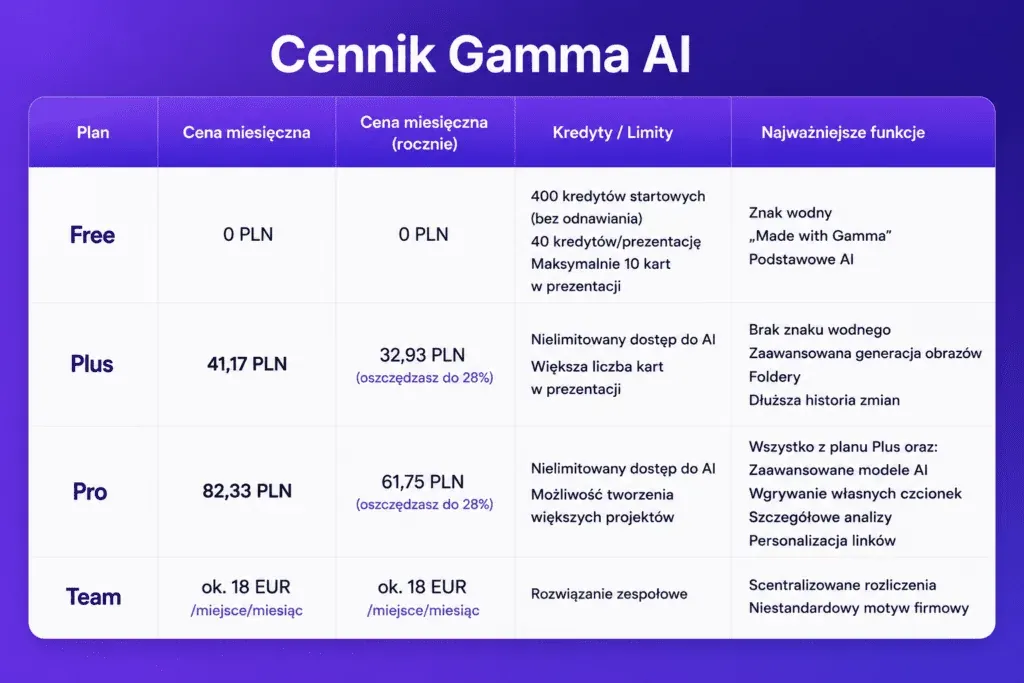
The Free plan offers 400 starting credits with no renewal. Every generated presentation uses 40 credits. Exports carry a "Made with Gamma" watermark. The limit is a maximum of 10 cards per presentation. This works well for students and people testing the tool.
The Plus plan costs €9.41 a month, or €7.53 a month billed annually. You get unlimited AI access, more cards per presentation, watermark removal, advanced image generation, folders and a longer version history. With annual billing you save up to 28% compared with monthly payments.
The Pro plan, at €18.82 a month (€14.11 billed annually), includes everything in Plus plus advanced AI models, the ability to build larger projects, custom font uploads, detailed analytics and link personalisation. The Team plan, at around EUR 18 per seat per month, offers centralised billing and a custom brand theme.
Source: own analysis
Who it's best for
Students and secondary school pupils use Gamma for coursework presentations, reports and thesis defences. The Free plan is enough for a whole academic year. Teachers and lecturers prepare teaching materials and presentations for meetings, producing 5 to 10 presentations a semester on the free plan.
Marketers and PR specialists use the tool for internal reports, campaign decks and client proposals. The Plus plan, at USD 10 a month, works well for heavy use. Startup founders build investor pitch decks following Guy Kawasaki's methodology (10-12 slides).
Freelancers and consultants prepare one-off client proposals, training materials and sales decks. Sales teams save time designing professional presentations for clients and business partners. Gamma also works well for business trainers, who value efficient collaboration on a single project and quick access to AI inspiration.
Canva Magic Design: the simplest AI presentation tool
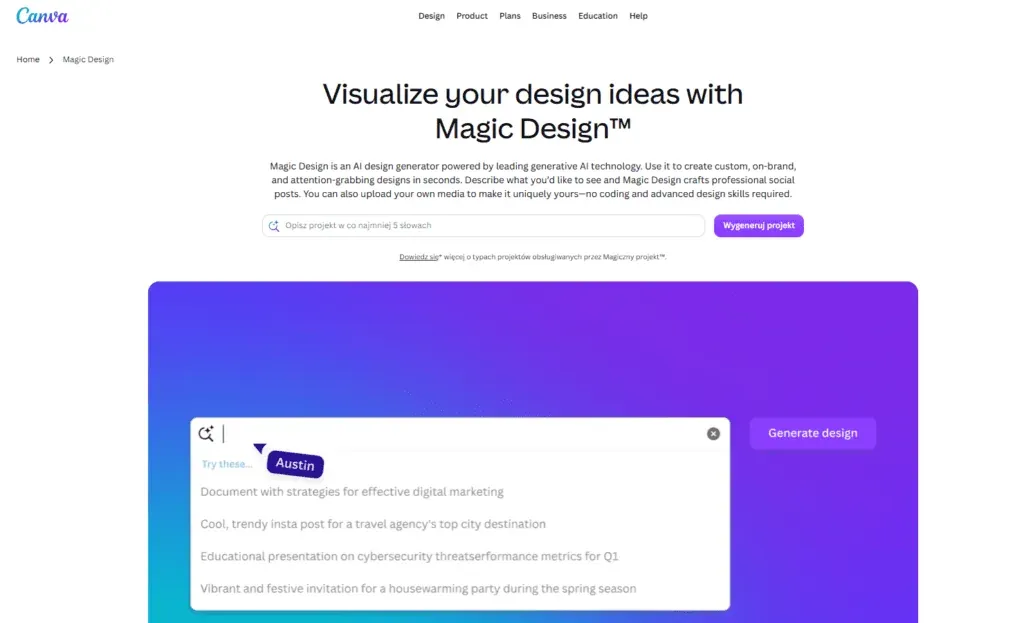
Canva Magic Design draws on an existing template library rather than generating presentations from scratch. It turns an idea or a photo into a finished project in seconds, picking suitable layouts from millions of available patterns. The tool, introduced as part of Canva AI 2.0, runs in the browser and supports a Polish interface, making it easy for users in Poland to work with.
Source: canva.com/magic-design/
Key features of Canva Magic Design
You launch Magic Design for presentations from the Canva home page or directly from the editor, by choosing Canva AI in the side navigation. After selecting "Presentation" as your project type, you type a description of your topic as a text prompt. The system analyses the prompt and generates a presentation outline split into sections and key points. You can edit each section of the outline, adding, removing or moving elements before the final slides are generated.
The tool builds presentations in 16:9 format with a maximum of 10 slides per generation. The system automatically fills the slides with content, choosing headings, charts and visuals that match the context. The more detail you add to the prompt, the closer the result will be to what you expect. Canva AI generates presentations in 20 languages, including Polish, removing the need for translation.
Magic Text is an assistant for writing and editing text within presentations. You can ask it to write a slogan on a given topic, then switch the style to more formal or friendlier, use a summary, continue writing or rephrase sentences. The feature analyses sample text and applies a matching tone to the generated content. Canva's built-in translator also quickly translates presentations into more than 100 languages.
Canva offers eight AI-based photo editing options:
- Background removal: automatically cuts elements out of a photo
- Magic eraser: removes unwanted objects from an image
- Magic expand: generates missing background fragments to fill out a graphic
- Magic edit: changes selected fragments of a photo based on a text description
- Magic grab: separates a foreground element from the background with one click
- Text extraction: turns text from a photo into an editable form
- Magic animations: adds motion to static elements of a presentation
- Magic media: generates AI images matched to the slide content
The system turns presentations into other formats with one click. You can turn a slide deck into a text document, a blog post or a graphic, and Canva automatically adjusts the layout and formatting. The "Layouts" feature shows layout suggestions matched to your brand identity, which you can apply to the project instantly.
Magic Design works alongside other AI tools available in Canva. DALL-E generates custom images from text prompts. Murf AI creates natural-sounding voiceovers for video presentations. Krikey AI lets you add animated 3D avatars to slides. The AI headshot generator turns ideas into professional portraits.
Canva AI can generate 15 chart types based on the data you upload. The system builds the charts, adds headings explaining the key points and builds a clear story from summary to conclusions. You can edit every part of a generated presentation individually in the editor.
Advantages
Simplicity of use is Canva Magic Design's main strength. You don't need programming skills or advanced design knowledge. The Polish interface and intuitive navigation let you start work without any training.
Integration with the Canva ecosystem gives you access to millions of templates, images, fonts and graphic elements. Magic Design pulls the most relevant content from the library, automatically adapting the project to your needs. You can link the presentation to your Brand Kit, keeping visual consistency across all your materials.
Canva applies a multi-layered set of safeguards across its AI tools. The system automatically checks prompts for content that could generate inappropriate material. Users can report unsafe content, and Canva's team continually refines its control mechanisms.
Real-time collaboration lets teams work on a presentation together. Administrators and teachers on a Canva Education plan control who has access to AI features in their class or team. You can use AI-generated projects for both personal and commercial purposes.
Limitations
AI editing only works with presentations, social media posts and print projects. Other project types don't have access to the full Magic Design functionality. Human silhouettes in photos are particularly problematic, proving too complex for accurate editing.
AI doesn't always produce the expected result on the first try. You need to check and edit the content manually, since the system can produce material that is inaccurate or unoriginal. The law doesn't clearly define who owns the copyright to AI-generated content. Canva doesn't claim rights to your AI projects, but it also doesn't guarantee that the generated images, designs or text are free of claims.
Magic Design doesn't generate videos from scratch. It helps you organise and style content, but you need separate tools such as Magic Media or Canva AI Video to create video itself. The presentation format is limited to 16:9 with a maximum of 10 slides per generation.
Pricing
Source: own analysis
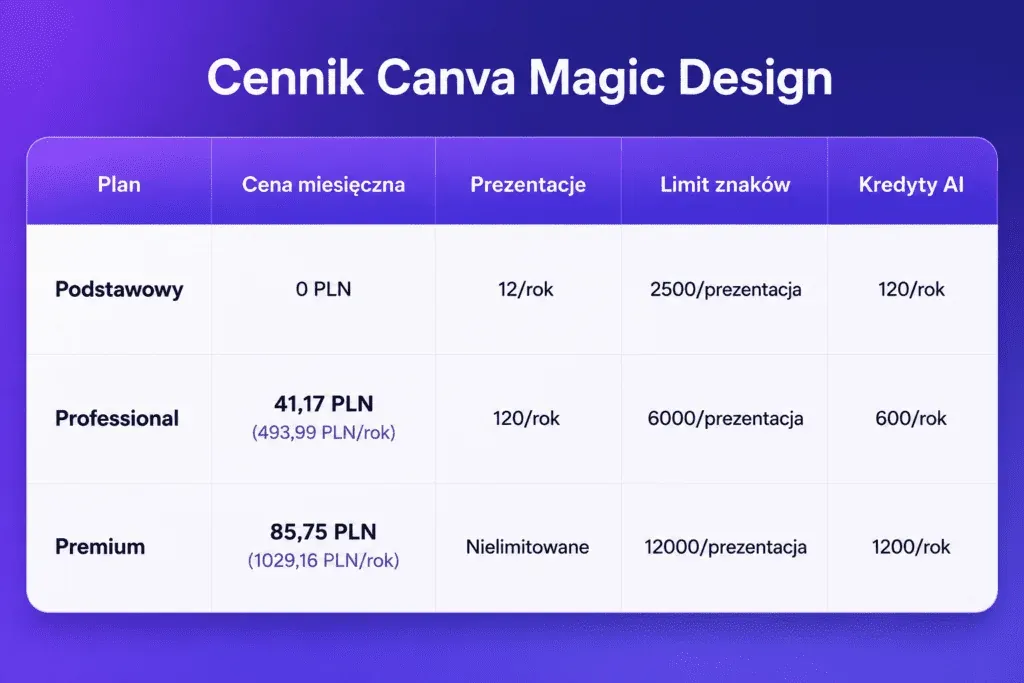
On the free plan you get 10 lifetime uses of Magic Design for presentations and video. A use is counted when you click "Generate" or apply a template. Once you've used up the limit, you have to move to the Pro plan or wait for a possible reset.
Canva Pro users have unlimited access to Magic Design. The Pro plan also offers more than 500 credits for AI content and advanced editing tools. You can use Magic projects for free up to 10 times across all versions, including the global search, presentations and videos.
Who it's best for
Marketers and social media specialists build quick presentations from campaign graphics. Magic Design turns social posts into multi-page presentations while keeping visual consistency. Freelancers use the tool to prepare client proposals quickly without involving a designer.
Non-profits and educational institutions make good use of the Polish interface and the free plan. Teachers on Canva Education control student access to AI features. Entrepreneurs and small business owners generate sales presentations, reports and training materials without needing specialist design knowledge.
Corporate teams stay on brand thanks to the automatic application of company colours, fonts and decorative elements. Business trainers and consultants prepare training materials using data, which Canva turns into presentations with charts and conclusions.
Beautiful.ai: automatic presentation layout matching
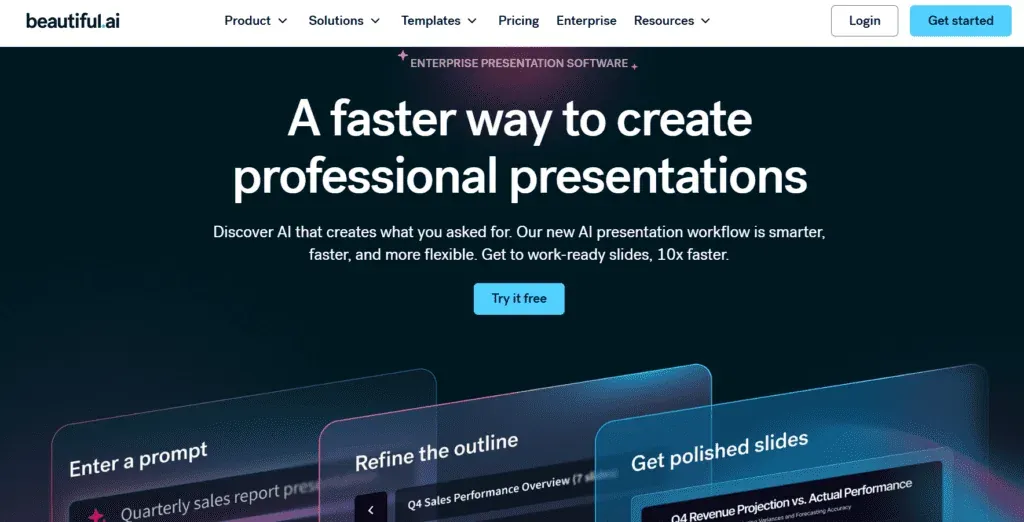
Beautiful.ai works on a different philosophy from its competitors. Instead of generating slides from scratch or picking ready-made templates, the system focuses on an intelligent content layout that automatically adjusts every element in real time. The platform was built for business users and consultants who need a professional look without involving graphic designers.
Source: beautiful.ai
Key features of Beautiful.ai
The Smart Slides system is the foundation of how Beautiful.ai works. These are intelligent layouts that automatically align, resize and animate content as you edit. The platform offers more than 300 different Smart Slide layouts suited to every purpose: data, comparisons, quotes, timelines, image grids and more. You choose the slide type that fits your content, add the content, and the design logic automatically adjusts spacing, text and visual elements without you having to move text boxes by hand.
Smart Slides analyse the content you enter, text, images, charts and other components, and then present it in a logical structure that follows the principles of visual design. When you add another bullet point to a list or reduce the number of elements in a chart, the system reacts instantly and updates the layout in real time, keeping it clear and attractive. You never start from a blank slide, which removes creative block and formatting problems.
Themes apply fonts, colours and brand logos across all slides automatically. You can also browse new layouts in your own style without adjusting each element manually. Built-in slide animations and data visualisations bring presentations to life when they're shown. The platform integrates with Google Drive, Dropbox and OneDrive, making teamwork and file syncing easier.
Beautiful.ai lets you export presentations to PowerPoint, Google Slides and PDF. You can also embed presentations on websites or share them online as a link. Team features let several users edit presentations together in real time. The system also offers AI-powered content generation, viewer analytics and PowerPoint import.
Advantages
Automatically aligning elements such as text, photos or charts removes the need for manual alignment and formatting, which saves time. The system keeps a consistent style and layout across all slides, which gives the presentation a professional look. Even beginners can build attractive, readable presentations without advanced design skills, thanks to the intuitive interface.
The system's flexibility allows for quick editing and automatic reformatting of content depending on your needs. Team collaboration is easier, since multiple users can work on presentations at once without worrying about disrupting the visual layout. The tool offers professional templates and attractive charts that automatically adjust to the values you enter.
Limitations
Automatic layouts are designed for consistency and visual appeal, which can limit manual adjustment of certain elements to specific needs. Relying on ready-made schemes can lead to repetitive-looking presentations, particularly in larger organisations where many teams use the same templates.
Automatic layouts work best when the data is well organised and concise. With more complex information or a non-linear narrative, the system can struggle to match the layout properly. Like any AI-based tool, Beautiful.ai can find it difficult to interpret non-standard input, which affects the quality of the layout suggestions it produces. Rolling out a new tool can take time and training before users make full use of its capabilities.
Pricing
Source: own analysis
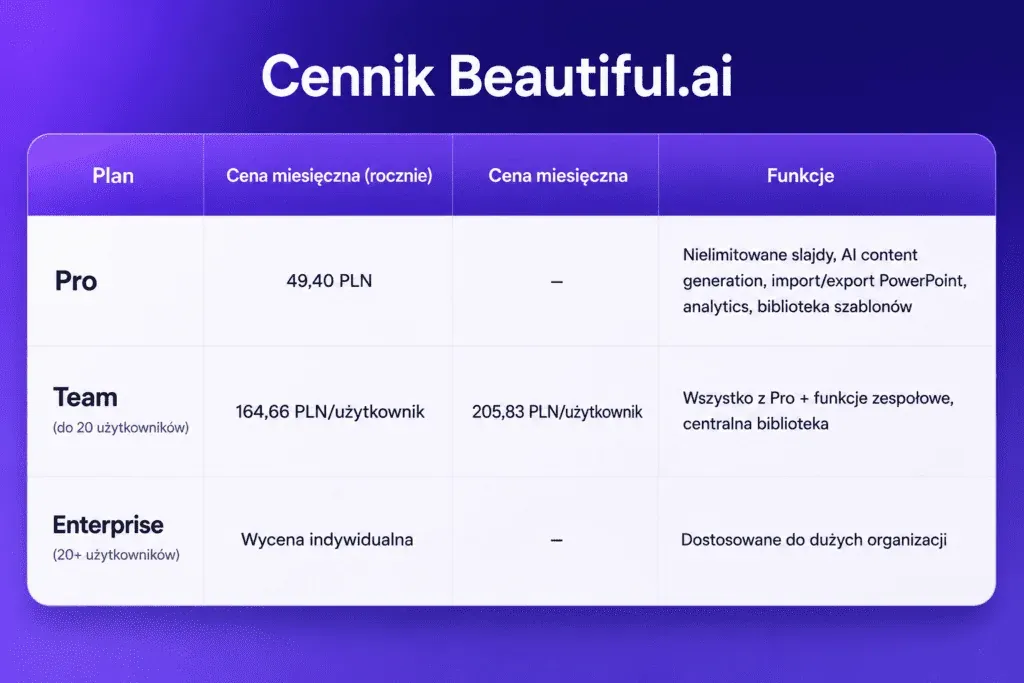
Beautiful.ai offers a 14-day free trial that gives unlimited access to every feature of the plan: unlimited slides, AI-powered content generation, analytics and more. Students with a .edu address get a year of free access. Every paid plan includes unlimited AI content generation with no credit limits.
Who it's best for
Beautiful.ai is ideal for consultants and non-technical professionals who need consistent visual quality. Sales and marketing teams and agencies that produce large volumes of presentations will find value in automated layouts. Managers and team leaders use the tool to present results, strategy and business analysis.
Marketers and salespeople prepare proposals, market analyses and campaign strategies. Teachers and trainers build engaging educational materials. Startups and entrepreneurs use the platform for investor presentations and pitch decks. Beautiful.ai works well whenever speed matters in producing a visually polished presentation without a design team.
SlidesAI: turns text into a Google Slides presentation
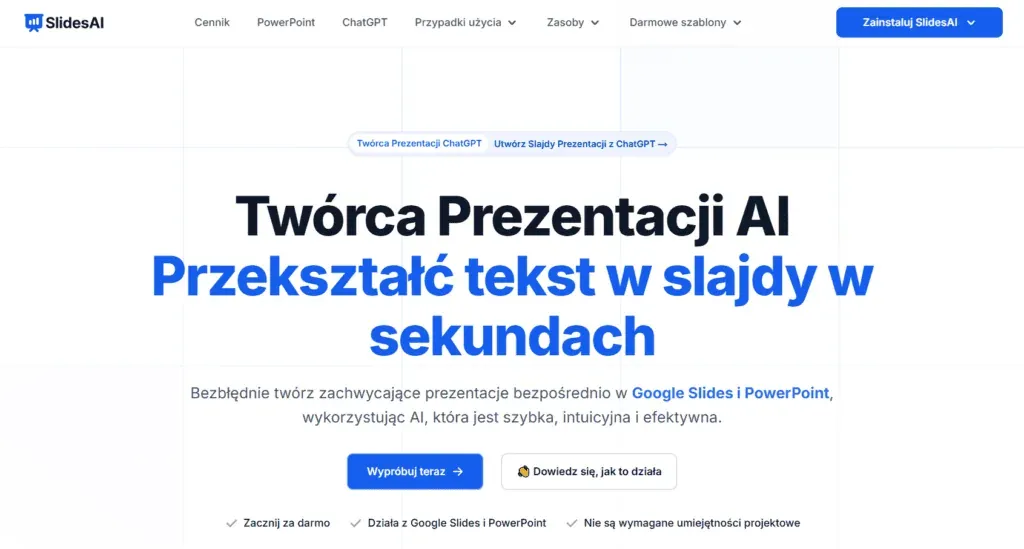
SlidesAI has built a position as one of the most popular third-party add-ons for Google Slides and PowerPoint. The tool focuses solely on converting text into a presentation, cutting out the intermediate design steps. Since launch it has been used by millions of users worldwide. In practice, you paste in ready-made text, choose the number of slides, and the system instantly turns the content into a structured presentation.
Source: slidesai.io/pl
Key features of SlidesAI
SlidesAI works directly inside Google Slides and PowerPoint, so you edit presentations without switching between platforms. You install the extension from the Google Workspace add-on store or the PowerPoint add-ins store, then start a new presentation or improve an existing one. You enter a topic, paste in notes or upload a document, and the AI builds slides within seconds.
The tool supports many types of input. You can generate presentations from a topic, notes, a script or a document. The system processes PDF, TXT and DOCX files, turning them into structured slides. You can choose the presentation type: general, educational, sales or conference, then set the number of slides. The platform supports more than 100 languages with built-in translation, removing the need for external tools.
Magic Write helps you paraphrase or shorten existing text on your slides. This feature is handy when you need to fit too much information into limited visual space. You can shorten, lengthen or rewrite any slide with a single click. The system also lets you create single slides or remix existing layouts.
SlidesAI offers a choice of hundreds of professionally designed templates and layouts. You don't need to worry about design or formatting. The tool automatically adds quizzes to educational presentations, saving teachers time. There's also an AI image generator and access to 1.5 million stock photos without leaving the editor.
You export finished presentations as PPTX, fully compatible with Google Slides and PowerPoint. The system lets you customise colours, choose ready-made palettes or build your own colour schemes. Team collaboration runs smoothly, since you share the generated slides and edit them together in Google Slides or PowerPoint.
Advantages
Conversion speed is SlidesAI's main strength. The tool generates a ten-slide presentation in under a minute. For users with a ready script or a long article who need to visualise it immediately, SlidesAI offers a very low barrier to entry. The interface is intuitive, making it accessible to people without technical experience.
Support for all major languages removes language barriers. The Google AI slide generation app is translated into English, Spanish, French, Italian, Japanese and Russian. The feature that translates presentations into more than 100 languages works well for international classes or teams.
Integration directly inside Google Slides removes the need to learn a new tool. You use what you already know. You can also build slides just by chatting with SlidesAI's ChatGPT-based assistant, with no design experience required. The system saves time and delivers a professional design, helping you overcome writer's block.
Limitations
Design results can be inconsistent or cluttered. The AI's choice of images is sometimes irrelevant to the context of the content. Although the tool is good at putting text on slides, the visual styling itself is often basic. The templates it provides are functional, but rarely reach an "investor-ready" standard.
Customisation options are limited compared with standalone platforms. As a third-party add-on, SlidesAI doesn't have as deep access to Google Drive files as native solutions. That means you have to manually supply text for processing every time. The tool doesn't have advanced research or fact-checking features.
Pricing
Source: own analysis
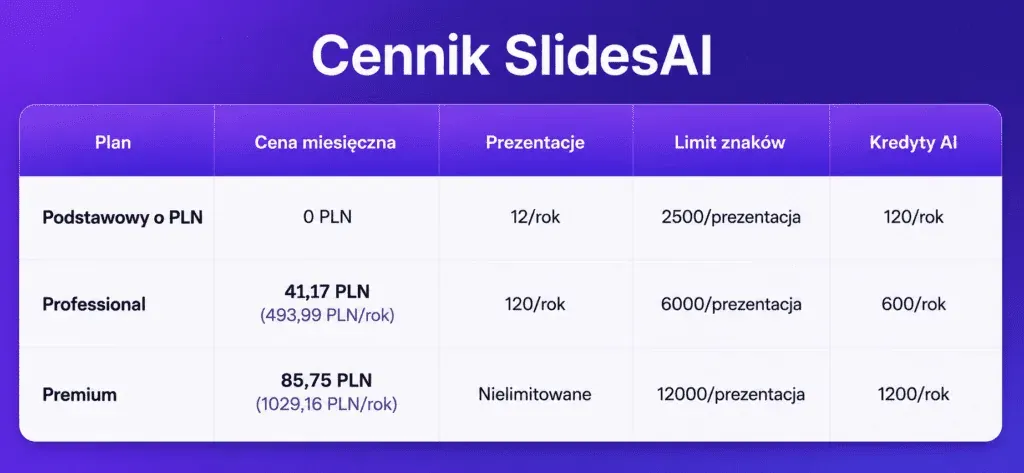
The Basic plan allows a limited number of presentations a month, with a character limit on input text. Free users can generate 12 presentations a year. Professional is described as the ideal plan for students and teachers. Premium is aimed at business and marketing professionals. The Professional and Premium plans offer document uploads, more AI credits and faster processing.
Who it's best for
Students and solo creators with a lot of text and little time will find SlidesAI a good fit. The tool handles text-to-slide conversion excellently and is cheaper than full subscriptions to competing platforms. Educators quickly turn lesson plans into engaging slides, while students streamline their project presentations.
Business professionals instantly produce project updates, proposals or sales presentations. Marketers prepare campaign briefs and performance reports with brand colours and a clear message. Internal teams summarise monthly KPIs, HR updates or product roadmaps using structured slides. SlidesAI is a solid choice for quick drafts that don't need a high level of design polish.
Slidesgo AI: quick presentations on ready-made templates
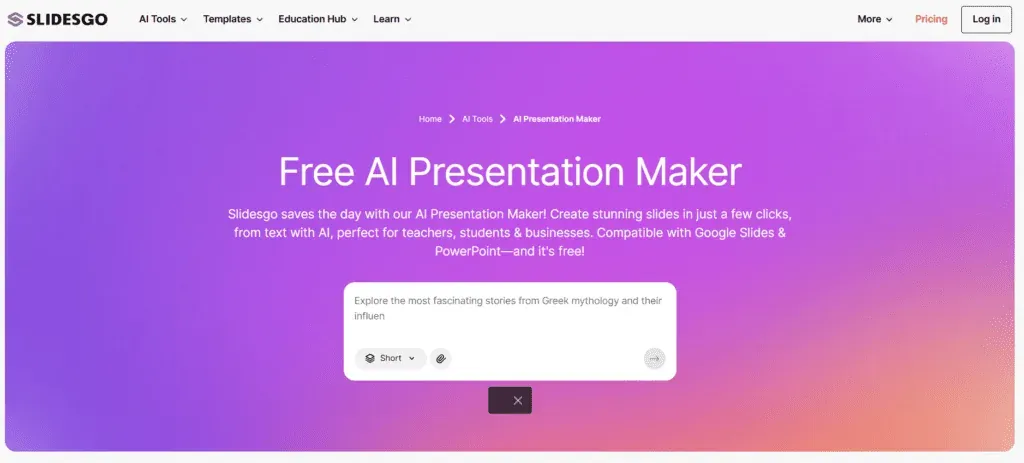
Slidesgo combines an extensive library of professional templates with AI presentation generation features. The platform already serves more than 70 million users and has generated more than 4 million presentations. Unlike tools that build slides from scratch, Slidesgo relies on ready-made, polished layouts designed by graphic designers, which speeds up the process and minimises the risk of aesthetic mistakes.
Source: slidesgo.com/ai/presentation-maker
Key features of Slidesgo AI
The AI Presentation Maker in Slidesgo works on a simple pattern. You type in a topic and choose a presentation style (business, educational, creative), and the system generates a complete presentation with content, slide structure and matching graphics. The tool turns ideas into finished slides within a few minutes, drawing on more than 800 professional templates.
The system doesn't build a design from scratch; instead, it intelligently matches your content to existing layouts. As a result, the final effect keeps a high visual standard without the need for advanced editing. The library includes templates for education, business, marketing, medical topics, science, history and university projects.
You can adjust the generated slides by changing the text, colours and layouts before downloading. The platform offers access to more than 150 free templates, with new designs appearing every week. Export is flexible: you download presentations as PPTX, editable in PowerPoint, Google Slides or Figma.
Building a presentation requires you to create an account and log in. A detailed prompt increases how well the final result matches your needs: the more information you give about the topic, audience and tone, the better the results.
Advantages
A large library of ready-made templates guarantees a consistent, attractive slide look. The tool has a low barrier to entry and intuitive operation, making it accessible to people with no design experience. Fast AI presentation generation gives you material that you can often use almost straight away.
The solution works particularly well in education. Teachers and students find plenty of ready-made templates for lessons, school projects and research presentations. Export flexibility lets you edit in your preferred tool or adjust it online. The tool saves significant preparation time, generates new ideas and delivers a professional structure with minimal effort.
Limitations
Lower flexibility in customising layouts can be a limitation. Presentations rely on specific schemes, which some users will see as an advantage and others as a drawback. The AI Presentation Maker is useful for quick drafts, but doesn't always produce slides ready for professional business use.
The platform is strong on templates, but a template isn't the same as a finished business deck. Users may need time to rewrite content and reorganise the structure. Slidesgo can feel more like a template resource than a full AI presentation agent.
Pricing
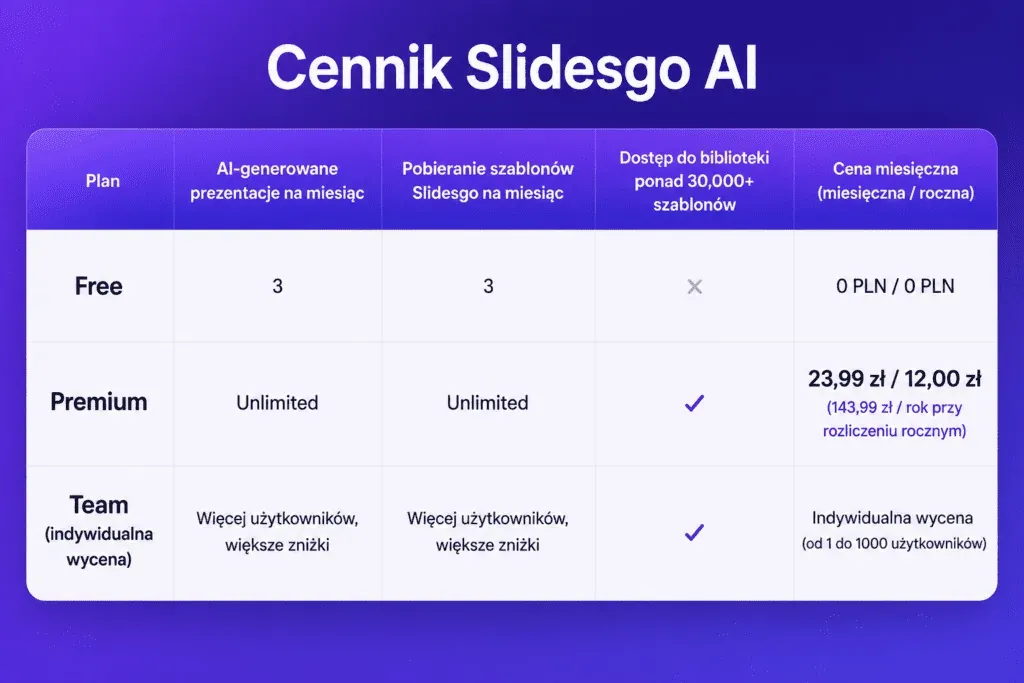
You can create up to 3 free presentations a month to test the service. To generate more presentations or access advanced templates and features, you need to move to a Premium subscription. Detailed pricing includes monthly, annual and lifetime options with flexible plans for teams.
Source: own analysis
Who it's best for
Slidesgo is an ideal solution for teachers, students, educators and content creators who need attractive presentation templates. It works well for people who already know their content and just need a better visual design. The tool is valuable if you need beautiful templates for Google Slides and PowerPoint, especially in an educational or creative context.
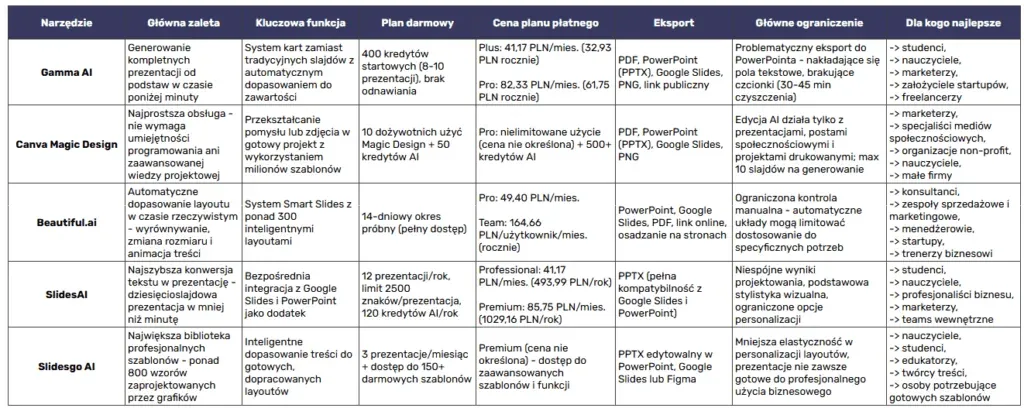
Comparing AI presentation tools
Notes:
- All the tools support the Polish language
- Prices given in EUR per month (as of 2026)
- Free limits refer to the basic AI presentation generation features
Each of the five AI tools takes a different approach to building presentations. Gamma AI is best for generating from scratch, Canva Magic Design offers the simplest experience, Beautiful.ai automatically matches layouts, SlidesAI converts text instantly, and Slidesgo delivers ready-made templates.
The right tool for you depends mainly on your needs. Students and teachers will find value in the free plans, while business teams will benefit from advanced collaboration features.
Not every solution will be ideal for your project, but each of them saves time and removes the need to involve a designer. Try a few options to find the best fit for your working style.
Check out these too: