













In short
- AI systems pick the fragments that answer questions directly, in full sentences. The answer should open with the specifics in 2-3 sentences, be understandable without the context of the page, and each question should cover one intent. It is worth taking questions from emails, chats, GSC, forums and the sales team.
- FAQPage data in JSON-LD describes the structure of questions and answers, but it guarantees neither a citation nor a rich result, and the marked-up content must be visible to the user. A good layout is H2 for the section and H3 for each question.
- According to Seer Interactive, with AI Overviews the CTR of organic results falls from 2.94% to 0.84%, so the brand's presence as a source matters too. Typical mistakes are one-word answers, outdated FAQs, duplicate questions, forced FAQs and unchecked AI-written text.
AI-ready FAQs are becoming one of the key elements of SEO strategy. Artificial intelligence doesn't "read" pages the way a human does. Instead of reacting to emotion or style, it focuses on structure, consistency and context. That's why FAQ sections are becoming a strategic element in building visibility in AI Overviews, ChatGPT, Gemini and Perplexity AI.
What's more, when an "AI Overview" appears in search results, the user can get a large part of the information they need without visiting the page at all. This means that simply appearing in traditional search results may no longer be enough: the ability to have your content used and cited directly in AI answers is becoming increasingly important.
AI-powered tools reward content that is genuinely useful to readers. They particularly value high-quality material that is unique and not duplicated elsewhere. In this context, a well-designed FAQ is a good place to naturally use long-tail phrases, which further increases the chance of appearing in AI summaries.
AI systems select fragments that answer user questions directly and in complete sentences. In practice, this means the section should be built so that AI can easily identify valuable content worth citing.
It's worth remembering, though, that an AI-ready FAQ isn't just a tool for search engines or language models. A good FAQ section should also help the user, clear up their doubts, support their purchase decision, reduce the number of repetitive questions to customer service, and guide them to the right pages on your site. It's precisely this combination of SEO, usability and business needs that makes this format increasingly valuable.
Why FAQ sections matter more in AI SEO
The role of the FAQ section has clearly changed with the growth of AI-powered search. What used to be just an add-on to content is now becoming a strategic element of optimisation for visibility in AI-based systems.
FAQs as a data source for AI Overviews
Content in question-and-answer format works well for conversational queries. A clear separation of question and answer also makes it easier to identify information relevant to a specific problem. The FAQ format encourages content that directly answers user questions and can easily be pulled out of a larger piece of content.
Why does this happen? Above all, this layout allows you to answer specific reader questions directly, and these often overlap with the queries people put to AI assistants. In addition, using FAQPage structured data (JSON-LD) helps Google's systems understand the relationship between a question and its answer, and correctly interpret the structure of the section.
In practice, AI Overviews draw on content that is clear, well-organised and written in natural language. If a given fragment answers the intent of the query well, the chance of that fragment being used as a source of information increases.
However, FAQPage schema shouldn't be treated as a guarantee of citation. Structured data helps describe the content, but it doesn't replace its quality, credibility, freshness or fit with the user's intent. The content itself should remain the main carrier of value.
Changing user behaviour and falling CTR in organic results
Google's introduction of AI Overviews has had a significant impact on click-through rate (CTR). An analysis by Seer Interactive found that when AI Overviews are present for a given query, CTR for paid results falls from 21.27% to 9.87%, and for organic results from 2.94% to 0.84%. (1)
In practice, this means users increasingly don't need to click any link to get the information they need. They can get part of what they need directly in the search results. Google emphasises that it cites sources and tries to redirect traffic, but the significance of so-called zero-click searches, searches that end without a visit to a page, is also growing.
From a brand's perspective, this changes the way we think about presence in search results. The goal no longer has to be a click alone. In many cases, brand presence as a source of information becomes important too, especially if the user encounters the brand again at later stages of the buying journey.
The role of FAQs in building AI visibility
Given these challenges, the FAQ section is becoming an important element in building visibility in AI systems. Here's why:
- it organises content into a clear question-and-answer layout,
- it answers specific user queries directly,
- it makes it easier to extract the most important information from a larger piece of content,
- it lets you further describe the structure of questions and answers using FAQPage data.
A well-prepared section therefore combines the reader's needs with a clear information structure, making it easier for search engines and AI systems to interpret the content.
Answers are specific, concise and precisely address readers' needs. This means they can also cover queries similar to those that appear in the "People Also Ask" box or in conversational search.
FAQs as support for sales, trust and customer service
Visibility in AI is only one function of a well-designed FAQ. A question-and-answer section can also support sales, because it clears up doubts that arise right before a decision is made.
A potential customer might want to know:
- how much the service costs,
- how long it takes to deliver,
- what the limitations are,
- what documents are needed,
- what happens after purchase,
- whether the scope of the service can be changed,
- what risk is involved in a given solution.
If a potential customer finds this information without having to send a message or make a phone call, they move on to the next step of the buying journey more easily. This helps the FAQ reduce the number of repetitive questions going to sales and customer service, while also building trust through a clear presentation of terms.
Question selection shouldn't therefore come purely from what can be optimised for search engines. It's also worth including questions that potential customers actually ask before buying or getting in touch.
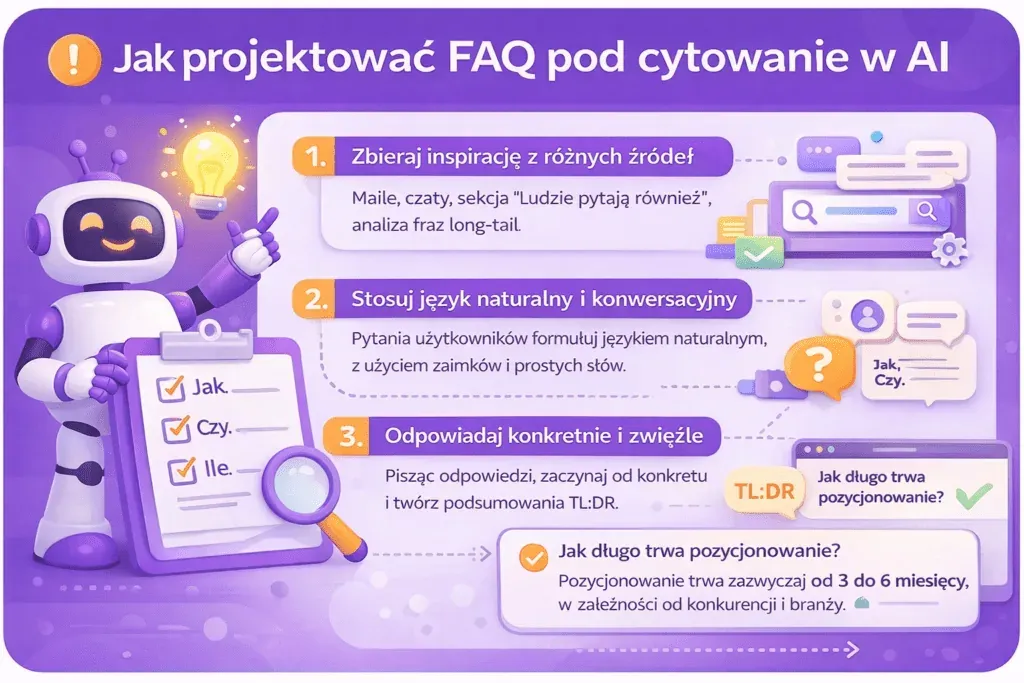
How to design an FAQ for AI citation
Designing an FAQ section for AI citation requires a strategic approach. Simply placing questions and answers on the page is no longer enough. You need thoughtful formatting and structure that increase the chances of your content appearing in AI-generated answers.
Writing questions that match user intent
The foundation of an effective AI-ready FAQ is writing questions that genuinely interest your audience. Key sources of inspiration include:
- Emails, chats and comments from customers
- The "People Also Ask" box in Google
- Long-tail phrase analysis from SEO tools (Ahrefs, SEMrush)
- Social media and direct conversations with customers
It's worth extending the analysis to also cover:
- industry forums and topical groups,
- Reddit and other communities,
- questions passed on by the sales team,
- questions directed to customer service.
Forums and communities are particularly valuable because they show how users actually phrase their questions. You can then use these phrasings when writing your FAQ section.
Keep in mind that questions should complement the topic of the article, not be a random collection of trivia. Questions starting with "how", "does", "why" and "how much" work best: exactly what users type into search engines. Phrase questions the way readers naturally ask them in a search engine, in conversation or in a chat. This makes the answers feel like they're speaking directly to the reader.
It's also worth noting that a single question should address a single intent. Instead of combining several threads, split them into separate questions. For example, "How long does SEO take, how much does it cost, and can I do it myself?" is better split into three separate questions.
How to group user questions by intent
Simply collecting questions isn't enough. The next step should be ordering them by intent. This way, the FAQ section doesn't look like a random list but guides the reader from a basic understanding of the topic all the way to a decision and post-purchase actions.
Questions can be split into a few groups:
- introductory - "What is it?", "How does it work?", "Who is it for?";
- explanatory - "What does the process look like?", "What are the terms?", "What does the outcome depend on?";
- comparative - "How does option A differ from option B?", "Which solution should I choose?";
- decision-making - "How much does it cost?", "How long does it take?", "Does it involve any risk?", "What are the limitations?";
- practical and post-action - "What do I need to prepare?", "What happens after implementation?", "Can I make changes later?".
This kind of split is also valuable from an SEO perspective. Different question groups cover different types of long-tail queries and different stages of the user journey.
Comparative questions and addressing objections
It's worth deliberately including comparative questions in your FAQ. Readers very often no longer want to know what a given solution is; they want to decide which option is best for them.
These can be questions like:
- How does the basic package differ from the extended one?
- When is it better to choose solution A instead of B?
- Will this service work for a small business?
- What are the limitations of a given solution?
- Does implementation require additional tools?
Questions like these help not only with SEO but also with closing purchase objections. If a potential customer is considering buying, a specific answer about price, time, risk or scope can be more valuable than yet another definition of a basic concept.
Practical questions: what happens after the choice or implementation
One of the often-overlooked areas of an FAQ is questions about what happens later.
Users might ask:
- what documents need to be prepared,
- who is responsible for implementation,
- how long the first stage takes,
- whether corrections can be made,
- what support looks like after the service is delivered,
- what to do if there's a problem,
- what the next stage of cooperation looks like.
Questions like these address customers' real needs related to using the product or service.
AI is also changing how FAQ questions are researched and prepared
AI doesn't have to be just a consumer of content. It can also support the process of preparing an FAQ.
A language model can help you:
- expand the list of questions collected from customers,
- group them by intent,
- detect questions with similar meaning,
- suggest additional questions,
- draft a first version of the answers.
This doesn't mean, however, that generated questions and answers should be published automatically. AI should act as an assistant, while final selection and editing of the content should remain with a human.
A good workflow might look like this:
user research → AI support → analysis by an SEO specialist → editing by a copywriter or expert → subject-matter verification → publication → monitoring.
The SEO specialist assesses the potential of queries, intent and how they relate to site architecture. The copywriter is responsible for natural language, readability and matching the brand's tone. A subject-matter expert should verify specific information, especially where the topics covered are specialised.
Answers in TL;DR plus expansion format
A good FAQ answer starts with the point: no preamble, no digressions, no filler words. AI often cites only a fragment, so it's essential that the first sentence contains a complete answer. This is the so-called "Answer Box" or "Quick Answer": a short 2-3 sentences containing the essence of the answer.
Instead of: "Many clients ask us about the terms of cooperation…" it's better to write: "Yes, running a company blog includes four articles a month plus their SEO optimisation."
Answers must stand alone, understandable without the context of the whole page. AI might cite only a fragment of the FAQ, so the answer should be complete in itself.
Not: "It's available in three variants."
Instead: "The Google Business Profile optimisation service is available in three variants: basic, extended and premium."
The optimal answer length depends on the question. In many cases a few sentences are enough, while a more complex issue may need broader context. If a single fragment starts turning into a separate guide, it's better to give the reader the option to move to a fuller discussion of the topic: "Learn more about running a company blog → [link]".
How many questions should an FAQ section have?
There's no single ideal number of questions. Quality and relevance matter more than the number of items in the section.
A short article needs only a few questions addressing the most important doubts. A more complex topic might require more answers, split into logical groups.
It's not worth treating recommendations like "5-7 questions" as a fixed rule. If your analysis shows only three relevant questions, there's no need to add more just to hit a target number. On the other hand, if the analysis reveals a dozen or so relevant intents, restricting the FAQ purely for formal reasons doesn't make sense either.
Using natural, conversational language
FAQ language should be natural and conversational, the kind we use every day. Avoid industry jargon and don't force keywords in. Write questions as if you'd heard them directly from a customer.
If someone types "is it worth using X?", that's exactly how the question in the FAQ should read. The more natural, the better, especially since many queries today come from voice search. Content written in a "human" way better matches the conversational nature of queries and has a better chance of ranking well.
For example, instead of writing "eSIM functionality", it's better to ask "How does eSIM work?". Use a conversational style in your answers, as if you were replying to a customer in a chat. NLP models reward clear, conversational phrases, not formal blocks of text.
It's also worth remembering to avoid specialist vocabulary that can make content harder to understand. Using technical jargon can put users off and cause them to leave the page quickly. The goal of this section is to explain the problem quickly and clearly.
FAQ vs Q&A: how do these formats differ?
FAQ and Q&A can look similar, but they serve slightly different functions.
- FAQ (Frequently Asked Questions) is a set of questions and answers prepared by the site owner, company or content author based on the most common needs of users.
- Q&A (Questions and Answers) can instead include questions asked directly by users, with answers added by the site owner, experts or other community members.
This distinction also matters when implementing structured data. Not every section with questions should automatically get the same type of schema. The technical structure should match the actual nature of the content visible on the page.
Technical structure of the FAQ section for AI SEO
The technical structure of an FAQ helps search engines and other systems correctly interpret the layout of questions and answers. The right HTML structure, structured data and clear formatting make it easier to interpret the content correctly.
Using FAQPage structured data (JSON-LD)
Structured data in JSON-LD format defines which fragments of the page are questions and which are answers. It's a metadata layer that's invisible to users directly, but readable by systems processing the page.
Implementing FAQPage schema helps describe the structure of the content, but the mere presence of structured data doesn't guarantee a rich result or an AI citation. What matters most remains the consistency of the structured data with the content visible to the user, and the quality of the answers themselves.
Example JSON-LD code:
{
  "@context": "https://schema.org",
  "@type": "FAQPage",
  "mainEntity": [{
    "@type": "Question",
    "name": "How long does CRM implementation take?",
    "acceptedAnswer": {
      "@type": "Answer",
      "text": "Standard CRM implementation takes 4-8 weeks, depending on the number of integrations."
    }
  }]
}
It's important, though, that all content marked up with structured data is visible to users on the page. Google checks whether schema matches visible content; mismatches can be treated as an attempt at manipulation.
H2-H3 heading hierarchy in the FAQ section
A clear heading hierarchy is an organisational signal that helps AI algorithms understand the structure of the content. The following layout works well:
- H2 for the title of the whole FAQ section
- H3 for each question
- Answer text directly below the question
This structure makes it easier for AI to identify topic boundaries and the relationships between questions and answers. Language models also learn context through document structure. If sections are logical and unambiguous, there's a greater chance of correct interpretation.
Paragraph length and answer formatting
Short, concise paragraphs improve readability and make it easier to extract the most important information. However, answers that are too short and lack context won't be useful as standalone fragments.
A well-built fragment should:
- start with the most important piece of information,
- then briefly explain the context,
- end with a specific detail, condition or example, if needed.
A format of 2-4 sentences also works well, if it allows a thorough answer to the question. From the reader's perspective, an accordion layout can be a convenient solution, letting them expand chosen questions without showing all the content at once.
It's also worth taking care of formatting elements such as bolding key phrases, bullet points for important information, and tables for comparisons. Clear formatting makes it easier to extract fragments for answers, both for people and for AI.
You should regularly check Google Search Console to see which questions are gathering impressions and which aren't. If something isn't working, the content needs updating; sometimes changing a single word or adding a specific example is enough for a page to start gaining more traffic from a given set of queries.
Internal linking from the FAQ section
The question-and-answer section also serves a useful function in your internal linking architecture.
If a short answer doesn't fully cover the topic, it's worth directing the reader to:
- a fuller guide,
- a specific service page,
- a case study,
- an instruction manual,
- a category page,
- another article that expands on the topic.
In a blog article, internal linking should guide the reader from informational content towards more detailed material or the right offer page. The article shouldn't compete with the offer page for the same transactional intent. Its role is to answer the question, build awareness and hand the user over to the right service page once they're ready for the next step.
The question-and-answer section is therefore a natural place for a soft CTA such as "Learn more", "See how the process works" or "Check the scope of the service".
Elements that increase citability in AI
Effective citation in AI requires not only the right content structure, but also strategically enriching the content with elements that increase its informational value. AI models look for fragments that provide specific, verifiable information they can cite directly in their answers.
Adding numerical data and sources
Numerical data makes answers more specific and easier to verify. Every figure should have clearly stated units, a date range and a calculation method. Instead of writing "costs went down", it's better to state a specific percentage change, the period analysed and the data source.
It's worth emphasising that content with links to credible sources, such as scientific studies, official reports, manufacturer documentation or reputable publications, allows readers to verify the claims being made.
However, you shouldn't assume that a domain extension alone, such as .gov or .edu, automatically guarantees the quality of a source. What matters most is who publishes the data, what it covers and whether it actually supports the claim.
Enriching FAQs with checklists and tables
Content organised using bullet points, numbered steps or short summaries is easier to scan and makes it easier to clearly extract individual pieces of information.
This structure lets readers quickly pull out a set of features, the next steps, or the most important conclusions.
Example AI-ready checklist:
- Add a one-sentence definition at the start of the key section.
- Prepare the FAQ based on "People Also Ask", customer data, GSC, forums and communities.
- Group questions by intent.
- Build a comparison table wherever different variants are being compared.
- Use bullet points in sections covering several features or conditions.
- Add a link to fuller material if the answer needs a longer discussion.
The number of questions shouldn't come from the checklist itself. A section might have 4, 7 or 15 items; what matters more is whether each one answers a genuine user need.
How to use mini-summaries in FAQs
For more complex answers, it's worth using a short summary such as "In short" or "The key thing is…". But it isn't needed after every answer; if two or three sentences already cover the topic, an extra summary just repeats the same information.
How FAQs help increase your site's topical coverage
Analysing FAQ questions can reveal topics that shouldn't be squeezed into one short answer. If several important questions concern the same issue, it might mean the topic needs its own section, article or page.
For example, while analysing questions for an article about SEO, you might regularly see questions about:
- the cost of SEO,
- how long it takes to see results,
- local SEO,
- link building,
- SEO audits,
- SEO for online shops.
This doesn't mean all these topics need to be covered in detail in a single FAQ section. A short answer can point to a separate piece of material dedicated to a specific issue.
This way, analysing questions helps identify content gaps and gradually increase your site's topical coverage. A blog article remains an informational page, while more commercial queries can be directed to the relevant service pages. This way, the blog supports the offer pages instead of competing with them for the same intent.
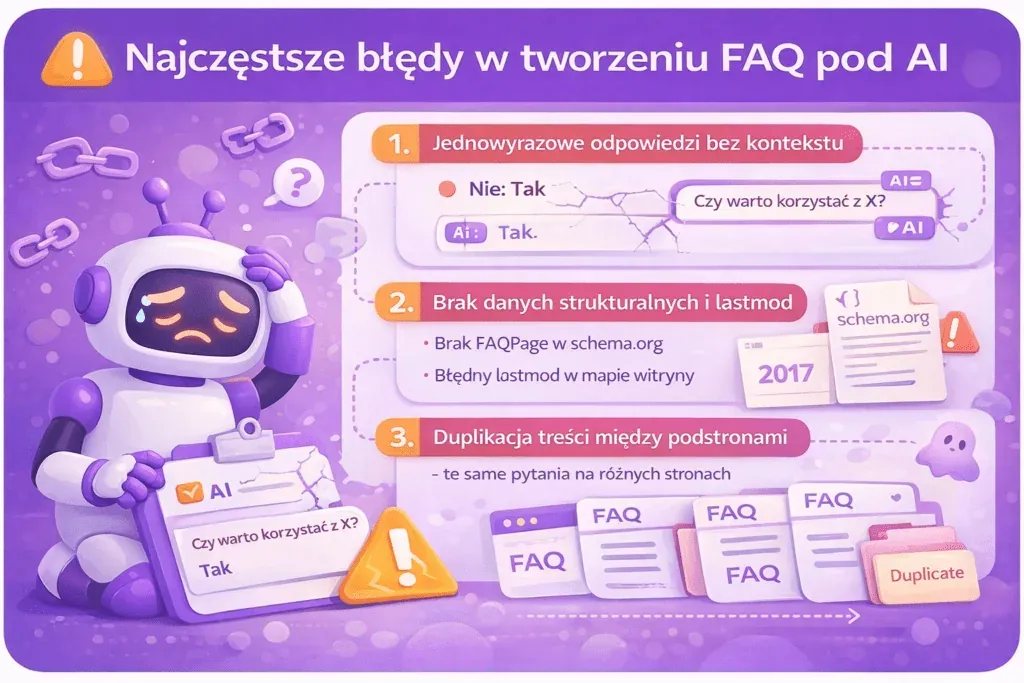
The most common mistakes when writing an FAQ for AI
Making mistakes when writing an FAQ for AI can effectively wipe out all the benefits this content format offers. Optimising for AI is a relatively new area, so many people still focus mainly on repeating keywords and on technical optimisation elements, overlooking user intent and answer quality.
One-word answers without context
One of the most common mistakes is writing answers that are too short and vague, without adequate context. A one-word answer doesn't provide enough context to function as a standalone piece of information. Language models need clear, complete sentences to correctly interpret and cite content. "Half-sentence" answers full of shorthand significantly reduce the chance of the content being used in AI results.
The following are especially problematic:
- answers without context (e.g. "Yes" or "No" without an explanation),
- statements that are too vague, without any specifics,
- text that reads like it was AI-generated without any unique knowledge behind it.
Incorrect structured data and an outdated lastmod
Incorrect or missing structured data can make it hard to clearly describe an FAQ section. It's equally problematic to implement the wrong schema type or to copy sample code without adapting it to the page's actual content.
In addition, failing to update the lastmod element in the sitemap means Google treats the last-modification date information for pages as unreliable. According to Google's official guidance, the lastmod element must always match reality: if you say a page changed yesterday when it was actually last modified 7 years ago, the algorithm will stop trusting that data.
Not updating the FAQ after business changes
An FAQ section shouldn't be treated as content published once and left unchanged. It's worth re-reviewing the section whenever the following change:
- the offer,
- the price list,
- the scope of services,
- the cooperation process,
- delivery times,
- the terms and conditions,
- the returns policy,
- the implementation method,
- the questions customers most often ask.
An answer that was correct a year ago might now mislead the user. Updating the FAQ should therefore rely not only on Google Search Console data, but also on changes happening within the company and in customer behaviour.
Duplicating content across pages
Copying the same questions across different pages is a common mistake that affects visibility in AI. When Google encounters duplicate content, it has to pick the version it considers primary (canonical) and treat the rest as duplicates. This directly affects which URL has the best chance of being cited as a source in AI Overviews.
Instead of spreading SEO potential thin by duplicating identical content, it's better to match the set of questions to the intent and topic of a specific page. If one issue needs a fuller explanation, it's worth creating a separate piece of content for it and linking to it from elsewhere on the site.
Forcing an FAQ where it doesn't belong
Not every page needs an FAQ section. Adding questions just to increase text length or to squeeze in extra keywords can lead to artificial, low-value content.
An FAQ makes sense when:
- users genuinely ask additional questions,
- the answers expand on the page's main topic,
- there are recurring doubts before a decision is made,
- the short Q&A form helps readers reach specific information faster.
If readers aren't asking questions related to a given issue, it's not worth creating an artificial section purely for SEO reasons.
Publishing raw AI-generated answers
Language models work great as support for research and drafting a first version of the text, but the finished answer should be verified by a human.
Raw AI-generated text is often grammatically correct, but it can be:
- too generic,
- repetitive,
- lacking the brand's own experience,
- based on unverified information,
- not tailored to a specific customer or process.
The most valuable content combines AI support with specialist knowledge and unique information drawn from the company's own experience.
Why it's worth implementing an FAQ section
Preparing an FAQ section for AI has become an inseparable part of an effective SEO strategy in 2026. Changes in user behaviour and the rapid growth of AI-based tools have completely reshaped how content is found and presented. It's no longer enough just to appear in search results; having your page present in AI-generated answers is becoming an increasingly important goal too.
An effective FAQ section requires, above all, understanding user intent and using natural, conversational language. It's worth grouping questions by the stage the reader is at: from learning about the topic, through comparing options and addressing objections, to questions about implementation and ongoing support.
Well-constructed questions and answers increase the chance that AI systems will correctly understand your content, while technical aspects, such as correctly implementing JSON-LD structured data, help clearly describe the FAQ's structure.
The likelihood of your content being used in AI answers is mainly influenced by its specificity, freshness, credibility and fit with the user's question.
A well-designed FAQ also helps users make decisions. Answers to questions about price, time, limitations, process or next steps can build trust and reduce the number of repeat contacts with sales and customer service.
An FAQ today is much more than just answers to popular questions. A well-designed section can simultaneously support the user, traditional SEO, internal linking, topical coverage and visibility in AI-generated answers. One thing remains key, though: write your FAQ primarily so the user gets a specific, credible and useful answer. If the content achieves that goal well, it holds far more value for search engines and AI systems too.
Read more: