












In short
- AI features in Google Ads include Smart Bidding, in which the algorithm decides the bid in every auction to hit a goal such as target CPA or ROAS, as well as Performance Max, Demand Gen and ad copy generation.
- Asset Studio creates images in Nano Banana Pro and video in Veo at no extra charge. From up to 3 photos it produces clip variants of up to 10 seconds, and a video can also be generated from a text description alone.
- AI creatives are not automatically approved to run and need to be checked before publication. In Poland, Ask Advisor and ads in AI Overviews are not yet available, while AI Max in Search has been available since 2025.
Just two years ago, artificial intelligence in Google Ads mainly meant automatic bid setting. Today, a complete creative asset can be built from a single panel: from product imagery to a few-second video with sound. Google keeps adding new AI features. Find out which of them are already available in Poland and how you can put them to practical use.
What do AI features in Google Ads cover?
AI features in Google Ads are a set of solutions based on machine learning and generative models. They include automatic bid setting (Smart Bidding), campaigns optimised by algorithms, image and video generation in Asset Studio, ad copy creation and assistants that support account management. Not all of them are new, though. Some have been part of Google Ads for years, while others have only recently been rolled out and are being gradually introduced in further markets. That's why, for every feature, it's worth looking not only at its capabilities but also at its current availability in Poland.
What underpins campaign automation in Google Ads?
The longest-standing feature is Smart Bidding, meaning smart bid setting. Instead of manually setting the cost per click, the advertiser specifies a goal, for example a target CPA (cost per acquisition) or ROAS (return on ad spend), and the algorithm decides for each individual auction how much to bid in order to catch the moment with the highest chance of conversion.
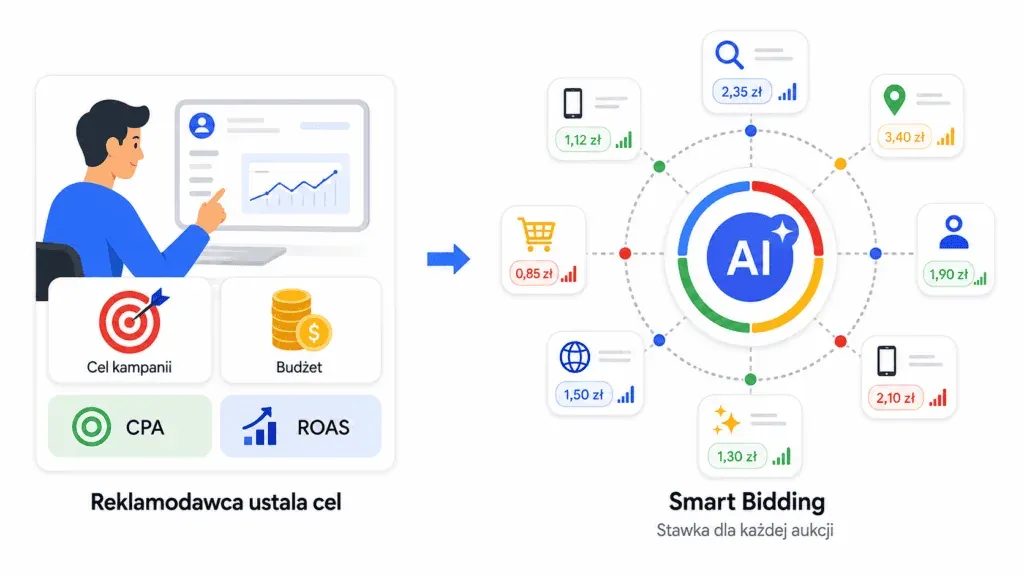
More automated campaign types work on similar logic, such as Performance Max or Demand Gen. The system itself selects placements, works with the available data and optimises activity towards the chosen goal. This mechanism is exactly what underpins many of the newer Google Ads features too, including those related to creative generation and support for everyday account work.
What does ad creative generation look like in Google Ads?
The biggest changes today are visible in ad creatives. Asset Studio, the central hub for working with assets, lets you generate and edit images using the Nano Banana Pro model. The feature is available at no extra charge on all Google Ads accounts.
Images with Nano Banana Pro
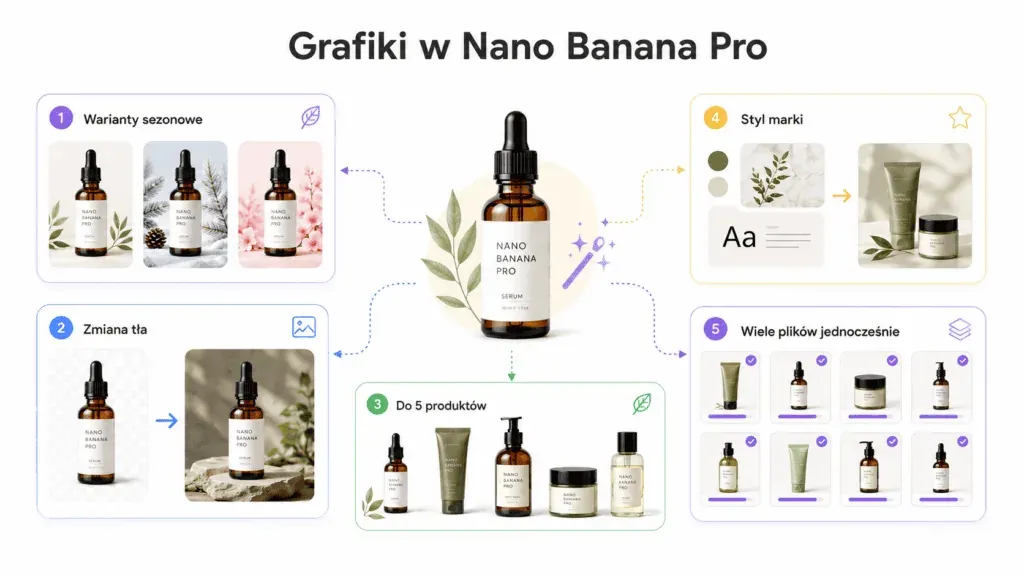
The tool isn't limited to creating an image from scratch. With a simple prompt, you can transform an uploaded photo, including:
- preparing seasonal versions or colour variants,
- changing the background or placing the product in a photorealistic scene,
- combining up to 5 products in a single image,
- adding your own reference images so the result stays true to the brand style,
- processing multiple files at the same time.
In practice, this shortens the path from idea to a finished set of creatives from several days to a few minutes. Asset Studio organises the whole process: from the brief, through creating variants, to previewing the ad across different channels before it's even published.
You can also set a reference style, so that subsequent images stay visually consistent, with the model refining details such as textures, lighting and a finish close to photography. Google also suggests options tailored to the site and product, and the decision on whether to use them stays with the advertiser.
Video generation: Veo in Asset Studio
Video has long been one of the harder formats to prepare for ad campaigns. It required footage, editing, adapting to channels and usually a bigger budget than static creatives. Veo in Asset Studio significantly shortens this process: the latest model turns photos into short, naturally looking videos at no extra cost.
How is a video made in Veo?
The process is simple. You upload up to 3 static photos, and Veo creates several variants of a clip lasting up to 10 seconds, with smooth camera and scene movement. The finished footage can be used in the ad straight away with templates for captions, a voiceover or music, and then run on YouTube, the display network or in Performance Max campaigns. A video is created this way in a few minutes, without a production crew or an editing budget.
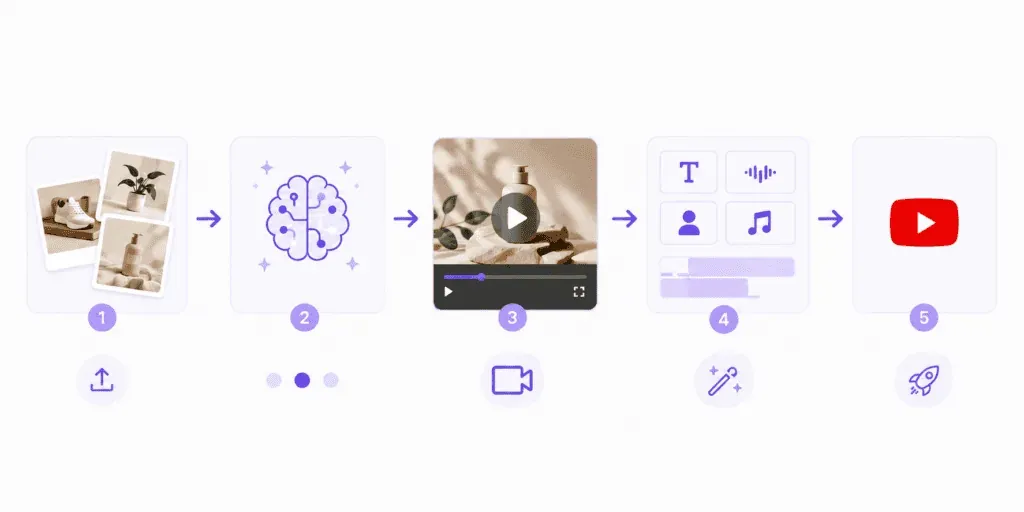
Image-to-video and video from a description alone
Veo analyses what's in the uploaded photo, then animates the scene in a natural way. This is exactly the image-to-video technique, meaning the shift from a static image to motion.
The second option is generating a clip based solely on a text description, for when finished photos aren't available.
The latest versions of the model also let you add synchronised sound: music, effects, and even a voiceover. Several variants to choose from are created from a single set of materials, which makes it easier to compare different creative directions instead of basing the whole campaign on one idea.
Veo works across various campaign types, and in Demand Gen also in an automatic variant. This is one of the biggest changes of recent months: video, which used to be one of the most expensive and time-consuming formats, is becoming available practically on demand.
From a product photo to a finished video
The greatest value of these solutions is that they can be combined into a single process. The starting point is a product photo, which can first be refined in Nano Banana Pro (changing the background, preparing a new scene or creating a different visual variant) and then used as the basis for generating a short video in Veo.
As a result, the entire ad material is created within a single environment, without moving files between different programs.
For smaller brands, this mainly means a lower barrier to entry for the video format. However, a lot still depends on the quality of the starting point: the better the product photo and the more accurate the description, the greater the chance of a usable final result.
Text generation and search ad automation
Generating ad copy
AI also supports the creation of ad content. Google can suggest headlines and descriptions based on the advertiser's website, and after you enter your own instruction, it can develop further variants to choose from. The suggestions are generated in the language of the landing page.
The generated messages can also be constrained with brand guidelines, such as a list of excluded words or phrases that shouldn't be used. They then go into responsive search ads, where the system tests different combinations to show users the best-matched version.
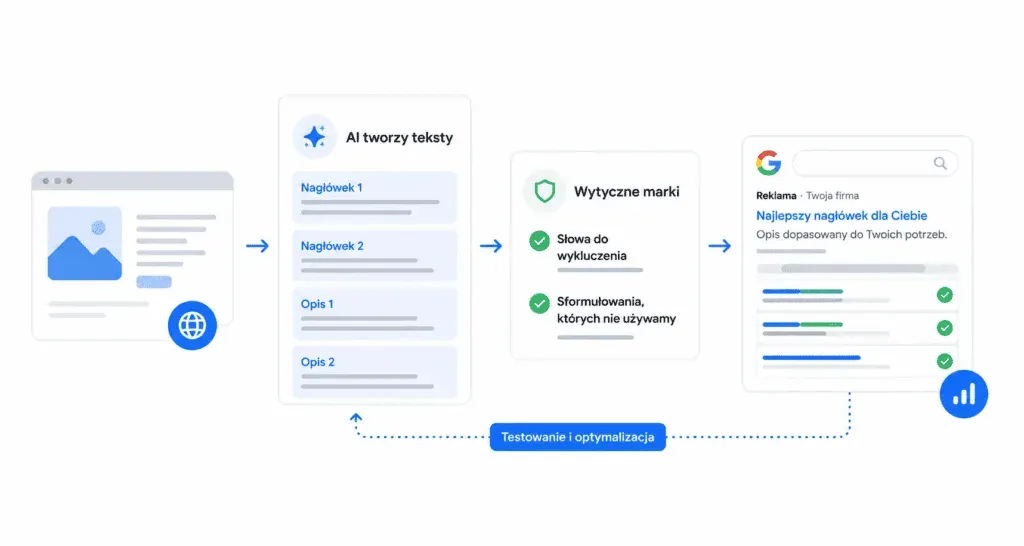
Keyword matching
Classic search campaigns increasingly rarely rely solely on a rigidly defined list of phrases. Broad match lets the system show ads for queries that are semantically related too, not only ones identical to the specified keyword.
This solution is complemented by keywordless technology. The algorithm analyses landing pages, ad assets and existing keywords in order to reach queries the advertiser wouldn't have included in a manually prepared list.
Control over delivery is still provided by negative keywords, which are taken into account before the campaign's reach is extended.
AI Max in Search campaigns
AI capabilities are also reaching classic search campaigns. AI Max, rolled out globally in 2025, lets the system better match ads to user intent: generating headlines and descriptions for specific queries, going beyond literal keywords, and directing traffic to more relevant subpages.
The advertiser still retains control over these activities. Queries handled by AI Max are marked accordingly in reports, and the system separates traffic coming from expanded matching from that generated based on landing pages. This makes it possible to check exactly where the additional reach comes from.
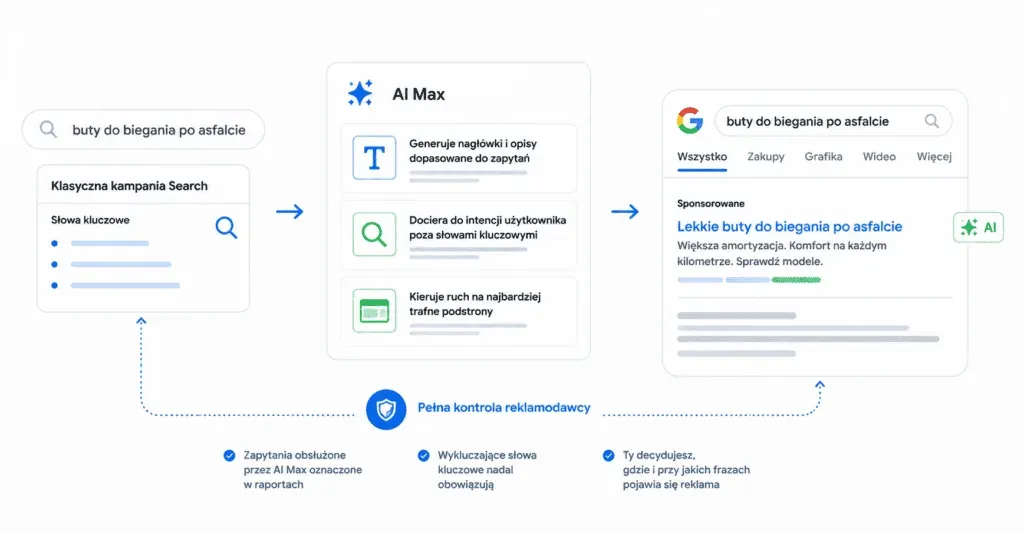
Negative keywords still apply, which means you can use broader matching and automatic message creation without completely losing control over where and for which queries the ad appears.
New directions in AI development in Google Ads
Google is also developing tools designed to support everyday work on ad accounts. One of them is Ask Advisor: an assistant announced at Google Marketing Live, working across Google Ads, Analytics and Merchant Center. Its job is to help with data analysis, suggest next steps and support account management in a conversational form.
At the same time, Google is testing ads appearing in AI-generated search answers, namely AI Overviews. Right now, both directions are being developed most heavily in English-speaking markets, so in Poland it's worth treating them as a preview of what's coming.
The limits of generative creatives: what to keep in mind?
Generative features have their limits, and it's good to know them before your first campaign. Asset Studio doesn't let you create photorealistic faces of specific people, and Google marks all AI-generated material with an invisible SynthID watermark.
Such a creative isn't automatically approved for delivery, though. It's subject to the same ad policies as other assets and can be rejected, for example due to the context of use, combination with other materials, or local regulations. That's why every generated element should be checked before publication, especially in industries subject to additional restrictions.
What is the availability of AI features in Google Ads in Poland?
Before implementing, check which solutions are already available on Polish ad accounts:
| Feature | Status in Poland | Notes |
|---|---|---|
| Smart Bidding, Performance Max, Demand Gen | available, work in Polish | full set of strategies and campaign types |
| Ad copy generation | available, works in Polish | content is generated in the language of the landing page |
| AI Max in Search | available | rolled out globally since 2025 |
| Images (Nano Banana Pro) and video (Veo) | available, prompt in another language | for example an English prompt, result used in Polish campaigns |
| Ads in AI Overviews, Ask Advisor | not yet available | rollout mainly in English-speaking markets so far |
The scope of features changes very quickly, so before launching a campaign, check the current status directly in the panel or in the Google Help Centre.
Generative creatives still need human control
Generative AI features in Google Ads today do work that until recently required a graphic designer, a video editor and several days of waiting. They shorten production from days to minutes and make it easier to test formats such as video, which used to be out of reach for smaller budgets.
This doesn't mean, however, that the advertiser can hand the whole process over to the system. The quality of the generated materials can vary, and automation on its own doesn't make a creative effective.
The best results come when AI speeds up production while a human still ensures brand consistency, compliance with ad policies, and whether the material genuinely supports sales.

If Google Ads campaigns interest you, also check out:
- Performance Max: the complete 2026 guide
- ROAS is a myth. Let's stop telling fairy tales and focus on the data
- Over €180,000 in revenue in 30 days? See how we did it!
FAQ: AI in Google Ads
Does generating images and video in Asset Studio require extra payment?
No. Google provides Nano Banana Pro and Veo free of charge on all ad accounts. Costs only appear at the ad delivery stage, according to standard campaign billing.
Will Veo create a video if there are no product photos?
Yes. Besides the image-to-video mode, the model can generate a clip based solely on a text description of the scene. Working from your own photos still gives better results, though, because the video stays closer to the real product.
Does an English prompt mean the ad will be in English?
No. The prompt only describes the look of the image or video scene and doesn't go into the ad itself. Ad copy is generated independently, in the language of the landing page, so for a Polish website it will be in Polish.
How does AI Max differ from Performance Max?
AI Max is a feature switched on within a classic search campaign: it broadens matching and adds content to match the query. Performance Max is a separate campaign type that covers multiple Google channels at once and distributes the budget between them on its own.

Have a question about this article? Write to us.