












In short
- Meta Ads ad types are creative formats (single image, video, carousel with 2 to 10 cards, collection, Reels and Stories in vertical 9:16), plus dynamic ads, lead forms and ads that lead to a conversation. The format has to match the placement and the campaign objective.
- Meta organises campaigns around 6 objectives (awareness, traffic, engagement, leads, app promotion, sales), and Advantage+ is switched on by default. Since the system picks the audience, budget and placements, the quality and variety of creatives matter more.
- The best results come from a set of different materials judged by sales data, not from one universal format: a single image for quick tests, a carousel to present a product range, a dynamic ad for remarketing. Reels and Stories need a separate, vertical creative.
More and more businesses are running ads on Facebook and Instagram, but choosing a format alone can be overwhelming. A single image, video, carousel, collection, plus dynamic ads and lead forms. Each of these types serves a different purpose and looks different on the recipient's phone screen. Find out which Meta Ads types are available today and which format suits a specific goal.
What Is the Difference Between Meta Ads Ad Types and Formats?
Meta Ads ad types are the creative formats available in Ads Manager for Facebook and Instagram: single image, video, carousel, collection, and assets designed for Reels and Stories. These are complemented by dynamic ads that pull from your product catalogue, lead forms, and formats that direct the user into a conversation in Messenger.
In practice, the term “ad types” covers three different layers. The creative format determines what the material looks like: whether it is a single photo, a video or a swipeable carousel. Placement decides where the recipient will see it, for example in Reels, the Feed or on Marketplace. The campaign objective, meanwhile, indicates what effect the ad is meant to achieve, from building brand awareness to driving sales.
All of these elements are connected. The same video will look different in a full-screen Reels placement than in the classic Feed. That is why choosing an ad type should not come down to visual preference alone, but to matching the creative to the placement and the campaign objective.
What Are the Basic Creative Formats on Facebook and Instagram?
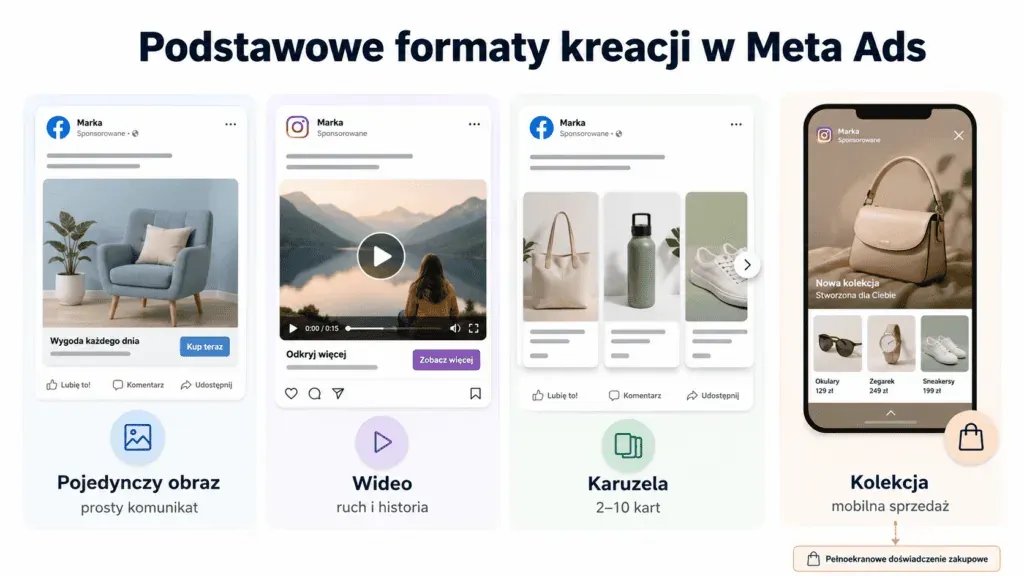
Meta Ads campaigns are built on four main formats. Most other advertising solutions are based on them, so it is worth getting to know them first.
Single Image Ad
The simplest format is a static graphic accompanied by text, a headline and a CTA button. It works well for simple messages and quick tests, because it can be prepared quickly without any editing. It is also a good starting point when promoting a new offer, when you want to check whether a particular message interests your audience. Its limitation is the lack of motion, which is increasingly effective at grabbing attention on social media.
Video Ad
Video gives you more room to tell a story and show a product in action. Because videos often play without sound, it is worth conveying the most important information through visuals and captions rather than relying solely on a voiceover. Short clips lasting a dozen or so seconds usually hold attention more effectively than longer forms. This is a good choice when you want to explain how a service works or show a product in everyday use.
Carousel
The Carousel format lets you combine 2 to 10 cards in a single ad. Each card can have its own image or video, headline and link. This lets you present several products, show the successive benefits of a single offer, or take the recipient through a short story step by step.
This format gives you more room for your message than a single graphic and lets you engage the user with different elements of your offer. In e-commerce, it is often used to showcase bestsellers, products from a single category, or successive variants of the same product.
Collection and Instant Experience
Collection is a mobile format: a main image or video is displayed above a grid of products. Clicking it opens an Instant Experience, a full-screen page that loads inside the app without switching to a browser. This path shortens the journey from the ad to browsing the offer and works well for shopping on a phone.
At the start of 2026, Collection stopped being a separate option in the ad creation tool and moved into the format's display settings, but it remains one of the strongest formats for mobile sales.
Full-Screen Formats: Reels and Stories
Reels and Stories are vertical ads in a 9:16 ratio that take up the entire phone screen. They appear between content from friends and followed creators, so they work best when they look natural rather than like a classic banner.
Organic Stories disappear after 24 hours, but as ads they display in the same full-screen space between stories. Reels focus on short, dynamic video with sound and editing prepared for the vertical format.
Both require material built vertically. A square or horizontal creative will be cropped or padded with a background, which reduces its effectiveness. If you are planning to run ads in these placements, prepare separate 9:16 files instead of using the same graphics as for the Feed.
Ad Formats Matched to a Specific Objective
Some ad types go beyond the visual layer alone. They not only grab attention but also perform a specific task: presenting products from a catalogue, collecting contact details, or directing the user into a conversation.
Dynamic Ads (Advantage+ Catalogue Ads)
Dynamic ads, known as Advantage+ catalogue ads (formerly dynamic product ads), pull data directly from your product catalogue. The system decides on its own which items to show a given person, based on their behaviour in your shop and on your website. This is the most common choice for product remarketing: someone looked at a specific pair of shoes, so they will see exactly those shoes together with the price and availability. The format requires a correctly configured catalogue and event tracking. Without data, the system has nothing to match against.
Lead Forms (Lead Ads)
Lead forms (lead ads) let you collect leads, meaning contact details, without leaving Facebook or Instagram. Clicking the ad opens a form, often pre-filled with data from the person's profile, which lowers the barrier and increases the number of submissions. This format works well for event sign-ups, quote requests or booking consultations. It is worth passing collected contacts straight into your CRM system or email tool so you can start further communication as quickly as possible.
Click-to-Message Ads
Click-to-message ads direct the user not to a website, but into a conversation on Messenger, WhatsApp or Instagram direct messages. The recipient asks their question straight away in a messaging app they already know, and the business continues the contact without a form. This is an option for industries where the decision is made in conversation: services, made-to-order products, offers that need clarifying.
The table below sets out which task each ad type suits best:
| Format | Best suited to | What it requires |
|---|---|---|
| Single Image | Simple messaging and quick tests | One strong graphic |
| Video | Product demos, building attention | Material that reads clearly without sound |
| Carousel | Several products or features in a single ad | 2 to 10 cards with separate links |
| Collection | Shopping from a phone | A product catalogue |
| Reels and Stories | Reach among younger audiences | Vertical 9:16 video |
| Dynamic Ads | Product remarketing in e-commerce | Catalogue and event tracking |
| Lead Forms | Collecting contacts | A GDPR-compliant form |
Where Do Meta Ads Appear?
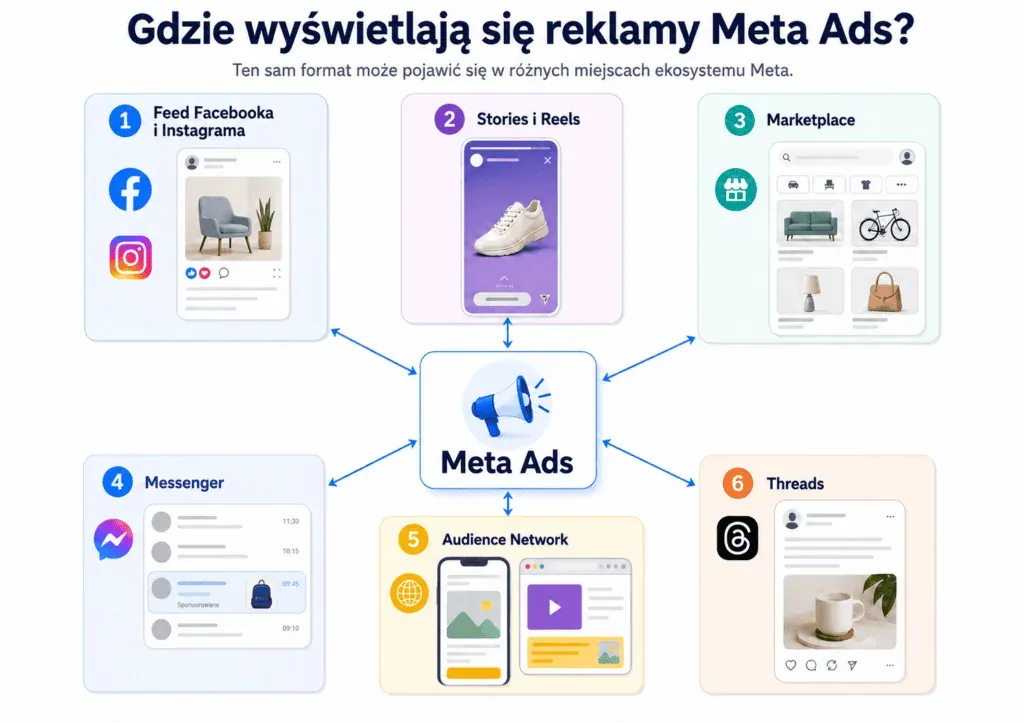
The same format can appear in different places across the Meta ecosystem. Placements include:
- Facebook and Instagram Feed: ads in the main content stream, alongside posts from friends and followed profiles,
- Stories and Reels: full-screen vertical formats between stories and short videos,
- Marketplace: a place where users search for products, so the ad reaches them in a shopping mindset,
- Messenger: ads in the chat list and campaigns that lead to a conversation,
- Audience Network: placements in apps and on partner websites outside Meta's own apps,
- Threads: the newest ad placement, where single images, video and carousels appear.
By default, the system distributes delivery across the available placements on its own, based on predicted effectiveness. Placements can, however, be selected manually, and you can switch off any where you do not want the ad to appear.
Advantage+ and Campaign Objectives: What Changed in 2026?
Choosing a format is only one of the decisions involved. Today, a campaign's final shape is determined mainly by its objective and its level of automation. This is precisely the area where Meta has introduced its biggest changes in recent months.
Six Campaign Objectives
Meta organises campaigns around 6 objectives: awareness, traffic, engagement, leads, app promotion and sales. These correspond to successive stages of the conversion funnel, from the first contact with a brand to purchase.
The chosen objective also affects which formats and placements are available. Collection and dynamic ads use the product catalogue and are most often used in sales campaigns, while lead forms are tied to lead generation. So before choosing a format, decide what effect the campaign should achieve: its other settings depend on that.
Advantage+ Set by Default
Advantage+ is a set of features that use AI to automate audience selection, placements and budget allocation. Meta has merged manual configuration and Advantage+ solutions into a single campaign creation process. For sales, lead generation and app promotion objectives, automation is applied by default, but the advertiser can still control its individual elements.
Ad selection is driven, among other things, by the Andromeda system, which analyses the available creatives and helps choose the ones best matched to a specific recipient. As a result, the campaign's centre of gravity is shifting. Since the system is now largely responsible for the target audience, budget and placements, the quality and variety of advertising materials matter more and more.
Changes to Flexible Ads fit the same direction. Flexible Ads have stopped functioning as a separate format, and the ability to automatically match and enhance materials has been moved into Advantage+ Creative solutions.
In Meta Ads, Results Increasingly Come Down to Creative
Today, the system makes a significant share of decisions about audiences, budget and delivery, so the advertiser's influence is shifting towards the advertising materials: their format, quality and fit with the placement.
The best results are usually delivered not by a single universal format, but by a set of different materials matched to the campaign objective and evaluated based on sales data and ROAS, or return on ad spend. A single image will work well for a quick test, a carousel will let you showcase your range, and a dynamic ad will support remarketing and closing sales. So instead of looking for one best solution, it is worth preparing several variants and checking which one best achieves the chosen objective.
Formats alone, though, are only part of the puzzle. In performance marketing, Facebook and Instagram ads deliver the best results when they are backed by a well-thought-out strategy, proper measurement and regular creative testing. That is when they stop being isolated actions and become part of coherent Meta Ads activity focused on sales.

Interested in paid campaigns? Also check out:
- What Are the AI Features in Google Ads?
- ROAS Is a Myth. Let's Stop Telling Fairy Tales and Focus on Data
- Over €180,000 in Revenue in 30 Days? See How We Did It!
FAQ: Meta Ads Ad Types
How Many Images Can You Add to a Carousel Ad?
A carousel holds 2 to 10 cards, and each has its own image or video, headline and link. You do not have to use the maximum, though. It is usually better to start with 3 to 5 cards and add more only once the data shows they genuinely improve results.
How Does a Dynamic Ad Differ From a Regular Product Ad?
You create a regular product ad once and show the same thing to everyone. A dynamic ad pulls items from the catalogue and selects them for a specific person based on their behaviour. This means the same format shows different products to different recipients.
Do Reels and Stories Ads Require a Separate Creative?
Yes. Both formats are full-screen and vertical, in a 9:16 ratio. A square or horizontal graphic will be cropped or padded with a background, which reduces its effectiveness. It is best to prepare separate material matched to these placements.
Which Meta Ads Type Should You Choose to Start With?
A single image or a short video aimed at a clearly defined objective works well to start with. Once the first data comes in, further formats are added and their results compared. The choice always starts with the campaign objective, not with the format itself.
Can You Still Run a Campaign Manually in 2026?
Yes. Even though Advantage+ is switched on by default, individual automation features can be turned off with separate toggles. Manual settings, such as your own choice of audiences or placements, remain available for most objectives.

Have a question about this article? Write to us.