













In short
- Claude Projects is a separate workspace built on project knowledge (files, briefs, documents) and project instructions, so conversations don't start from zero. Individual chats within a project don't, however, share information with each other automatically.
- Projects is used to organise knowledge, analyse documents and create content in the web interface. Claude Code is an agentic coding tool for working on a repository in the terminal or an IDE, with context stored in a CLAUDE.md file.
- The best results come from a clear project goal, only the materials you need and keep up to date, and precise instructions split into stages. Answers need to be verified, and for confidential data you should check the terms of your plan, because the rules for consumer and commercial accounts may differ.
Claude Projects is an Anthropic feature that lets you organise your work with AI around a specific project. Instead of starting every conversation from scratch, you create a dedicated space, add files, instructions and context to it, and then hold further conversations related to a single topic. Claude then becomes an assistant that remembers the project's assumptions and uses the materials you've provided.
The solution works well both in business and technical work. A marketer can use it to analyse materials and generate content, while a developer can use it to work with documentation and code. In this article, we'll show exactly what Claude Projects is, how to set it up, and how it differs from Claude Code.
What Is a Project in Claude?
A project in Claude is a separate workspace intended for a longer task or for managing a specific brand. Instead of pasting the same guidelines into every new chat window, you gather the key materials in one place and set fixed instructions. This lets the model work within a stable context and generate answers tailored to your strategy. Every project rests on two elements. The first is project knowledge, meaning the documents, reports and briefs the AI uses while working. The second is project instructions, which define the assistant's role, target audience, language and the rules for producing content.
What Can You Use Claude Projects For?
Claude Projects works best wherever you need repeated access to the same information. You can use it to analyse documents, prepare content, plan projects, organise knowledge, or work on technical documentation. Developers can gather an application's assumptions, documentation, code snippets or requirements within a project. Claude can then help analyse solutions, explain code, plan changes, and create documentation. In practice, Projects works best for complex, multi-stage tasks that can't comfortably fit into a single conversation.
How to Use Claude Projects Step by Step?
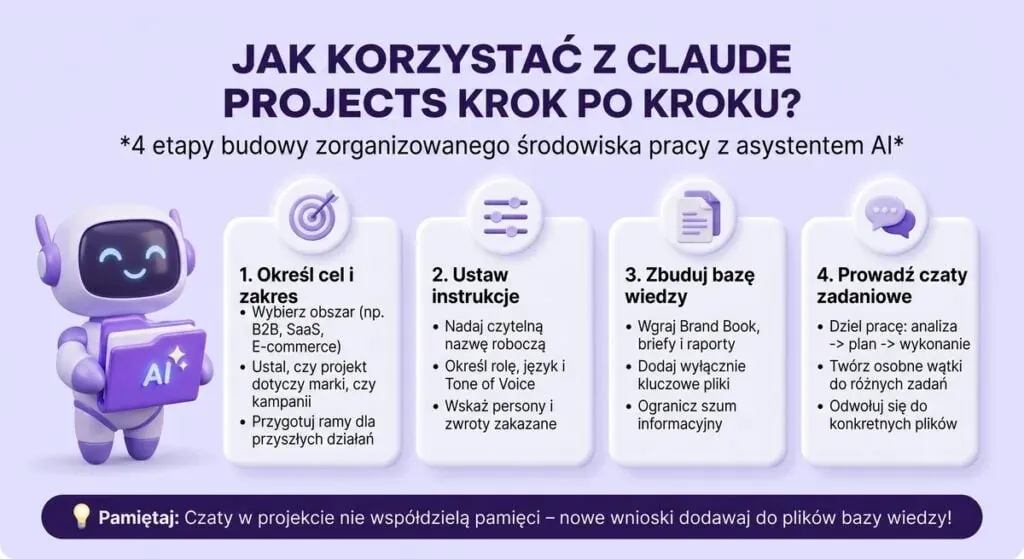
You start by precisely defining what the project is for, for example handling B2B communication in the SaaS industry, preparing a multichannel e-commerce product campaign, or ongoing content recycling from webinars.
It's important to remember one key rule: the individual chats within a single project don't automatically share information with each other. If during one conversation you work out a new value proposition (UVP) or an article structure, the other threads won't know about it until the summary is added to the project's knowledge files or main instructions.
How to Create and Configure a Project?
Go to the Projects section in the Claude interface and create a new project. Give it a clear name, such as "2026 Content Marketing Strategy" or "Python Application: Documentation". Even at this stage, it's worth treating the project as an organised working folder rather than an ordinary chat.
In the configuration, set the project instructions. They can include the goal, target audience, preferred response format, language and working rules. The more precise the instructions, the better the results. Instead of a general "help me code", it's better to write that Claude should analyse Python code, flag potential bugs, propose solutions and explain changes before applying them.
How to Add Files and Instructions to a Project?
You can add text documents, PDF files, reports, briefs, instructions and code snippets to the project's knowledge. Claude uses them as a source of context. For development work, you can also use selected files and folders from GitHub repositories. It's not worth adding everything. The best results come from adding only the materials that genuinely help the model understand the task. Knowledge should be current, well organised, and related to the project's goal. With larger amounts of data, Claude may use retrieval mechanisms to find the relevant fragments (RAG).
How to Work With Claude Within a Project?
Once the project is configured, hold task-focused conversations. Instead of broad requests, break the work into stages: first analyse the materials, then identify problems, then propose a solution, and finally produce the finished text or code. This approach gives you greater control over the result.
Within a single project, you can run several separate chats (for example, one for analysis, one for planning, and one for content creation). They all draw on the same project knowledge and instructions. It's still worth clearly indicating which materials Claude should refer to.
What Are the Key Features of Claude Projects?
The main advantage is combining conversations with your own materials and fixed instructions. Claude no longer acts just as a tool for one-off queries, but as an assistant within a longer process. You can add documents and ask for them to be analysed, compared, summarised, or have conclusions drawn from them. Claude also supports creating content that fits an established context, such as your brand description, offer, target audience or product documentation. In technical projects, that context consists of requirements, architecture and information about the system.
Working With Files and Documents
You can add materials to a project to serve as a knowledge source for Claude. These can include text documents, PDF files, reports, briefs, instructions or code snippets. This lets you work with specific materials instead of copying their content into the chat window every time. Users can then ask Claude to find specific information, compare documents, prepare a summary, or draw out the most important conclusions. With larger amounts of material, it's worth keeping it current and logically organised, since the quality of the project context you provide affects how useful the answers you get are.
Analysing Data and Information
Claude can also support analysis of the information gathered in a project. Data analysis can include finding relationships, comparing values, identifying the most important conclusions, or preparing summaries based on the supplied materials. In practice, a business owner might use AI to analyse a report, a marketer to organise campaign results, and a developer to analyse technical data or documentation. Claude can also perform calculations and work with data using computational tools, but the result should still be verified by the user. An AI assistant can significantly speed up analysis, but it doesn't replace expert judgement, especially when important decisions will be made based on the results.
Creating Content and Working With Project Knowledge
Projects also works well when creating materials that must comply with a defined set of information and rules. You can add a brand description, offer, audience information, product documentation and communication style guidelines to a project. Claude can then use this project knowledge when preparing articles, descriptions, analyses, summaries or other text materials. A similar mechanism can be applied in a technical project, where the context consists of requirements, documentation and information about the system being built. Instead of starting every conversation by restating all the assumptions again, users can focus on the specific task. This makes working with Claude more organised and easier to continue across subsequent conversations.
Claude Projects vs Claude Code: How Do They Differ?
Claude Projects and Claude Code both use Claude models, but they were built for different ways of working. Claude Projects lets you create separate spaces with their own chats, instructions and knowledge base, documents, text, code and other files that give the AI context for subsequent conversations. Claude Code, on the other hand, is a solution focused on software development and working directly with a codebase. The difference mainly concerns scope: Projects helps you organise knowledge and conversations, while Claude Code can carry out development tasks on an actual repository.
| Feature / Use case | Claude Projects | Claude Code |
|---|---|---|
| Main purpose | Organising knowledge, strategy, document analysis and content creation | Direct programming and codebase operations |
| Working environment | Web interface (browser) | System terminal / IDE environment / GitHub |
| How it works | Conversational (chats based on uploaded files) | Agentic (edits files, tests and refactors independently) |
| Context configuration | Project Instructions + files in Project Knowledge | CLAUDE.md in the repository |
| Who it's for | Marketers, managers, analysts, business teams | Developers and software engineers |
What Is Claude Code?
Claude Code is Anthropic's agentic development tool, which can analyse a codebase and carry out tasks related to developing it. Developers can use it to explore the structure of an existing project, build new features, fix bugs, refactor code, or prepare tests. Claude Code can run in a terminal, in a development environment, or in a web version linked to GitHub repositories. In a local project, you can also use a CLAUDE.md file containing information about the architecture, commands, standards and rules that apply to that codebase, so project context is available in future sessions without having to describe the basic working rules every time.
When to Use Claude Projects, and When to Use Claude Code?
Claude Projects is worth choosing when the main goal is working with knowledge, documents and context related to a specific undertaking. This could be analysing documentation, planning an application's features, discussing architecture, or gathering information a team needs. Projects can also use selected files and folders from a GitHub repository as a knowledge source. If the task requires active work on code, though, such as making changes across multiple files, fixing bugs, or carrying out specific development tasks, Claude Code is the better fit.
In practice, both solutions can complement a developer's working environment: Projects helps organise knowledge and hold conversations around a project, while Claude Code is designed to carry out work directly on the codebase.

Privacy and Security When Using Claude
When using AI tools at a company, it's worth paying close attention to the kind of information you share. Claude Projects can hold documents, project data, code snippets or internal materials, so before uploading them, check whether your organisation allows external tools to process this kind of data. The type of plan you use and the data-processing rules that apply to it also matter. Protecting privacy, then, shouldn't be limited to Claude's own settings; a company's internal procedures, access control and mindful use of AI tools matter just as much.
Are Data and Files in Claude Projects Safe?
Anthropic uses measures designed to protect user data, but how data is used can depend on factors such as the type of account and its settings. For Anthropic's commercial products, such as Claude for Work and the Claude API, the company states that customer input and output data isn't used by default to train its generative models. Different rules may apply to consumer Claude accounts, so it's worth checking the current terms for the plan you're using before uploading confidential materials. Personal data, financial information, trade secrets, API keys and confidential source code all call for particular caution; a good approach is to anonymise data and only share the information the model actually needs to complete the task.
How to Use Claude Projects Effectively?
Creating a project alone isn't enough; the quality of the context and how you approach the work matter most. Here are a few rules that genuinely affect the results:
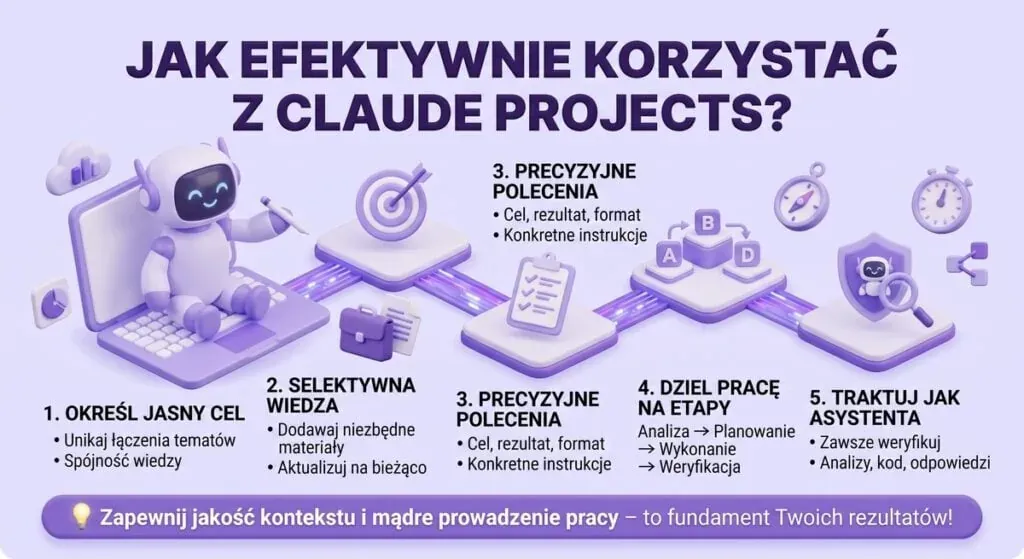
- A project should have a clearly defined goal; combining unrelated topics in a single space makes organising knowledge and later conversations harder.
- Add only the materials genuinely needed for the task, and keep the project's knowledge up to date.
- Instructions should state the goal, the expected result and the response format; instead of "analyse this document", it's better to specify exactly what to look for and how to present the conclusions.
- For complex tasks, break the work into stages: analysis → planning → execution → verification.
- Treat Claude as an assistant, not an autonomous performer; always verify responses, analyses and code snippets before using them.
The Most Common Mistakes When Using Projects
One of the more common mistakes is creating a project without defining its goal and adding a large amount of random material; more data doesn't always mean a better result, what matters is providing information that genuinely helps the model understand the task. Other problems include overly general instructions, failing to update the project's knowledge, and assuming Claude knows information the user never actually gave it.
It's worth remembering that even well-prepared project context doesn't guarantee error-free answers; AI models can generate inaccuracies, misinterpret data, or suggest code that needs fixing. That's why important decisions, analyses, documents and technical solutions should be checked before you rely on them.
FAQ: Frequently Asked Questions About Claude Projects
Is Claude Projects Available for Free?
Yes, Claude Projects is also available to users on the free Claude plan, though certain usage limits apply. Paid plans, such as Claude Pro, provide higher limits and access to additional capabilities. The availability of specific features may change as Anthropic's offering develops.
How Many Files Can You Add to a Project in Claude?
You can add many materials to a project, and how usable they actually are for the model depends, among other things, on content size and the system's context capabilities. These can include text documents, PDF files, data or other materials needed for the project. With large bodies of knowledge, Claude may use mechanisms to retrieve the relevant information from the project's materials.
Does Claude Remember All the Conversations Held Within a Project?
You shouldn't assume that every new conversation automatically knows the full content of all the other chats in the project. The shared source of information is mainly the materials and instructions saved at the project level. That's why important information that should be available across different conversations is best placed in the project's knowledge or instructions.
How Large Is Claude's Context Window?
The size of the context window depends on the Claude model you're using and how you access it. Many Claude models support a very large context, measured in the hundreds of thousands of tokens, and some models and API use cases can offer even higher limits. The context window determines how much information the model can take into account while processing a given task.
Can Claude Projects Be Used for Programming?
Yes. Developers can use Claude Projects to store documentation, requirements, architecture information and code snippets. Claude can then help analyse solutions, generate code, plan features or explain bugs. For more direct work with a codebase, Anthropic offers Claude Code instead.
Are Claude Projects and Claude Code the Same Thing?
No. Claude Projects is mainly for organising conversations, knowledge, files and instructions around a specific project. Claude Code, on the other hand, is an agentic tool designed for development work, capable of analysing and modifying a codebase and carrying out tasks related to building software. Both solutions use Claude, but they serve different user needs.
See also: