














In short
- A Google Business Profile is free. Google charges nothing to create, verify, update or maintain it, and the profile has no expiry date or subscription.
- A demand for a "mandatory fee" to register, renew or maintain your profile is a warning sign. Scammers call as "Google representatives", send invoices for non-existent services and threaten to delete the profile, so do not pay without checking the sender.
- Costs only appear with extra services you pay an agency, a photographer or for advertising: Google Ads, profile management and positioning, a photo shoot. None of them is mandatory.
Is a Google Business Profile free?
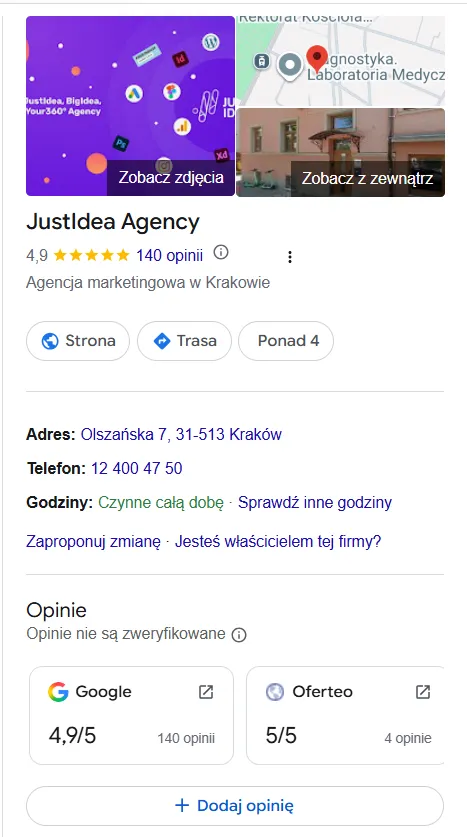
Yes. A Google Business Profile (formerly Google My Business) is completely free. It is the profile that appears in Google Search and Google Maps when someone looks for your business or for services nearby. Customers see your address, opening hours, phone number and reviews, and can get directions, call you or go to your website.
Google earns money from advertising, not from business profiles, so creating, verifying and maintaining a profile costs nothing, regardless of the size of your business.
However, only a business that meets Google's guidelines can create a profile: it serves customers at a physical location or provides services in a defined area (e.g. a renovation company or a plumber). Businesses that operate only online usually do not qualify.
What you can do in your Google Business Profile at no cost
Verification
After you create a profile, Google asks you to confirm that the business exists and operates at the given address. Google chooses the verification method (e.g. a video recording, phone call or SMS, email or a postcard) depending on the type of business. Each of them is free.
Updating your details
At no extra cost you can:
- change your opening hours, including holiday hours,
- update your business address or phone number,
- add new photos and videos,
- complete the description of your business and services,
- publish updates and offers, if the feature is available,
- reply to customer reviews,
- change your business categories and attributes.
Changing your address or business name may require re-verification, and Google sometimes checks new details before publishing them. This costs nothing either.
Renewal
A Business Profile has no expiry date, subscription or annual fee. If someone tells you that your profile is expiring and you need to make a transfer, it is a scam attempt (more in the section below). Google can suspend or restrict a profile, but only when it violates the platform's policies, not because of a missing payment.
Closing or removing your profile
If you are closing your business, you can mark it as temporarily or permanently closed free of charge. Marking a business as permanently closed does not, however, make the listing disappear from Google Maps immediately. Removing the profile from your account also does not guarantee that all information about the place will be removed from search.
If your business is only moving, do not mark it as closed. Update the address and go through re-verification if Google requires it.
Google Business Profile scams
Google does not charge for creating or maintaining a profile, but scammers regularly try to convince business owners otherwise. They often impersonate Google or present their services as mandatory.
How scammers operate
- A "Google representative" calls and claims your profile requires paid activation or renewal.
- An email arrives asking for a fee to maintain or position your profile.
- You receive an invoice for supposedly maintaining or optimising your profile, although nobody ordered such a service.
- You hear that your "subscription is expiring" and the profile will disappear from Google Maps unless you make a transfer.
- Someone threatens to delete your profile if you do not pay.
- Someone demands a fee for adding a location pin for your business, although it is free for qualifying businesses.
- An agency guarantees first place in Google Maps. Nobody can guarantee a specific position in the free local results.
- Someone asks you to grant them access to your profile and then makes it hard for you to regain control.
Time pressure and a demand for immediate payment should make you especially cautious.
How to protect yourself
- Do not pay for a supposedly mandatory creation, renewal or maintenance of your profile.
- Check the sender and the caller's number. An email address alone is not proof, however, because it can be spoofed. If in doubt, log in to your profile yourself rather than through a link in a message.
- Do not share verification codes or your Google account password. Give an agency manager access to the profile instead of handing over your login details.
- Report the fraud attempt to Google.
How much does a Google Business Profile cost when you use paid services?
The profile itself is free, but there are paid services around it. None of them is mandatory: you decide whether you want to invest in them to reach more customers in your area.
Google Ads
Google Ads campaigns let you show your business in paid search results, and some ad formats also in Google Maps. The cost depends on your budget, competition and cost per click (CPC). Advertising does not improve your profile's position in the free local results, because these are two separate channels.
Profile management and positioning by an agency
An agency can take over the day-to-day running of your profile or handle its positioning:
- Profile management covers regular posts, updating details, adding photos and replying to reviews.
- Profile positioning is a broader set of activities aimed at a higher position in local results. The cost depends on the scope and the competition in your industry.
Paid positioning does not mean you buy a specific spot in Google Maps: you pay for the agency's work. You can do some of the work yourself, as we describe in the article How to position a Google Business Profile?
An agency may invoice you for work actually done, but it must not present its fee as a charge collected by Google. Before signing a contract, check what the subscription covers and make sure you are paying for specific activities, not just for keeping the profile.
Photo shoots
A photo shoot (interior, products, team) is a one-off cost that depends on the photographer and the scope. It is not necessary: you can take photos yourself and add them to your profile for free.
Frequently asked questions about Google Business Profile fees
How much does a Google Business Profile cost?
Nothing. Creating, verifying and maintaining the profile is free. Costs only appear with extra services, such as Google Ads, management by an agency or a photo shoot.
Is Google Business Profile verification paid?
No. All verification methods offered by Google are free. If someone demands a fee to "speed up verification", it is not a Google fee.
Is adding a business to Google Maps free?
Yes. You add your business to Google Maps by creating a free Business Profile. The location pin appears at no cost if the business meets Google's guidelines.
Can you buy reviews for a Google Business Profile?
No. A Google review costs nothing: customers leave it for free, and offers such as "reviews for X" mean buying fake reviews. This breaches Google's rules and may end with reviews being removed or the profile being restricted. It is safer to ask satisfied customers for reviews.
How to report a company demanding a fee for your profile?
Through the Google form for reporting policy violations by third parties. If you have already made a transfer, also report the matter to your bank and the police.
Is unlocking a Google Business Profile paid?
Google does not charge for the profile reinstatement procedure. If your profile has been suspended, check the reason and use the official appeal path. An external specialist may charge for helping you solve the problem, but this is not a mandatory Google cost.
Summary
A Google Business Profile is free: you do not pay to create, verify, update or maintain it, and the profile does not expire for lack of payment. Any demand for a "mandatory fee" is a warning sign.
Costs only appear when you decide on Google Ads, profile management or positioning, or a photo shoot.
Want to know how your profile compares with local competitors? Contact us and we will check its visibility in Google Maps and suggest what to improve.
Check also: