








In short
- Bing Places for Business lets you create a free business listing that appears in Bing search and on Bing Maps. Since October 2025 there is a new dashboard with faster import from Google, bulk editing and hints on what your profile is missing.
- Setting it up covers a Microsoft account, business type, name, address and phone number in the same form as on Google, categories, description, photos and opening hours. The listing goes live only after PIN verification, and after an import from a verified Google Business Profile Bing usually verifies it automatically.
- Reviews on Bing come from external sites such as TripAdvisor, Yelp and Facebook, and you reply to them there. Complete and consistent data on Bing also makes it more likely that Copilot gives customers the correct address, opening hours and phone number.
Being present in Bing search is part of a marketing strategy that increases your visibility in search results and attracts new customers. Bing is the second most popular search engine in the world and lets businesses create a free profile that shows up in local search results and on Bing Maps. In this article you will learn how to set up and manage a business listing in Bing Places, how to verify it and how Bing Places for Business differs from Google Business Profile (formerly Google My Business).
What is Microsoft Bing?
Microsoft Bing is a search engine created by Microsoft that lets users search for information, browse maps and use many other online services. Thanks to its integration with Bing Places for Business, companies can increase their visibility in Bing search results. Like Google, Bing lets you create a business listing, which matters for every business that wants to be present online and attract future customers. Bing is the default search engine in the Edge browser and in Windows search, and Microsoft Copilot also uses its index.
Bing's market share in Poland and worldwide
In September 2026 Bing had a 5.29% share of the global search engine market and was second only to Google (89.94%). In Poland its share was 7.38%, compared with 89.56% for Google (StatCounter). It is a small part of the market, but far fewer businesses compete for these users than on Google.
How does Bing Places for Business work?
Bing Places for Business is a tool that lets companies create and manage listings in Bing search and on Bing Maps. Business owners can add the most important information about their business, such as the business name, address, opening hours, contact details and a description. Complete data helps promote the business in search and strengthens its position in Bing search results.
Bing Places lets you add photos and media, which makes the profile more attractive and helps attract new customers. What is more, a Bing Places listing lets a business monitor its results and adjust its promotion strategy.
The new Bing Places for Business dashboard
On 3 October 2025 Microsoft launched a new Bing Places for Business dashboard. It is available at bing.com/forbusiness, and existing accounts and listings were moved over automatically. You log in with the same credentials as before.
The most important changes in the new dashboard:
- faster import from Google that transfers the business name, opening hours and contact details more accurately, also for all your locations at once,
- bulk editing and a live view of the status of changes,
- a recommendations tool that shows what your listing is missing, e.g. photos, a website link, opening hours or social media profiles, and for restaurants a link to the menu or online ordering.
Microsoft also announced a deeper connection between Bing Places, Bing Maps and Copilot (Microsoft Bing Blog).
Why set up a business listing on Bing Maps?
A business listing on Microsoft Bing has many advantages. Above all, it increases visibility in local search results, which matters a lot for local SEO. Interested people find your business profile online more easily, which means more visits and a chance of a new customer. Bing also provides statistics that let you monitor the results of your listing. This data helps you develop your promotion. In addition, consistent business data (name, address, phone number) on Google, Bing and in business directories strengthens local SEO, because search engines see the same information in many places.
Is a Bing listing free?
Creating a listing in Bing Places for Business is completely free. Once the profile is set up, you do not pay for keeping, editing or updating it either. The listing has no expiry date: it exists until its owner decides to delete it.
Bing does not sell higher positions on the map. Only Microsoft Ads are paid, and they are a separate service that the listing does not need in order to work.
How to create a business profile in Bing Places step by step
Below you will find a guide that takes you step by step through creating a business listing on Microsoft Bing.
Creating a Bing Places for Business account
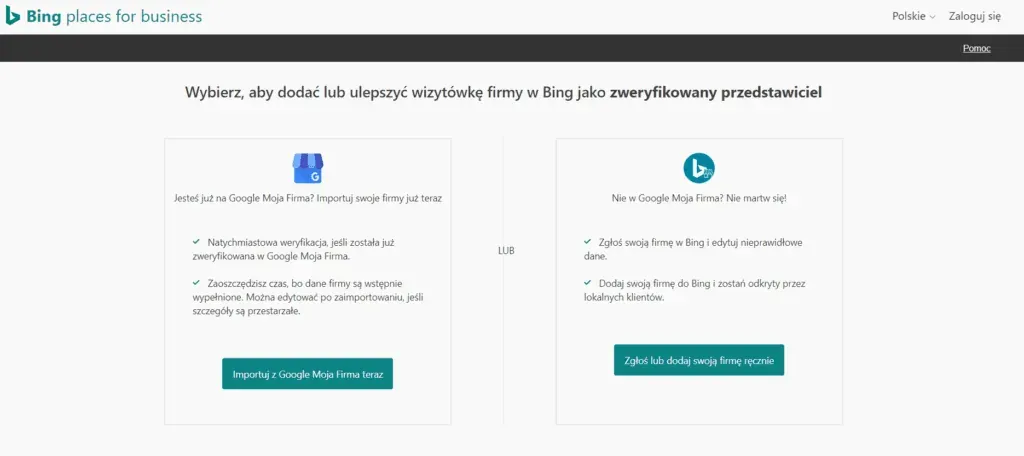
Go to Bing Places for Business (bing.com/forbusiness) and sign in with a Microsoft account. You can use an existing account or create a new Bing account just for your business. It is best to link it to a company email address so you do not lose access when the person responsible for marketing changes. At this stage you also choose whether to import data from an existing Google listing or to create the profile manually.
If your business is already in the Bing database, search for it by name and town and claim the existing entry. Do not create a new one, or two entries for the same business will appear on the map.
Business type
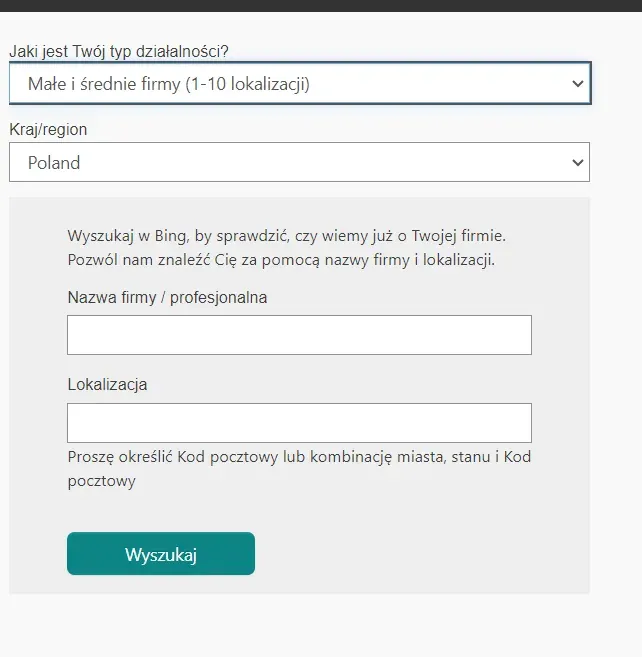
In the second step, enter the business name and choose the business type that describes it best. Choosing the right type and range of services matters, because Bing Places adapts the profile to the specifics of your business, which helps it rank better in search results. As a result, your profile will match users' queries more precisely and customers will be more likely to find your business online.
Entering basic information
The next step is filling in information about the business. Enter the business name and address and a phone number. This information must be accurate and up to date, because it will be shown in Bing search results. Incorrect data misleads users, so make sure it is current before moving on to the next step.
The business name must match the real name of the business, without added keywords or a city name. Enter the name, address and phone number in the same form as in your Google Business Profile and on your website.
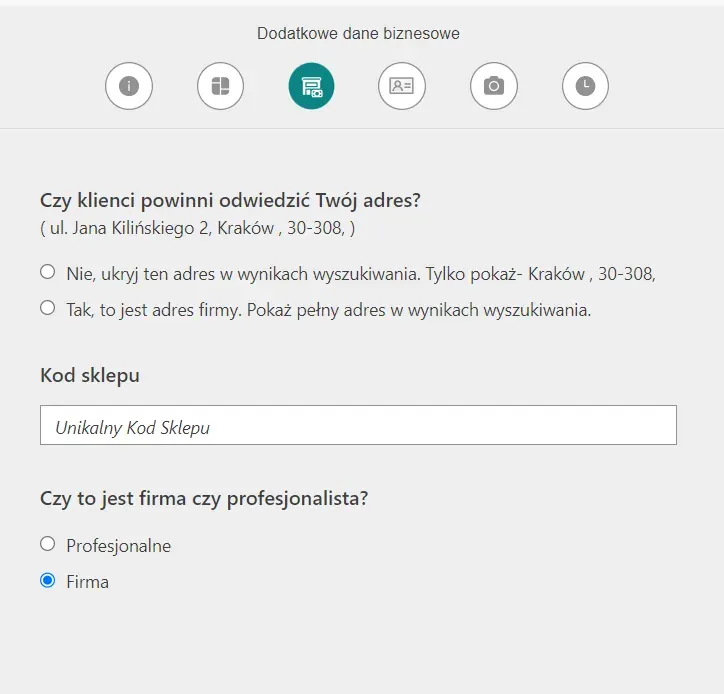
If you serve customers at their location, e.g. as a plumber or a cleaning company, you do not have to show your address. Hide it and specify the area you serve.
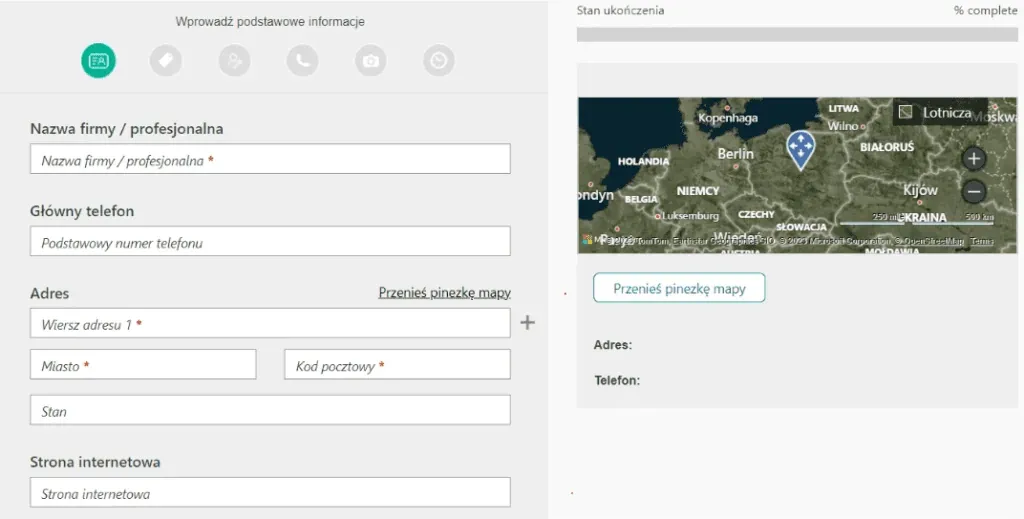
Information about your business
In the next section, choose the categories that best fit your business. Pick categories that are as specific as possible and describe your business accurately. This helps your local rankings and makes it easier for potential customers to find the business in Bing search.
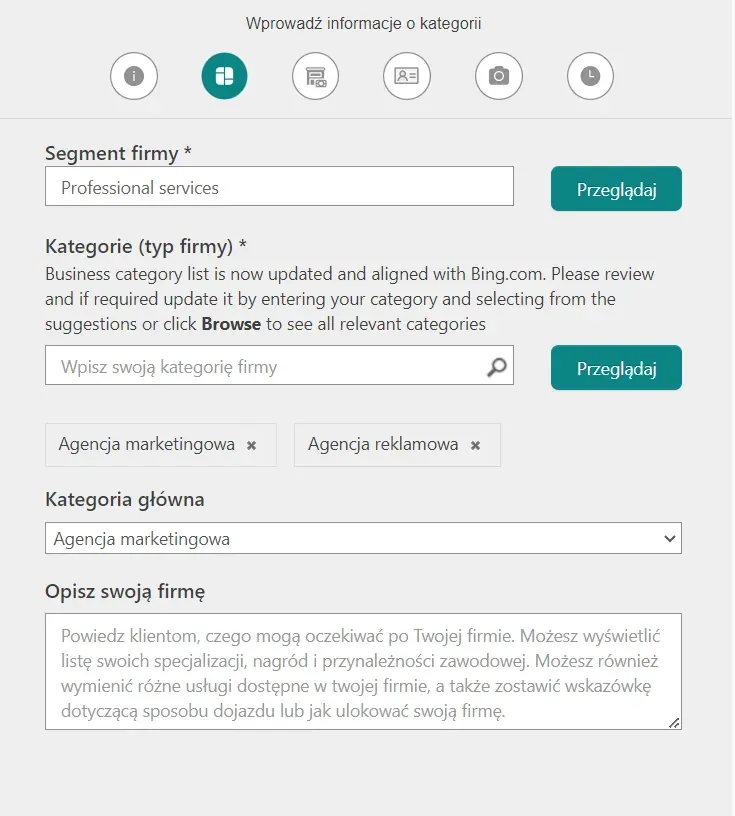
Additional business details
In this part, add information such as a business description, which helps with SEO and attracts new customers. The description should be concise but include the keywords potential customers type in, e.g. the name of the service and the city. Write it for people: a jumble of phrases puts readers off.
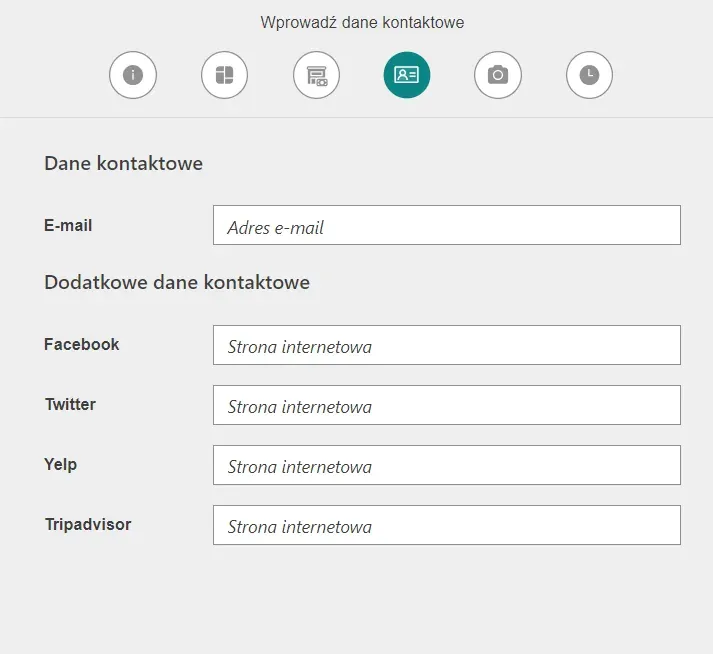
Contact details and social media
In the next step, fill in the contact details that were not covered earlier, such as email, and add links to your business's social media profiles. This information helps build trust and lets customers contact your business quickly.
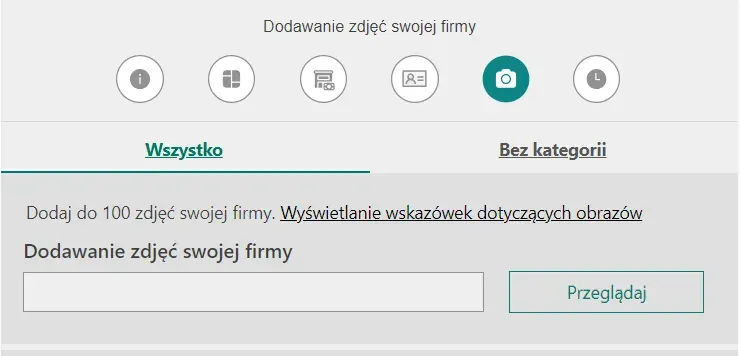
Adding photos and media to your Bing Places profile
Bing Places lets you add photos and media, which is a great way to make your listing more attractive and stand out in search results. Well-chosen photos can significantly influence how potential customers perceive your business and help build a positive image online.
Take time to choose and prepare visual materials for your Bing Places listing. Add your logo, a photo of the building from outside that helps customers find the entrance, and photos of the interior and the team.
Before adding photos, make sure they are high resolution so they look good on different devices, including computers, tablets and smartphones. Upload photos of at least 1200×900 pixels so they look professional and sharp. Add them one at a time or in small batches, because with a large batch the dashboard may fail to load some of the files.
Remember that photos should be authentic and true to reality. Avoid heavy editing and filters, so that customers who visit your business see exactly what the photos show.
Opening hours
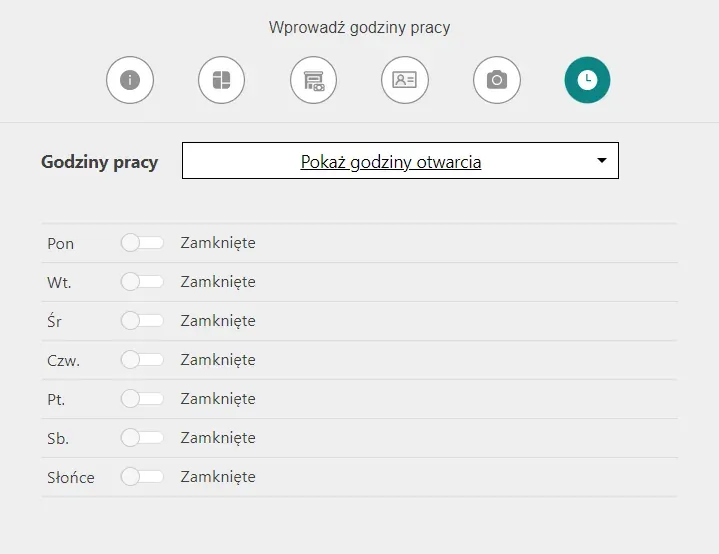
In the next stage, fill in your opening hours. Make sure they are accurate and up to date, because wrong information can lead to negative reviews from customers who, for example, tried to call the business during the opening hours shown on Bing and nobody answered. Also add holiday hours and seasonal changes.
Verifying your Bing Places listing
The last step is verification. Until you complete it, the listing will not appear in Bing search or on Bing Maps. Bing confirms that you own the business with a PIN code that it sends:
- by text message or phone call to the business number,
- by email,
- by post to the business address.
The available methods depend on the business data, so you will not always see all three. A letter takes the longest, so if you have a choice, pick text message, phone or email. If you import data from a verified Google Business Profile, Bing usually verifies the listing automatically and you do not have to wait for a code. After verification, give the listing a few days to go live and do not make many changes at once during that time.
Once you have completed all the steps, you can use the platform fully. Check that your listing is visible on Bing and that all its elements are displayed. If the listing displays with errors, contact Microsoft Bing technical support by email, and they will help solve the problem.
How to update business information in Bing Places?
Bing Places lets business owners update the information in their profile easily. Regularly updating details such as opening hours, offer or contact data helps maintain a high position in search results. In the Bing Places dashboard you can change your business profile at any time, which lets you respond to changing needs as they arise.
Only a verified owner can mark a business as closed, and this change requires verification again. If the business has stopped operating, you can also delete the listing in the dashboard.
Syncing your Google Business Profile with your Bing Places listing
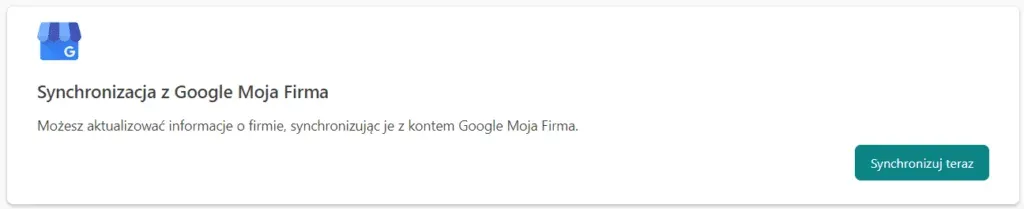
As mentioned in the first step of the guide, if you already have a Google Business Profile (formerly Google My Business), you can easily transfer its data to your Bing Places listing. Bing imports, among other things, the business name, address, phone number, opening hours and categories, which makes creating the listing much easier. You do not have to enter all the information manually again, which saves time and reduces the risk of mistakes.
After the import, check the categories and description, because categories on Bing and Google do not always match. After every change to your Google listing, also check that the same data shows on Bing.
A Bing business listing for several locations
If you have several branches or a chain of shops, you do not need to set up each listing separately. The new dashboard imports all locations from Google at once, and you can make changes, e.g. holiday hours, with bulk editing. Each location needs its own address and phone number, and the business name should be the same in all listings.
How to make your business stand out in Bing results with Bing Places for Business?
Standing out in Bing search results requires optimising your listing for SEO. The basis is using keywords that best describe the business and its services. This makes the listing more visible to potential customers looking for products or services related to your business.
It is very important to keep all the information in the listing current and complete. Carefully filled-in fields such as business name, description, categories and contact details contribute to better rankings for the profile.
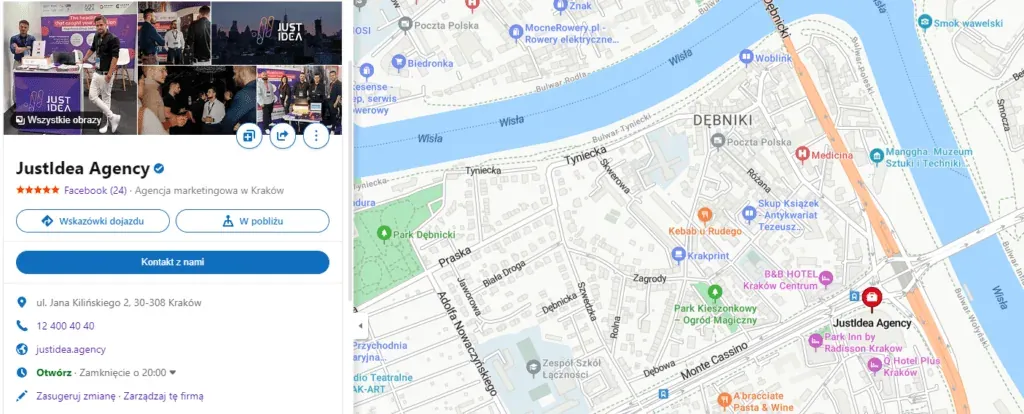
It is also good practice to highlight what makes your business unique, such as special offers, opening hours or local events. Additional elements in the listing will help you stand out from the competition.
Reviews in a Bing listing: where do they come from?
Bing does not collect reviews the way Google does. In the listing it shows ratings and reviews from external sites such as TripAdvisor, Yelp and Facebook. You cannot reply to these reviews in the Bing Places dashboard, only on the site where the customer posted them. If ratings on Bing matter to you, encourage customers to leave reviews outside Google too, e.g. on Facebook, and in hospitality and tourism on TripAdvisor.
Bing Places statistics
Bing Places shows statistics for your listing: how many people viewed the profile and what actions they took, e.g. clicked through to the website, called or requested directions. With this data you can optimise your listing and make your promotional campaigns more effective.
You can check the queries your website appears for in Bing search in Bing Webmaster Tools. It is a free tool into which you can import sites from Google Search Console. Since February 2026 Bing Webmaster Tools has also had an AI Performance report (in beta), which shows how often your website is cited as a source in Copilot and in AI summaries on Bing.
Bing Maps vs Google Maps listing
Business listings on Bing and Google serve similar purposes, but each platform has its own features and advantages. Google Maps is by far the more popular tool, with global reach and a dominant market position. Thanks to its wide reach and integration with other Google services such as Google Business Profile (formerly Google My Business), Google Maps listings are very effective at attracting customers.
Bing Maps, on the other hand, being part of the Microsoft ecosystem, mainly reaches users of Windows and the Edge browser, where Bing is the default search engine. A business listing on Bing Maps, managed in a Bing Places for Business profile, benefits businesses that want to reach customers who use Bing search.
One of the biggest advantages of Bing Maps is lower saturation with competing listings, which makes it much easier to achieve a higher position in search results. Bing Maps also integrates with Microsoft products, which can be especially useful for businesses that already use that system.
For businesses that want to increase their online visibility, a listing on both Bing Maps and Google Maps is the best solution and lets them reach a wider group of potential customers.
| Bing Places for Business | Google Business Profile | |
|---|---|---|
| Cost | free | free |
| Search engine share in Poland (September 2026) | 7.38% | 89.56% |
| Verification | PIN by phone, email or letter; automatic after import from Google | depending on the business: video, phone, email or letter |
| Reviews | from external sites (TripAdvisor, Yelp, Facebook) | posted on Google, you reply in the profile |
| Competition on the map | lower | high |
| Data import | from Google Business Profile | none |
Bing listing, Copilot and ChatGPT
Microsoft Copilot looks for information in the Bing index, so data from Bing search also ends up in the assistant's answers. When the new dashboard launched, Microsoft announced deeper integration of Bing Places with Copilot. ChatGPT uses Bing results only partly, because it also has its own crawler (OAI-SearchBot).
A Bing listing will therefore not guarantee you a place in AI answers. Complete and consistent business data does, however, make it more likely that the assistant gives the customer the correct address, opening hours and phone number. You can read how we build business visibility on Bing and in Copilot on the Bing SEO page.
The most common mistakes when managing a Bing Places profile
Although managing a listing in Bing Places for Business is relatively simple, business owners often make mistakes that can hurt their visibility in Bing search results.
One of the most common mistakes is not updating business information regularly. Details such as opening hours, address and phone number must always be current to avoid frustrating customers who might receive wrong information.
Some businesses also neglect reviews. Bing pulls them from external sites, so a negative review left unanswered on Facebook or TripAdvisor is also visible on Bing. Actively managing reviews on those sites, replying to them and encouraging customers to leave positive reviews can significantly improve a business's reputation and build trust among new customers.
Another common mistake is not using enough keywords in the business description. A lack of SEO optimisation can lead to low positions in local search results, which in turn reduces the number of potential customers.
It is also important to avoid adding blurry or low-quality photos, which can damage the business's image. High-quality images attract attention and build a professional image online.
Duplicates and inconsistent data also cause trouble. If you create a new listing instead of claiming the existing entry, or give a different phone number on Bing than on Google, the customer will not know which information to trust.
The role of Bing listings in building customer trust
A complete listing with up-to-date contact details, good photos and reviews shows the customer that the business pays attention to detail. If you update it regularly, you will gain the trust of new customers faster and build lasting relationships with them.
FAQ: frequently asked questions about Bing listings
Is a Bing Places listing paid?
No. Creating, running and editing a listing in Bing Places for Business is free, and the listing does not expire.
How long does Bing listing verification take?
A PIN sent by text message, phone call or email arrives quickly, while a letter with the code takes the longest. After an import from a verified Google Business Profile, Bing usually verifies the listing automatically.
Can I move my Google listing to Bing?
Yes. When creating a Bing Places for Business account, choose import from Google. Bing will transfer the business name, address, phone number, opening hours and categories, also for many locations at once.
Where does Bing get reviews from and can I reply to them?
Bing shows reviews from external sites such as TripAdvisor, Yelp and Facebook. You reply to them on those sites, not in the Bing Places dashboard.
Does a Bing listing help with visibility in Copilot and ChatGPT?
Indirectly, yes. Copilot uses the Bing index, and ChatGPT partly uses Bing results. A complete listing makes it more likely that an AI assistant gives the correct details of your business, but it does not guarantee a place in the answer.
How much does Bing listing optimisation cost?
The Bing Places listing itself is free; you only pay for the work on its visibility. At JustIdea we do not sell Bing optimisation as a separate subscription, because it is part of website SEO. You will find the scope and prices on the Bing listing optimisation service page.
How do I delete or close a Bing listing?
You do it in the Bing Places dashboard. Only a verified owner can mark a business as closed or delete the listing.
See also: